
AI Keywords Optimizer: How It Works and How to Use It
Keywords Analysis: data-driven on-page optimization
You know which pages rank for which queries in Google Search Console. But translating that data into actionable on-page improvements takes work. Which keywords are already reflected in your titles? Which ones are missing from your meta descriptions? Are your H1s aligned with how users actually search?
Keywords Analysis in URL Explorer answers these questions directly.
The manual optimization problem
Optimizing a page for its ranking keywords typically requires several steps: export GSC data, filter by URL, compare queries against your title and meta description, identify gaps, then rewrite. For a handful of pages, this is manageable. For hundreds or thousands, it becomes a bottleneck.
Beyond the time investment, there’s the challenge of prioritization. Not every keyword deserves the same attention. Some queries share the same intent and can be addressed together. Others are noise – low – impression variations that won’t move the needle.
How Keywords Analysis works
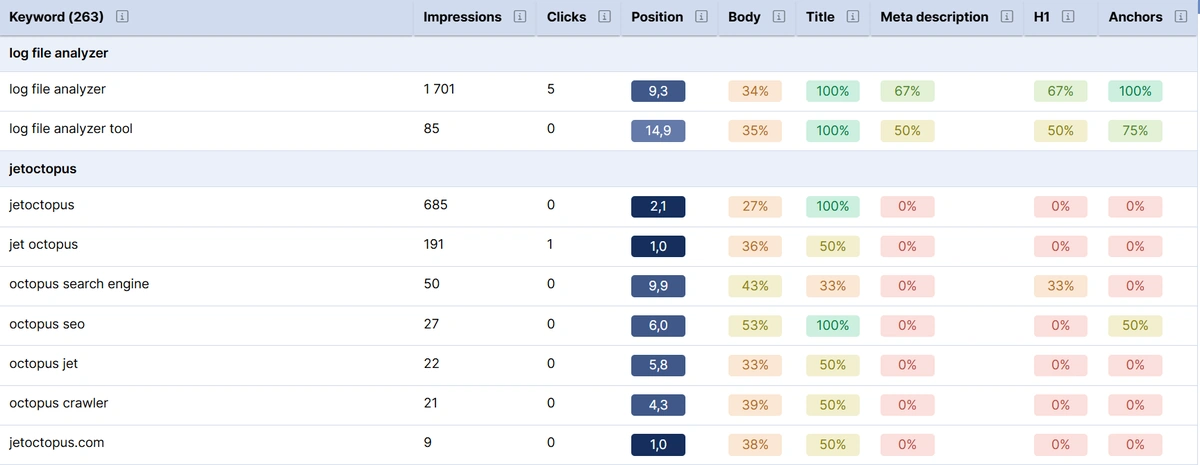
Navigate to URL Explorer and enter the page URL you want to analyze. The Keywords Analysis section displays all GSC queries where the page ranks, along with key metrics: impressions, clicks, position, and CTR.
For each query, the tool shows match status across four on-page elements:
- Title: Does the keyword appear in your title tag?
- Meta description: Is it present in your meta description?
- H1: Does your primary heading include it?
- Anchors: Do internal links pointing to this page use this keyword?
Keywords are grouped by semantic similarity. If ten queries all relate to the same concept, they appear together. This clustering helps you spot patterns and prioritize which keyword themes to address.
Identifying missed opportunities
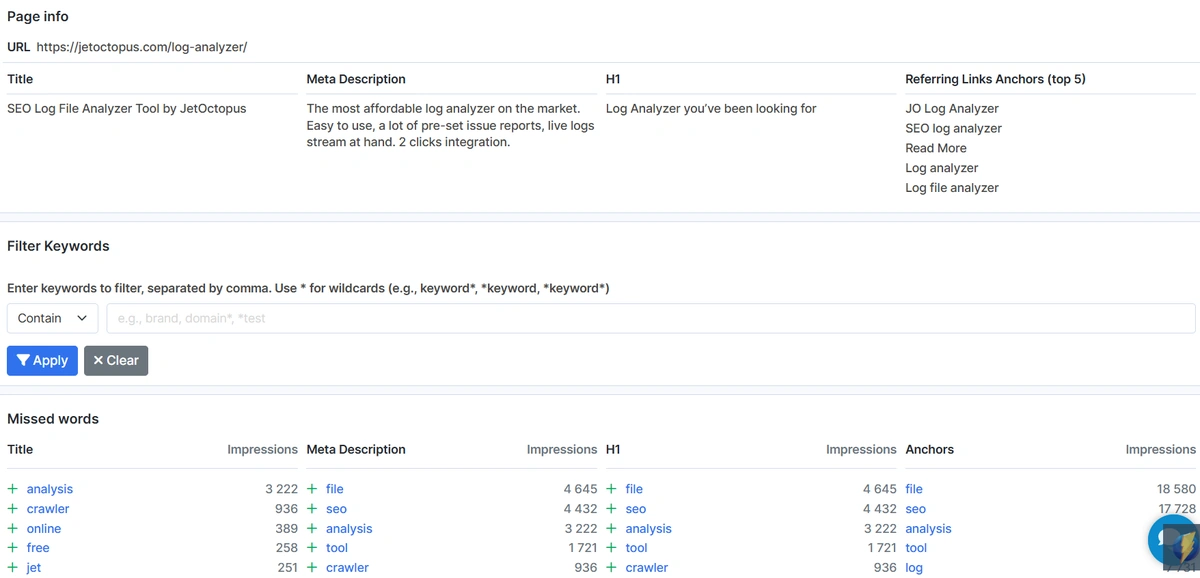
Above the keyword table, you’ll find recommendations for each page element. These show the most impactful words missing from your title, meta description, H1, and anchor texts.
Each recommendation includes context: the specific queries where the word appears and how often. This helps you evaluate whether adding a particular word makes sense for your page’s topic and intent.
For example, if “tool” appears in 15 high-impression queries but is absent from your title, the tool surfaces this gap. You decide whether it fits.
AI-powered suggestions
After selecting which words to add, click Improve. The tool generates revised versions of your title, meta description, and H1 that incorporate your selected keywords while maintaining readability.
The AI-generated suggestions appear alongside your original versions, with additions highlighted. You can copy the optimized text directly or use it as a starting point for your own edits.

Filtering noise
- Not every ranking keyword matters equally. Keywords Analysis includes a noise filter that hides low-impression queries by default. This keeps your focus on the terms that drive meaningful traffic.
- You can toggle noise visibility to see the full picture when needed.
Getting started
Open URL Explorer, enter your target URL, and select the Keywords Analysis tab. The analysis runs automatically, pulling your GSC data and comparing it against your current on-page elements.
The tool works with any URL in your project that has GSC data available.
- Category:
- Crawlers
- Product Update

About Julia Nesterets
Julia Nesterets is the co-founder and CEO of JetOctopus. With 10+ years in marketing and sales, she helps to identify our clients' needs to the fullest. She can explain complex ideas by simplifying them which makes her a very valuable asset to JO.She is also a very social person. You can catch up with Julia on Digital Olympus, BrightonSEO, and Slush conferences for some small talk. You can also find Julia on Twitter and LinkedIn .