
JavaScript powers modern web experiences, but it also creates some of the most serious, hidden SEO risks. Inconsistencies, like JS rewriting canonicals or titles, can trigger major indexing failures. And while Google and other search engines can render JavaScript, AI search systems still can’t. If your content loads dynamically, you risk delayed indexation, uncrawlable content, wasted crawl budget and rendering bottlenecks.
But the good news is that every of these risks is solvable with the right rendering approach and a clear framework for choosing it.
In this article, you’ll learn more about the core JS SEO risks, the key solutions (SSR, SSG, dynamic rendering, progressive enhancement) and a clear, practical decision‑making framework to help you determine which rendering model is right for your site’s architecture, scale and business goals.
TL;DR
- JavaScript for SEO is the reason why some pages rank while others never get seen. If your key content only appears after JavaScript executes, search engines may never access it, simply seeing empty spots on a page.
- Google processes JavaScript in three distinct phases: crawl, render and index. First, Googlebot fetches the raw HTML, then a separate rendering system executes your scripts and only after that, Google decides what to index. Any friction in these stages directly affects page rankings.
- The most common JavaScript SEO issues: crawl budget drain, rendering queue bottlenecks, unrendered content and indexing delays – all trace back to the same root cause: search engines receiving less than a complete picture of your pages.
- Your rendering architecture should be determined by three factors: whether the content needs to rank, how frequently it changes and what your stack and team can realistically support.
- SSR is optimal for live data, while SSG and ISR are suitable for stable content. Hybrid approaches cover complex, mixed-route applications.
- When choosing the right rendering approach, take into account what needs to rank, then implement it properly.
- If your site runs on JavaScript, your rendering strategy is vital for your SEO.
JavaScript’s Technical Role in SEO
JavaScript SEO is the technical process that ensures JavaScript‑driven websites, especially SPAs (Single Page Applications) built with frameworks like React, Vue, Angular or Svelte, are fully crawlable, renderable and indexable by search engines. The purpose is to make dynamic, JS‑generated content reliably visible in search results without sacrificing performance.
Because search engines must execute JavaScript to access key content, poorly optimized code, heavy bundles or client‑side rendering delays can block indexing and suppress rankings. SEO for JavaScript optimizes rendering paths, prerenders critical content and manages metadata via framework modules, this way maintaining fast, stable experiences so crawlers and users receive complete, accurate pages.
How Search Engines Process JavaScript
Search engines like Google generally process pages in a multi-stage pipeline: crawling, rendering and indexing, where JavaScript execution often occurs in a deferred rendering phase, meaning it may not contribute to initial URL discovery or immediate indexing.
Google’s Web Rendering Service (WRS) handles execution using a headless, Chromium-based browser cluster that mirrors a real user agent but operates under strict resource and timing constraints.
Phase 1: Crawling
Googlebot fetches initial HTML via HTTP GET, honoring robots.txt disallow rules, X‑Robots‑Tag headers and other directives before parsing. Crucially, no JavaScript executes at this stage.
It parses raw HTML, extracts static content, follows <a href> links in the initial DOM (Document Object Model) and queues JS‑dependent URLs for deferred processing in the rendering pipeline. This decoupling is intentional: executing JavaScript at crawl time is too resource‑intensive at Google’s scale. The SEO impact is substantial because anything that exists only in the post‑JS DOM is invisible during the crawl phase.
Client‑side navigation, dynamically injected links and JS‑gated anchors don’t contribute to crawl discovery until rendering completes.
This can create crawl‑budget fragmentation, where allocation is spent on shell pages instead of content‑rich URLs.
Phase 2: Rendering
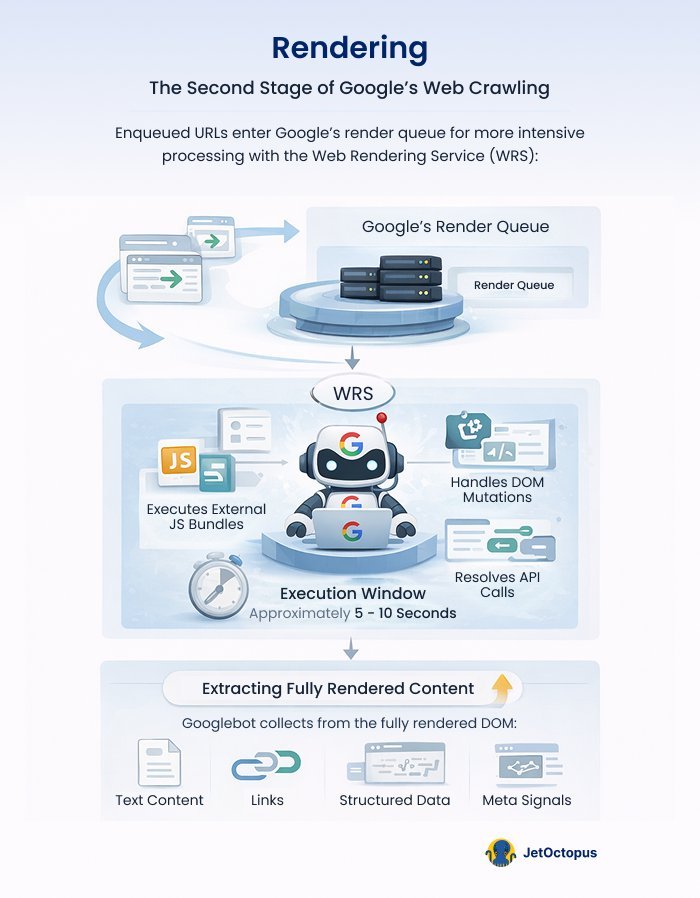
Enqueued URLs enter Google’s render queue, where WRS downloads and executes external JS bundles, handles DOM mutations, resolves API calls for client-side data fetching and fires event listeners – all within an execution window of approximately 5–10 seconds (based on observed behaviour; Google hasn’t published a fixed timeout).
The output is a fully rendered DOM, from which Googlebot extracts text, links, structured data (application/ld+json, microdata) and meta signals.
Phase 3: Indexing
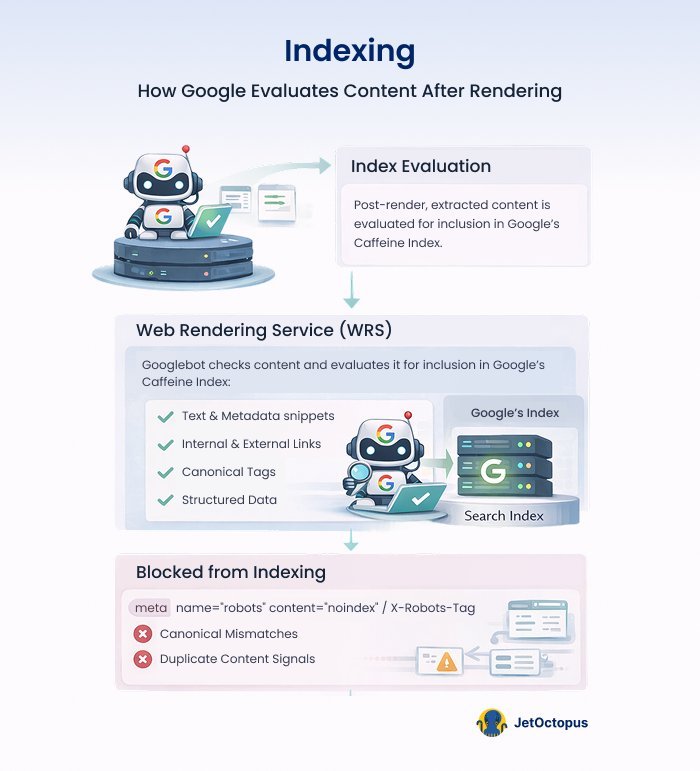
Post-render, the extracted content (text, internal and external links, canonicals, structured data and metadata) is evaluated for inclusion in Google’s index. Pages blocked from indexing via noindex meta tags or X-Robots-Tag response headers, canonical mismatches or duplicate content signals are detected during index evaluation.
Indexing delays are built on top of render lag and tend to vary depending on a site’s crawl frequency. Naturally, domains with strong crawl rate allocations can see render-to-index propagation in hours; newly launched sites should plan for multi-week cycles. This has direct implications for time-sensitive content strategies, product launches and programmatic SEO campaigns at scale.
Structured data embedded in JavaScript (e.g., ld+json blocks injected client-side) is only parsed and eligible for rich result consideration after rendering completes, adding further latency to schema-driven features like FAQ, Product and HowTo rich results.
With the mechanics of JavaScript rendering and indexation discussed, the next step is to examine where these processes most frequently break down in real‑world environments and how to diagnose and remediate the issues before they erode crawl efficiency or search visibility, including in AI systems.
Common JavaScript SEO Issues and How to Handle Them
Here are the issues that tend to surface most frequently when JavaScript meets search engine rendering constraints and what to do when they show up.
Crawl Budget Drain
Almost all JavaScript-heavy architectures have issues with crawl budget, which, of course, leads to lower organic performance of websites. Because every site operates within a finite crawl allocation, Google must prioritize requests and JS forces significantly more of them.
Google processes JS pages twice, but if budget runs out mid‑render, pages remain partially processed or undiscovered.
Dynamic frameworks add further overhead through redirect chains, parameterized URLs and slow server responses, all of which suppress crawl rate. Rendering can also misfire, causing Google to skip resources that actually contain critical content.
How to fix:
Addressing JavaScript crawlability issues requires both technical adjustments and the right diagnostic toolset. This is where JetOctopus becomes essential. A technical SEO platform built specifically for large-scale websites, JetOctopus combines server log file analysis, JavaScript crawling and website crawling in one place.
Unlike traditional crawlers, it shows you exactly how Googlebot behaves on your site, which URLs it visits, which it skips and how it allocates crawl budget, giving you the data needed to make precise, impactful fixes.

- Reduce and optimize JS bundles – audit your bundle with tools like Webpack Bundle Analyzer, remove unused dependencies, split code into smaller chunks and defer or lazy-load scripts that are not critical to the initial page render.
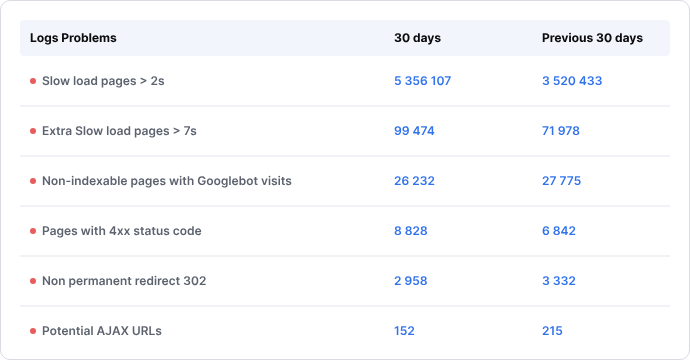
- Block low‑value URLs – use JetOctopus’ log file analysis to identify exactly which parameterized, faceted or duplicate URLs Googlebot is wasting crawl budget on. Cross-reference these patterns with GSC data, then disallow them in robots.txt or apply noindex tags to protect your crawl allocation for pages that actually matter.
- Fix redirects/404s – run a full site crawl with JetOctopus to generate a complete map of redirect chains and broken links across your site. Then, update internal links to point directly to final destination URLs and reinstate or redirect any returning 404s before they erode crawl efficiency.
- Consolidate duplicates – add self-referencing canonical tags on all pages meant for ranking, ensure pagination and filter URLs have a <meta name=”robots” content=”noindex, follow”> and where possible, unify URL structures at the server level to prevent the same content from being served under multiple addresses.
- Prioritize key URLs in sitemaps while monitoring crawl stats in GSC – maintain a clean XML sitemap containing only canonical and indexable URLs and regularly review the Crawl Stats report. Use JetOctopus’ crawl monitoring alongside GSC’s Crawl Stats report to track whether Googlebot’s behavior actually shifts after your changes, closing the loop between fix and result.
Rendering Queue Issues
Google’s two‑stage indexing pipeline (HTML crawl followed by JS rendering) introduces a separate processing line where pages must be executed in a headless browser. While Google reports a median rendering delay of just seconds, the reality is more complex: not all pages ever make it to the renderer.
Pages blocked by noindex, flagged as low quality or identified as low‑priority simply never enter the rendering stage. News sites are treated differently as well: Google indexes HTML immediately and returns later for JS SEO execution. Add render‑blocking scripts, slow APIs, oversized bundles or heavy client‑side logic and the queue backs up further, delaying or preventing full indexation.
Pages may never reach the rendering stage at all, meaning their JavaScript-generated content is never evaluated.
How to fix:
- Defer/async non‑critical JS, minimize bundles and lazy‑load below‑the‑fold components – add defer or async attributes to script tags that don’t need to block the initial page load and use code splitting to break large bundles into smaller, route-specific chunks.
- Inline critical CSS, simplify client‑side logic and cache API responses to prevent timeouts – move the CSS required for above-the-fold content directly into the HTML
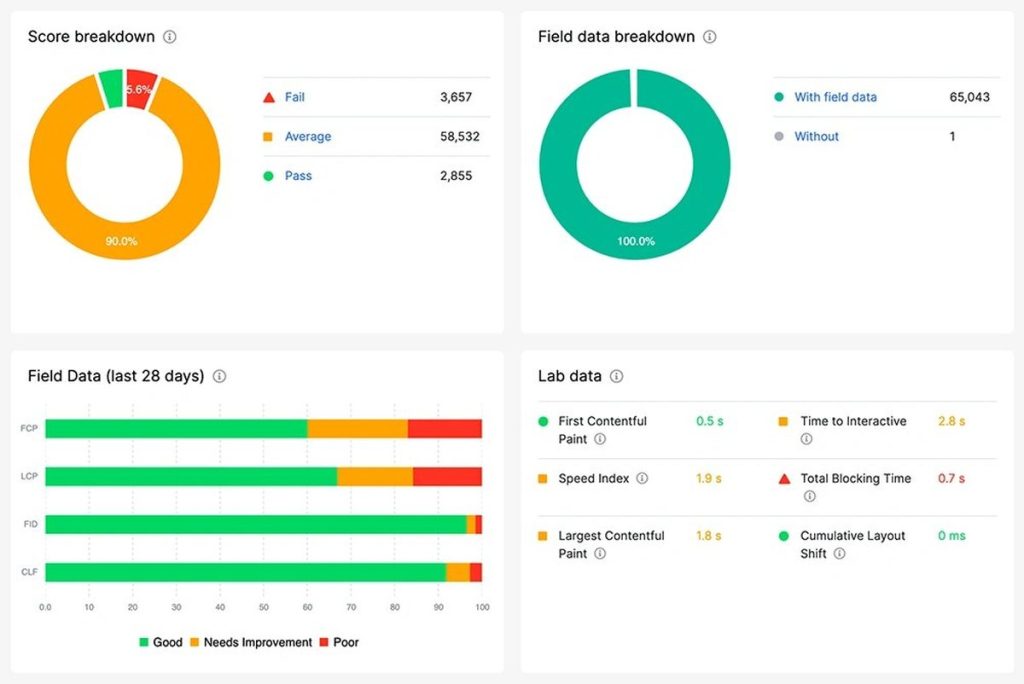
<head>so the page can render visually without waiting for external stylesheets to load. On the API side, cache responses at the server or CDN level so that data-dependent content resolves quickly and doesn’t push rendering past Google’s execution window. - Monitor JS impact through a JS tool in JetOctopus. Our platform scans your page 2 times to get an HTML and a rendered page to further compare them and highlight how JavaScript changes your page’s size, content, SEO tags, links and page speed. And that’s not all: we also build the JS rendering charts and provide the lists of all assets needed to load your pages. This data can be merged with our CWV checker and you’ll be able to see which assets drag down your FCP, LCP or create a CLS. Add your API key, launch a crawl within minutes and instantly scan any page set (full indexable inventory or custom lists).
Here’s what you can do in a worse scenario, when content doesn’t get rendered at all.
Content not Rendered
When JavaScript fails to render content, search engines receive an incomplete or entirely empty version of your page. Under pure client‑side rendering, the initial HTML is often just a structural shell. If Googlebot’s rendering window expires, scripts error out or resources are blocked, the crawler never sees the dynamically injected text, links or metadata.
The result is a page that appears content‑thin, unoptimized or even blank, severely limiting indexation and suppressing rankings. Elements like tabs, accordions and infinite scroll are especially vulnerable because crawlers don’t reliably trigger user actions. If heavy JS bundles, hydration mismatches and weaker JS support from non‑Google engines are added on top, the problem is even bigger.
How to fix: Rely on Search Console’s URL Inspection Tool to surface discrepancies.
- Enter the page URL at the top of the tool and press Enter.
- Click “Test Live URL” on the right.
- After a short wait, open the Live Test tab and select “View Tested Page” to see the rendered code and screenshot.
- Use the More Info panel to spot missing or unrendered content.
A frequent cause of failed JS rendering is an incorrectly configured robots.txt file blocking essential resources.
Ensure Googlebot can access them by adding:
| User-Agent: Googlebot Allow: .js Allow: .css |
Keep in mind that .js or .css files aren’t indexed, but they’re used to render a webpage.
For large sites, however, manual checks only go so far. But if you use JetOctopus, you will see which pages fail to render since it crawls a page two times: one using raw HTML retrieval and another using full Chrome‑based rendering.
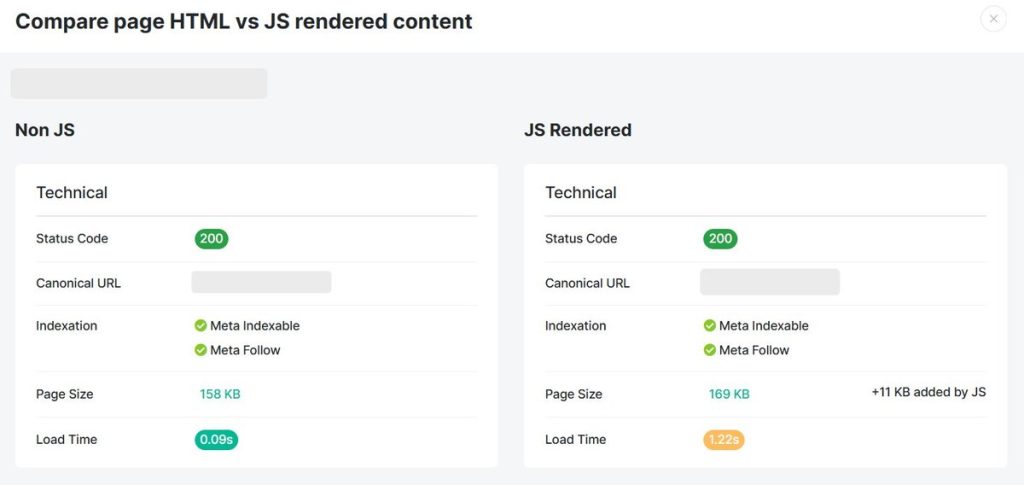
With this side-by-side analysis, JetOctopus highlights pages where critical content, headings, structured data, links or product information only appear post‑JavaScript execution.
JetOctopus then flags URLs where JS changes key elements or a page shows materially less/more content than the source.
This visibility helps SEO teams make informed decisions:
- shift essential content to server‑side or hybrid rendering
- add
<noscript>fallbacks - ensure schema is present in the initial HTML or prerendered output
Delays in Indexing
Even if your page is rendered, sometimes JavaScript slows or complicates the process, which leads to pages experiencing delayed indexation. This is a common but costly issue.
Because JavaScript execution happens in a delayed rendering phase (as outlined above), pages often sit in the render queue before their full content becomes eligible for indexing.
During this delay, time‑sensitive pages lose competitive visibility while server‑rendered competitors index immediately.
Heavy bundles, script errors, blocked resources or slow networks extend queue times and may leave pages stuck in “crawled but not indexed.”
How to fix: Use JetOctopus as it pulls indexation data directly from Google Search Console. Run a crawl with GSC connected, filter for “Not Indexed” URLs and then validate them against log files to understand how often bots actually visit those pages. You’ll quickly see which pages remain unindexed, blocked or affected by canonical conflicts.
You can also verify this directly on Google by using the “site:” search operator. Just replace yourdomain.com with the URL you want to check:
site:yourdomain.com/page-URL/
If the page is indexed, it should appear in the search results.
If your JavaScript‑generated content isn’t showing up, a few things might be happening:
- Google may not be able to render the content properly
- The URL might not be discoverable if internal links are created only after a user interaction (like a click)
- The page may be timing out during Google’s indexing process
This helps you prioritize high‑value pages for faster discovery and inclusion in the index.
How to Choose A Rendering Strategy – JavaScript SEO Best Practices
Step 1: Identify What Actually Needs to Rank
Before touching rendering architecture, ask yourself and your team: what content do search engines need to see and access?
- Must rank and be fully crawlable: Marketing pages, blog posts, product listings
- Doesn’t need to rank: Dashboards, user-generated content behind login, app UI → In this case, it’s better to use standard HTML + minimal JS and there’s no special rendering needed, thus you won’t face a JavaScript SEO problem.
- Mixed strategies per route: Hybrid (public + private content)
Let’s take a SaaS platform as an example: the marketing site, feature pages and public blog all need to rank, while the actual app dashboard behind login doesn’t.
Public-facing routes should be handled with SSR or SSG, while authenticated routes can rely on CSR without any SEO cost. The key is making sure your routing architecture treats these as distinct concerns from the start, rather than applying a single rendering approach across the entire site.
| Content Type | Examples | Implication |
|---|---|---|
| Static / rarely changes | About page, landing pages, docs | Pre-rendering is recommended |
| Frequently updated | News, prices, inventory | Needs real-time rendering (SSR) |
| User-specific | Personalized feeds, account pages | Doesn’t need SEO rendering |
| Mixed | E-commerce (static structure + live price) | Hybrid approach (SSR + CSR) |
Step 2: Evaluate Your Stack and Team Constraints
Rendering decisions should also consider organizational capabilities, resources and infrastructure. The right approach for your site is shaped as much by your team’s capabilities and infrastructure as it is by your content requirements.
For instance, if you’re running a React, Vue or Angular SPA, moving to SSR or SSG is a meaningful refactor, but migration cost needs to be factored in honestly. Teams already on Next.js, Nuxt or SvelteKit are in a stronger position since these frameworks make SSR and SSG adoption significantly easier; it delivers full HTML upfront, it eliminates the rendering queue and it maximizes indexing reliability.
But if bandwidth is tight, dynamic rendering can serve as a temporary bridge: bots receive pre-rendered HTML while users get the full JS experience. For mostly static content, SSG remains a low‑overhead option.
Simply put, you should know your constraints before you commit to an approach.
Step 3: Apply the Decision Tree
Once you know your stack and team constraints, the next step is narrowing down the right rendering approach through a short but decisive set of questions.
1. Is the content behind authentication?
If the answer is ‘yes’ → You can use CSR freely and no special SEO rendering is needed.
If the content is publicly accessible → Search engines will attempt to crawl and render it, which means your rendering approach directly affects what gets indexed and how quickly.
2. Does the content change in real time (prices, stock, live data)?
If the answer is ‘yes’ → You need to use SSR (Server-Side Rendering) to stay accurate and indexable.
If the content is stable → A static or hybrid approach will serve you better and is considerably easier to maintain at scale.
3. Is the content largely the same for all users?
If the answer is ‘yes’ → Use SSG (Static Site Generation) or ISR (Incremental Static Regeneration) because this will lead to faster load times, lower infrastructure costs and a significantly reduced rendering burden for Googlebot.
If the content is personalized but still publicly accessible → SSR or hybrid hydration is the more appropriate path. SSR ensures that each user receives a fully rendered, accurate version of the page on the first request, keeping the content both indexable and current. Hybrid hydration takes this further by serving the initial HTML from the server, satisfying crawlers and improving perceived load speed.
Example: Shopify’s own storefront architecture.
Product pages, collection pages and the homepage are publicly accessible and need to rank, making them strong candidates for SSR or SSG. The cart, checkout flow, account dashboard and order history sit behind authentication and serve no SEO purpose, making CSR entirely appropriate there.

Simultaneously, certain storefront elements: live inventory counts, dynamic pricing and personalized product recommendations require client-side rendering even on otherwise public pages.
The result is a genuinely hybrid architecture where rendering decisions are made at the component level, not just the route level, with different strategies applied to different parts of the same page depending on what the content is and who needs to see it.
4. Can you afford framework migration?
If the answer is ‘yes’ → Commit to SSR or SSG through a proper meta-framework.
If the answer is ‘no’ → Dynamic rendering (serving pre-rendered HTML to bots while users get the full JS experience) is a viable and legitimate stopgap.
But keep in mind that Google no longer recommends dynamic rendering as a long-term solution. That means there’s a real risk that Google will eventually detect and devalue it, so any site relying on it long‑term is taking on an indexing risk that grows along with the site that keeps scaling as well.
| Rendering Approach | Best For | Watch Out For |
|---|---|---|
| SSG | Blogs, docs, marketing sites, landing pages | Stable content if not rebuilt frequently |
| ISR | E-commerce category pages, news archives | Cache invalidation complexity |
| SSR | Product pages with live data, personalized-but-public pages | Server load, TTFB impact |
| CSR + Prerendering | SPAs that can’t be refactored; low-budget fix | Only works for non-personalized pages, maintenance overhead |
| Dynamic rendering | Legacy SPAs, stopgap solution | Google has officially moved away from recommending this; treat it as temporary |
| Hybrid (SSR + CSR) | Apps with mixed public/private routes | Complexity in routing and hydration |
Step 4: Validate After Implementation
Rendering approach decisions don’t end at deployment. Your SEO team should always do these check-ups:
- Use Google Search Console → URL Inspection to see what Googlebot actually rendered and compare it against what the page should deliver. In Crawl Stats, watch specifically for sudden drops in pages crawled per day, spikes in crawl response times or a growing gap between crawled and indexed pages.
- Run JetOctopus for JavaScript SEO → the differences reveal what’s hidden from non-rendering crawlers. Confirm Googlebot is reaching the right pages at the right frequency through log file analysis and surface any canonical conflicts or redirect issues introduced during migration.
- Monitor Core Web Vitals → SSR can hurt or help LCP (Largest Contentful Paint) depending on implementation, so treat performance monitoring as a direct extension of your rendering validation process.
Conclusion
JavaScript and SEO work well together when the technical foundations are solid. The difference between a site that ranks and one that doesn’t often comes down to rendering decisions: how content is delivered to Googlebot, how crawl budget is spent and how quickly pages move from discovery to indexation.
The framework in this article gives you a clear path: identify what needs to rank, choose the right rendering approach for that content, implement within your stack constraints and validate after deployment.
While GSC’s URL Inspection Tool is useful for spot checks, finding rendering failures across 10,000 pages requires proper tooling.
That’s where JetOctopus fits. Its dual‑crawl engine: raw HTML and full Chrome‑based rendering shows exactly what Googlebot sees versus what the site intends to deliver. Unrendered content, canonical issues, redirect chains, crawl budget waste and indexation blockers are surfaced in one place, with log files confirming whether Googlebot is crawling the right pages at the right frequency.
Get the rendering right, validate it thoroughly and indexing follows.