
Google’s 2024 update on faceted navigation confirmed something technical SEOs have been dealing with for years: uncontrolled facets are one of the biggest sources of crawl inefficiency on the web.
What changed is Google’s ability to detect patterns automatically, by deprioritizing low‑value variations and giving more attention to canonical, high‑value pages. In theory, a win, but in practice, the benefit is uneven. Google’s pattern recognition only works when your technical signals are clean. But if your architecture leaks infinite filter combinations, Google will still burn crawl budget on pages that shouldn’t exist.
This guide gives you a repeatable framework to identify crawl waste, stop index bloat and consolidate link equity, so you can have a clear, prioritized plan to fix them before they cost you more rankings.
TL;DR
- Faceted navigation can overwhelm SEO by generating huge numbers of low‑value, duplicate URLs.
- Potential issues: crawl budget waste, index bloat, link equity dilution – all pulling attention away from the pages you actually need to rank.
- Auditing your website is critical to detect all faceted navigation issues and see how Googlebot truly crawls your site.
- Unifying crawl data, server logs and GSC metrics reveals real bot behavior, ignored pages, crawl‑budget waste, indexation status and ranking pages, while pinpointing underlinked URLs.
- A clear breakdown on how to fix faceted navigation issues: restore proper indexing, shift facets to client‑side JavaScript where appropriate, manage internal links so low‑value combinations can be blocked to preserve crawl budget and apply noindex tags to non‑SEO facets.
Bottom line: Faceted navigation is a scalability risk that can erode your site’s ability to rank. The way to overcome it is to gain the visibility to measure its impact, the right tools to keep it under control and a workflow that adapts as your site evolves.
What Is Faceted Navigation
If you have a large website, at some point it will inevitably hit the same architectural bottleneck: users expect to sift through massive volumes of content (thousands of pages, assets, data points or product variations) with instant precision. They want to filter, sort and refine results across multiple dimensions without friction or delay.
Faceted navigation makes this possible and satisfies users’ expectations on the UX side. But on the technical side, it quietly creates one of the most consequential SEO challenges: the explosive creation of crawlable combinations, states and URLs that can overwhelm search engines and dilute organic performance.
You’ll see this navigation paradigm deployed across virtually every high‑volume digital platform, like:
- E‑commerce (e.g., Amazon): Precision filtering across attributes, like color, size, brand, availability and price.
- Travel and booking platforms (e.g., Booking.com): Dynamic narrowing of flights, stays or packages by date, carrier, duration or amenities.
- Real estate marketplaces (e.g., Zillow): Targeted discovery through filters for location, property type, features and budget.
- Library and content catalogs (e.g., WorldCat): Rapid refinement by genre, author, publication year or media format.
- Professional job boards and aggregators (e.g., LinkedIn jobs): Systematic sorting of jobs, courses or programs by category, level or duration.
How It Works Behind the Scenes
Faceted navigation typically behaves in one of four ways once a user applies a filter and each pattern carries distinct implications for crawl efficiency, indexation control and overall site performance:
| Potential results | Functionality | The Benefit | The Downside |
|---|---|---|---|
| Instant client‑side updates (JavaScript): | The interface refreshes dynamically without a page reload | Improves UX | Creates invisible states that search engines can’t reliably crawl, while AI bots can’t crawl at all |
| Full server‑side reload | The page regenerates on the server after each filter selection | Produces crawlable responses | Increases the risk of crawl budget waste, URL bloat and duplicate content |
| Deferred filtering via an “Apply” action | Filters accumulate client‑side and only trigger a state change when the user confirms | Reduces URL bloat | Requires careful SEO governance |
| New URL generation with query parameters | Filters create new URLs like /shoes?color=red&size=10 | Crawlable pages for important variations | Explodes into millions of crawlable combinations |
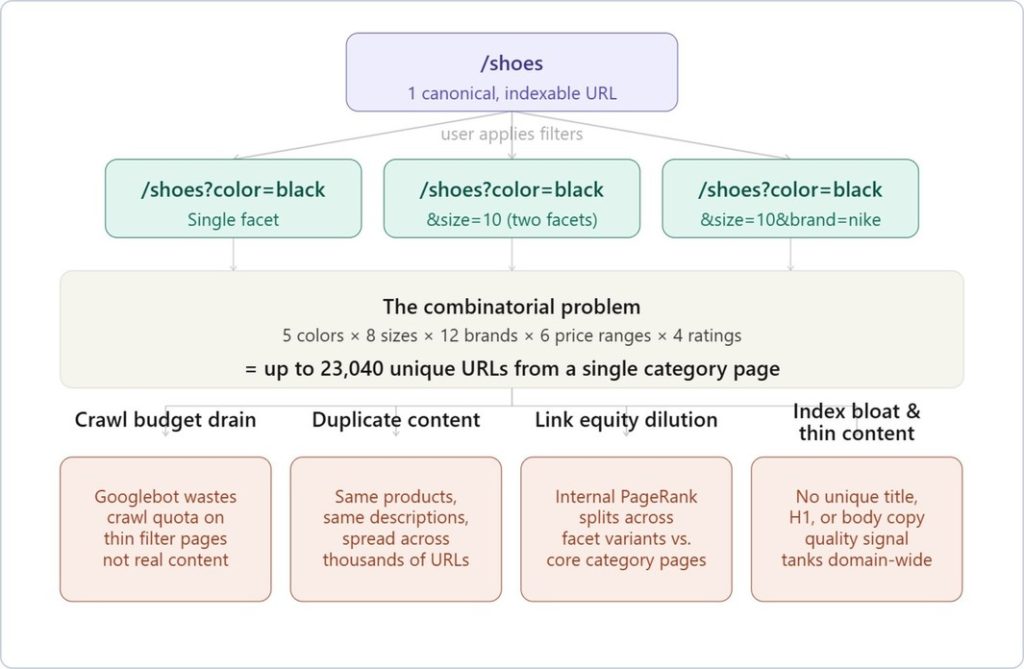
Here’s an example of the mechanics behind an e-commerce site: faceted navigation generates on-the-fly filtered URLs as shoppers apply combinations of filters.
Each combination, /shoes?color=black&size=10&brand=nike, is technically a unique URL. With even a modest catalog, that combinatorial explosion is brutal.
Check this diagram of what that actually looks like at scale:
Let’s analyze each problem more in-depth.
The Problems that Faceted Navigation Creates
Crawl Budget Exhaustion
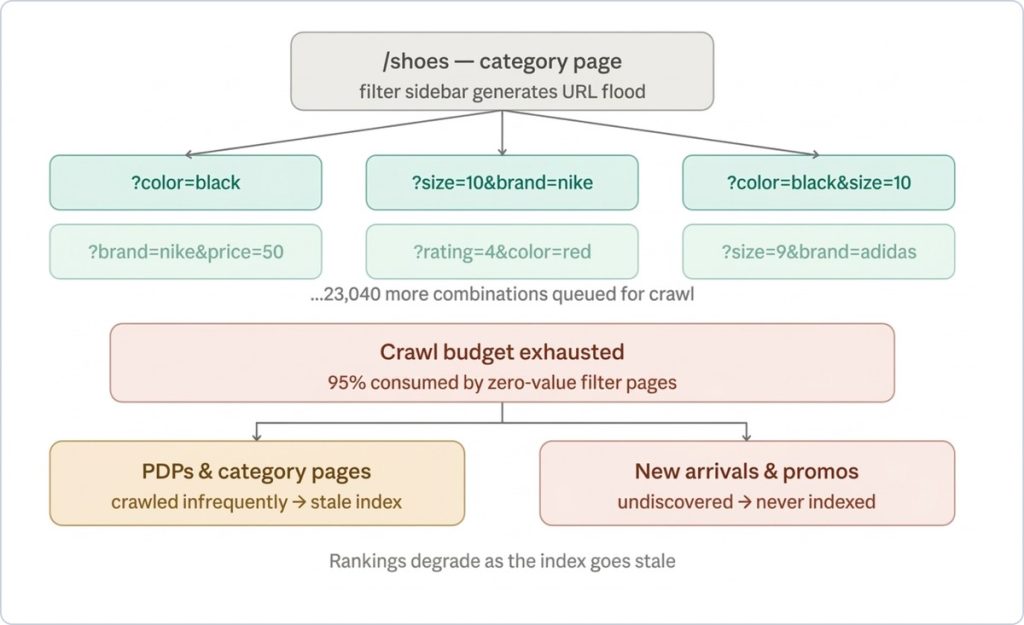
This is the most immediately damaging issue from faceted navigation. Googlebot’s crawl allocation for your domain is calibrated to your site’s perceived authority and server response times.
If Googlebot is spending 80% of its crawl budget on /shoes?color=red&size=9&brand=adidas&rating=4&price=50-100 instead of your actual product pages, your PDPs will be discovered and re-crawled far less frequently. For fast-moving catalogs where stock, pricing and promotions change daily, that lag is commercially material.
Duplicate Content
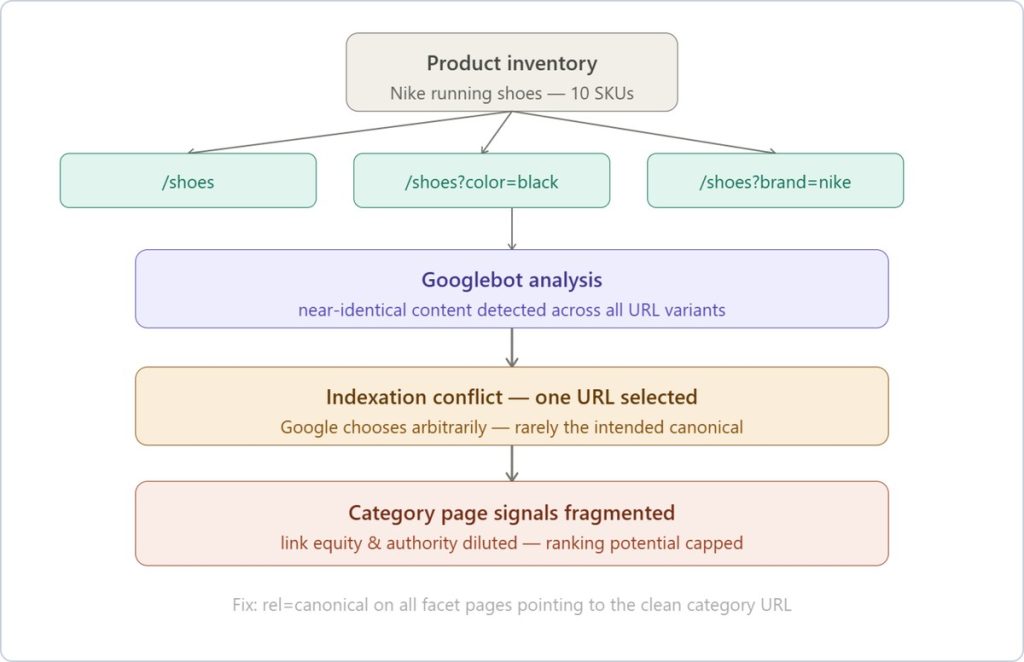
Duplicate content fragmentation is a subtler issue compared to crawl budget exhaustion, but equally damaging at scale.
A /shoes?color=black page and a /shoes?color=black&sort=price-asc page often render near-identical product grids. Google has to make a judgment call about which one to index and rank and that choice is rarely in your favor, because the signal is diluted across variants rather than consolidated on the canonical category page.
Index Bloat & Thin Content
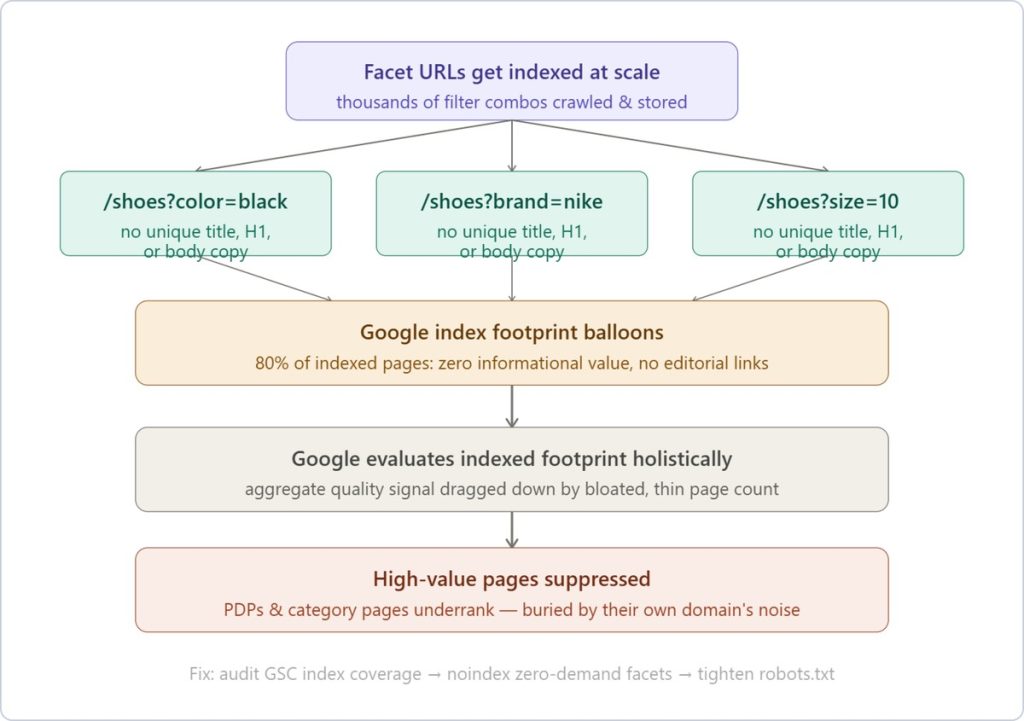
Index bloat and thin content is where crawl waste and duplication converge into a ranking liability. Thousands of indexed facet URLs, each rendering near-identical product grids with no unique copy, no differentiated metadata, no editorial links, inflate your page count while dragging down your domain’s aggregate quality signal.
Google evaluates your indexed footprint holistically and a catalog where 80% of indexed pages add zero informational value suppresses the pages that actually matter.
The thin content piece is what makes index bloat specifically damaging rather than just wasteful. A /shoes?color=black&brand=nike&size=10 page typically has no unique title tag, no unique H1 and no unique body copy; just a filtered subset of the same product cards that appear on the parent category page.
Link Equity Dilution
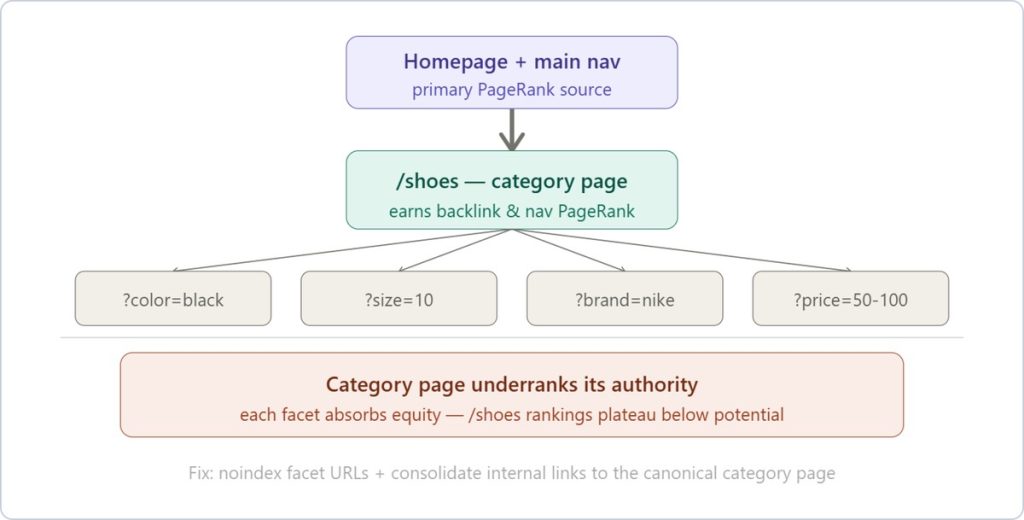
The dilution of link equity (or PageRank) is the one that frustrates SEO managers most when it finally surfaces in a ranking audit. The homepage, category nav, breadcrumbs and internal linking all flow PageRank down to your category pages.
Faceted navigation creates unintended internal links to filter URL variants: /shoes?brand=nike gets linked from the filter widget on every page load, which splits that equity across thousands of near-duplicate pages instead of consolidating it where you actually want to rank.
Now, let’s take a closer look at how to diagnose the faceted navigation problems that may be holding your site back.
Make an Audit of Faceted Navigation Issues
Auditing faceted navigation begins with understanding whether your filters are silently generating crawl budget waste, pages bloat or thin-content pages.
One of the fastest ways to detect early index bloat is by running site:yourdomain.com on Google search.
- Check the number of results Google returns. Figure out if the revealed number seems higher than the number of URLs you know to be available on your site. If that’s the case, you’re likely dealing with uncontrolled facet combinations.
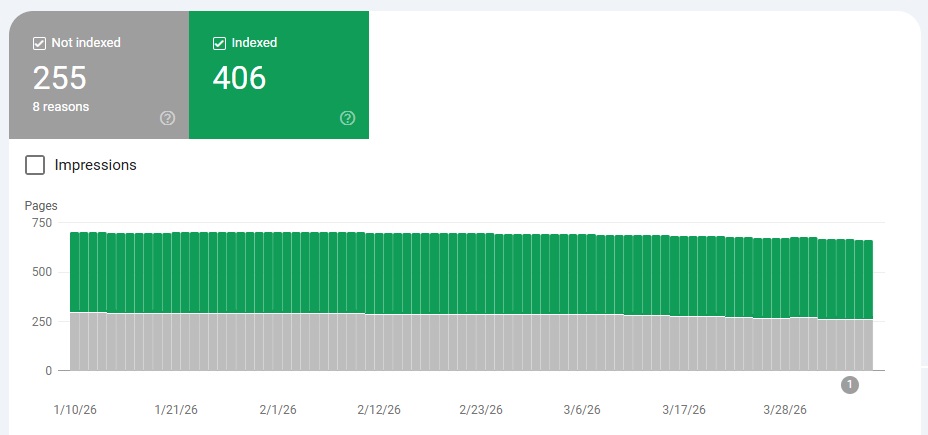
- Validate your findings in Google Search Console. Go to Indexing > Pages. If you uncover unwanted indexation, especially in Indexed, not submitted in the sitemap, that’s a clear sign of rogue facet URLs. Also review Excluded → Crawled– currently not indexed to quantify crawl waste and identify patterns where Googlebot is discovering but rejecting low‑quality facet pages.
- Analyze how your URL generation logic works. Test single and multi‑filter behavior, parameter order, empty‑result handling and whether filters use links or buttons.
For instance, if we take the ecommerce and Nike running shoes example from above, you need to see what happens when a shopper applies filters that return no matching products. Does the page serve a 200 OK status code on an empty grid, creating an indexable, zero-content URL or does it correctly return a 404 Not Found?
If a no‑results page returns a 200 OK status, Google treats it like a real page even though it has no useful content. That means it can get indexed and adds to your site’s index bloat. This is also called a soft 404 page and GSC used to have a separate report for the matter. - Evaluate traffic and demand. Identify which facet URLs drive organic sessions and which generate none. Pages with no demand (e.g., hyper‑specific attribute combos) shouldn’t be indexable and/or should be removed.
- Confirm how Googlebot actually behaves through log file analysis. If logs show heavy crawling of deep facet URLs that produce no traffic, you’ve found a crawl‑budget sink that requires containment.
At this point, most teams hit a visibility ceiling.
You can spot symptoms across Google Search Console, manual checks and isolated log samples, but connecting them into a single, reliable picture of how facets impact crawling, indexation and performance is where things break down.
This is where specialized crawling and log analysis become essential and it’s exactly what JetOctopus does best.
Its our log file analysis (built on a dataset of 25+ billion log lines and over 4.5 billion crawled pages), lets you see your site exactly as Googlebot does, at scale.
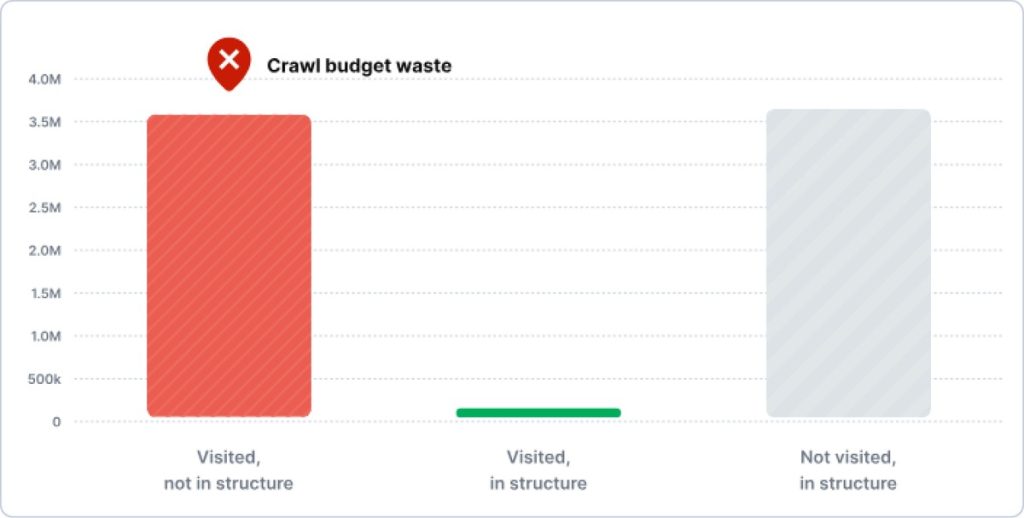
More importantly, it connects directly to the problems identified earlier:
- You can quantify crawl budget waste by comparing heavily crawled facet URLs against pages that actually drive traffic
- You can detect patterns in low-value URL discovery that aren’t visible in Search Console alone
- You can see which facet combinations are consuming resources without contributing to rankings.
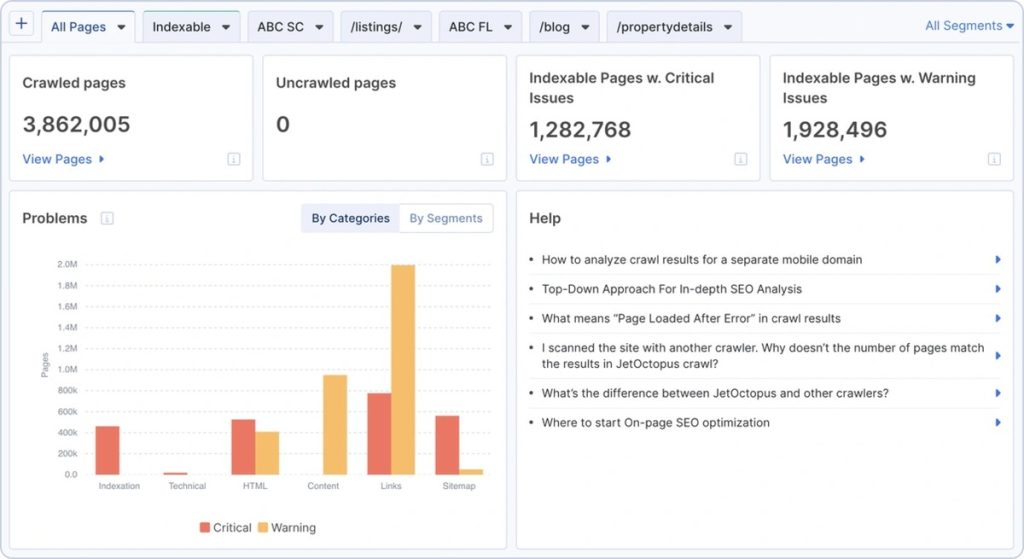
Log analysis also reveals how faceted navigation can compound crawling and indexation issues, especially on large ecommerce websites, including:
- orphan pages generated by uncontrolled filters
- indexation inconsistencies
- performance bottlenecks tied to deep URL structures
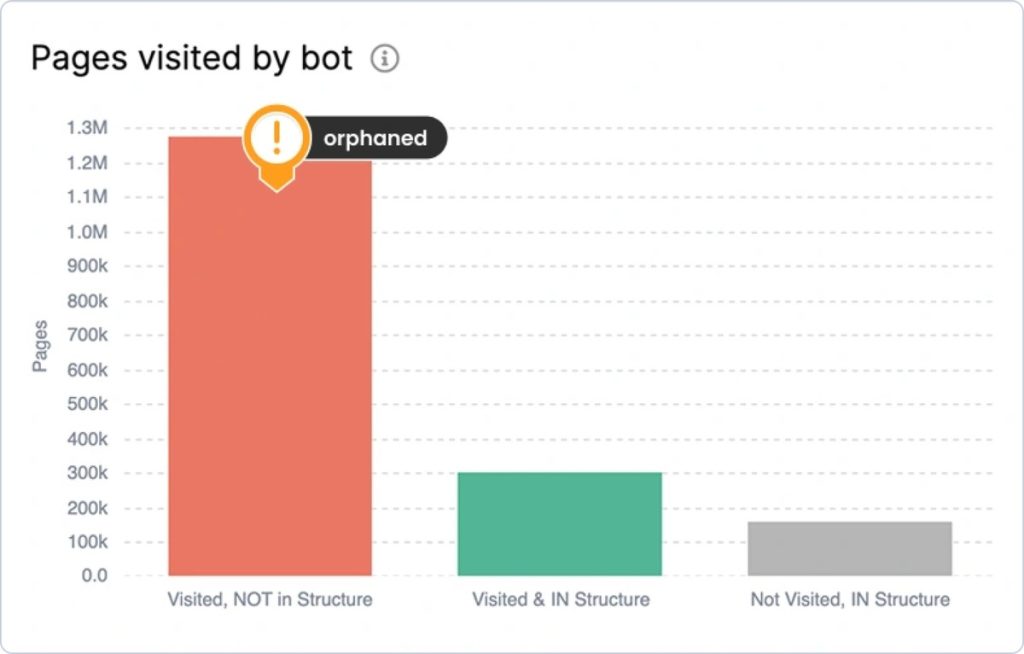
Bar chart showing “Pages visited by bot” across three categories, showing that Google is skipping pages that could actually rank.
Because JetOctopus integrates with Google Search Console, you can intersect crawl behavior with real SERP data, making it easier to identify near-duplicate facet pages and cannibalization cases, underperforming URLs and internal linking gaps.
Once you have that level of insight, the next step is turning it into action.
Fix Faceted Navigation Issues – Best Practices
Manage Internal Links Strategically
Swap <a href> for <button> elements on combinatorial, low-signal filters (size, color, sort order) – anything that generates near-duplicate pages with no realistic ranking potential.
Reserve crawlable anchor links for facets with proven search demand: brand, price range, material, use case. These should be surfaced from category pages, breadcrumbs and editorial content using keyword-rich anchor text (e.g., “red leather shoes under $100”) to reinforce topical relevance and drive intentional PageRank flow.
One hard rule: don’t place buttons on facets you want indexed. Buttons are invisible to crawlers, which means no crawl, no index, no rankings, regardless of how strong the page’s content is.
The practical split: if a filter combination maps to a query with measurable volume and low cannibalization risk, keep it as a link and treat it like any other indexable page, while everything else gets a button.
Use JS on the Client-Side
Use client‑side JavaScript/Ajax to keep low‑value filters and sorts from generating indexable URLs. Implement dynamic, in‑browser updates for UI‑only controls (e.g., “sort by price,” view toggles) so the DOM changes without new query strings or directories, preventing URL proliferation and preserving crawl budget.
This approach is based on best practices: keep non‑valuable permutations out of the index, whether that’s through robots.txt, parameter handling or filtering out fragment‑based URLs when it makes sense. The focus should be on thorough testing. You need to ensure your important long‑tail filters stay discoverable and trackable, confirm real‑world behavior with log files and GSC data and build in solid QA and governance so client‑side rendering holds up consistently across regions and devices.
Yet, client-side rendering introduces a whole class of silent failures: filters that appear to work in-browser but never execute for bots or AJAX calls that stall long enough to get abandoned during crawl. JetOctopus’s JavaScript for SEO gives you the render-layer visibility you actually need: First Paint, First Contentful Paint, full page load and total JS request completion time, alongside any JS errors that may be blocking bots from rendering facet content entirely.
If you’re running AJAX-based facet loading, this data helps you confirm that non-essential filters aren’t creating indexation risk or bleeding into critical rendering paths.
Implement the Noindex Tag
Enable noindex to remove low‑value faceted pages from search results. Add a meta robots tag in the page head (<meta name="robots" content="noindex">) or an X‑Robots‑Tag: noindex HTTP header.
Ensure the target pages aren’t blocked in robots.txt, have no canonical and hrefland tags (pointing in and from).

Here’s a clear example of how this looks in practice. When RIA.com audited their crawl behavior using JetOctopus’s Log Analyzer, they uncovered exactly where Googlebot was overspending crawl budget across parameterized and low-value sections. They could see exactly where crawl budget was being spent, which sections were over‑crawled and which high‑value areas were being overlooked.
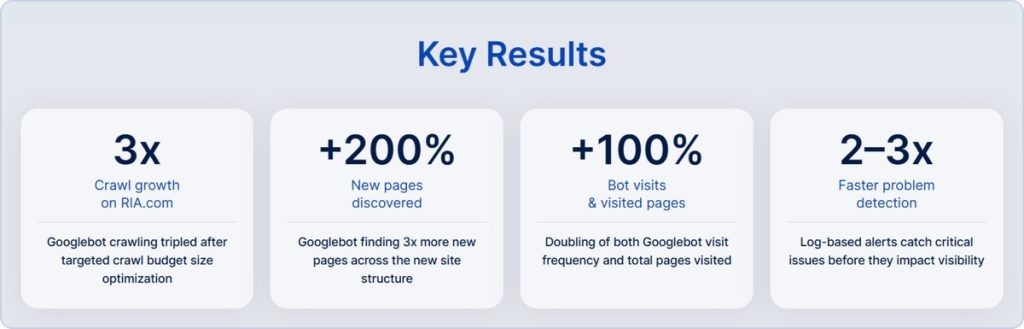
Every optimization became measurable in real time through log data. And with the SEO funnel view and the feedback loop – control → measure → refine, they turned crawl budget optimization from a one-off fix into a repeatable system.
Conclusion
For SEO leads, technical directors and eCommerce stakeholders, the question isn’t whether your faceted navigation is creating crawl waste, duplicate content, index bloat or link equity dilution. The question is whether you have the visibility to quantify it, the tooling to govern it and the workflow to keep pace with it as your website’s functionalities evolve.
If you don’t manage faceted navigation SEO issues, you’ll face a self-inflicted ranking liability, one that grows with every new filter option you add.
That’s the operational gap JetOctopus closes. Thanks to its super-fast crawling speed, it gives you almost instant access to valuable and actionable data about your site. With complete indexation visibility, you can methodically detect, interpret and address problems in crawling power, log‑based behavior intelligence, deep content analysis and interlinking structure.
Plus, you get a repeatable fix workflow for rapid iteration. Your teams can export reports directly into implementation tasks, to apply noindex tags, set canonical directives or configure robots.txt block rules, then re-crawl to measure the precise impact on bot behavior.
The net effect is a tighter, better‑optimized site where crawl resources are directed toward pages that actually support business goals.