Nofollow internal links rarely appear on purpose. A theme adds rel=”nofollow” to a footer block, a plugin marks every “related products” link or an old SEO rule survives several redesigns. The result is the same: pages you want to rank get links that pass no credit, and some of them get no followed links at all.
This guide explains when internal nofollow makes sense and when it hurts. You will also see how to find every nofollow link pointing to an indexable page with JetOctopus and how to fix what you find, by hand or at scale.
TL;DR
- A nofollow internal link is a same-site link with rel=”nofollow” that asks search engines not to pass ranking credit through it.
- Nofollow does not send the credit anywhere else: it is lost, so PageRank sculpting with internal nofollow does not work.
- If every internal link to an indexable page is nofollow, Google may not crawl it, and the page behaves like an orphan page.
- Internal nofollow is justified only in narrow cases: login and cart pages, filter and search URLs, user-generated links.
- To audit it, filter nofollow links whose destination is indexable, and to fix under-linked pages at scale, add links from strong pages with JetOctopus Internal Linker.
What Are Nofollow Internal Links?
A nofollow internal link is a link between two pages of the same website that carries the rel=”nofollow” attribute. In HTML it looks like this:
| <a href=”/mens-running-shoes/” rel=”nofollow”>Men’s running shoes</a> |
The attribute tells search engines to ignore the link relationship, and it can signal that the site owner does not endorse the target. For Google it is no longer a strict command. As Gary Illyes put it, nofollow is a hint now, so Google decides for itself whether to use the link.
Two related values exist for external links. rel=”sponsored” marks paid placements, which Google’s spam policies expect to be qualified, and rel=”ugc” marks links added by users, such as comments and forum posts.
Keep the link attribute apart from page-level rules. A meta robots nofollow applies to all links on a page as a page-level rule, while noindex keeps the page itself out of search results. Neither one is the same as rel=”nofollow” on a single link.
Do Nofollow Internal Links Hurt SEO?
Short answer: they can, if they point to pages you want to rank. Nofollow on its own is not a penalty, and it is common: the HTTP Archive found nofollow links on 32.3% of pages in 2025. The damage depends on where the links point. Here is how nofollow internal links SEO problems show up:
- They do not pass link equity, and the equity is not redistributed. The old idea of PageRank sculpting assumed that nofollowing some links would send more value through the rest. It does not work that way: the authority that would have passed through a nofollowed link simply disappears.
- Pages that receive only nofollow links can be missed by crawlers. Google can use links on a page to discover the pages they point to, and a nofollowed path is one it may skip. When every internal link to a URL is nofollow, the page behaves much like an orphan page.
- The same URL with both follow and nofollow links sends mixed signals. Google’s faceted navigation guidance says that every anchor pointing to a URL must carry nofollow for the attribute to be effective. A partly nofollowed URL gets neither full support nor full exclusion.
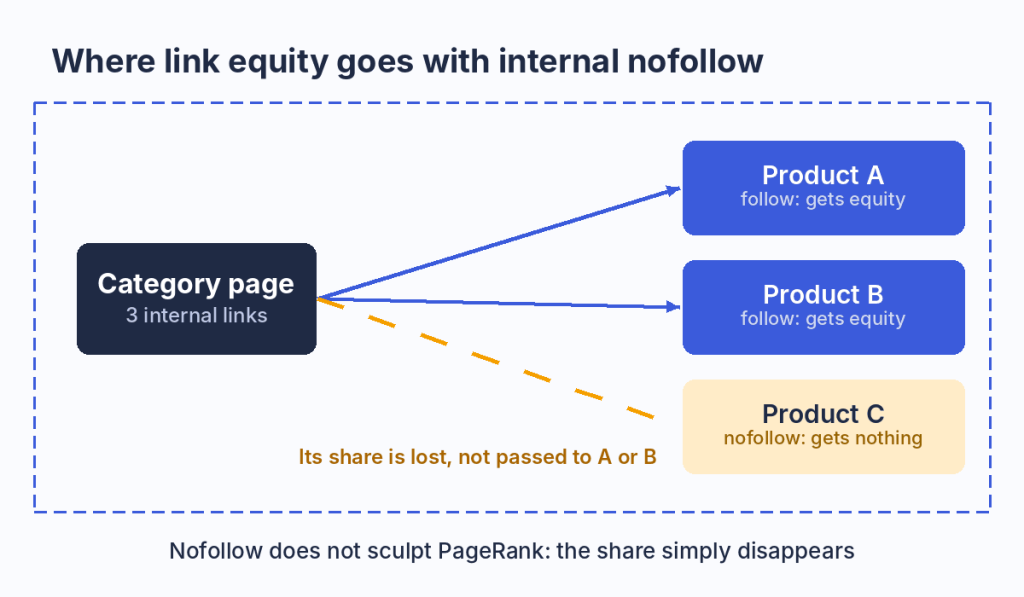
A nofollow link on a category page does not send its share to the other products. The share is lost.
When Are Nofollow Internal Links Appropriate?
In most cases internal nofollow is not needed. The justified cases are narrow, and they all concern pages that should never rank. The table covers the common scenarios:
| Scenario | Is nofollow appropriate? | Notes |
|---|---|---|
| Login, account, cart, checkout and order confirmation | Yes | Not pages for search. Links to a login page may be nofollow, but add noindex or robots.txt rules for reliability |
| Faceted filters and internal search | Sometimes | They generate endless thin URLs. robots.txt is the stronger tool, since a robots.txt file manages crawler traffic, and nofollow is only an extra measure |
| Links in user-generated content (comments, profiles) | Yes | Google advises a nofollow or similar annotation on user-posted links, or rel=”ugc” |
| Paid and partner links | Yes | Use rel=”sponsored” |
| Utility pages with noindex (privacy, terms) | Optional | Allowed, but the practical effect is small |
| Navigation, breadcrumbs, pagination, category to product links, links in content | No | These links must pass equity and open pages to crawlers |
The rule: if a page should be indexed and rank, no internal link to it should be nofollow.
Even a deliberate policy needs checking, since a rule written for cart links can spread to product blocks through a shared template.
How to Find Nofollow Internal Links Pointing to Indexable Pages
The method combines two datasets: all internal links with their attributes and the indexability of each link’s destination. JetOctopus joins them in one table, so the audit takes five steps.
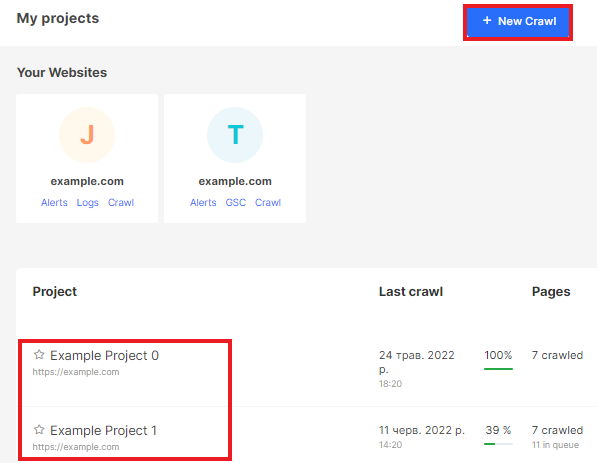
Step 1: Run a Full Crawl
Start a new crawl or open an existing one. Use a full crawl of the site: if the crawl is not complete, the number of nofollow links and their sources will not be accurate.
Step 2: Open the Links Table
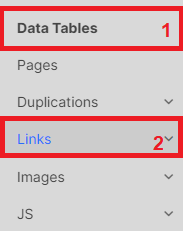
When the crawl is finished, open its results and go to the Links data table, which lists every link the crawler found with its attributes. The guide on analyzing internal linking covers the other reports in this section, such as Links Overview and the links problems list.
Step 3: Filter Nofollow Links
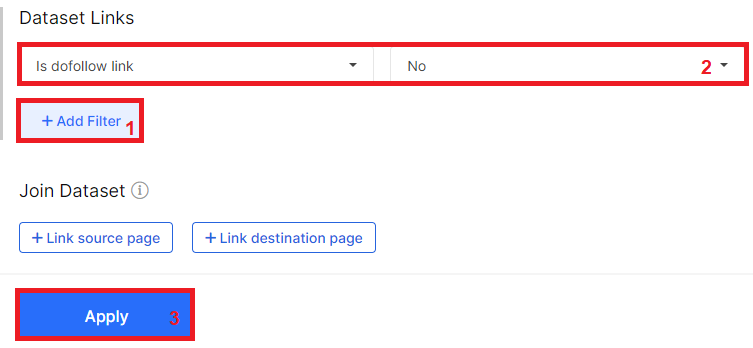
In the Links dataset, set the filter “Is dofollow link” to “No”. The table now shows only nofollow links.
Step 4: Add Link Destination Page and Filter Indexable Pages
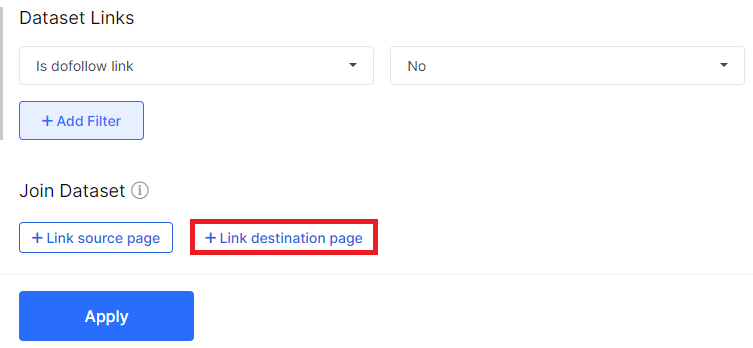
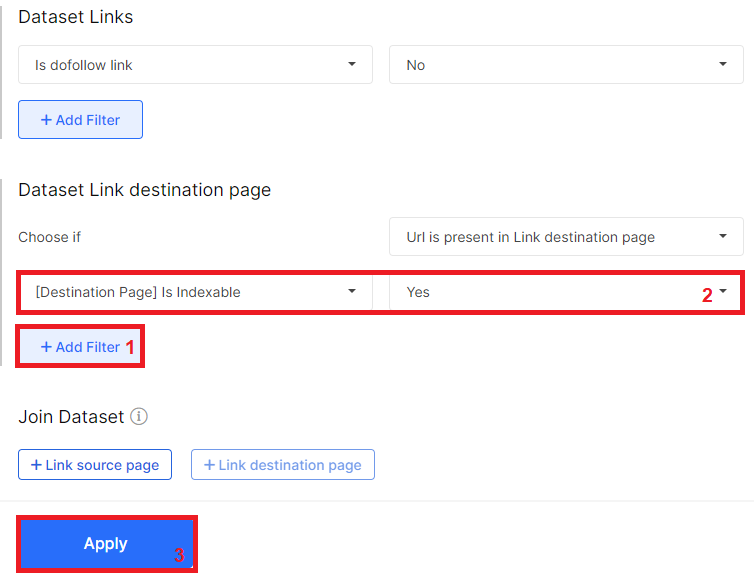
Add the Link Destination Page dataset, then set “[Destination Page] Is Indexable” to “Yes” and click Apply. The table now keeps only nofollow links that point to indexable pages, which are the ones worth reviewing.
Step 5: Read and Export the Results
The Page URL column shows the page where the crawler found the link, and the Link Destination (absolute URL) column shows the page the link points to. Sort by destination to see which pages receive the most nofollow links.

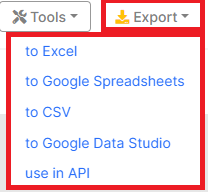
Click Export to download the table in Excel, Google Spreadsheets or CSV. If you use the JetOctopus API, the same data is available through a request, as described in the API guide.
Check every nofollow link that points to an indexable page on your site.
How to Fix Nofollow Internal Links
Start with one question for every link you found: is this nofollow intentional or accidental? The answer decides the fix.
Decision Table: Remove, Replace or Keep
Use this table to match each case to an action:
| Situation | Action | Notes |
|---|---|---|
| Nofollow in navigation, footer or a template points to an important page | Remove rel=”nofollow” in the template | Usually needs a release. Recrawl after the fix |
| Nofollow in content points to an indexable page | Remove nofollow in the CMS or content | Check the anchor: it should describe the target page |
| A page receives only nofollow links | Add followed links from relevant, strong pages | The page is as weak as an orphan. At scale, use Internal Linker |
| A URL receives both follow and nofollow links | Decide what you intend: if the page should be indexed, make every link followed, and if not, add noindex | Mixed signals weaken an intentional nofollow |
| Intentional nofollow (login, filters, UGC) | Keep it | Confirm the target is not indexable and not important |
Pages That Receive Only Nofollow Links
A page whose every inbound internal link is nofollow gets no internal equity and has no followed path for crawlers. In practice it sits close to an orphan page: nothing on the site supports it, and Google may find it only through the sitemap. Treat them like the pages in your orphan pages audit and add followed links from relevant pages that already receive crawl attention, such as the parent category and related items.
To confirm the effect on your site, compare these pages with bot activity in your server logs. Log file analysis shows high-value pages that receive zero bot visits, so you can check whether pages fed only by nofollow links are among them.
URLs With Both Follow and Nofollow Links
A mixed state usually means a template conflict: the menu links to a page normally, while a footer or widget links to the same URL with nofollow. If the page should rank, remove the attribute. If it should stay out of search, nofollow alone will not do it, because the followed links still lead crawlers there, so use noindex or robots.txt instead. The Links table with the nofollow filter shows which source pages carry the nofollowed copies.
How to Fix Under-Linked Pages at Scale With JetOctopus Internal Linker
Why Manual Fixing Doesn’t Scale
On large sites, nofollow comes from templates, plugins and old code, so every fix needs a release and a developer’s time. Meanwhile the affected pages stay under-linked, and pagination limits how deep category links can reach. The Internal Linker page notes that a handful of top pages get overlinked while 80% of the rest remain underlinked on large catalogs.
How Internal Linker Works
Internal Linker adds new links from strong pages to weak ones in four steps:
- Select donors and acceptors: pick pages with filters by any crawl, log or GSC metric.
- Set matching rules and run AI semantic matching: rules narrow the candidates, and AI text embeddings choose relevant pairs.
- Generate the linking schema: review the proposed links and their anchors before release.
- Fine-tune, ship and watch the results: adjust the rules, deploy and track how bots and users respond.
It does not change the attributes of your current links. JetOctopus doesn’t touch existing internal links and adds a new layer on top, so removing old nofollow attributes remains a separate template fix.
Donors and Acceptors
Donors are strong pages with crawl budget, traffic and impressions in Google, while acceptors are weak, orphan or unindexed pages that need a boost. The Internal Linker manual adds that acceptor pages must be indexable, which fits the pages this audit surfaces. Relevance comes from AI text embeddings, so a phone case page gets a link from a phone page and never from a garden tools category.
Three data sources feed the choice: the crawl shows the current structure and links, server logs show which pages Google and AI bots visit and Search Console shows which pages earn impressions and clicks.
The output fits existing workflows: a CSV export for developers, a Linker API that returns links during page render in 10 to 20 ms and a block-based format that fits large catalog templates.
Results and Who It’s For
Internal Linker is designed for websites with 10,000+ pages, such as e-commerce catalogs, marketplaces and classifieds. The product page lists +350% Googlebot visits and +700% SERP impressions for Swiss Marketplace Group, and more examples are in the JetOctopus case studies. For smaller sites, the decision table above is usually enough.
See how Internal Linker works on your own data.
How to Keep Nofollow Under Control
Nofollow problems return with every release that touches templates, so make the audit a habit. Recrawl the site after releases, redesigns and plugin updates, then rerun the five steps above and compare the number of nofollow links to indexable pages with the previous crawl. Crawl alerts run on your scheduled crawl cadence and can flag indexation drops between full audits.
Adopt one team policy: internal nofollow is allowed only for documented cases such as login, cart, filters and user-generated content, and anything else is a bug.
For related checks, see the guides on auditing image links and internal link anchors.
FAQ
Do bots follow nofollow internal links, or do they only ignore link equity?
These are two separate questions. Google treats nofollow as a hint: its crawler may still follow the link, but passing equity is not guaranteed. A page reached only through nofollow links can be found late or not at all. To check your own site, compare such pages with bot requests in your server logs.
What is the difference between a nofollow link and the meta robots nofollow?
rel=”nofollow” applies to one link. A meta robots nofollow tag or X-Robots-Tag header applies to every outgoing link on the page, internal and external. Audit them separately: link attributes in the Links table and page-level rules in the page data, since each problem has a different fix.
Does nofollow stop Google from indexing a page?
No. To keep a page out of the index, use noindex. Nofollow only affects whether signals pass through a link and whether a crawler uses it to find the page, so a nofollowed page that is linked elsewhere or listed in the sitemap can still be indexed.
Do nofollow internal links affect AI crawlers?
The evidence is still thin, so treat any firm claim with caution. AI crawlers discover content mostly by following links in the HTML, and how each of them handles rel=”nofollow” is not publicly documented. The safe approach is simple: make sure every important page is reachable through regular, followed links.
Wrapping Up
Nofollow internal links are a useful tool for a short list of pages that should never rank, and a quiet problem everywhere else. Audit them with a full crawl, filter nofollow links that point to indexable pages, then remove accidental nofollow and strengthen pages that received nothing but nofollowed links.