
A domain migration gone wrong. Thousands of pages flagged with 404 errors overnight. All indexed articles suddenly returning are linked through a 301 redirection. This is the everyday reality of managing SEO redirects across complex, fast-moving websites.
Whether you’re handling a platform migration, restructuring URLs after a rebrand or consolidating domains following the m&a, if redirects are missing or not working properly, you may lose traffic and conversions.
Dive into this SEO redirects guide to understand when and how to use them correctly and how to audit them using JetOctopus, so your team can catch problems before Google does.
TL;DR
- Redirects are a foundational SEO control: they preserve link equity, protect crawl budget and keep both users and bots on the right URL.
- Redirects are essential during migrations, restructures, domain changes and content cleanup to maintain stability and continuity.
- Log analysis is the only reliable way to catch bots silently hitting old URLs your current codebase no longer references.
- JetOctopus gives you full visibility into every redirect across your architecture: from status codes and chain depth to log-level bot behavior, so nothing slips through.
What Are SEO Redirects
SEO redirects are server‑level rules that automatically route users and crawlers from an outdated URL to its correct destination. They preserve rankings, traffic and link equity when pages move, domains change or content is retired.
In practice, a redirect tells a browser or bot: “When someone requests URL A, deliver URL B instead.”
Redirects and AI Bots
AI crawlers handle redirects much like traditional search bots and the way you structure those redirects directly affects how your content is fetched, indexed and surfaced inside AI‑generated answers. Modern agents (GPTBot, ClaudeBot, PerplexityBot, OAI‑SearchBot and others) follow 301/302/307/308 rules, but long or broken chains can drain crawl resources, trigger timeouts or cause models to skip pages entirely.
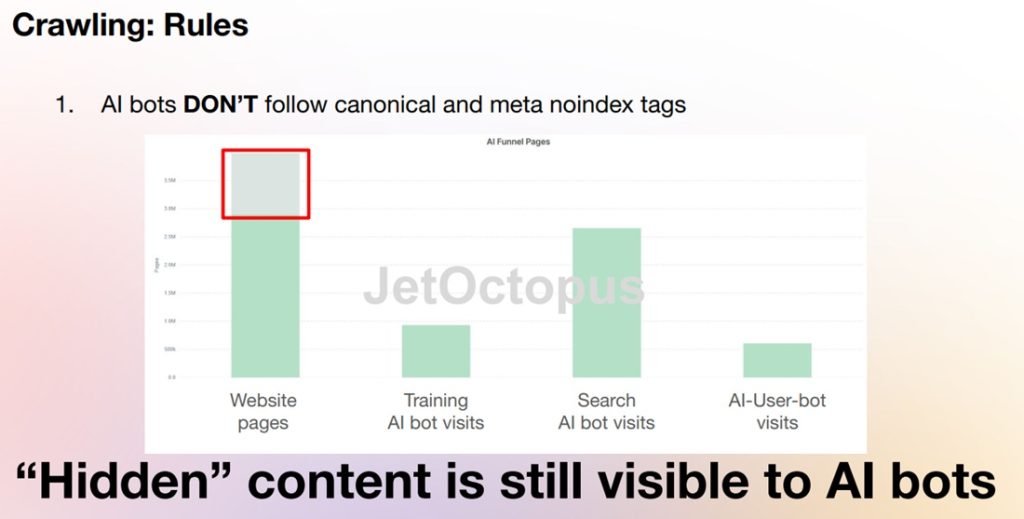
Companies increasingly use redirect logic to control how AI systems access, attribute or interpret content, including detecting or filtering specific user‑agents.
Clean, efficient redirect paths ensure AI systems reach the correct version of a page, cite the right URL and reliably include your content in retrieval, training and answer generation.
Why Redirects Matter
SEO redirects deliver several benefits, like:
Preserve and transfer ranking signals
A properly implemented redirect passes link equity, historical authority and topical relevance from the old URL to its successor. Since 2016, Google has confirmed that 301s transfer full PageRank, but timing matters. There’s an indexing lag between when a redirect is implemented and when equity fully consolidates, which can cause temporary ranking fluctuations during migrations.
Protect crawl budget and indexing efficiency
Redirects guide crawlers to the canonical version of a page, eliminating fragmentation across duplicate URLs. On large sites, this is a crawl budget issue: chains of redirects, masses of legacy URLs and unresolved loops all consume crawl budget that should be spent on live content.
Eliminate dead ends for users and bots
Broken URLs produce 404 pages, which waste crawl budget, erode user trust and can degrade engagement signals. Redirects remove these dead ends, routing both users and crawlers to the correct destination regardless of whether the traffic comes from old bookmarks, backlinks or cached SERPs.
When to Use Them
Use SEO redirects whenever a URL changes in a way that could disrupt users, fragment authority or confuse search engines.
- URL changes or page moves: Redirect when renaming, relocating or updating a page so users and crawlers reach the correct destination without losing equity.
- Website restructures or content cleanup: Use redirects to retire outdated URLs, eliminate duplicates and maintain a coherent architecture during major updates.
- Domain changes, mergers, or consolidations: Route all legacy traffic to the new domain to preserve rankings, backlinks and brand continuity.
- Migrations and protocol upgrades: Redirect during platform moves or when shifting from HTTP to HTTPS to protect performance and user trust.
*Note: While 302 and 307 redirects can temporarily preserve user experience during maintenance, modern SEO practice discourages relying on them; PageRank isn’t passed, organic visibility suffers and their usefulness has long faded since the early days of the web.
Types of SEO Redirects
SEO redirects fall into a defined set of technical categories, each built to control how users, crawlers and AI systems reach the correct URL. Understanding which is the best type of redirect for SEO in each scenario is essential for preserving authority, maintaining stability and enforcing canonical behavior across complex architectures.
Permanent Redirects (301, 308)
301 (Moved Permanently) – The standard for long‑term URL changes. It passes full link equity and tells search engines to index the new URL. 301 redirects tell search engines that the move from one URL to another is permanent.
308 (Permanent Redirect) – Similar to 301 but preserves the HTTP method and request body, making it ideal for forms, APIs, and transactional flows. HTTP 308 preserves both the HTTP method (GET or POST) and the request body.
Temporary Redirects (302, 303, 307)
These are used when you expect to restore the original URL and want users to return to it later.
- 302 – Best for short‑term changes, maintenance, or A/B testing.
- 303 – Common after form submissions, directing users to confirmation pages.
- 307 – Maintains the original HTTP method, useful for POST‑based workflows.
However, from an SEO perspective, only 301 or 308 are to be used, even for temporary cases.
Client‑Side Redirects (Meta Refresh, JavaScript)
These types of redirects are executed in the browser.
- Meta Refresh – Fires after a delay; acceptable for temporary use but not ideal for SEO.
- JavaScript Redirects – Flexible but less reliable for crawlers; use only when server‑side options aren’t possible.
Common Mistakes with SEO Redirects
| Mistake | What It Means | Why It Hurts SEO | Best Practice |
|---|---|---|---|
| Using 302 instead of 301 | Temporary redirect used for a permanent change | Google may not pass ranking signals | Use 301 for all permanent URL moves |
| Redirecting to irrelevant pages | Crawls get stuck, pages drop from the index | Google treats it as a soft 404 | Redirect only to the closest-matching page |
| Redirect chains | A → B → C → D | Slows crawling, dilutes link equity | Redirect A → D directly |
| Redirect loops | A → B → A | Crawls get stuck, pages drop from index | Fix mapping so each URL has one final destination |
| Redirecting everything to the homepage | Mass homepage redirects during migration | Google ignores them as soft 404s | Map URLs one-to-one |
| Not updating internal links | Internal links still point to old URLs | Wastes crawl budget, slows reindexing | Update links to the final URL |
| Redirecting to thin/weak pages | Destination page lacks content depth | Google may not transfer ranking signals | Ensure destination page is strong + relevant |
| Not redirecting image URLs | Image paths change but no redirects | Loss of image search traffic | Redirect image URLs during migrations |
| No one‑to‑one mapping during migration | Old URLs not matched to new equivalents | Search and AI visibility loss post-migration | Build a URL mapping spreadsheet |
| Redirects left in XML sitemap | Sitemap contains old URLs that redirect | Google sees sitemap as low quality. AI bots waste their time on wrong URLs | Include only indexable URLs in sitemap |
| Blocking redirected URLs in robots.txt | Old URLs disallowed before Google crawls them | Google can’t process redirects or pass signals | Allow crawling until redirects are processed |
| Redirecting to pages with different intent | E.g., product → category or blog → homepage | Google treats as soft 404 | Match search intent as closely as possible |
Now that you know about failure modes, it’s time you learn how to find which ones are active on your site. Here’s how to use JetOctopus to map your full redirect landscape, from status code distribution to chain depth and bot-level behavior.
How to Find the Total Number of Redirects on Your Website
To see the total number of redirects, go to the “Crawler” menu – “Overview”.
On the “Status Codes” chart, you will find the percentage of URLs with specific response codes. If there were redirects during crawling, you will find 301, 302, 307, 308 and other 3xx response codes on this chart.
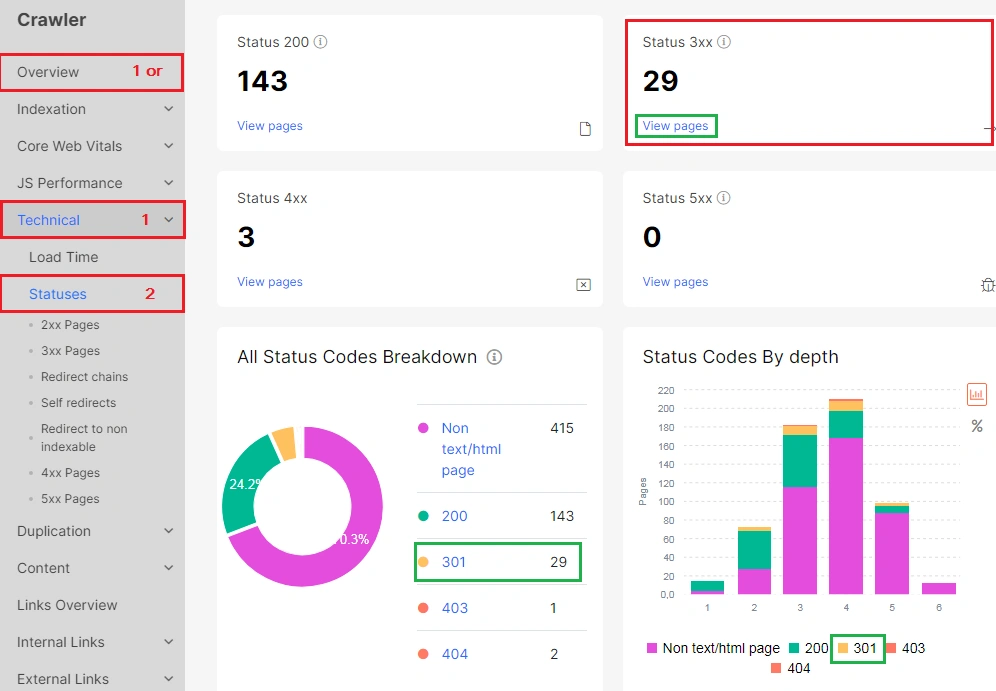
You will find the same chart with additional information in the report “Technical” – “Status Codes”.
Check if There are Problems with Redirects
With JetOctopus, you can easily check that your redirects are working properly.
Select the desired report in the “Technical” – “Statuses” menu.
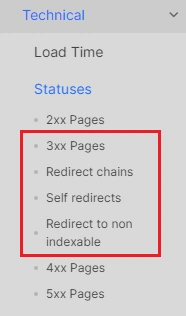
In the 3xx Pages report, you will see all the URLs with 3xx response codes. Check if this list really includes the pages that need to be redirected.
A permanent redirect is the ideal approach. Once it’s in place, the original URL should be retired and replaced with the updated one. Search engine crawlers, RSS readers, and other automated systems will then recognize the change and update their references accordingly.
Also, carefully check the “Redirect Target Status Code column”. Ideally, all redirect target pages should have 200 response codes.
How to Find Redirect Chains
JetOctopus has created a special report that will help to find redirect chains.
In the “Redirect chains” data table, you can find URLs with 2 or more hops during redirection. Search robots do not process more than 5 hops in a redirect chain.
More information on why you should avoid redirect chains: How to find redirect chains.
How to Find Redirect Loops
A page that redirects to itself creates a cyclic redirect, causing users and search engines to loop endlessly until the browser terminates the request. This is a technical error that should be avoided.
You can find the list of self-redirected URLs in a separate report.
Redirects to Non-Indexable URLs
If there is a redirect from a page that was already in the SERP to non-indexable URLs, it can cause it to drop out of the index. And redirects linked from non-indexable pages are often unnoticed because those are rarely audited. Such cases tend to waste a lot of crawl budget of both AI and search bots.
Check the list of such URLs in the “Redirects to non-indexable” report.
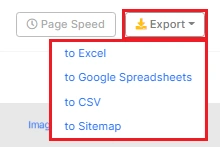
You can bulk export the data you need in a convenient format: CSV, Excel or Google Spreadsheets.
How to Check Redirects for Search Engines and AI Agents
You may not be aware that search and AI bots are crawling old URLs, as your website’s current code does not include links to those old pages.
You need to have logs to check redirects for search engines.
Go to the “Logs” menu, and select “Raw Logs”. Next, filter the URLs, using the drop-down menu. Select the status code “Between” – 300, 399.
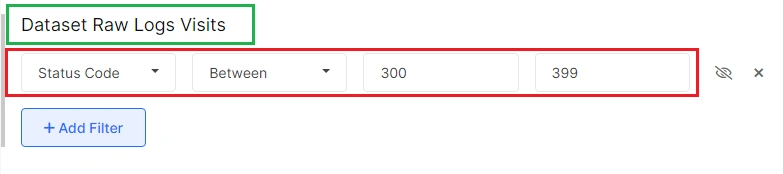
You can select any status code and configure additional filters.
Conclusion
Not maintaining redirects is one of the fastest ways to lose rankings you’ve worked hard to build. A single broken chain, a misused 302 or a loop left undetected can quietly drain crawl budget on scale and thus push high-value pages out of the index. Knowing the best type of redirect for SEO in every scenario and verifying it’s actually implemented correctly is what separates teams that recover fast from those that spend weeks diagnosing traffic drops.
Luckily, these are entirely solvable problems with the right tooling. JetOctopus gives you the full redirect picture: chain depth, target status codes, bot-level behavior via log integration and redirect on legacy pages. Your team can move from reactive cleanup to proactive governance.
For SEO pros managing complex architectures having clean paths, correct status codes, zero unnecessary hops and full confidence that both Googlebot and AI crawlers are reaching exactly the pages you want them to is standard.