You know the situations when you’ve got a 47-tab crawl export and a standup in twenty minutes. Every crawl produces thousands of data points. Broken canonicals, thin pages, orphan URLs, pages Google ignores, title tags quietly cannibalizing each other. The data isn’t really the problem. The problem is that the hours your team burns reading twenty reports just to figure out where to start.
That sifting is the real tax and what slows technical SEO. Manual, repetitive and project after project, it’s the work that blocks every decision downstream. So we built the AI SEO Recommender to handle that analysis automatically and consistently.
How It Works
After a crawl completes its run, the Recommender reads and interprets the output. Then, it creates a short, ranked list of the biggest problems on your site right now, written the way a senior SEO would brief a client:
- What’s broken – the issue, in plain language
- How bad it is – how many pages it touches
- What to do – a clear, actionable fix
Want to see it in action first? I walked through a live report in this short video:
What It Actually Is
The AI SEO Recommender is an analyst, built on Claude, that runs against your own JetOctopus data. It queries your crawl results, your Google Search Console performance and your server logs. It cross-references all three and highlights the issues that are real on your site and worth your time.
That last part is the whole point. There is no shortage of tools that will hand you a list of “SEO issues” pulled from a textbook. But most of them are broad and nonspecific, with rules that apply to every site and tell you nothing about yours. The Recommender starts from your data, so the findings reflect your site’s actual behavior, not someone else’s template.
Because it draws from multiple sources, it shows problems that aren’t immediately obvious:
- A page may be fully indexable and still go unseen by Googlebot for weeks. Your crawl confirms it exists. Your logs say Google never arrives. Neither report knows that alone.
- Multiple URLs can rank for the same query and cannibalize each other’s impressions. You only see this conflict when ranking data and URL structure are evaluated side by side.
- A redirect chain sitting on a page that still pulls traffic, so the cost is real (crawl budget gets wasted, load time takes a hit and any link equity pointing to that URL bleeds out at every hop).
These only become visible when all these three sources: crawl, GSC and log data, are read as one. That join is the part competitors cannot easily copy and it is exactly what the Recommender does on every run.
We process billions of log lines and crawled pages across the platform precisely so this kind of cross-source read is fast instead of a weekend of manual SQL queries to pull off.
Findings are fresh, always reflecting the last 30 days, as the Recommender pulls your most recent Search Console and log data paired with your latest crawl. That window is wide enough to show a real trend and narrow enough that the recommendations reflect how your site behaves now, not how it behaved last quarter.
A note on how to use these findings. The Recommender is AI-generated. It is a fast, well-informed first pass, but it’s not a final verdict. Every finding is a lead worth verifying. Check the affected pages, confirm the issue in the underlying reports and apply your own judgment before you change a live site. It is built to save you the hours of sifting, not to remove the human from the decision.
Why We Built the AI SEO Recommender
We kept watching skilled SEOs do the same thing after every crawl: export, pivot, filter and spend an afternoon turning a dataset into a to-do list. That work is valuable. But it is also mechanical and the value walks out the door the moment the list is written. SEO teams should be spending that time on decisions, instead of building the spreadsheet that makes decisions possible.
At the same time, we did not want to replace the analyst. We just wanted to hand them a first draft. The Recommender does the mechanical pass, the “what changed and what is broken” part, so teams spend their time on judgment and strategy instead of spreadsheet archaeology.
We know the pattern very well because we lived it. Even on our team, navigating a few hundred charts to assemble a priority list takes real time. If we, the people who built the platform, feel that friction, every customer feels it too. The Recommender is the answer we wanted for ourselves first.
How to Read It
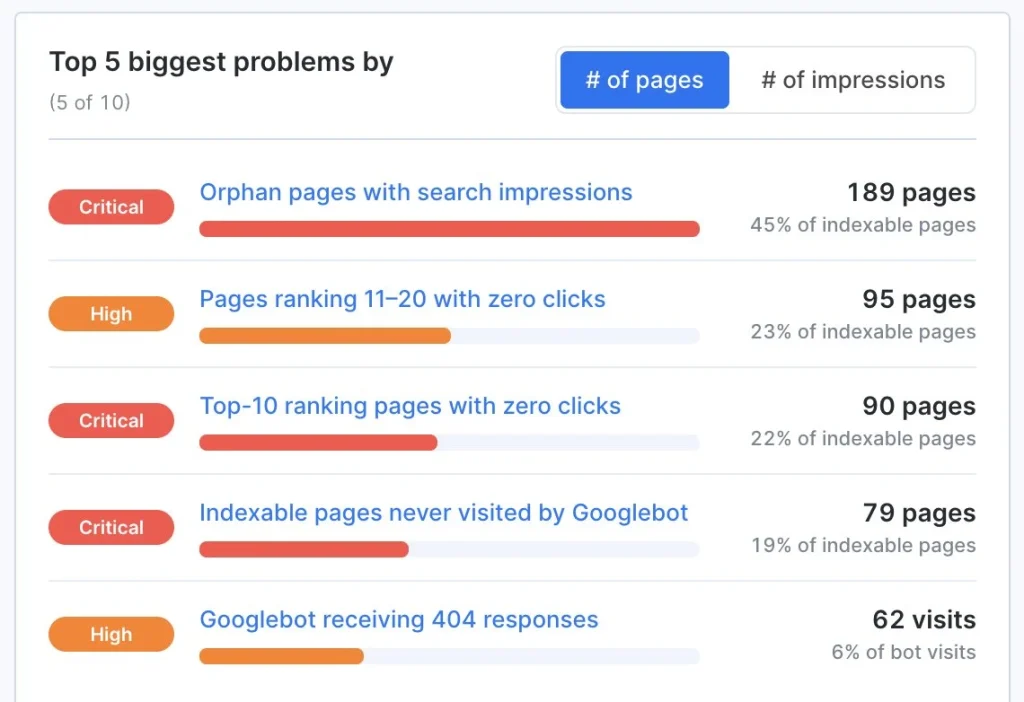
The report leads with the single question that matters most: what are the biggest problems on this site?
At the top, you will find the Top 5 biggest problems, ranked. Each one is a plain-language finding with the scale of the issue attached, so you always know whether something affects 5 pages or 50,000.
We want to be transparent and straight with you about this and not dress an AI summary up as gospel.
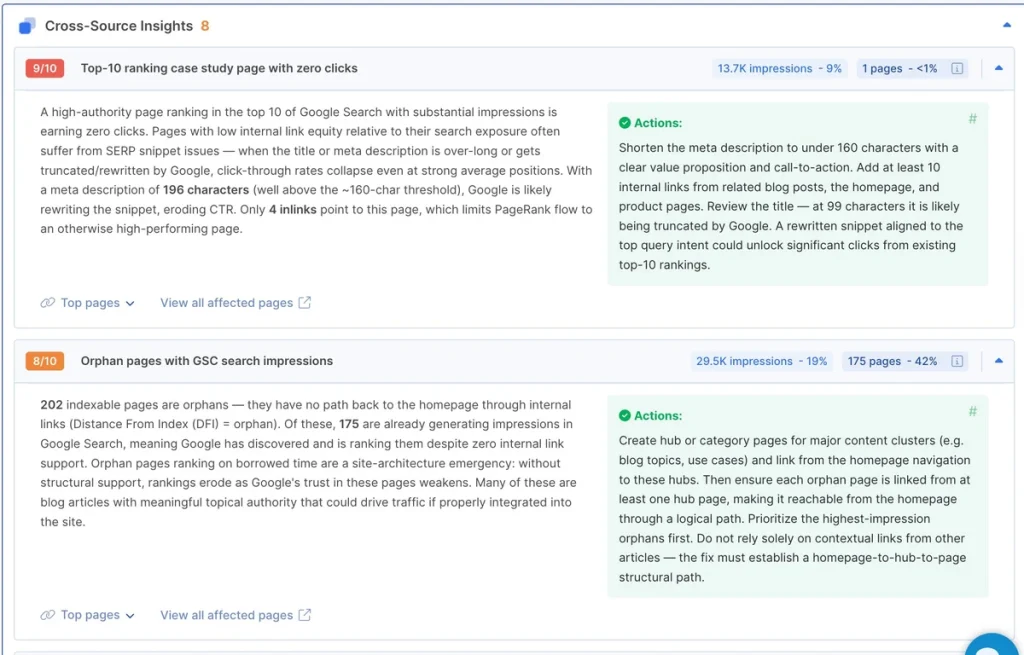
Every finding comes with a full brief. Open one and it expands into the full case:
- What it is. A plain-language description of the issue and why it matters for this site
- What to do. A specific recommended action is written for this exact finding, so you are not left to figure out the fix yourself.
- How big it is. The exact count of affected pages and the share of your site they represent, plus the Search Console impressions behind them.
- Where it is. Example URLs and a direct link into the filtered data table so you can verify
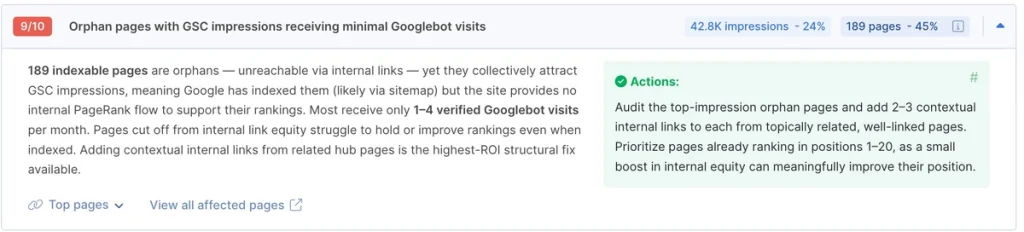
That last link is what turns a recommendation into something you can actually trust. One click takes you from “the AI says 1,200 pages have this problem” to the actual list of those 1,200 pages, filtered and ready to export. You never have to take the finding’s word for it.
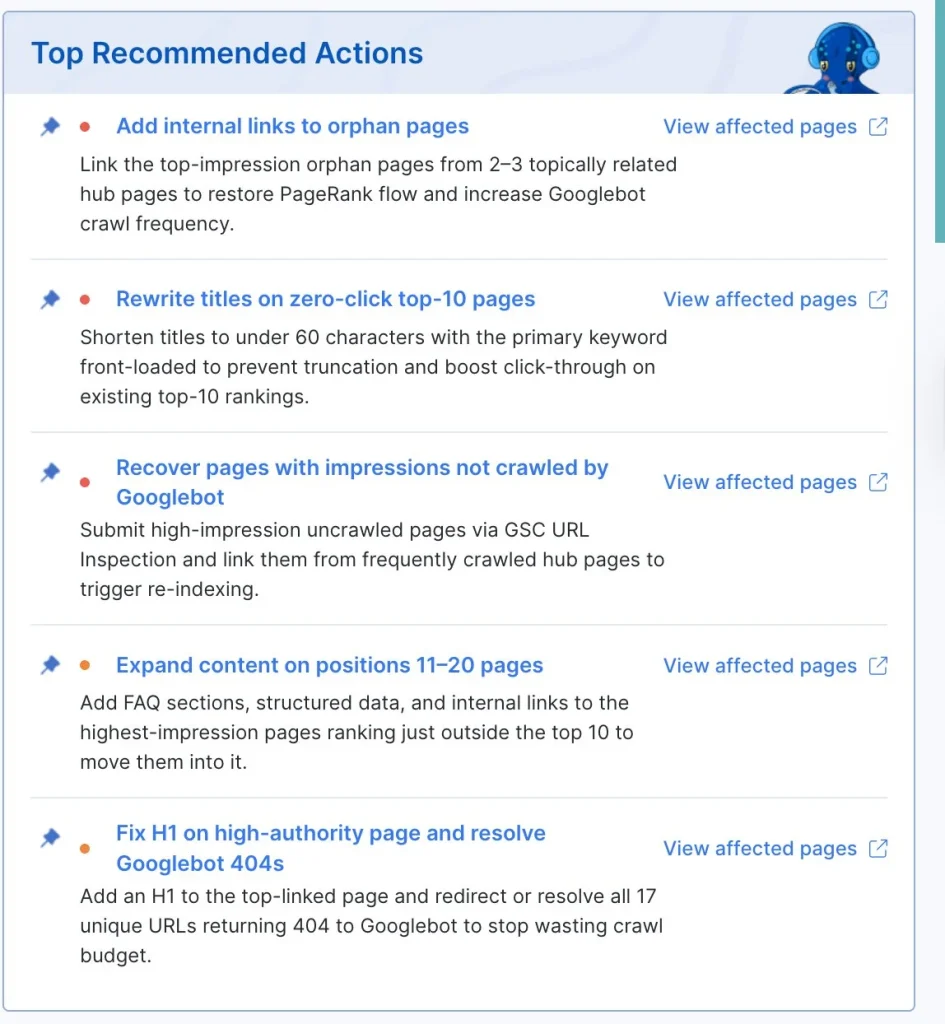
A recommendation you cannot inspect is just a guess. One that drops you straight into the underlying data is a starting point.
You can re-rank the top list with a single toggle:
- By number of pages: sorts problems by how much of your site they touch. This is the view for technical cleanup, when your goal is to fix the issues affecting the largest number of URLs.
- By number of impressions: sorts problems by how much search visibility sits behind them. This is the view for impact, when you want to fix the issues costing you the most actual exposure in Google.
The same problem can sit at the top of one view and the middle of the other and that difference is the whole idea.
- A bug touching 40,000 thin tag pages is a big number-of-pages problem but may carry almost no impressions.
- A title-tag issue on 200 pages might be tiny by page count, but it is quietly suppressing your best-performing templates.
The toggle lets you switch between “biggest mess” and “biggest opportunity” without leaving the report.
Below the ranked list, findings are grouped by section so you can read the full picture in context instead of focusing only on the top five.
Use Cases
The Monday-morning triage. Open the Recommender after the weekend crawl, sort by impressions and you have your week’s priority list in under a minute, ordered by what is actually moving traffic.
The client report starter. Sort by number of pages, screenshot the top findings and you have the skeleton of a technical audit summary without writing the first paragraph yourself.
The “is this crawl healthy” gut check. A glance at the top findings tells you whether a site is in good shape or whether something broke since the last crawl, before you commit time to a deep dive.
The cross-source catch. This is the one thing a single-source tool cannot do. Issues like:
- Indexable pages Google ignores
- Rankings split across duplicate URLs
- Crawl budget burned on pages that never convert to impressions
These get surfaced automatically instead of waiting for you to think to look for them. They are also the issues that, when fixed, show up in the results our clients actually report.
When It Runs and How to Run It Yourself
For most projects, the Recommender works on its own. When a full crawl completes, it analyzes the results automatically and the report is waiting for you the next time you open it. You don’t have to configure anything or lift a finger to start it.
When there is no analysis yet, the report tells you why and what to do next. If your crawl is eligible, a single Generate AI SEO analysis button runs it on demand. Processing takes a few minutes and the report shows a live status while it works and refreshes automatically once the findings are ready.
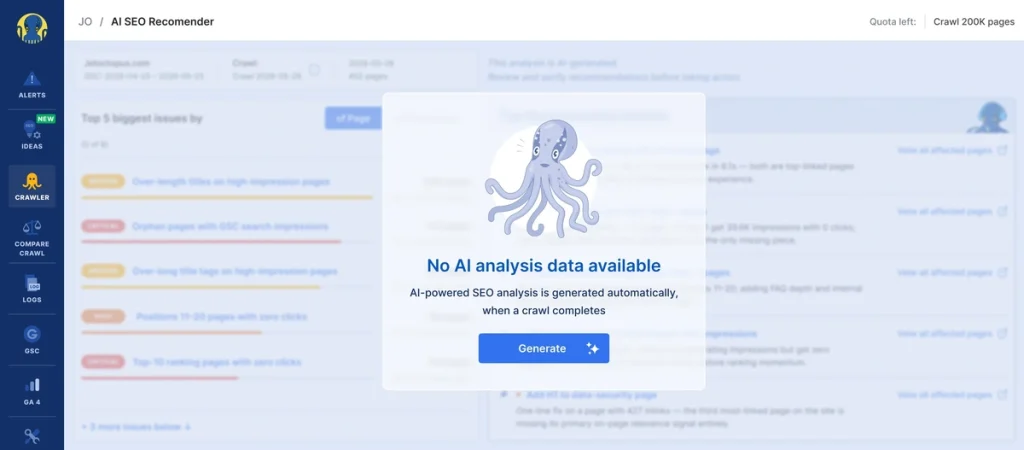
A few things worth knowing:
- The Recommender works best on full crawls of a meaningful size, so it can read the whole site.
- On-demand generation is available to users with an active crawl subscription.
- On-demand analysis only runs on recent crawls. If yours is too old, the report points you to start a fresh one, so the analysis always reflects the current state of your site.
Your Data Is Used for Reports, Nothing Else
Privacy is not a footnote here, so we will be direct about it. The Recommender analyzes your data to produce your report and that is the only thing it does with it.
- Your data is never used to train any AI model. Not ours, not the model provider’s. The analysis runs under enterprise terms that explicitly exclude your content from any model training.
- Nothing is shared between accounts. The Recommender only ever reads the data of the project it is analyzing. One client’s crawl, logs or Search Console data is never visible to another.
- It reads, but it does not retain. Your crawl, GSC and log data are queried to generate the findings for that run. The findings are stored in your account. The underlying data is not copied anywhere outside JetOctopus to produce them.
If you run audits for clients under their own confidentiality terms, the Recommender fits inside those terms and doesn’t attempt to work outside them.
What This Changes for Your Team
If you’ve been using JetOctopus, you already have everything the Recommender needs. You run the crawls, connect Search Console and ship your logs. The analysis that used to take an afternoon is now waiting for you when the crawl finishes, ranked by what matters and written in plain language.
Where to Find It
Open your project and go to the Ideas tab in the left menu, then select AI SEO Recommender. The report opens on the latest crawl, with your top problems ranked and ready.
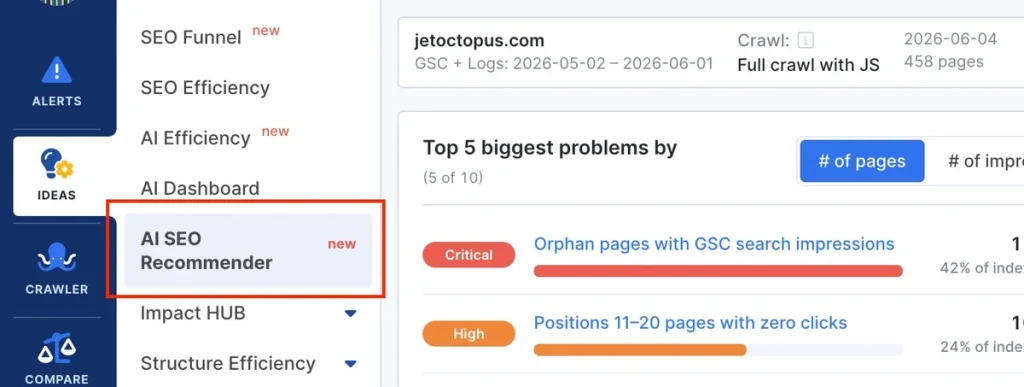
The data was always there. Now it reads itself.
Ready to put it to work on your own site?
Request a demo and we will set up the platform for your project, connect your crawl, logs and Search Console and walk you through your first AI SEO Recommender report on your own data.