Every SEO knows the fundamentals. None of them change at enterprise scale.
What changes is that you stop being able to see whether they’re working. When a single template governs 400,000 URLs, when Googlebot crawls 20% of your site in a month, when 3 million pages you’ve never heard of are eating crawl budget while 250,000 pages you built have never been fetched, the question stops being “is our SEO correct?” and becomes “how would we even know?” All four of those numbers are real, pulled from the enterprise sites in this guide.
On a 200-page site, “are our canonicals correct?” is a question you answer by looking. On a 4-million-page site built from fourteen templates, three CMS platforms and two decades of decisions, it’s a question you answer with data you probably don’t have and the confident answer you give in the Monday meeting is, statistically, a guess.
The web is “a nearly infinite space, exceeding Google’s ability to explore and index every available URL,” says Google Search Central, explaining why crawl budget exists at all.
Below a certain threshold, Google’s crawlers quietly absorb your inefficiency for you. Above it, they don’t and in 2026 they’re no longer the only crawlers you’re feeding. Every wasted request is a page that didn’t get seen and enterprise SEO is the discipline of finding out which pages before the quarter ends.
This guide covers the five failure modes that only appear at scale, why standard tooling is structurally blind to most of them, the AI crawlers now competing for the same crawl budget and how to prioritize when everything looks urgent.
TL;DR
- The enterprise threshold isn’t a page count. It’s a symptom. Google’s own trigger for active crawl-budget management: 1M+ pages updated weekly, 10k+ updated daily or a large share of URLs stuck in Discovered – currently not indexed at any size.
- Crawl budget is allocated per hostname and it’s zero-sum. www., shop. and m. are three separate budgets; every request Googlebot spends on a filter URL is one it doesn’t spend on a product page.
- Canonical is a hint, not a directive: at enterprise scale Google ignores it often enough that “we canonicalized it” doesn’t resolve duplicate crawling.
- Blocking URLs in robots.txt doesn’t reallocate crawl budget to other pages unless you’re already at your serving limit. Google states this directly.
- AI crawlers are now the largest category of bot traffic, at 33.8% versus 26.8% for search crawlers (Cloudflare, June 2026) and ~52% of AI crawling is for training, which sends no visitors. Anthropic’s crawl-to-refer ratio ran ~4,580:1; Google’s is 5:1.
- Blocking AI crawlers backfired in the data: publishers who blocked them lost ~7% of weekly traffic in six weeks with no drop in AI-citation frequency (Rutgers/Wharton).
- Most enterprise failures are invisible to any single tool. GSC caps you at 1,000 example URLs and says even those aren’t guaranteed complete; a crawler can’t find pages you don’t link to; logs don’t know your site structure. The failures live in the join.
- The bottleneck isn’t finding problems. It’s shipping fixes. The teams that win automate enforcement (a broken canonical fails the build), not reporting (a dashboard nobody was blocked on).
What Is Enterprise SEO? Where the Threshold Actually Is
Enterprise SEO is the practice of managing organic visibility on sites large enough that you can no longer verify your own work by inspection, where optimization becomes a question of systems, instrumentation and governance rather than pages. That’s the working definition and it’s more useful than the ones based on company size or Fortune 500 membership, because a 400-person SaaS company with 3 million programmatically generated URLs has every enterprise-level SEO problem there is and a bank with 900 pages has none of them.
The distinction from traditional SEO isn’t sophistication. It’s that enterprise search engine optimization operates on classes of pages, contested crawl resources and multi-team dependencies: three things that simply don’t exist below the threshold. Same principles, completely different failure modes.
Google’s thresholds, not the industry’s
Most guides put the line at 10,000 pages. That number comes from other blog posts, not from anyone with crawl data.
Google publishes its own thresholds and they’re the ones worth using. Per Search Central, crawl budget becomes something you need to actively manage when you’re running:
- 1M+ unique pages with content changing about once a week
- 10k+ unique pages with content changing daily
- a large share of your URLs classified in Search Console as Discovered – currently not indexed
That third one is the real trigger and it’s the one teams under a million pages ignore. It’s not a size threshold. It’s a symptom. If Google knows about your URLs and is choosing not to fetch them, you have an enterprise crawl problem at whatever size you happen to be.
There’s also an organizational threshold and it’s the one that decides whether anything gets fixed: multiple teams with write access to the same templates and no single owner for canonical logic. More on that below.
Two mechanics most enterprise crawl math gets wrong
Crawl budget is a product, not a number. It’s the intersection of two things: the crawl capacity limit (how hard Google can hit your servers without degrading them; it rises when you respond fast, falls when you’re slow or throw 5xx) and crawl demand (how much Google actually wants your pages, driven by perceived inventory, popularity and staleness). Gary Illyes has defined it as the number of URLs Googlebot “can and is willing or is instructed to crawl”. Capacity without demand gets you nothing. You can buy faster servers and change absolutely nothing about your indexation.
Crawl budget is allocated per hostname. www.example.com, shop.example.com and m.example.com are three separate budgets. If your platform is split across subdomains and most enterprise platforms are, you don’t have one crawl problem. You have three, with three different profiles and any analysis that pools them is measuring an average that describes none of them.
The mental shift: at this scale you’re not optimizing pages. You’re allocating a fixed, contested resource between them. Every request spent on a filter combination is a request not spent on a PDP. And that’s while Googlebot is still the only thing spending it, which, in 2026, it no longer is.
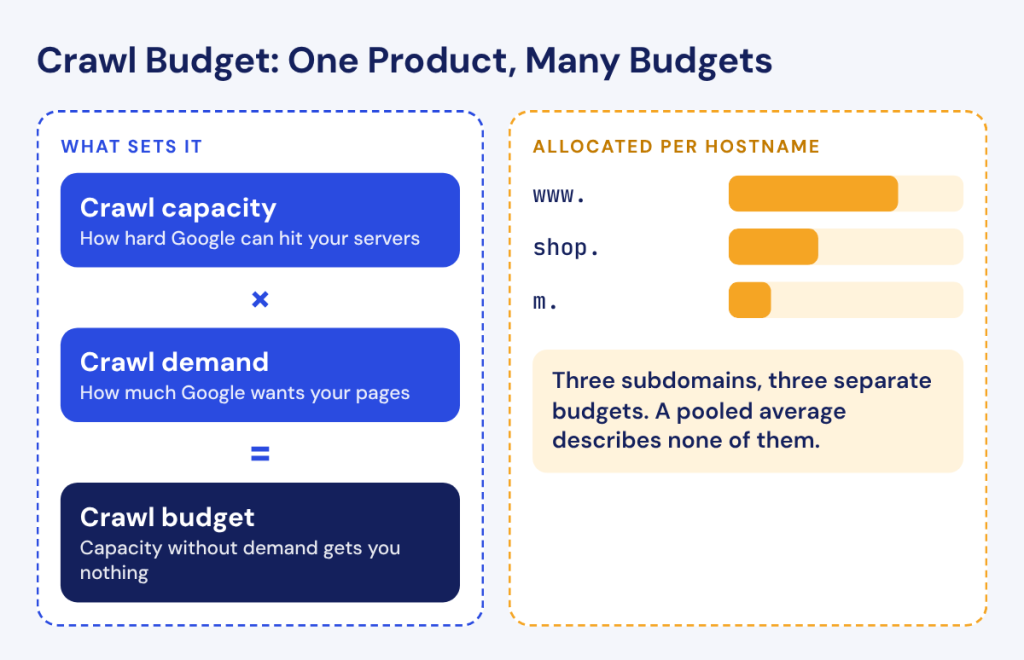
Crawl budget is set by capacity and demand, then allocated to each hostname separately
Why Enterprise-Level SEO Analysis Breaks: GSC vs. Crawlers vs. Log Files
Before the failures themselves, something has to be established, because everything after it depends on it.
Enterprise SEO teams aren’t short of tools. Most have three or four good ones. They’re short of one specific dataset: what search engines actually did, matched against what you actually built.
Almost every large-site failure lives in the gap between those two things and each tool in a standard stack can only see one side of it.
Google Search Console: 1,000 rows and even those aren’t guaranteed complete
GSC is the only tool that tells you what Google thinks. It also has the hardest ceiling and Google documents it themselves.
The Page Indexing report caps example URLs at 1,000 per issue type. The cap applies per status rather than per site. And Google’s own help documentation adds a line most people never read: the example list “isn’t guaranteed to show all URLs in a given status”, even when there are fewer than 1,000 of them.
Run that against a real situation. You have 380,000 URLs sitting in Discovered – currently not indexed. GSC hands you 1,000: 0.26% of the problem, not randomly sampled, with no guarantee of representativeness. From that you’re expected to find the pattern, write the ticket and convince an engineering lead to reprioritize a sprint.
Folder-level properties, the API and the BigQuery bulk export all buy you more room on the performance side. None of them gives you a complete indexation inventory and all of them are an engineering project rather than a Tuesday.
Two more ceilings that matter more than people admit:
- Crawl Stats is aggregated and 90 days deep. It tells you Googlebot made 4.2M requests and response time rose. It won’t tell you which URLs, the only thing you can act on.
- GSC only knows about Google. In 2026 that’s a shrinking share of the bots deciding whether you’re visible. There is no Search Console for ChatGPT.
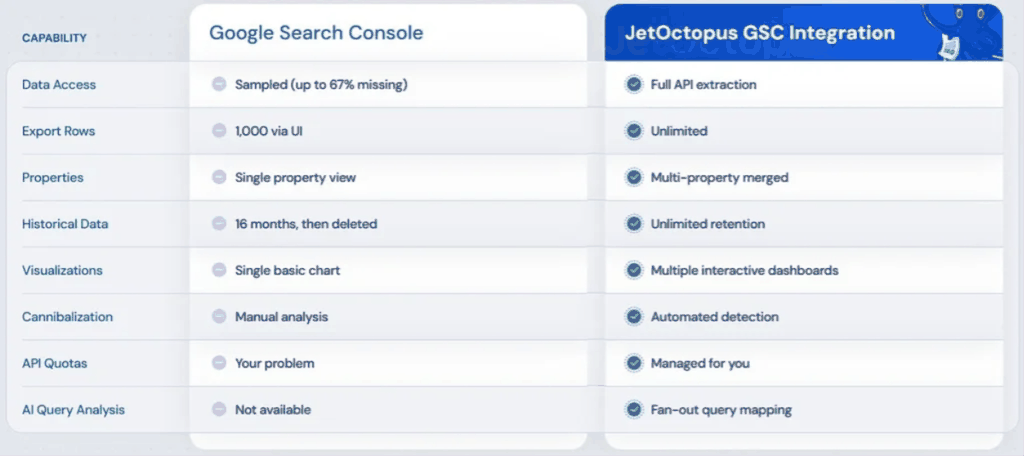
What Search Console shows versus what the JetOctopus GSC integration pulls
Desktop crawlers: built for a different job
A desktop crawler is the right tool for a great many things and it stays useful at enterprise scale: spot checks, a single section, a one-off question about a template. But four things sit outside what it does and each one sits directly under a failure below.
1. It can’t find pages you don’t link to. A crawler starts at your homepage and follows your links, so its output is bounded by the site you already know about. TemplateMonster’s 3 million orphaned URLs, pages Googlebot was actively crawling every day, were outside the structure entirely. No crawler would have listed them, at any configuration.
2. It doesn’t know what Googlebot did. It can tell you a page is technically fine. It can’t tell you Googlebot last touched it 40 days ago or never has or is hitting it 900 times a day. Most of the failures below are Googlebot behaviour questions and crawl data alone is silent on all of them.
3. It runs on your machine, on your time, at a speed you can’t safely raise.
Walk through what a full crawl of a 1M-URL site actually looks like. You switch to Database Storage mode (mandatory or RAM fills and the crawl dies). You start it. At a typical desktop-crawler default of 5 threads / ~5 URLs per second, a default that exists so you don’t overload the target server, one million URLs is roughly 55 hours of wall-clock time.
So you raise the thread count. At ~20 threads you’re down to about 14 hours, but now you’re making four times the requests and on a live production site that’s where the 403s, 5xx responses and rate-limiting start. Screaming Frog’s own guidance is blunt about it: “if you’re working on the machine while crawling, it can also impact machine performance.” The crawl and your laptop are competing for the same resources. And this is all before JavaScript rendering, which runs a headless browser per URL and pushes the same job past 55 hours again.
Then the crawl finishes and you’re not done. Several reports, orphans among them, only populate after you manually run post-crawl analysis, another pass over the full dataset. Realistically you’ve spent the better part of two days: one machine tied up, one analyst waiting, one snapshot that’s already aging.
There’s an honest, standard answer to all of this and it’s worth stating because it’s correct on its own terms: why crawl 5M URLs when 50k is enough? Sites are templated, so sample the page types and infer the rest. For most audits, that’s exactly right and it’s exactly what fails at enterprise scale. The orphan pages, the one broken template outside your sample, the parameter URLs you didn’t know existed: none of them are in the 50k. Sampling is the correct shortcut for the questions where sampling works and this article is a list of the questions where it doesn’t.
This is the difference that isn’t about features. JetOctopus runs the crawl on its own infrastructure, not your laptop: you start a full crawl of every URL and close the tab. Nothing ties up your machine, nothing competes with the work you’re doing and the crawl, the logs and GSC land in one place with the analysis already done. The comparison isn’t “a better crawler.” It’s “a crawl that runs in the background on a server” versus “a two-day process you have to babysit.”
RIA.com hit exactly this. Their team ran a standard desktop crawler plus custom in-house crawlers across five products with millions of pages each. Their SEO Team Lead Dmytro Melnychenko named the two things that broke: parsing large-scale projects and the complete lack of systematic work with server logs. The internal tooling built to close the gap broke under data volume and needed constant maintenance.
Raw logs: the right data, in a form nothing can read yet
Logs are the only complete, unsampled record of what actually happened: no estimation, no third-party interpretation. Which is why “we’ll just analyze the logs ourselves” is the most common plan on this list and the one that stalls most often. Three versions of that plan and where each one breaks.
- Query them where they live (Kibana, BigQuery, Grafana). Feels free, but logs have no concept of your site: /catalog/filter/?color=red and your top category look identical: same status, same bytes. Joining logs to your crawl structure is what JetOctopus does on ingest; without it, “Googlebot hit this 40,000 times” means nothing. And every answer is a query someone writes, in tools built for incident response, not SEO.
- Push them through a general LLM. Fine on a sample, misleading at scale, because the model doesn’t know your templates, parameters or bot patterns and research on LLM log analysis is explicit that general models need external context for org-specific vocabulary. And two hard limits: a month of logs is billions of tokens, past any context window, so you’re sampling again; and every full pass costs real money you’ll spend again next month. An LLM reads text, not causality over time, which is most of a crawl pattern.
- Build your own pipeline. Custom agents pulling logs, joining a crawl, flagging anomalies: genuinely good for one-offs. But now you own a pipeline that must survive CMS migrations, log-format changes and model updates. An ad-hoc session answers one question; a monitoring system four teams depend on is a different object, the one JetOctopus already is.
None of these are the wrong tool. They’re right for a different shape of problem: a sample, a build, a one-off. The enterprise job, a full month of logs joined to a full crawl, refreshed continuously and queryable by a non-engineer, is the seam all three fall through. Which is the whole reason JetOctopus exists: it ingests raw logs at any volume, joins them to the crawl and GSC automatically and turns “which templates is Googlebot wasting budget on this week” into a filter.
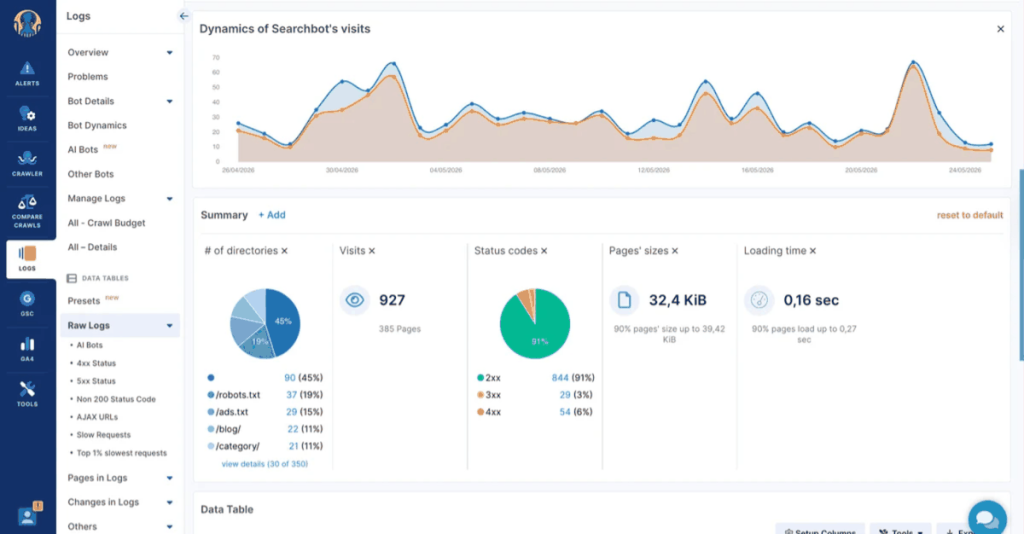
Search bot visit dynamics, directories and status codes in the JetOctopus Log Analyzer
The gap, in one table
| What you need to see | Desktop crawler | Search Console | Raw logs | Crawl + logs + GSC, merged |
|---|---|---|---|---|
| URLs in your structure | Yes | No | No | Yes |
| Which URLs Googlebot actually fetched | No | Partial: aggregated only | Yes | Yes |
| Full list of non-indexed URLs | No | No: 1,000 cap | No | Yes |
| Pages you built that were never crawled | No | Partial: delayed | No | Yes |
| Pages crawled that aren’t in your structure | No: by definition | No | Partial: visible, meaningless | Yes |
| Rendered vs. raw HTML diff, at scale | Partial: sampling only | Partial: 1 URL at a time | No | Yes |
| AI crawler behavior | No | No | Yes | Yes |
| Answerable without an engineering ticket | Yes | Yes | No | Yes |
| Shared across products and teams | No | Partial | Partial | Yes |
Read down the columns and the conclusion assembles itself. A crawler shows you the site you think you have. Logs show you what happened, with no idea what should have. GSC shows you 1,000 rows and a disclaimer. Each is a genuine instrument. Each is missing the exact half the others have.
The failures below don’t live inside any one column. They live between them.
That’s the design premise of JetOctopus: crawl millions of URLs without sampling, ingest raw logs, merge both with GSC and put the result in one queryable place, so that “which pages did we build that Googlebot has never touched?” is a filter, not a quarter-long project.
The Five Failures That Only Happen at Scale
Five failure modes account for most of it. None of them exist on a small site and none of them are visible from a single tool.
1. Template errors don’t affect a page. They affect a class of pages
The failure. Enterprise sites aren’t authored, they’re generated. Twelve to twenty templates produce millions of URLs. A single misconfigured rule doesn’t create a bug; it creates a population. One canonical condition written wrong is 400,000 URLs, shipped simultaneously, all returning 200.
Why can’t you see it. Because you’re sampling and you may not know it. Cap a crawl at 500,000 URLs on a 4-million-page site and you’ve audited 12%. If the broken template governs a tree outside your sample, the report comes back clean and a partial crawl doesn’t give you partial answers. It gives you wrong ones, in the same format and tone as right ones. There’s no warning label.
The second blind spot is worse: templates generate URLs you never designed. Internal filters, session parameters, sort orders. They’re not in your sitemap or your documentation, so no crawler starting from your homepage will list them. They exist in exactly one place: the record of what your server was actually asked for.
What surfaces it. A full crawl with no sampling, merged with raw logs, which is what exposes the URLs your structure never declared. JetOctopus’s SEO Problems list then ranks issues by how many URLs each touches, so you’re looking at classes of failure ranked by blast radius, not a flat list of 900,000 warnings.
Proof: Depositphotos, Their team connected a full crawl with a month of log data and GSC. It showed Googlebot had reached roughly 20% of the site in thirty days, with an average recrawl interval of 35 to 40 days, on a platform where organic search is the primary revenue channel. Fresh content routinely spent over a month invisible.
Then the logs surfaced the cause: millions of URLs generated by internal filter parameters, URLs the SEO team did not know existed. They already carried a canonical pointing at the clean version.
It wasn’t enough.
That’s not bad luck. Googlebot treats canonical as a hint and ignores it often enough on large sites that “we canonicalized it” should never end a conversation. Depositphotos fixed it by adding noindex to the parameter set, a decision they could only make because the logs proved the pages were being crawled at volume. Within weeks the parameter URLs were gone from the logs and Googlebot’s attention had moved to content.
2. Crawl budget doesn’t disappear. It gets reallocated
The failure. “Waste” makes crawl budget sound like a leak. It isn’t. Googlebot doesn’t lose the requests it spends on your facets. It spends them, deliberately, instead of on your money pages. Crawl budget is zero-sum, so every enterprise crawl problem is a distribution problem.
Why you can’t see it. Because the standard advice sounds right and nothing in your stack tells you it failed. Add an HTML sitemap hub in the footer, get everything within three clicks. Your crawler confirms it worked: links found, depth reduced, all green. Crawl Stats shows aggregate totals with no way to isolate that hub. Every instrument you own reports success. The only thing that would say otherwise is a count of how many times Googlebot actually opened those specific pages.
What surfaces it. The Log Analyzer, segmented by directory and URL pattern: skip “how much is Googlebot crawling” (a vanity number) and look at which sections it prioritizes and which it ignores, ranked. Then the SEO Funnel: pages in structure → pages crawled → pages indexed, so you can see where inventory falls out.
Proof: DOM.RIA. A real estate marketplace with a deep geographic hierarchy (city → district → micro-district → metro station), which pushes commercially valuable directories well past three clicks. The team built exactly what best practice prescribes: a clean sitemap hub in the footer, everything within 2 to 3 clicks.
Then they opened the logs. Over 15 days, Googlebot visited:
| Section | Bot visits (15 days) |
|---|---|
| Real estate catalogs | 1,048,000 |
| Street pages | 525,000 |
| District pages | 196,000 |
| Metro pages | 10,000 |
| The sitemap hub | 16 |
Sixteen bot visits In fifteen days. The hub was crawlable, linked, technically flawless and Googlebot had no interest, because crawl demand isn’t a function of click depth. It’s a function of what the bot already values. No crawler would ever have told them this. To a crawler, the hub was a success.
So they inverted the logic: instead of building a destination and asking Googlebot to come, they put mini-sitemaps inside the city catalogs Googlebot was already visiting a million times a fortnight and deleted the hub. Fifteen days later, same window: street pages +266%, district pages +230%, metro pages +230%. The hub pages started ranking on their own as a side effect.
Don’t ask the bot to go somewhere new. Put the links where the bot already is. You cannot execute that without log data.
Proof: SMG. The subtractive half of the same problem. Their classifieds marketplace has users creating and deleting thousands of listings daily and links to deleted ads persist in HTML and sitemaps long after the ads are gone. Googlebot kept fetching 404s at volume, burning budget and suppressing crawl rate. The fix: scheduled full crawls to find every link pointing at a non-200, plus alerts on Googlebot load time specifically, because a sustained slowdown reduces crawl capacity quietly, before it ever shows up in traffic. Across the ecosystem: +350% Googlebot visits, +700% SERP impressions.
The trap: “we’ll just disallow it in robots.txt.” Google’s documentation is explicit that blocking pages doesn’t reallocate that budget elsewhere unless you’re already hitting your serving limit. Blocking removes the URLs from your reports. It doesn’t hand the budget to your PDPs.
See how Googlebot actually spends crawl budget across your hostnames and sections in a 30-minute demo.
3. Your structure and Googlebot’s map of it are two different documents
The failure. Every SEO knows what an orphan page is: no internal links, invisible to crawlers. That definition is backwards at scale and the backwards version is what makes orphans dangerous.
An orphan isn’t a page the bot can’t see. It’s a page you can’t see. Googlebot’s memory spans years: old sitemaps, expired external links, a CMS you decommissioned in 2019, URL patterns from two migrations ago. It keeps fetching them long after they left your structure and every fetch is budget.
Why you can’t see it. This is the cleanest example of the gap:
- Your crawler follows your links. By definition it returns only the site you already know about.
- Your logs show millions of fetched URLs, but a line for /old-category/x/ looks identical whether that’s a core template or a ghost from 2016. Logs have no concept of your structure.
- GSC aggregates, samples and won’t hand you the list.
The problem is invisible to all three. It exists only in the difference between two datasets and if those datasets live in two tools, that difference is a manual reconciliation nobody will run across four million rows.
What surfaces it. Merging crawl and log data and querying the gap in both directions: in logs, not in structure (orphans burning budget) and in structure, not in logs (pages you built that Googlebot has never touched). Two filters, once the data is in one place.
Proof: TemplateMonster, live since 2002: a million URLs, three million monthly visits, structure authored by several generations of webmasters, facing a redesign and CMS migration. The pre-migration audit ran a full crawl plus log analysis, deliberately, before touching anything. The merge surfaced:
- 3,000,000 orphaned pages: outside the structure entirely, crawled by Googlebot regularly
- 250,000 pages that were in the structure and that Googlebot had never visited once
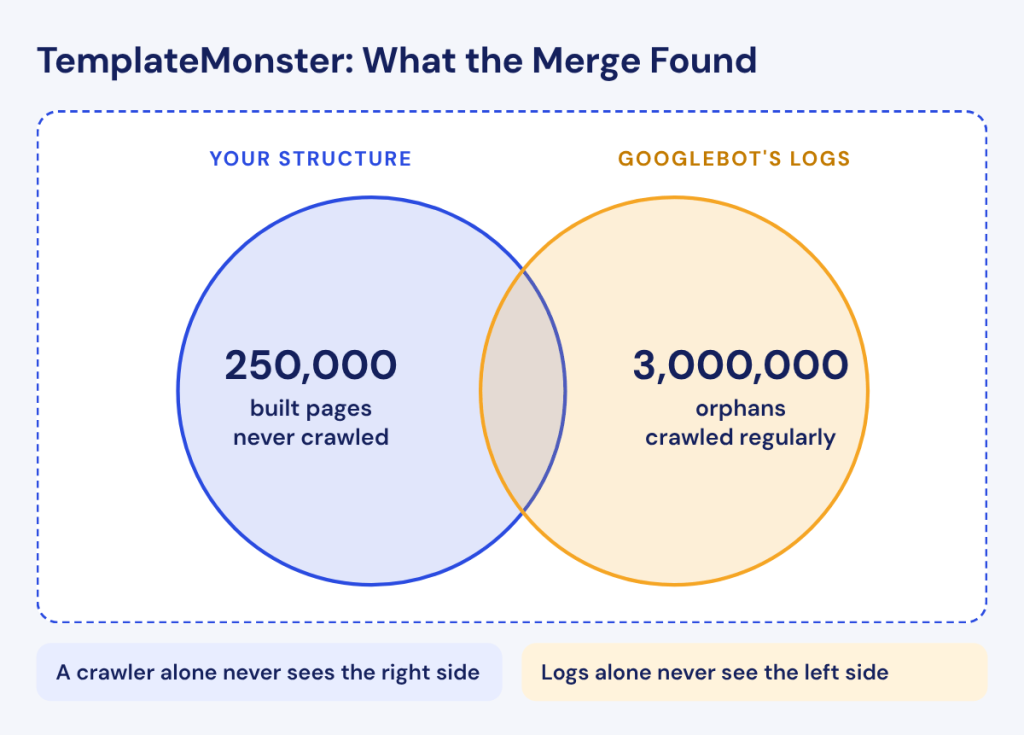
Both TemplateMonster numbers exist only in the difference between crawl and log data
Read those two numbers together. The site was spending crawl budget at industrial scale on pages nobody at the company knew about, while a quarter of a million pages it had deliberately built, commercial ones among them, had never been crawled, never ranked and could not be found by a single customer. As the team put it afterwards: for the first time they could see the site as Googlebot perceives it, not as the org chart describes it.
Then consider the timing. Redirect maps get built from the structure you know about. Three million URLs you don’t know about don’t make it into the map. They go into the migration as three million silent 404s.
4. Rendering failures are silent
The failure. Every other failure here eventually announces itself. This one doesn’t. The page loads perfectly in your browser, QA passes, product signs off and Googlebot indexes an empty shell, classifies it soft 404 or never sees the links meant to push equity into the category below.
On an SPA, rendering behaviour is a property of the framework, not the page. If it breaks, it breaks for every URL that framework serves. An entire product category goes invisible to search while looking completely normal to every human who checks it.
Why you can’t see it. Three reasons and they stack. You can’t sample it: URL Inspection tells you about the URL you inspected and failures cluster by template and route, so the three you picked are the least likely to be broken. It doesn’t produce errors: nothing 500s, nothing logs an exception; the failure is a discrepancy and no tool reports a discrepancy you didn’t ask it to compare. And rendering at scale is expensive, which pushes teams back to sampling, which is where we started.
What surfaces it. Running the full inventory twice, once raw, once with Execute JavaScript enabled and diffing canonical, title and link count across the whole set, then comparing mobile against desktop. The output isn’t a list of errors. It’s a list of URLs where what Googlebot renders and what you shipped disagree.
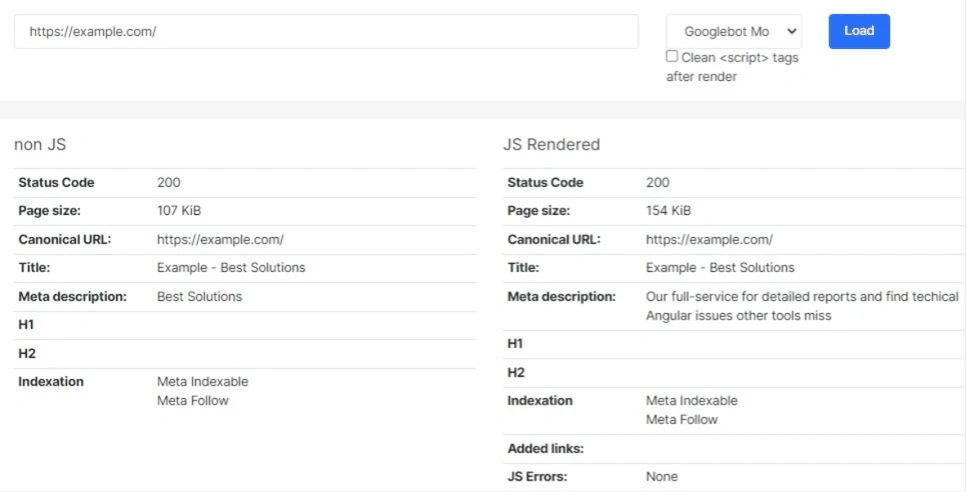
Raw and rendered HTML of the same URL compared field by field
The 2026 addition. Google renders JavaScript. Most AI systems don’t. Content dependent on client-side rendering can be fully indexed by Google and completely unreadable to the crawlers now shaping how your brand gets described in AI answers. A rendering strategy that was survivable in 2023 is a visibility ceiling in two channels at once.
5. Hreflang breaks quadratically
The failure. The only system here where failure rate grows faster than the site. Run n localized versions and each URL carries roughly n annotations, so a cluster carries n². Ten markets: 100 signals per cluster. Thirty markets: 900. You didn’t triple your risk surface; you multiplied it by nine.
And it’s brittle out of all proportion to the effort of breaking it. One relative URL or one annotation pointing at a non-200, doesn’t degrade that page. It can invalidate reciprocity for every language version referencing it. One deploy, one market, thirty markets quietly lose targeting.
Why you can’t see it. Hreflang errors are invisible to human review by construction. A relative URL looks correct in the source. A link to a page that 404s looks identical to one that 200s: the difference is a request you’d have to make, 900 times per cluster, on every deploy. There’s no version of this a person does by looking and no partial-crawl version either: the annotation that breaks the cluster is, by definition, the one you didn’t check.
What surfaces it. Crawling the full inventory and filtering the annotation set directly (Crawl Report → Indexation → Rel tags), then the three filters that account for nearly all of it: hreflang has relative URLs, hreflang has non-200 URLs, hreflang has non-indexable URLs. Each returns an exportable list of exact URLs. That export is the dev ticket.
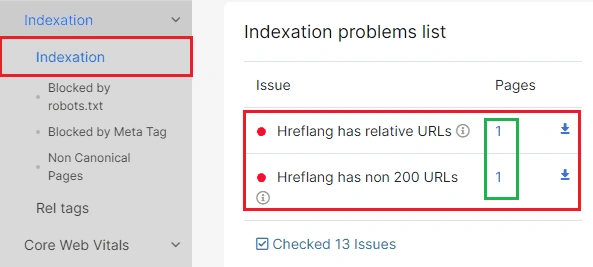
Hreflang problems in the Indexation report, each with an exportable URL list
Proof: multilingual platform, 1.5M pages, 2.5M+ monthly visits. A full crawl surfaced all three classes. The dev team rewrote relative paths as absolute, fixed the status codes, audited the blocked pages. Indexed pages rose 7% within two weeks and kept climbing: 7% of 1.5 million pages, from a bug class nobody catches by opening a page and looking at it.
The takeaway isn’t “check your hreflang.” It’s that hreflang is a build-time validation problem, not an audit problem. Anything invalidated by one relative URL in one market’s deploy has to be validated automatically, on every deploy, against the sitemap. Otherwise you’re not preventing it, you’re finding out later.
The AI Crawler Budget Nobody Allocated
Everything above assumed one consumer of your crawl capacity, and that stopped being true.
Per Cloudflare Radar (June 2026), AI crawlers, assistants and AI search now account for 33.8% of bot traffic across Cloudflare’s network, ahead of traditional search-engine crawlers at 26.8%. On the same network, bots crossed 57.5% of all HTML requests, passing humans for the first time.
The number that should reorganize your thinking is the next one: 52.3% of AI crawling is for model training. Roughly 10% is live search indexing. A majority of the AI requests hitting your servers are, structurally, requests that cannot send you a visitor.
The crawl-to-refer ratio makes the asymmetry concrete: pages crawled per referral sent back:
| Operator | Pages crawled per 1 referral |
|---|---|
| 5:1 | |
| Perplexity | ~186:1 |
| OpenAI | ~848:1 |
| Anthropic | ~4,580:1 |
These swing hard month to month (Anthropic’s ranged from roughly 13,500:1 in April to 4,580:1 in June), so treat any single figure as a dated reading, not a constant. The structure is what’s stable: the exchange that made Googlebot worth serving doesn’t exist for most AI operators. Meanwhile Google still sends ~87.6% of all search referral traffic; every AI chatbot combined sends about 0.29%.
So block them?
This is where it gets uncomfortable and where most 2026 advice is wrong.
The reflex, once you see AI bots eating budget and returning nothing, is to block them. Two reasons that’s the wrong first move.
First, the cost is real and the benefit isn’t there. A working paper by Hangcheng Zhao and Ron Berman used a difference-in-differences design on high-frequency publisher data to compare news sites that blocked LLM crawlers via robots.txt against those that didn’t. The blockers lost roughly 7% of weekly traffic within six weeks and the frequency with which their content was cited in AI answers did not fall. They paid the price and kept the problem.
Worth pausing on what “citations didn’t fall” actually tells you, because it cuts in more than one direction. At least three mechanisms fit the data: models keep citing from data they ingested before the block; answer engines reach the same content through third parties (syndication, aggregators, archives) that never blocked anything; or some retrieval crawlers simply don’t honor robots.txt.
Which mechanism dominates matters for what you do next, but notice that none of the three makes blocking look better. Under every reading, robots.txt failed to remove the content from AI answers while the traffic loss was real and measured. The uncomfortable conclusion isn’t “blocking is a bad trade.” It’s that robots.txt isn’t the control surface publishers think it is, which is one more reason the decision has to start from your own logs, where you can at least see who’s actually honoring the file.
Second, AI citation is turning into a visibility channel of its own and it’s one you can’t measure yet. Blocking blind doesn’t just cost referral traffic today. It opts you out of a surface that’s still forming, before you’ve built any way to tell whether it was working. You’d be killing a channel on the evidence that you can’t see it, which is exactly the mistake this whole article argues against.
Then there’s the structural trap Google set by merging its search and AI crawling under one user-agent. As Cloudflare CEO Matthew Prince put it: “You can’t opt out of one without opting out of both, which is crazy.” Blocking Google-Extended is not a clean decision and the data shows publishers know it: most block at least one AI training bot, but far fewer touch Google’s.
And llms.txt won’t save you here. It’s worth being blunt because the hype is loud: as of 2026, no major AI provider has confirmed it reads third-party llms.txt files for citations and both of Google’s public crawler voices have said Search doesn’t use it at all. It has a genuine use (a curated map for agentic retrieval, when a coding assistant fetches your docs), but that’s a different job from conversational AI search and treating it as a ranking lever is cargo-culting. The fact is in your own logs: the share of AI-bot requests actually touching /llms.txt is statistically negligible. Which is the pattern for this entire topic: the file you publish matters less than what the bots are observably doing.
What to do instead
Not “block” or “allow.” Measure, then decide per section, because the data to decide well is sitting in your logs and nowhere else.
Practically, that means five steps:
- Pull AI bots out of your logs by user-agent. The main ones write themselves into the log explicitly: GPTBot, ChatGPT-User, ClaudeBot, Claude-Web, PerplexityBot.
- Break it down by section, the same way you would Googlebot: same Log Analyzer, same directory-level cut, just a different bot filter. The question: are AI bots concentrated on the same sections as Googlebot or somewhere else entirely? Docs and help content are typical training-crawl targets.
- Check what share of their requests hit non-indexable URLs, the same filter as failure #1 (noindex, 404, redirect chains). A high share is pure waste, a candidate for blocking with no citation risk.
- Run the raw-vs-rendered diff, filtered to AI bots specifically: not the general rendering check from failure #4, the same report, just scoped to a bot that doesn’t execute JS. If ClaudeBot or GPTBot are hitting an empty <div id=”root”>, no AI answer will ever cite that page, regardless of content quality.
- Decide block/allow per section, not per domain: a training bot on your blog is a different call than the same bot on a product catalog feeding agentic shopping.
That last one, the rendering check, is the single fastest thing to run this week, because it’s the same failure as #4 above, now costing you in a second channel: a page fully indexed by Google can be simultaneously invisible to every AI answer engine.
None of this is answerable in GSC. There’s no Search Console for ChatGPT. They’re log questions and JetOctopus’s AI Efficiency Report tracks crawl frequency and page-level behaviour for ChatGPT, Perplexity, Claude and others alongside Googlebot, with alerts when a pattern shifts.
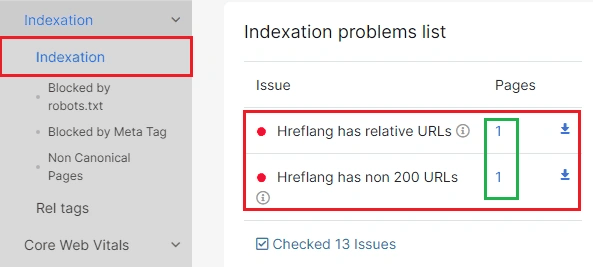
AI Efficiency report: ChatGPT bot visits against crawled pages
RIA.com is one of the few enterprise teams already doing this systematically across all five of their products. Their reasoning, from SEO Team Lead Dmytro Melnychenko, is the whole argument in one line: as a market leader, they can’t afford to wait to understand this landscape. AI bot analysis is the top of the AI funnel and it’s where you learn how interesting your content is to LLMs before it shows up (or doesn’t) in an answer.
Enterprise SEO Management: Why Correct Recommendations Never Get Shipped
The failures above are diagnosis problems. This one is why diagnosis doesn’t matter.
Most enterprise SEO programs don’t fail because nobody found the issue. They fail because a correct, well-evidenced recommendation sat in a backlog for eight months waiting on approvals from teams that don’t share a priority list. A canonical change needs developer time, legal review and content sign-off. Without a governance model, none of that moves at the speed SEO requires.
Three things separate programs that ship from programs that document.
Defined ownership
Who on engineering owns crawl errors. Who owns canonical logic. Where content escalates an indexing problem. A RACI that ties SEO goals to each department’s deliverables is the baseline, not a nice-to-have.
The enterprise SEO team is rarely the team doing the work. It’s the team that decides what work is worth doing and proves it afterwards. That’s an uncomfortable reframe for a lot of practitioners, but it’s the job. Which means your throughput is governed by how fast you can turn a finding into a ticket somebody else accepts, not by how fast you can find things. Most teams optimize the wrong half of that sentence.
Standards, not guidelines
Guidelines are optional and therefore theatre. Standards are enforced in the pipeline: template constraints in the CMS, schema validation that fails a build, an SEO checkpoint in any sprint touching indexable URLs.
Most teams automate the wrong half of this. The instinct is to automate reporting: a nightly crawl, a dashboard, a Slack digest of new issues. It feels like progress and changes nothing, because nobody was ever blocked on a chart. You’ve automated the discovery of a problem you’ll still fix by hand, one ticket at a time, forever.
The thing worth automating is enforcement and it lives on three levels, from weakest to strongest:
| Level | What it does | The limit |
|---|---|---|
| Detection (after the fact) | A scheduled crawl finds on Thursday the broken canonical that shipped on Monday | Necessary as a safety net, useless as a defense: by the time you see it, Googlebot has too. This is where most enterprise SEO lives and why the same issues recur every quarter |
| Alerting (near real-time) | Log-based monitoring flags a 404 spike or crawl-rate drop within hours | Cuts the exposure window from a quarter to an afternoon, but you’re still fixing after the fact, just faster |
| Prevention (before the fact) | The broken artifact never reaches production: invalid schema, a hreflang annotation pointing at a non-200 or a template change that would orphan a section fails the build or review | That class of failure doesn’t get faster to fix: it stops existing |
That bottom row is what “SEO as code” actually means: a canonical rule written once as a CI/CD test can never silently regress and a schema requirement wired into a template can’t be forgotten by an editor who never knew it existed. You’re not asking four teams to remember your standards, you’re encoding them where the work happens.
There’s a ceiling and pretending otherwise gets you ignored by engineering. Enforcement works only for deterministic rules: status codes, canonical presence, hreflang reciprocity, schema validity, redirect chains. It does not work for judgment: whether content is useful, whether a page should exist, whether intent is matched. Automate every rule that can be expressed as a rule, so your team’s attention goes only to the decisions that genuinely need a human. The question isn’t “how do we find issues faster.” It’s “which issues can we make structurally impossible, so we never have to find them again?”
A single evidence base
This one is technical, not political. When crawl data lives in one tool, server logs in another and GSC in a third, every finding is disputable and it will be disputed, by whichever team the fix lands on. “Your crawler says one thing, our monitoring says another” ends the conversation and the ticket dies.
RIA.com’s team named exactly this as the pre-JetOctopus state: crawl data, logs and GSC in separate silos, with connecting the dots between what was crawled, what was indexed and what actually performed requiring manual effort that didn’t scale across five products.
Unified data doesn’t win the argument by being persuasive. It wins by making the argument unnecessary: the stakeholder is looking at the same screen you are.
How to Prioritize When Everything Looks Urgent
With millions of URLs and multiple teams, the question is never “what’s broken.” It’s “what do we fix first and who do we have to convince.”
| Issue type | Crawl impact | Index impact | Business impact | Owner | Typical lead time |
|---|---|---|---|---|---|
| 5xx server errors | High | High | High | Engineering | Days to weeks |
| JS rendering failures | High | High | High | Engineering + SEO | Weeks to months |
| Crawl waste (params, redirect chains) | High | Medium | High | SEO + Engineering | Weeks |
| Orphan pages crawled at volume | Medium | High | Medium | SEO | Weeks |
| Catalog / faceted navigation bloat | High | Medium | Medium | Engineering + SEO | Weeks to months |
| Hreflang errors | Medium | High | Medium (intl) | SEO | Days |
| Non-indexable pages with inlinks | Medium | High | Medium | SEO | Days |
| Thin or duplicate content | Low | Medium | Medium | Content + SEO | Months |
| Duplicate / missing titles | Low | Low | Low | SEO | Days |
Start with what scores High across all three columns. On enterprise sites that’s consistently 5xx errors and JS rendering failures, both because they hit indexation directly and because they need engineering, which means they need the most lead time. Start them first not because they’re worst, but because they’re slowest.
Then quantify before you present. Not “we have a crawl waste problem” but “1.8M URLs affected, 34% of Googlebot’s requests last month, an estimated 40k commercial pages not recrawled in 30 days.” That’s a sentence a VP of Engineering can act on. The first one is a complaint.
And keep expectations honest. As Barry Adams of Polemic Digital puts it, “no one thing can improve crawl efficiency in one easy step.” It’s about doing all the right things and making small marginal improvements. Anyone promising a single fix is selling something.
Enterprise SEO Analytics: Metrics That Survive a Conversation with the CFO
Rankings and sessions are too far from the business to defend a budget. Four metrics that aren’t:
- Crawl efficiency ratio. What share of Googlebot’s requests landed on live, canonical, indexable URLs. This is the single number that describes whether your crawl budget is working. Track it monthly; a downward trend is the earliest warning signal you have and it moves weeks before traffic does.
- Time-to-index. How long from publication until Googlebot’s first visit. For news, product launches and anything time-sensitive, this is the KPI. Distractify (millions of pages, ~100k daily visits) built their whole log workflow around exactly this question, because for a news operation the only thing that matters is how fast a new page gets crawled. Result over the following year: 5x increase in Googlebot visits, +54% pages in Google News.
- Crawl coverage of commercial pages. Not “how many pages are indexed” but how many of the pages that make money were crawled this month. Segment by template. This is where the DOM.RIA and TemplateMonster failures show up as a number before they show up as a revenue miss.
- AI share of voice and citation frequency. Immature methodology, worth tracking anyway. You’re establishing a baseline now so you can detect the change later.
One operational note: alerts beat dashboards. Nobody opens a dashboard on the day something breaks. Distractify caught a sudden 404 spike, caused by unexpected embeds, through alerting and fixed it before it touched traffic. RIA.com’s team reports finding critical problems two to three times faster using log-based alerts. The value isn’t the report. It’s the fifteen minutes between a template shipping and someone knowing.
A 90-Day Enterprise SEO Roadmap
Days 1 to 30: establish ground truth. Full crawl, no sampling, every hostname separately. Connect raw logs and GSC. Then produce three numbers you’ve probably never had: crawl efficiency ratio, count of structure-pages Googlebot has never touched, count of crawled URLs not in your structure. Don’t fix anything yet. Most teams discover their model of the site was wrong and fixes based on a wrong model are expensive.
Days 31 to 60: fix by class, not by page. Take the High/High/High rows. Work at template level: one canonical rule, not 400,000 URLs. Map dependencies before committing to dates: any recommendation with an undocumented dependency sits in a backlog forever.
Days 61 to 90: make it self-maintaining. Alerts on crawl budget shifts, indexation drops, status-code spikes, Googlebot load time, AI bot anomalies. Validation moved into CI/CD so hreflang and schema fail a build instead of an audit. Re-crawl and verify against your day-1 baseline. Establish the governance cadence: monthly steering, weekly execution.
Then repeat. Enterprise SEO isn’t a project that completes. It’s an instrument you keep calibrated.
The 90-day roadmap: ground truth first, fixes by class next, automation last
FAQ
What is enterprise SEO and what page count actually makes a site “enterprise”?
Enterprise SEO is the practice of managing search visibility on sites large enough that you can no longer verify a fix by looking at a page.
Google’s thresholds are the useful ones: 1M+ pages updated roughly weekly or 10k+ updated daily. But the real trigger is symptomatic, not numeric: if a large share of your URLs sit in Discovered – currently not indexed, you have an enterprise crawl problem at whatever size you are. Organizationally, the threshold is multiple teams with write access to the same templates and no single owner for canonical logic.
How is enterprise SEO different from regular SEO?
The principles are identical. What changes is verifiability and blast radius: you can’t confirm a fix by looking at a page and a single template error affects a population rather than a page. Enterprise SEO is less about knowing what’s correct and more about building the instrumentation to know whether it’s true and the governance to get it shipped.
Does blocking URLs in robots.txt free up crawl budget for other pages?
Generally no. Google’s documentation is explicit that blocking pages doesn’t shift that budget elsewhere unless you’re already hitting your site’s serving limit. Blocking removes URLs from your reports, which feels like progress. If the goal is to stop wasting budget on parameter URLs, the answer is usually fixing what generates them, plus noindex where appropriate. As Depositphotos found, a canonical alone often isn’t enough at scale.
Should we block AI crawlers?
Not without data. A Rutgers/Wharton study of news publishers (Zhao & Berman, 2025) found those who blocked LLM crawlers lost around 7% of weekly traffic in six weeks, with no reduction in how often they were cited in AI answers.
Do we need log analysis if we already have GSC Crawl Stats?
Yes and the reason is specific rather than philosophical. Crawl Stats is aggregated, 90 days deep and won’t give you the URL-level inventory: it tells you Googlebot made 4.2M requests, not which 4.2M. Every actionable enterprise crawl decision requires knowing which URLs. Logs are the only unsampled record of that and GSC has no equivalent for AI bots at all.
Why are our new pages stuck in “Discovered – currently not indexed”?
Google knows the URL and has chosen not to fetch it, which is a crawl demand problem, not a crawl capacity problem. Usually one of three things: budget being consumed elsewhere (check what Googlebot fetched most last month), weak internal linking from pages Googlebot actually visits or a quality signal at template level suppressing demand for that whole class. All three are diagnosable from logs merged with crawl data. None are diagnosable from GSC.
What should we look for in an enterprise SEO platform?
One question separates enterprise SEO tools from everything else: does it join crawl data, raw server logs and Search Console into one queryable dataset? Everything else (interface, keyword tracking, integrations) is preference. That join isn’t, because the failures that cost enterprise sites the most exist only in the gap between those datasets and are invisible to any tool holding just one.
After that, the practical filters are: does it crawl your full inventory without sampling, does it render JavaScript at that volume, does it track AI crawlers as well as Googlebot and can four teams use it at once without exporting anything.
Is enterprise SEO just corporate SEO with a bigger budget?
No and the budget framing is why so many programs are structured wrong. A large company with a small site has ordinary SEO problems and lots of money to solve them. A mid-sized company with 3 million programmatically generated URLs has enterprise-level SEO problems and usually no budget at all. The variable isn’t headcount or spend: it’s whether your site has passed the point where you can verify your own work by looking at it. Everything in this guide follows from that one threshold.