Ecommerce SEO audits are chaotic by nature. When you’re responsible for a store with millions of SKUs, endless category combinations and a CMS that seems determined to spawn duplicate URLs overnight, it’s no wonder things get messy. Faceted navigation bloats your index, crawl budget evaporates into parameterized pages no human has ever seen, and page speed drags precisely where it hurts your revenue the most: product and category pages.
And in the middle of all that, you’re expected to “just fix SEO” while juggling merchandising deadlines, dev queues and stakeholders who want traffic growth yesterday. So where do you even begin? Do you tackle crawlability issues first, clean up duplicate content or chase the quick wins that could move revenue fastest?
We’ve put together this ecommerce SEO audit checklist to walk you through every step, prioritized by revenue impact, so you know exactly what to fix first and where JetOctopus speeds up the process.
TL;DR
- AI Overviews appeared on 14% of shopping queries in March 2026, up from 2.1% in November 2025, across 20.9 million product keywords analyzed by Visibility Labs. Technical SEO and structured data decide whether your catalog stays visible in classic results and in AI answers.
- A complete ecommerce audit checklist covers four layers: technical health, crawlability and indexation, traffic performance and user satisfaction, with every finding ranked by revenue impact.
- Faceted navigation, URL parameters and redirect chains multiply near-duplicate URLs, which is how crawl budget gets spent on pages that never convert and how product URLs drop out of the index.
- Page speed carries a price tag: a 0.1 second improvement in mobile site speed lifted retail conversion rates by 8.4% and average order value by 9.2% in the Google and Deloitte study Milliseconds Make Millions.
- JetOctopus unifies crawl data, server logs and GSC signals into a single operational view, and the AI SEO Recommender turns that data into site-specific, prioritized findings.
What an Ecommerce SEO Audit Really Is
The familiar line that “ranking on page one is no longer enough” is also true for ecommerce.
AI Overviews now answer product queries directly inside Google, GPTBot and ClaudeBot are crawling your catalog to decide what gets cited in AI‑generated responses and zero‑click results are quietly absorbing traffic that used to land on your site. The visibility game has changed, yet most ecommerce brands are still optimizing for a version of search that no longer exists.
That’s why a modern ecommerce SEO audit matters more and why its scope has expanded far beyond traditional SEO.
An SEO audit for an ecommerce site is a structured, revenue‑aligned evaluation of how well a large catalog can be crawled, indexed, understood and converted by searchers. It means evaluating technical foundations, product‑category architecture, structured data quality, internal linking and UX friction points, through the lens of ecommerce realities; that includes faceted navigation, variant canonicalization, dynamic pricing and availability, SKU churn and feed accuracy for Merchant Center.
But in 2026, it also means asking whether your product pages are readable to AI crawlers that don’t execute JavaScript, whether your structured data makes you citable in AI-generated answers and whether your content is formatted in the ways AI systems actually surface: comparison tables, spec sheets, bullet-point summaries, FAQ sections.
A solid audit checks whether your crawl budget is being used wisely, makes sure your product and category pages are easy for both machines and AI systems to understand, and highlights every place where search engines and AI crawlers start losing track of your URLs.
In the end, you should have a prioritized roadmap that fixes blockers first and improves the systems that keep fast‑moving catalogs discoverable across the entire site.
Here’s how that roadmap breaks down in practice:
| Priority | Audit Area | Key Actions | Timeline |
|---|---|---|---|
| P0 – Critical | Log File & Crawl Analysis | Analyze Googlebot behavior, align crawl demand with revenue pages, run AI SEO Recommender | Sprint 1 (Quick wins) |
| P0 – Critical | Crawlability & Indexation | Fix robots.txt, sitemap errors, internal redirects and 404 pages, crawl budget drains, faceted navigation | Sprint 1 (Quick wins) |
| P1 – High | URL Structure & Canonicalization | Resolve canonical conflicts, parameter handling, redirect chains, 4xx/5xx errors | Sprint 2 (Medium term) |
| P1 – High | Hreflang & International SEO | Audit hreflang tags, fix broken alternates, validate language/region codes | Sprint 2 (Medium term) |
| P1 – High | Schema Markup | Implement and validate Organization, Product, Review and Breadcrumbs schemas | Sprint 2 (Medium term) |
| P2 – Medium | Page Speed & Core Web Vitals | Optimize LCP, INP, CLS on product and category templates | Sprint 3 (Long-term) |
| P2 – Medium | Site Architecture & Internal Linking | Flatten hierarchy, fix orphan pages, strengthen internal linking to revenue pages | Sprint 3 (Long-term) |
The Ecommerce SEO Audit Checklist: 7 Steps to Work Through
Step 1: Crawlability and Indexation
Before anything else, Google needs to find, access and index your pages and on large ecommerce catalogs, robots.txt misconfigurations, sitemap errors, crawl budget waste and pagination gaps are where that process most commonly breaks down.
1. Check Robots.txt File
The robots.txt file is a small but strategic asset that dictates how search engines crawl your site, critical when you manage thousands of categories, products, filters and assets.
- Verify that yourdomain.com/robots.txt loads correctly, isn’t blocking revenue‑driving pages and efficiently restricts low‑value paths like cart, login or faceted URLs.
- Ensure your XML sitemap is declared to accelerate discovery.
- Review User‑agent, Allow, and Disallow rules, then validate key URLs.
This validation now extends beyond traditional search engines. With AI crawlers like GPTBot, ClaudeBot and PerplexityBot increasingly accessing ecommerce sites, your robots.txt needs to govern both search and AI bot behavior from a single, conflict-free configuration.
JetOctopus validates your robots.txt, highlights conflicting directives and lets you simulate how search engines and AI crawlers interpret your rules before any changes go live.
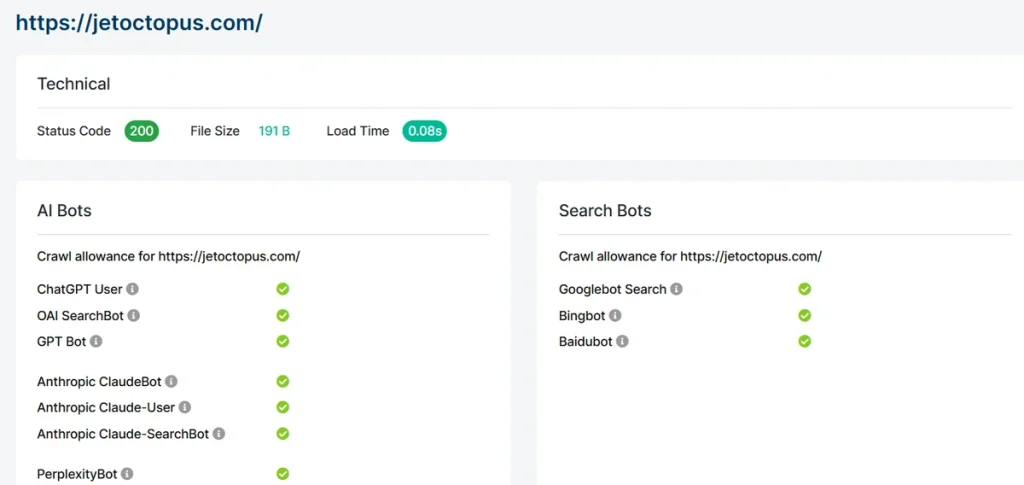
A well‑configured robots.txt protects crawl budget, prevents accidental deindexing and keeps Google focused on the pages that actually bring you money.
2. Ensure You Have a Valid XML Sitemap
The sitemap is the authoritative blueprint search engines use to understand your site’s structure, so it must be clean, current and technically correct. Ensure it includes only canonical, index‑worthy URLs. That means no parameters, no noindex pages, no blocked paths, no 3xx/4xx responses.
For instance, here’s how a product entry in Shopify can look like:
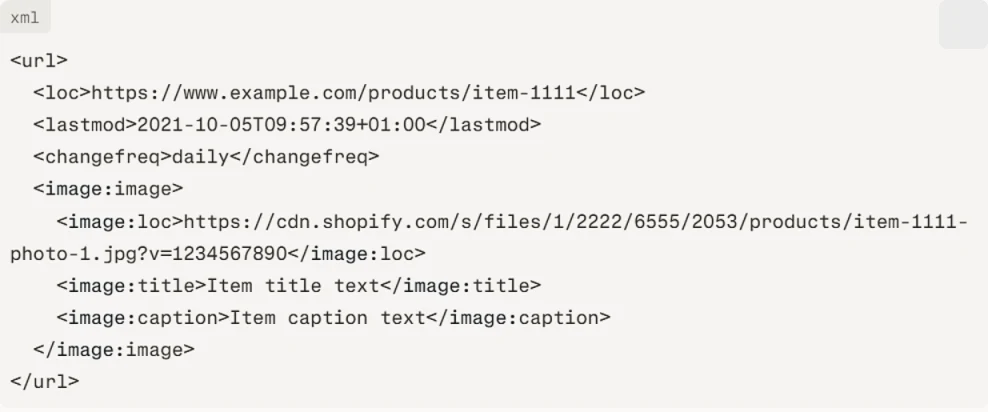
Confirm it updates automatically as products and categories change and verify its status in Google Search Console. A precise, continuously maintained sitemap accelerates discovery, improves crawl efficiency and ensures Google focuses on your website’s most important pages: product listings, category pages, and high-converting landing pages. Additionally, AI bots (like GPTBot, ClaudeBot and PerplexityBot) rely on XML sitemaps too, making sitemap hygiene a direct signal influencing AI search visibility.
With JetOctopus, you get a dedicated sitemap dashboard that gives you an immediate structural overview.
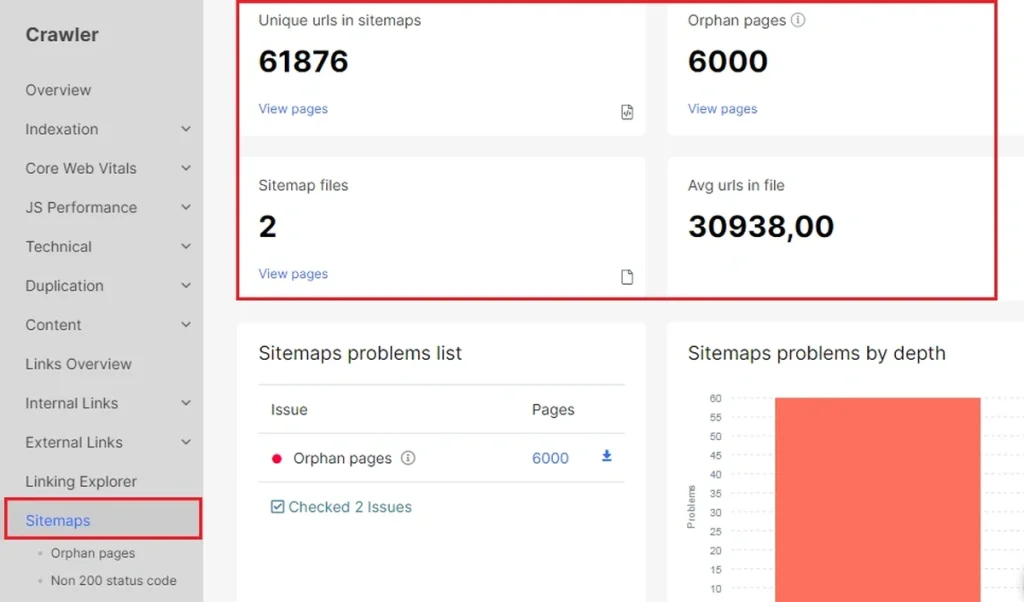
Run a crawl (in “Only Sitemap” mode to audit sitemap URLs exclusively), and point it to any sitemap file or index; JetOctopus processes all nested sitemaps automatically.
The dashboard lays out unique URL counts, duplicate entries, file totals and average URLs per file in one clean snapshot.
3. Control Your Crawl Budget
Controlling crawl budget is a non‑negotiable priority in an SEO audit checklist for ecommerce website.
Large catalogs generate endless parameterized, duplicate and expired URLs that can drain Google’s crawl capacity and delay recrawling of revenue‑critical pages. Audit for crawl traps: filters, internal search URLs, redirect chains, soft 404s and thin content and eliminate or block them.
You should improve your sitemap and server speed, and consolidate duplicates, so Google spends its crawl effort on categories, products and key content.
JetOctopus gives you precise visibility into exactly where that crawl effort is going. It merges crawl data with server log files, so you can see which pages Googlebot is actively hitting, which it’s ignoring and where budget is being wasted on parameters, filters and low-value paths.
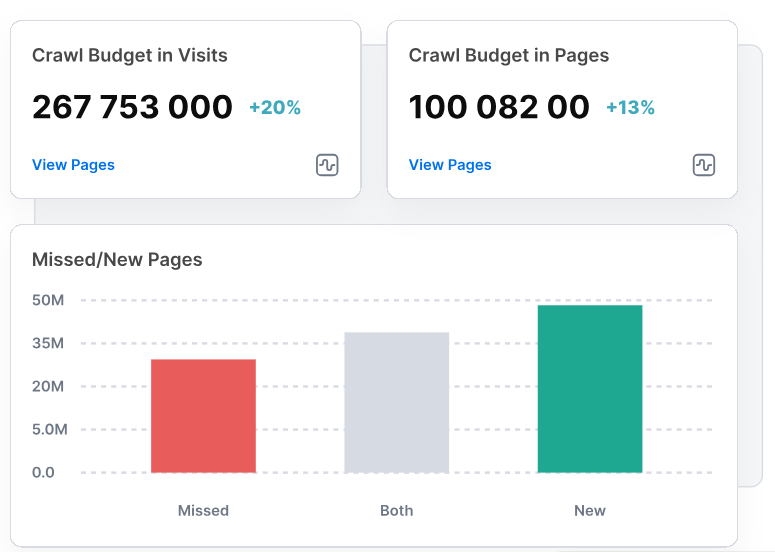
You can run up to 10 simultaneous crawl comparisons to track structural changes over time and identify regressions before they compound. Every crawl simulates search engine bot behavior with full fidelity, so you can confirm that priority pages are reachable, logically linked and free of the barriers that make content discovery expensive for Googlebot on large ecommerce catalogs.
4. Remove Pagination Issues
Strong pagination is essential because it determines whether search engines can reliably reach products buried beyond page one. Large catalogs depend on clean, crawlable pagination to expose deeper inventory and ensure that high-value products buried beyond page one aren’t invisible to search engines by default.
- Ensure each page in the sequence has a unique, link‑based URL, self‑referencing canonicals and no accidental noindex or blocking rules.
- Avoid infinite scroll without crawlable fallbacks; for instance, a paginated HTML alternative, “load more” button, or static URL set allows Googlebot to discover and index deeper content independently of JavaScript rendering.
JetOctopus audits your entire pagination structure in a single crawl, showing how paginated pages are distributed across the sequence, how deep they sit, whether they’re indexable and where canonicalization or indexation mistakes are silently blocking discovery.
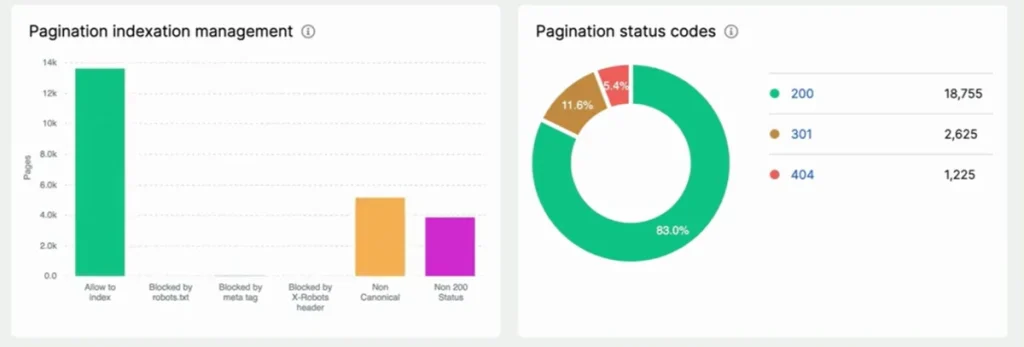
Orphaned paginated pages, those disconnected from the sequence through poor internal linking, are flagged directly, giving you a clear remediation list rather than a guessing game across thousands of category pages.
Get the exact details from this video:
When pagination is structured, consistent and bot‑friendly, Google can efficiently scan your category depth, maintain index freshness and reveal more of your products.
Step 2: URL Structure and Canonicalization
On large ecommerce catalogs, uncontrolled URLs are where crawl budget leaks, duplicate content multiplies and ranking signals quietly fragment.
1. Check Canonical Tags to Avoid Duplicate Content
Canonical tags are a critical safeguard in an ecommerce SEO site audit because they prevent duplicate‑content dilution across product variants, filtered URLs and parameterized pages.
Large catalogs naturally generate near‑identical URLs and without clear canonicals, search engines index the wrong version, fragment relevance and leave your strongest pages underperforming.
- Audit every page’s canonical target, ensure it’s present in the <head>, self‑referencing when appropriate and always pointing to a 200‑status, indexable URL.
- Watch for broken, redirected or conflicting canonicals across templates.
JetOctopus crawls and evaluates rel=canonical across your entire domain in a single pass. Enable JavaScript execution before running the crawl to capture rendered tags accurately, then navigate to the Indexation section to access the canonical tags report.
From there, you get a complete breakdown of every page’s canonical status: coverage, targets, conflicts and non-indexable destinations, giving you the full picture needed to fix issues at template level.
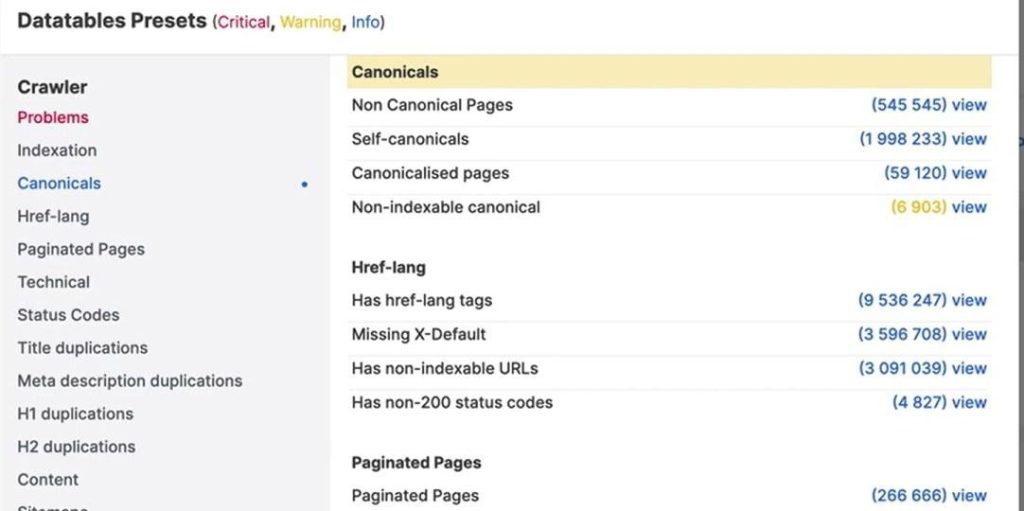
Strong canonical hygiene consolidates signals, clarifies preferred URLs and keeps ranking power intact.
2. Configure URL Parameters in GSC
Parameterized URLs, like filters, sorts or tracking tags, can explode into thousands of near-duplicate pages. When you leave them unmanaged, they fragment ranking signals, confuse canonical signals and bury your key product and category URLs.
That’s why you should have a thorough check on every parameter your platform generates, decide which changes real content and make sure all low‑value variations consolidate to clean URLs via canonicals, internal linking and robots rules.
Use Search Console’s URL inspection to verify how Google interprets parameterized pages. A clean and consistent parameter handling keeps Google focused on those URLs that actually convert.
To boost internal linking even more, use JetOctopus’ AI internal linker to surface underlinked pages by combining crawl data, log insights and GSC keywords.
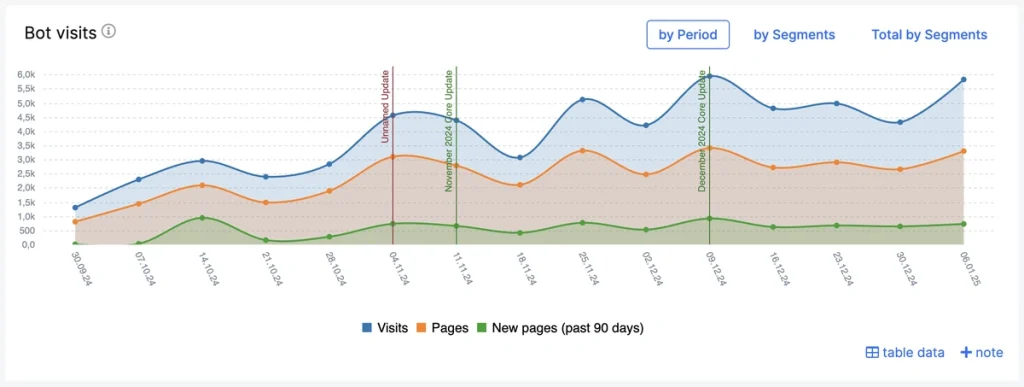
Once you apply the required changes, verify in the next crawl that previously orphaned or weakly linked URLs are being picked up correctly.
3. Fix Status Codes and Redirects
Broken URLs and inefficient redirect paths directly undermine crawl efficiency, link equity and user experience. In most cases, 4xx errors are the downstream result of broken internal links pointing to moved, deleted or renamed product and category pages.
Auditing your internal link profile is therefore essential. Identify and eliminate 4xx errors by correcting or removing bad internal links and escalate any recurring 5xx issues that signal server instability.
JetOctopus displays every status code anomaly in its Technical – Statuses report. The 3xx Pages report gives you a complete view of all redirected URLs in one place; verify that each redirect is intentional, uses a 301 for permanent changes and resolves to a final destination with a 200 status code.
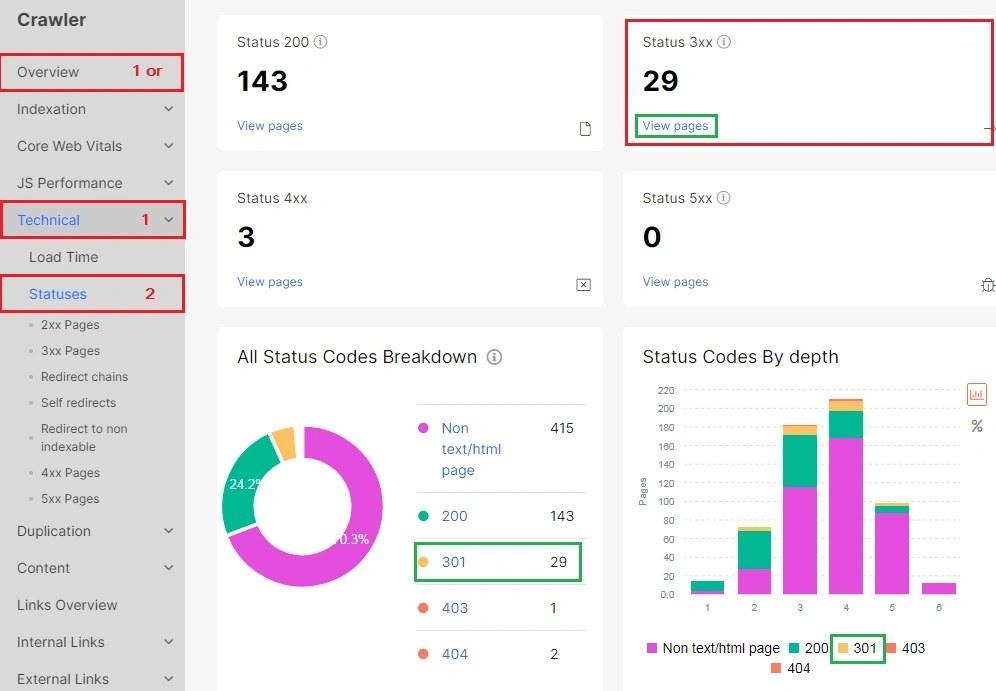
Any redirect chain terminating on a non-200 target is a direct signal of lost link equity and should be prioritized accordingly. For large ecommerce websites, even small errors can impact thousands of product URLs; clean status codes keep authority flowing and revenue pages fully discoverable.
4. Decide What Happens to Out-of-Stock and Discontinued Products
Catalog churn is constant, and every retired SKU raises the same question: keep the URL, redirect it or let it go. The answer depends on whether the product comes back.
- Temporarily out of stock: keep the page live and indexable, keep it in the sitemap and set availability to OutOfStock in your Product schema so the status stays accurate in rich results.
- Permanently discontinued with a close equivalent: 301 the URL to the replacement product or, when there is none, to its parent category.
- Discontinued with no replacement and no links or traffic: return 410 and remove the URL from the sitemap and internal links.
What quietly damages large catalogs is the middle ground: dead product pages that stay in the sitemap, keep collecting internal links and return soft 404s. JetOctopus surfaces them in the same crawl, and Custom extraction lets you pull availability values from your product template, so you can see how many URLs claim InStock while the page says otherwise.
Step 3: Site Architecture and Internal Linking
How your site is structured determines how efficiently Google moves through it and how effectively authority reaches the website’s pages.
1. Ensure a Flat Hierarchy
A flat hierarchy is a structural advantage in any SEO audit for an ecommerce site because it keeps your highest‑value pages (categories, subcategories and products) close to the homepage, where authority is strongest and crawl paths are shortest. When most pages sit within 2–3 clicks, Google discovers them faster, wastes less crawl budget and passes link equity more efficiently.
Verify URL depth, navigation, breadcrumbs and internal linking to see if they display buried products and collapse unnecessary layers. Flatten deep silos, simplify category chains and reinforce priority pages with strategic cross‑links.
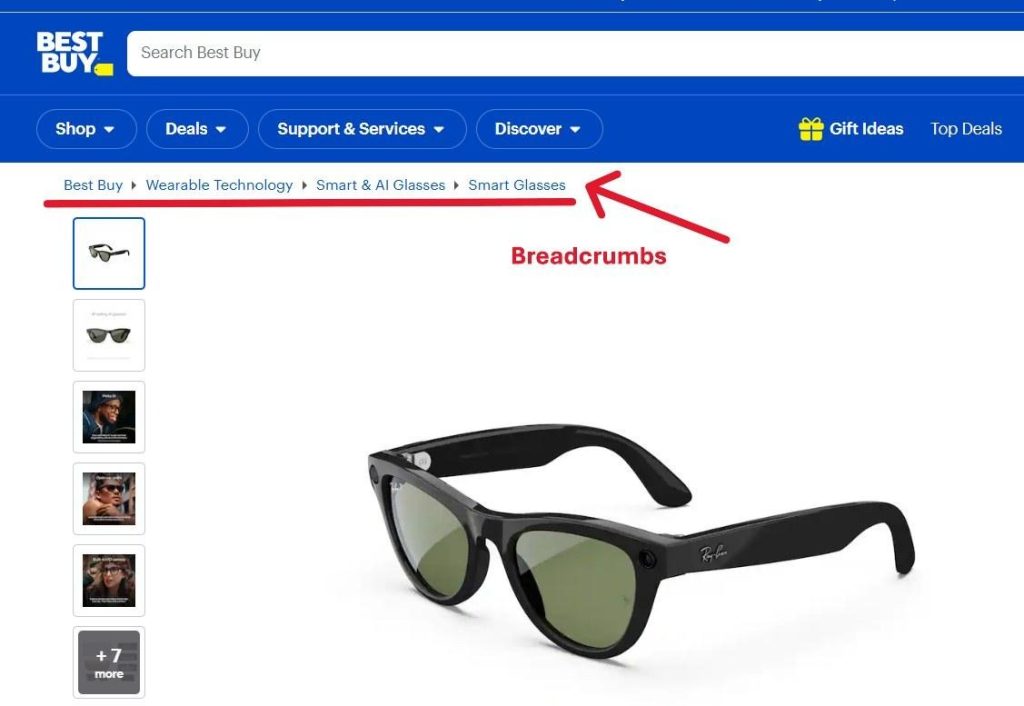
A simplified architecture also helps your site’s user flow, allowing users to move through the buying journey without friction.
2. Orphan Pages
Orphan pages are a silent revenue leak in large ecommerce architectures. When product or category pages lose internal links, they become disconnected from your site’s crawl paths, forcing Google to rely on chance discovery through logs or external backlinks.
That isolation reduces crawl frequency, weakens ranking signals, and leaves valuable inventory effectively invisible. For users, the impact is just as real, where products that should be discoverable vanish from navigation, filters and category flows.
JetOctopus identifies orphan pages directly within its crawl workflow. Run a crawl and connect Google Search Console as a secondary data source to catch anything the sitemap misses.
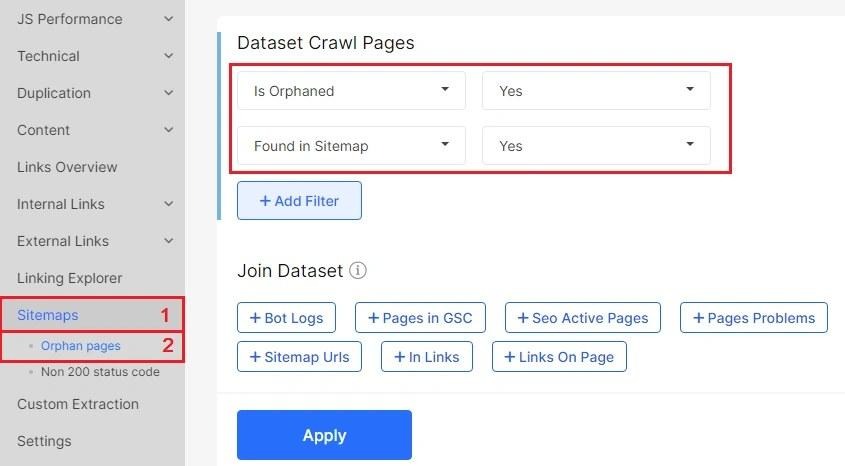
Once the crawl completes, the dedicated orphan pages report gives you a full, actionable list of disconnected URLs ready for prioritization and remediation.
Step 4: Page Speed and Core Web Vitals
Architecture and URL hygiene set the foundation, but how fast those pages actually load is what Google and your customers measure next. Page speed and Core Web Vitals are direct Google ranking factors and for ecommerce websites they carry an added dimension: every millisecond of delay has a measurable impact on whether a user completes a purchase or abandons it.
That impact has been measured. In Milliseconds Make Millions, the study Google ran with Deloitte across 37 brand sites and 30 million user sessions, a 0.1 second improvement in mobile site speed lifted retail conversion rates by 8.4% and average order value by 9.2%.
Core Web Vitals measure three specific dimensions of real-world user experience that Google’s ranking systems actively reward or penalize:
- LCP (Largest Contentful Paint): loading performance; target under 2.5 seconds
- INP (Interaction to Next Paint): responsiveness to user input; target under 200ms
- CLS (Cumulative Layout Shift): visual stability; target under 0.1
On an ecommerce site, these thresholds have a direct commercial consequence: a slow product page loses the sale. A category page with layout shift during load destroys trust before a user even browses. Poor INP on a product configurator or add-to-cart interaction directly suppresses conversions.
Auditing Core Web Vitals across a large ecommerce catalog one URL at a time is impractical.
JetOctopus solves this by running bulk CWV analysis across thousands of URLs simultaneously via Google’s PageSpeed API, giving you LCP, INP and CLS scores without manual, page-by-page testing.
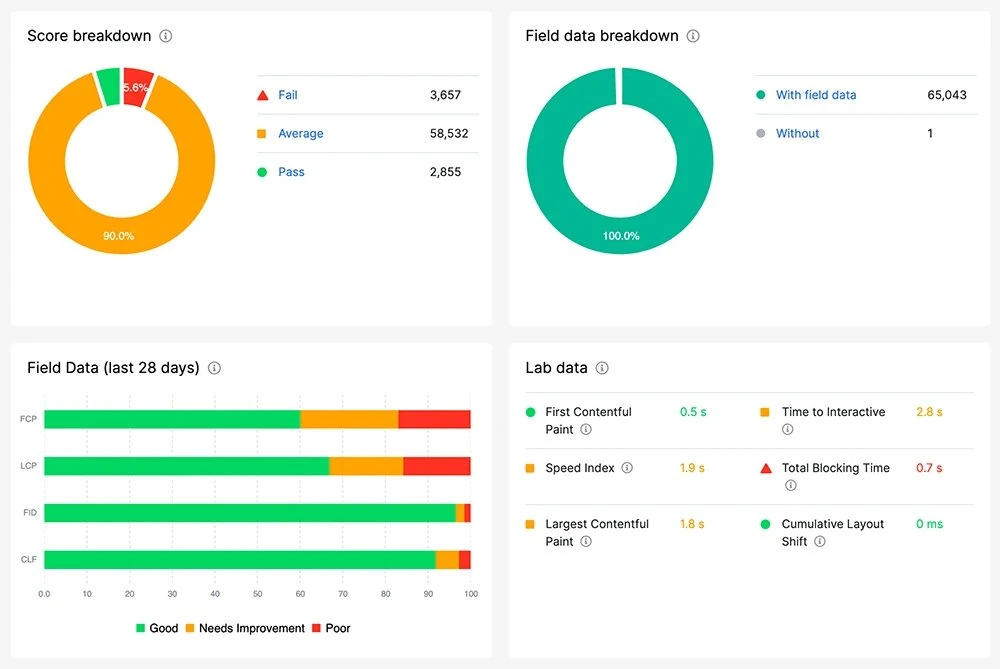
When connected to Google Search Console, it layers real-user CrUX field data alongside lab results in a single unified view, where you get to see what your actual visitors experience.
From there, JetOctopus lets you segment results by folder or page type, so you can immediately isolate whether it’s your product pages, category listings or promotional landing pages dragging scores down and prioritize fixes where commercial impact is highest. Automated CWV alerts then monitor for score drops continuously, catching regressions before they turn into ranking losses.
To complement this, cross‑check Google Analytics’ site speed data filtered by device and browser. Mobile underperformance or browser-specific failures frequently point to render-blocking resources or unoptimized assets that controlled lab environments alone won’t surface.
Step 5: Schema Markup
Schema markup is structured, machine-readable data that tells Google exactly what your pages contain and for ecommerce, that precision translates directly into competitive visibility.
While schema doesn’t influence rankings directly, it enables rich snippets displaying price, availability, ratings and delivery details inside search results, giving shoppers critical purchase signals before they even click.
The case studies published by Google Search Central put numbers on that: Nestle measured an 82% higher click-through rate on pages that show as rich results, Rotten Tomatoes recorded a 25% higher CTR after adding structured data to 100,000 pages and Food Network saw a 35% increase in visits once it converted 80% of its pages.
The schema types that matter most for ecommerce:
| Schema Type | Purpose | Key Properties |
|---|---|---|
| Product | Core product details | Name, brand, SKU, price, availability, aggregateRating |
| ProductGroup | Product variants | Variant handling across color, size, material |
| BreadcrumbList | Site hierarchy | Hierarchical navigation signals |
| Review | Product feedback | Rating content for snippet eligibility |
| Organization | Business information | Logo, return policies, business identifiers |
| LocalBusiness | Physical store details | Location, opening and closing hours hours for physical stores |
| VideoObject | Video content | Product videos and livestreams |
JetOctopus audits structured data across your entire site through its custom extraction feature, giving you a breakdown of every schema type detected, how many pages carry each type and which properties are in use.
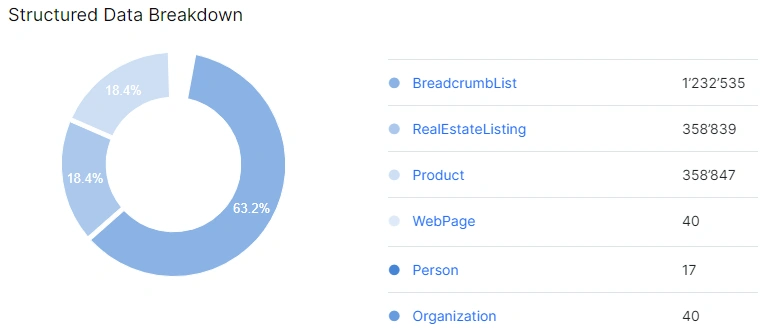
Filter by schema type to instantly identify missing Product schema on PDPs, inconsistent Review markup across category pages, or BreadcrumbList gaps in your navigation layer.
For ecommerce specifically, this also means monitoring price consistency and out-of-stock status flags directly within your schema audit workflow, catching implementation drift before it affects rich result eligibility.
Step 6: Hreflang for International SEO
For any ecommerce website SEO audit, international SEO determines whether your German product pages rank in Germany, your French‑Canadian store surfaces in Québec, or your entire international catalog collapses into a single market signal that ends up cannibalizing itself.
From a technical perspective, international SEO tells Google three things: which markets you’re targeting, which languages you support and which version of a page should be served to each user based on location, language preference, and search behavior. And hreflang is the mechanism that makes all three work in practice.
Hreflang is also where most ecommerce sites break. Each tag maps a page to its correct language and regional variant, every version must reference all others bidirectionally, and a single broken link collapses the entire chain.
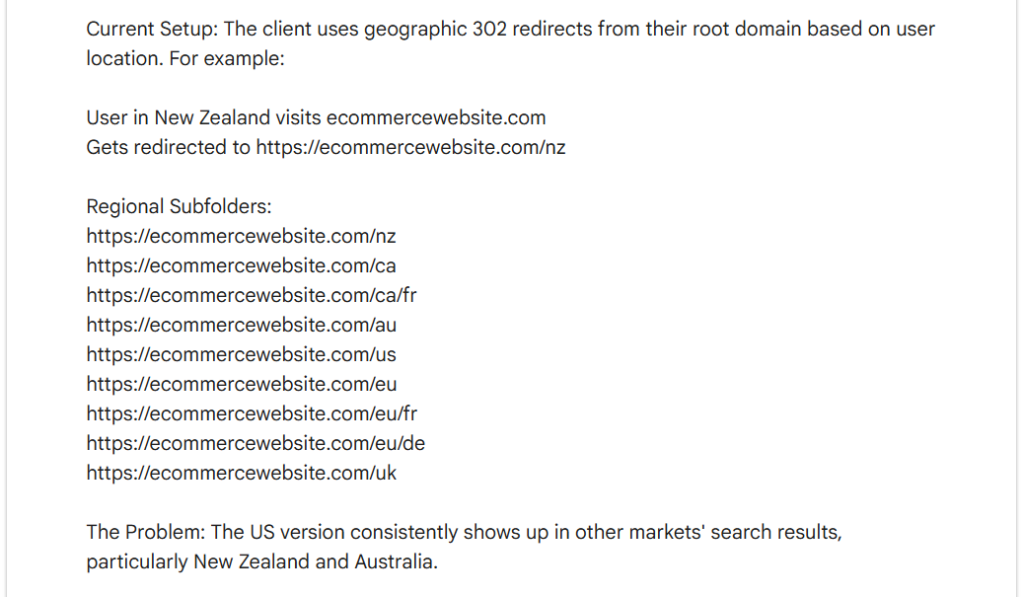
Implementation can be handled via the HTML <head>, XML sitemaps, or HTTP headers, always using absolute HTTPS URLs and an x-default tag for unmatched regions.
Sometimes, though, rankings behave unexpectedly long before the root cause becomes obvious and manual auditing across large multilingual catalogs is where errors get missed.
JetOctopus highlights hreflang failures directly in its Crawler’s Indexation report, covering every failure mode:
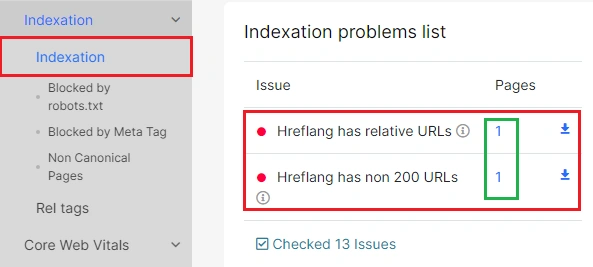
- Relative URLs: search engines ignore them; JetOctopus flags every instance so alternate mappings can be corrected
- Non-200 URLs: broken or redirected URLs in hreflang chains are surfaced with full context, showing exactly where indexing authority is severed
- Non-indexable URLs: pages where noindex silently overrides hreflang, causing localized versions to vanish from SERPs entirely
- Invalid language/region codes: incorrect codes that cause search engines to serve the wrong version, undermining both relevance and user experience
Every flagged issue links directly to the full list of affected URLs, making prioritization and remediation systematic, whether you’re managing 5 languages or 30.
Step 7: Log File and Crawl Analysis
If Google can’t reliably crawl, understand and index your site, every downstream optimization is built on sand. Log‑file and crawl analysis give you the truth: what Googlebot actually does, not what your sitemap or tools suggest.
JetOctopus brings enterprise‑level clarity to ecommerce crawling by unifying crawl data, server logs, and Google Search Console signals into a single operational view. You’ll see which templates Googlebot prioritizes, which revenue pages it misses and where crawl budget is being wasted on parameters, filters and low‑value paths.
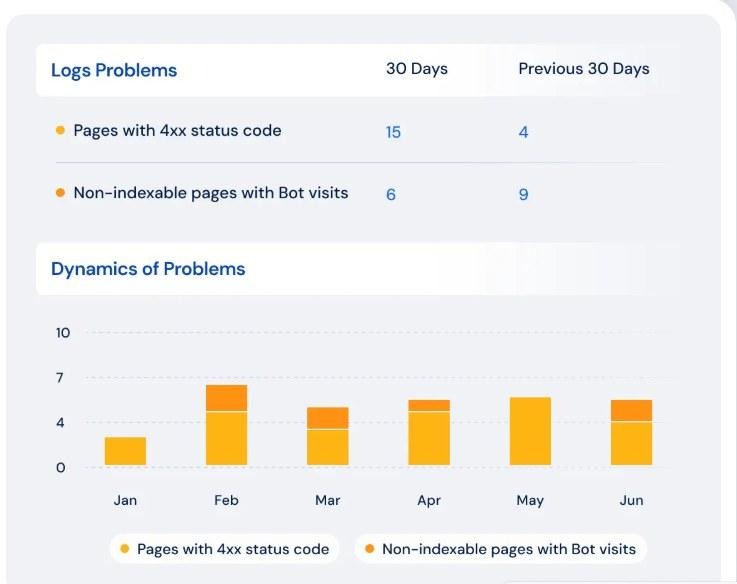
This visibility makes it far easier to diagnose indexability issues, validate technical fixes and track shifts in crawl patterns over time. Most importantly, it helps teams direct crawl demand toward category pages, product pages, and other high‑value templates, ensuring that engineering effort translates into measurable improvements in crawl efficiency and indexation.
Once you have that data, the next question is: where do you actually start? That’s where the AI SEO Recommender comes in. Rather than handing you a generic checklist, it runs directly against your JetOctopus crawl results, GSC performance and server logs, cross-referencing all three to surface issues specific to your site.
A fully indexable page Googlebot hasn’t visited in weeks. A redirect chain draining crawl budget on a page that still pulls traffic. Keyword cannibalization only visible when ranking data meets URL structure. Findings always reflect the last 30 days, so recommendations are based on how your site behaves now. This is a fast, well-informed first pass, built to save you hours of sifting.
Check more about it in this video:
For enterprise ecommerce, log file and crawl analysis are non‑negotiable. It connects how search engines interact with your site to what actually drives revenue, speeds up product discovery and removes the inefficiencies that quietly cap organic performance.
The Ecommerce SEO Audit Checklist: Quick Reference
Here is the short version of everything above: the complete e-commerce SEO audit checklist on one screen. Work through this ecommerce website audit checklist top to bottom and tick each line once it holds true for your store.
- Robots.txt loads, declares the XML sitemap and blocks cart, login and faceted paths without touching revenue pages
- Robots.txt rules for Googlebot and for AI crawlers such as GPTBot, ClaudeBot and PerplexityBot are consistent with each other
- XML sitemaps contain only canonical, indexable, 200-status URLs and update automatically as the catalog changes
- Crawl traps (filters, internal search, session parameters, soft 404s) are blocked or consolidated
- Server logs confirm Googlebot spends its crawl budget on category and product templates rather than parameters
- Every paginated page has a unique URL, a self-referencing canonical and no accidental noindex
- Infinite scroll has a crawlable fallback, so products beyond page one are reachable without JavaScript
- Canonical tags point to a 200-status, indexable URL and are present in the <head> on every template
- URL parameters are documented, and low-value variations consolidate to clean URLs
- 4xx pages are removed from internal links, and 5xx spikes are escalated to engineering
- Redirects use 301 for permanent moves and resolve to a 200-status destination in one hop
- Out-of-stock products stay indexable with the correct availability value, and discontinued URLs are redirected or returned as 410
- Commercially important pages sit within 2-3 clicks of the homepage
- Orphan pages are identified and linked back into navigation, category flows or hub pages
- LCP is under 2.5 seconds, INP under 200 ms and CLS under 0.1 on product and category templates
- Core Web Vitals are tracked by page type, with alerts on score drops
- Product, ProductGroup, BreadcrumbList, Review and Organization schema are implemented and validated
- Prices and availability in structured data match what the page actually shows
- Hreflang tags are bidirectional, use absolute HTTPS URLs, valid language codes and an x-default
- Hreflang targets return 200 and are indexable
- Log file analysis, crawl data and GSC are reviewed together, and findings are prioritized by revenue impact
FAQ
How long does a full ecommerce SEO audit take for a large catalog?
For a catalog of a few hundred thousand URLs, plan on two to four weeks: a few days for crawling, log collection and data checks, then the bulk of the time for analysis and writing up prioritized fixes. Sites in the millions of URLs take longer, mostly because crawls run longer and more templates need review.
How often should you run a full ecommerce audit checklist versus monitor continuously?
A full audit twice a year works for most large stores, plus one before peak season and one after a replatforming or major template change. Everything in between belongs to monitoring: scheduled crawls, log analysis and alerts on status codes, indexability and Core Web Vitals catch regressions while they are still small.
Do you need developer resources to run this audit, or can an SEO team do it alone?
An SEO or marketing team can run the entire e-commerce audit checklist and produce the findings without a developer. Implementation is where dev time comes in: schema, redirects, pagination, rendering and speed work on templates. The practical split is that SEO owns the diagnosis and prioritization, and engineering owns the fix.
Should product pages and category pages be audited differently?
Yes. Category pages are judged on crawlability, pagination, faceted navigation and internal linking, because they distribute authority into the catalog. Product pages are judged on canonicalization across variants, structured data, availability accuracy and speed. Both belong in the same audit, with separate segments so their numbers never get averaged into one meaningless score.
Does this checklist apply the same way to Shopify, Magento and custom-built platforms?
The checks are the same, the implementation is not. Shopify generates collection and variant URLs in its own way, Magento gives you more control over layered navigation and parameters, and custom builds vary with whatever the team implemented. Run the same e commerce audit checklist everywhere, then adapt the fixes to your platform’s URL and template logic.
Can you block AI crawlers like GPTBot or ClaudeBot without hurting Google rankings?
Yes. GPTBot, ClaudeBot and PerplexityBot are separate user agents from Googlebot, so blocking them in robots.txt does not affect Google crawling or rankings. The trade-off is visibility: blocked content is less likely to be cited in AI answers. Check your server logs first to see how much those bots actually crawl before deciding.
Final Thoughts – The Audit Is Only Valuable If It Leads to the Right Fixes
Running through an ecommerce SEO audit checklist in 2026 isn’t really the challenge. What’s more important is knowing which findings actually block revenue and how to fix them.
Technical SEO sets the baseline: crawlability, indexation and site architecture determine whether your strongest content can even compete. A JS-heavy page template or a crawl budget disappearing into faceted URLs can suppress rankings long before any traffic report shows you the damage. And with constantly changing inventories, seasonal categories, and thousands of new SKUs cycling in and out, these issues escalate fast if they’re not caught early.
JetOctopus gives enterprise ecommerce teams a clear overview so you can move from audit to action, unifying crawl, log and GSC data in one place. This way, the right problems get fixed first and they get fixed fast.