Every SEO team I know is sitting on a mountain of data and starving for answers.
The problem isn’t access; it’s the time it takes to get from question to answer.
Which pages is Googlebot ignoring?
Where is the crawl budget being wasted?
Which technical issues are actually hurting rankings versus which ones just look bad in a report?
These aren’t hard questions. But finding the answer means rebuilding the same filtered table you built last Tuesday, cross-referencing three exports, and explaining the output to someone who needed it an hour ago.
That friction is the real SEO tax. And it’s the reason we built the JetOctopus Model Context Protocol (MCP) – the missing link between AI and your actual SEO data, turning it into a live, conversational command center, where every answer is grounded in what’s actually happening on your site, not what the model was trained to assume.
What MCP Actually Is (and Why It Matters)
Model Context Protocol (MCP) is the emerging open standard for giving AI assistants secure, live access to real data. Think of it as the universal adapter between your AI tools (Claude, ChatGPT, Cursor, Codex) and the platforms where your work actually lives.
Without MCP, an AI assistant answering SEO questions is doing one of two things: hallucinating from training data, or waiting for you to copy-paste the relevant CSV. Neither is useful.
With MCP, the assistant pulls your real, current JetOctopus data on demand, turning crawl pages, technical issues, redirects, Search Console queries, into something your AI can actually read, reason over and act on in real time. This isn’t a chatbot layered on top of your tool. It’s your tool, made conversational, with every insight faster, sharper and trustworthy.
Why We Built It
I’ll be direct: we built JetOctopus because we lived through the pain ourselves. We knew what it felt like to manage SEO insights and issues on platforms that were slow, expensive, and built for enterprise procurement teams rather than practitioners.
The MCP integration came from the same instinct, and from an uncomfortable admission. JetOctopus surfaces hundreds of data points across crawl, logs, and GSC. That depth is the product’s strength but also its hidden cost. Even we, the people who built this, despite knowing exactly where the answer lived, we were still clicking through reports, adjusting dates, applying filters, and waiting for tables to load before taking action. For our customers, SEO leads at Swiss Marketplace Group, Fiverr, Depositphotos, and others, the same friction shows up. The data isn’t buried, neither is the platform broken.
The bottleneck isn’t data quality but actually data retrieval.
Meanwhile, the same people were already using AI assistants daily. Whether for writing briefs, analyzing competitor pages, or summarising audit findings, the AI was already in the workflow. The data wasn’t.
So we closed that gap. JetOctopus MCP brings the data to where people already work.
What You Can Do With JetOctopus MCP Right Now
Connect JetOctopus to Claude Desktop, ChatGPT, Cursor, Codex, Claude Code, or any other MCP client, and your assistant gains live access to your site data.
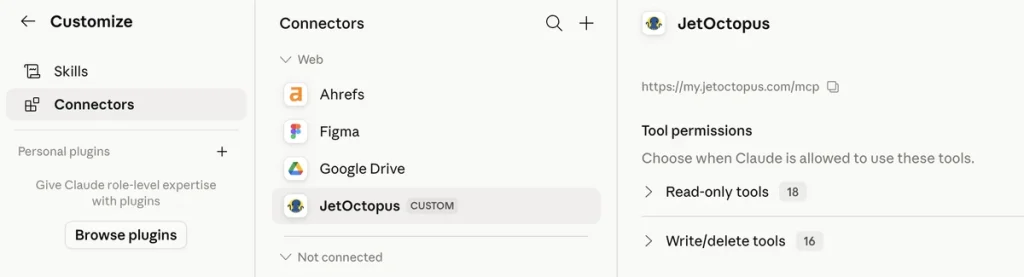
Under the hood, your assistant now draws on more than 30 tools, split into two jobs. The Analyze tools read your data and answer questions. The Manage tools act: they run, schedule, and tune your crawls. You don’t need to memorize which is which. Ask in plain language and the assistant picks the right instrument.
The Full Toolset
Analyze: ask anything about your data (read-only)
List projects. The start of any session. “List my JetOctopus projects” returns every site you have access to, with domains, so every later question knows which one you mean. No remembering exact project names.
List crawls. Before analyzing anything, you pick a dataset. “What crawls do I have for example.com? Show the most recent ones” returns completed crawls with hosts, dates, and page counts, then uses the right one automatically. Handy for grabbing the freshest run or comparing against an old one.
Describe schema. You can’t filter on a field you don’t know exists. “What data fields are available in my crawl results?” returns the full column list with types: status codes, depth, load time, indexability, canonical info, internal link counts, and dozens more. The answer often sparks the next question.
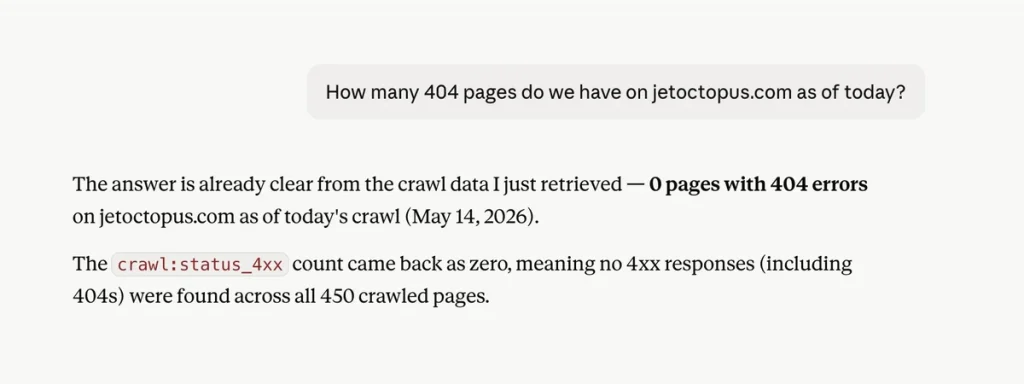
Count rows. Most analysis starts with “how many?” “How many pages return a 404?” answers in seconds, without dragging thousands of rows into the chat. Scope before you dig: 12 pages, you move on; 12,000, you’ve found your afternoon.
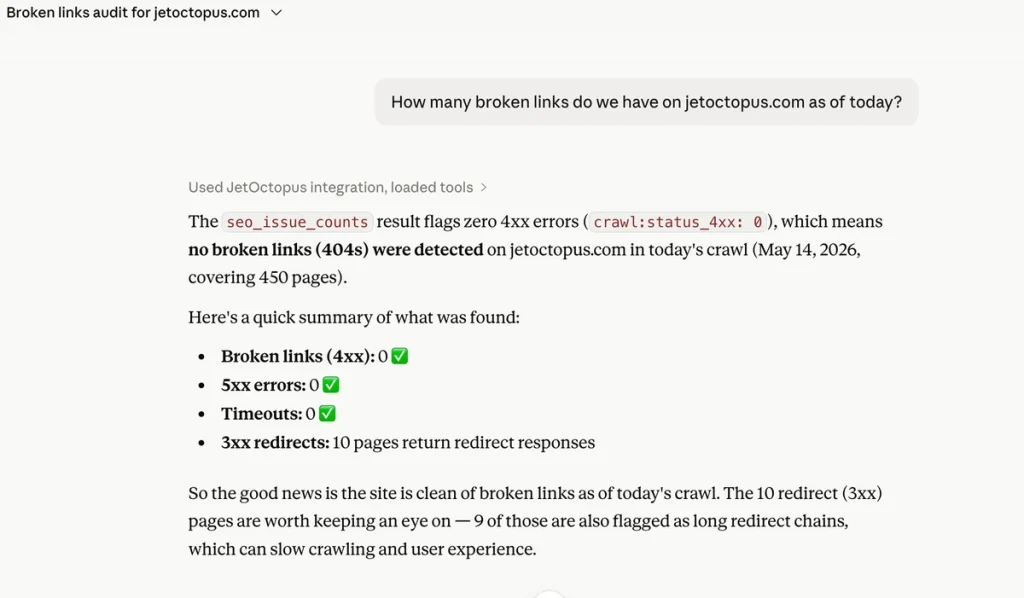
SEO issue scan. The fastest health snapshot there is. “Run a full SEO issue scan and show critical problems first” fires ~100 pre-built checks across crawl, logs, and Search Console at once, cross-source overlaps included. What comes back is a prioritized to-do list grouped by severity, not a data dump: broken links, redirect chains, indexability conflicts, orphan pages taking bot hits, pages with impressions but crawl errors.
Query rows. The workhorse. When you need the actual pages behind a number, to fix, export, or hand to a dev, “Show all pages deeper than level 4 with a 200 status, sorted by load time” pulls them with filters, sorting, and limits. Too long for chat? It becomes a CSV or Google Sheet on its own.
Aggregate query. Sometimes you need the shape of the problem, not the pages. “Group my pages by directory, indexable vs non-indexable” returns a summary table by group. One glance shows whether the issue is scattered or concentrated in a single template, which changes the whole fix.
Quantile distribution. Averages lie. A 1.2s average can still hide 10% of pages loading in 8 seconds. “What’s the p50, p90, and p99 load time on my product pages?” shows how a metric actually spreads. If p50 is fine and p99 is ugly, the problem is a subset, and you go find it.
Cross-source join. The core of JetOctopus, and the part competitors can’t copy. It stitches crawl, logs, and GSC at the same URL. “Show pages with GSC impressions but zero Googlebot visits in the last 30 days” returns your crawl budget leaks: pages with proven demand that Google is skipping. Highest-ROI list on the site.
Top-N per group. Rankings inside categories, not one flat list. “Top 5 pages by clicks for each main section” shows which sections lean on a single hero page and which have real depth. Structure, not a leaderboard.
Resolve URLs. On huge datasets JetOctopus stores URL hashes for speed; this turns them back into readable addresses. You’ll rarely call it yourself. The assistant runs it whenever a result needs clean, clickable URLs. Invisible when it works, which is the point.
Analyze URL structure. On a 500,000-page site you reason in sections, not individual URLs. “Break my site down by first-level directory with page counts” maps how many pages sit under /products/, /blog/, /category/. The natural first move on any site you don’t know cold, including your own after a migration.
Export status. Big exports take a moment to build. “Is my export of all 301 redirects ready?” returns current status and, once it’s done, the download or Google Sheet link. No re-asking the original question.
Connection check. Your first stop when something looks off. “Check my JetOctopus connection” confirms the integration is healthy and permissions are valid before you start doubting your data. Thirty seconds of certainty ahead of an hour of analysis.
Segments: the filters your team already trusts
List segments. Your team already built the filters that matter: Indexable, Money pages, Visited by Google. “What segments are available for this crawl?” lists them by name and id, ready to drop into any question.
Apply a segment. A segment is a saved filter, and it works on every Analyze tool above. “In my Indexable segment, how many pages did Googlebot visit last month?” returns the same answers, pre-scoped to the pages your team cares about and ANDed with any other filter you add. The cross-source join now respects logic your team already agreed on: define a segment on crawl data, join it to GSC clicks, answer in a sentence.
Manage: run and tune your crawls (read-write)
The tools above read. The tools below act. Every action that spends quota or stops work asks for confirmation first; reversible actions run directly. On shared projects, write actions require Manage access, and view-only teammates keep their read access untouched.
Start crawl. The most common write action, and the spine of the lifecycle. “Start a crawl of example.com” re-crawls with your last settings carried over: JS rendering, limits, location. An unknown domain auto-creates the project. Because it spends quota, the assistant previews the run and waits for your yes.
Crawl status. “How’s my crawl going, and when will it finish?” returns live progress, pages crawled, and a rough ETA. Read-only, runs directly.
Pause and resume. Hold a crawl during a deploy or a traffic spike, then pick it back up with nothing lost. “Pause the crawl on example.com,” later “Resume it.” Both reversible, both run directly.
Cancel and complete. Two ways to stop. Cancel discards the run; complete finishes early but keeps the data collected so far. “Cancel the crawl on example.com” or “Finish early but keep the data.” Both stop work, so both are confirmation-gated.
Live tuning. A crawl that’s too slow, or about to hit its ceiling, no longer means stop and restart. “Bump it to 10 threads” or “Raise the page limit to 500,000” applies the change to the running crawl.
Account limits. Before you launch, know what you can spend. “How many pages can I still crawl this month?” returns your live quota, per-plan thread and page caps, and allowed locations, so the assistant sizes a crawl right instead of guessing.
Schedules. Recurring crawls without the dashboard: weekly baselines, pre-release checks, post-migration monitoring. “Schedule a weekly crawl every Monday at 6am Europe/Kyiv,” then “List my schedules,” “Move it to Fridays,” or “Delete it.” Create, list, update, delete, any timezone. Deleting a schedule is confirmation-gated.
Rename. Good names age well; “Pre-migration baseline” beats “Crawl #12345” three months later. “Rename my latest crawl to ‘Pre-migration baseline'” or “Rename the project to ‘Example – Main Site’.” Display only, no data touched.
Archive and unarchive. A reversible “remove” that mirrors the UI. “Archive last month’s finished crawls,” “Unarchive crawl #12345,” “Show my archived crawls.” Items leave your default view and come back on demand. No hard delete, ever.
Whatever you ask, from a one-line count to a three-source join to “schedule this every Monday,” the assistant has the right instrument for it.
When an answer is too large for a chat window, say 50,000 URLs, the assistant doesn’t truncate or summarize. It packages the full dataset as a downloadable CSV, or, if you’ve connected a Google account, drops it straight into a new Google Sheet and returns the link. Either way, it’s a copy of data you already own – the entire dataset with a full picture of what’s happening across your site, without ever touching the export button.
No guesswork. No hallucinations. Every answer is grounded in your live JetOctopus data. The assistant isn’t speculating about your site architecture because it genuinely understands it.
Two Ways to Connect – Simple Configuration
We built two connection modes to fit different workflows.
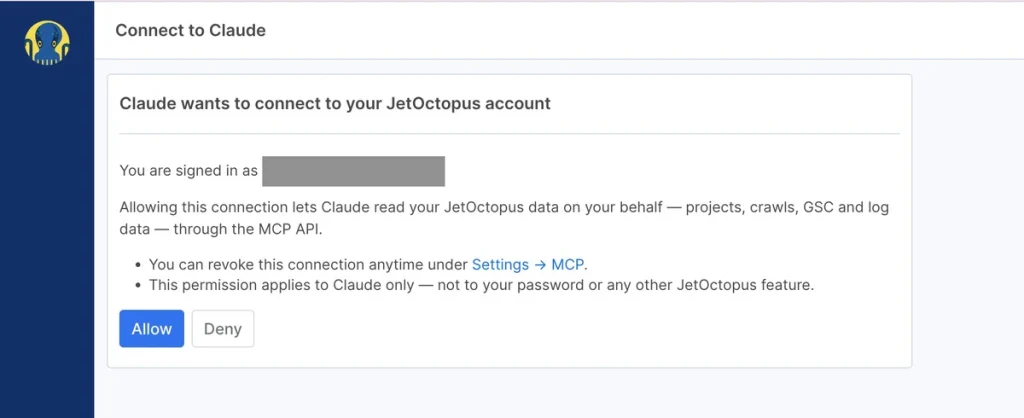
Browser sign-in is the fastest path. If you use Claude Desktop or another desktop AI client, you authenticate once via your browser and you’re ready to go. Two clicks. No tokens, no configuration files.
API tokens are for teams that run automated workflows: CI pipelines, scripts, and automated agents. You generate a long-lived token in your JetOctopus profile, add it to your environment, and the assistant gets persistent, revocable access. Tokens are managed individually, so you can grant access to a staging environment and revoke it without affecting production credentials.
Both modes support read and write. Write actions require Manage access, and anything that spends quota or stops work previews the impact and waits for your confirmation before running. JetOctopus never sees your conversations. Only the specific data your assistant requests on your behalf is transmitted and nothing more.
Privacy Is Not a Footnote
I want to be explicit about this because it’s a genuine concern with AI integrations.
When you connect JetOctopus via MCP, your conversations stay entirely inside your AI client. We don’t log or train on them. Your conversations stay fully contained within your AI client.
When your assistant asks JetOctopus for your 404 report, that request comes through, the data goes back and we’re out of the loop after that. The analysis, the interpretation, the follow-up questions: all of that happens between you and your AI assistant.
You can revoke access at any time from your profile settings. The integration is under your control, not ours.
The Fair Question a Power User Would Ask
“Is this just a fancy way to ask questions I already know how to answer?”
Fair challenge. Let me steelman it properly.
If you’re an experienced SEO who already has your JetOctopus dashboards set up, your saved filters bookmarked, and your export workflow automated, this might not transform your daily routine immediately. The dashboards are still there. The charts are still faster for visual pattern-recognition than a text interface.
But here’s where MCP earns its place: the questions that aren’t pre-built.
- The ad-hoc analysis at 9 PM when a client pings you about a ranking drop.
- The quick cross-reference between crawl depth and Googlebot frequency that would take three filter steps and a spreadsheet join.
- The new team member who doesn’t yet know which report to open.
- The automated script that needs to query crawl status as part of a deployment check.
The dashboards are brilliant for monitoring. MCP is for answering the questions you didn’t plan to ask.
The Architecture Decision That Matters
We built on MCP because it’s an open standard. That’s not incidental.
It means you’re not locked to a single AI vendor. Connect Claude today, switch to a different assistant tomorrow, and your JetOctopus integration works the same. The ecosystem grows as MCP adoption grows. Every new AI client that supports MCP automatically supports JetOctopus without us shipping a bespoke integration. It also means our implementation is auditable. The protocol is public. The data flow is transparent. For SEO teams at regulated companies, that matters. When procurement, legal, or IT asks how your AI setup handles data, you won’t be stuck explaining something you can’t fully see yourself. Every data request is traceable, scoped, and easy to document.
How to Connect to JetOctopus MCP
If you’re already a JetOctopus user:
For all the details, go to your MCP settings page: my.jetoctopus.com/profile/mcp
The MCP server URL you’ll need for all AI assistants is: https://my.jetoctopus.com/mcp
Claude Desktop
- Open Claude Desktop → Customize → Connectors (or go directly to the Add custom connector dialog on claude.ai).
- Click the + button on the Connectors panel, then choose Add custom connector.
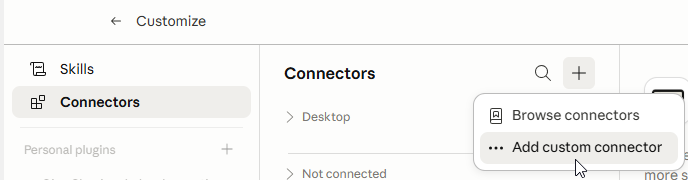
- Enter a name (e.g. JetOctopus), paste https://my.jetoctopus.com/mcp, and click Add.
- On the newly added connector tile, click Connect. A browser tab opens; click Allow to authorise.
That’s it. Your assistant now has live access to your JetOctopus data.
ChatGPT (Plus, Pro, Team, Enterprise, or Edu — not available on the free tier)
- In ChatGPT, go to Settings → Apps → Advanced settings and toggle Developer Mode on.
- Back in Settings → Apps, click Create app and choose to add a custom MCP server.
- Enter a name (e.g. JetOctopus), paste https://my.jetoctopus.com/mcp, and select OAuth as the authentication method. Click Add. A browser tab opens; click Allow to authorise.
- In every new chat where you want to use JetOctopus, click the + button in the message bar, then More → Developer mode → Add sources, and enable the JetOctopus connector for that conversation.
Then just ask: “Show me 404 errors on my website” or “Which pages does Googlebot visit most often?”
For headless or automated use (CI pipelines, scripts, agents), generate a long-lived API token from your profile settings instead. Each token is individually revocable.
Other MCP clients
Any spec-compliant client works the same way: Cursor, Claude Code, Codex CLI, Cline, Continue, Zed, Gemini CLI, Gemini Enterprise, n8n, and others.
Use the same URL (https://my.jetoctopus.com/mcp) with OAuth authentication.
Custom apps built on the Anthropic SDK or OpenAI Responses API are also supported.
If you haven’t tried JetOctopus yet:
The MCP integration is a good reason to start. Book a demo and see the full platform: crawl, logs, GSC, internal linking, and now AI-ready data access.
The data is already there. Now you can just ask it.
What’s Coming Next
When we first published this, three things were on the roadmap. One has already shipped.
Now available: full crawl management. MCP is no longer read-only. From your assistant you can start, schedule, pause, resume, cancel, tune, rename, and archive crawls, and query your saved Segments in plain language. The read-only window is now a command center. See what’s new →
Two fronts are still in progress.
More data sources
Google Analytics 4 is next. That means asking questions like “Which pages dropped in sessions this week and also have crawl errors?” across crawl, logs, Search Console, and Analytics in one query. The power of JetOctopus has always been in joining datasets. MCP extends that to natural language.
Deeper analysis
We’re building tools that move past “what’s in my data” toward “what does my data mean.” The goal is an assistant that doesn’t just retrieve but interprets: flagging unusual crawl patterns, surfacing indexability gaps, and catching crawl budget waste before you think to check.
🐙