“Do I need canonical tags on every page of my site?” It’s one of the most common questions in technical SEO and the answer is more nuanced than a simple yes or no.
Most sites have more duplication than they realize. Filtered category pages are a classic example: you set up robots.txt rules, point canonicals to the main category URL and Google still indexes the filtered versions. Canonical tags declare your preference but don’t enforce it.
That gap between what you declare and what Google actually accepts is where canonicalization gets complex.
In this guide, we break down how to use canonical tags like a pro: when to use them, how to implement them correctly and how to catch the issues that quietly undermine your indexation.
TL;DR
- Canonical tags tell search engines which URL is the authoritative version when duplicate or near-duplicate content exists across multiple URLs.
- Proper SEO canonicalization protects PageRank, prevents keyword cannibalization and improves crawl efficiency.
- Every indexable page should carry a self-referential canonical, even if no duplicates exist.
- Common mistakes include canonicalizing to non-200 pages, creating chains, mixing canonical with noindex and including non-canonical URLs in sitemaps.
- JetOctopus audits all of this automatically: its Canonical Links Analysis report, DataTable filters, GSC integration, and Bulk URL Inspection let you detect and fix every canonical issue, from blocked targets to Google overriding your declared canonical, across your entire site.
What Are Canonical Tags and Why They Matter for SEO
Canonical tags are HTML signals that designate the authoritative version of a page when multiple URLs contain identical or near‑duplicate content. They prevent search engines from splitting ranking signals, like indexing the wrong URL or wasting crawl budget on duplicates.
A canonical URL tag sits in the <head> as <link rel="canonical" href="https://example.com/preferred-page" /> and tells crawlers exactly which URL should carry the weight.
Enterprise sites, like ecommerce, with parameters, filters, mobile variants or syndicated content rely on canonicals to consolidate links, preserve ranking strength and maintain clean indexation. Using self‑referential canonicals on every page ensures search engines always understand the correct URL, strengthening sitewide consistency and protecting critical SEO equity.
In a nutshell, if you have 3 duplicate pages (or approximately similar ones), you should pick just one of them to be shown in Google. Canonicalization is a way to help Googlebot decide what page to show in the SERP. However, rel=canonical tags don’t help the search engines unless you use them properly.
The Benefits
- Protect your site’s authority: When multiple URLs serve the same or highly similar content, search engines treat each version as a separate page.
- Prevent keyword cannibalization: Canonical tags consolidate duplicates, ensuring all ranking signals flow to the preferred URL instead of being split across variations. This also preserves PageRank and keeps the correct page indexed.
- Improve crawl efficiency: Canonicals steer bots away from unnecessary duplicates so high‑value pages get crawled more often.
| Canonical Tags | |
|---|---|
| Purpose | Prevents duplicate-content problems by specifying the “original” or most representative URL |
| How it works | Search engines group duplicate pages and use the canonical URL as the main source for indexing and ranking |
| HTML syntax | <link rel="canonical" href="https://example.com/preferred-page" /> placed in the <head> |
| When to use | Only for exact or very similar duplicates; a large portion of the duplicate’s content should match the canonical version |
| Best practice | Use self-referential canonicals on every page (pointing to itself) even if no duplicates exist, so search engines always know the correct URL |
For maximum crawl efficiency, you can combine rigorous canonicalization with AI‑driven internal linking automation. JetOctopus’ AI Internal Linker identifies systemic underlinking across your architecture by unifying crawl data, log files and GSC signals into a single intelligence layer. It then generates semantic, context‑aware linking recommendations that direct both Googlebot and emerging AI crawlers toward your highest‑value URLs.
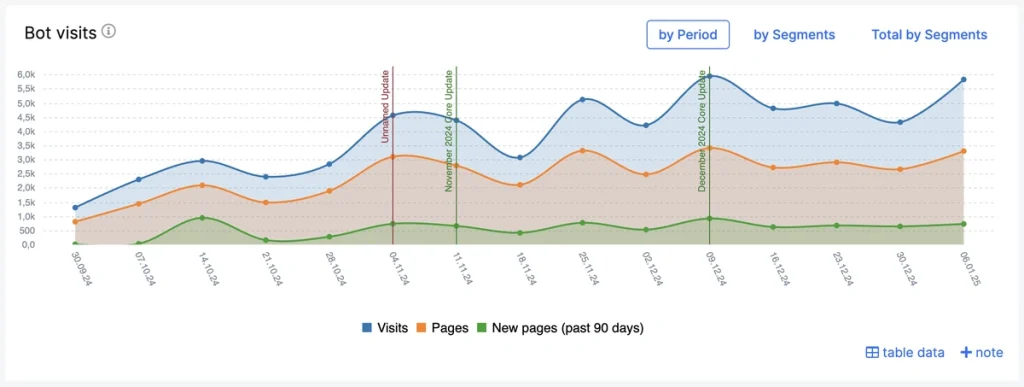
Canonical tags establish which URL should be treated as the authoritative version; strategic internal linking ensures those URLs are consistently discovered, crawled and prioritized.
Together, they form a reinforced technical foundation that accelerates indexation and strengthens the visibility of your most critical pages.
Google’s Canonical is Less Predictable on Large Sites
Canonicalization has always been a hint, not a directive. But Google’s canonical decision‑making becomes increasingly volatile as a site grows, because the search engine weighs a broad mix of signals: redirects, internal linking patterns, sitemap structure, hreflang clusters, URL variants and overall crawl behavior. When those signals conflict, even slightly, Google’s canonical selection becomes less stable and less aligned with what you intended.
Why Large Sites Experience More Volatility
Google’s guidance explicitly notes that canonical mapping becomes harder to maintain on large or frequently changing sites. In practice, this means Google continually re‑evaluates which URL looks most representative as new crawl data comes in.
Google’s canonical logic blends two priorities:
- Which URL does the site appear to prefer
- Which URL seems most useful for users
Since these two priorities often diverge, Google defaults to the version “where more signals align,” even if it contradicts your declared canonical.
This is why small sites see stable canonical behavior, while large ones see fluctuations that feel unpredictable.
AI crawling complexity now extends far beyond Google. Emerging crawlers from platforms like ChatGPT, Claude and Perplexity are actively discovering, evaluating and surfacing site content and they’re just as vulnerable to canonical ambiguity as traditional search engines, especially on large, multi‑layered enterprise sites.
JetOctopus’ AI Bots Report provides full operational visibility into how these systems navigate your architecture. You can validate, with precision, whether your canonical framework is steering AI crawlers toward the correct, authoritative URLs rather than allowing them to drift into duplicates, loops or dead‑end paths.
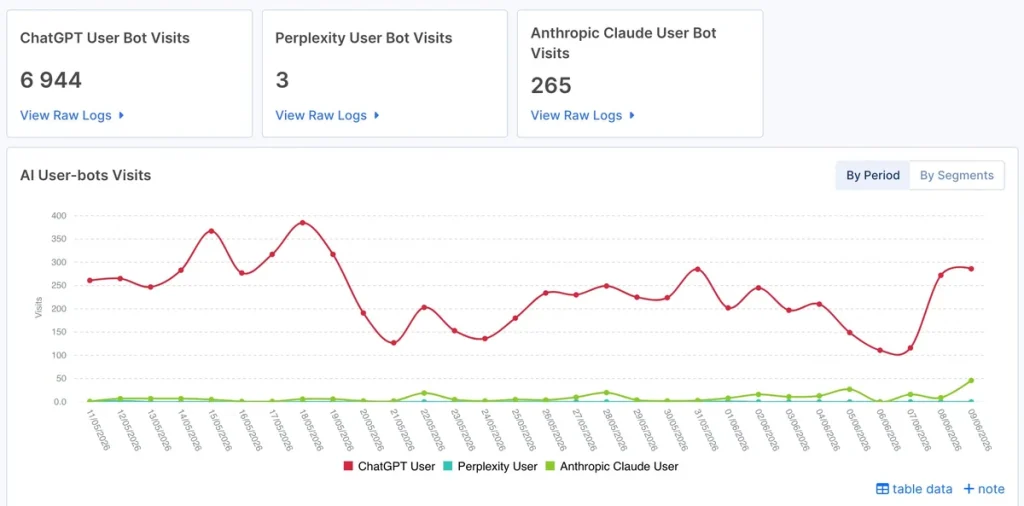
This level of insight ensures your technical signals are consistently interpreted across both search engines and AI‑driven discovery systems.
How to Implement Canonical Tags
The first step when implementing canonical tags is to identify duplicate or near‑duplicate pages and select the single, authoritative URL with the strongest performance indicators: links, traffic and historical authority.
Add a self‑referential canonical to the primary page and point all duplicate variants to it using an absolute, SSL‑correct URL in the <head>:
<link rel="canonical" href="https://www.example.com/page/" /> |
For large websites, you can automate this via server‑side templates or SEO plugins like Yoast (WordPress and WooCommerce integrate this plugin, for instance), which allow canonical assignment directly in each page’s Advanced settings. For non‑HTML assets such as PDFs, deploy the canonical via HTTP header:
Link: <https://www.example.com/file.pdf>; rel=”canonical”
Support canonicalization by keeping your internal links consistent and your sitemap clean and up to date, plus using redirects to guide both users and search engines to the right version of a page.
The key is to keep things simple: only use one canonical URL tag per page, always use full HTTPS URLs and make sure every page clearly points to the version you want search engines to treat as the main one.
However, some specific platforms have their own rules for applying canonicalization:
| Platform | Add Canonical Tags |
|---|---|
| Amazon (Seller Central) | Automatically generates canonical URLs from the first 5 words of your product title + ASIN |
| Shopify | Product pages: Automatically includes canonical tags by default (usually self-referential). Custom pages: Must be added manually via theme or apps |
| Wix/Squarespace | Auto-generated for most pages |
| Adobe Commerce | May need adjustments in admin configuration or via extensions |
But to validate canonical URLs and ensure everything is configured correctly, it’s best to use a robust technical SEO platform like JetOctopus.
How to Audit Canonical Tags with JetOctopus
Crawl your website using JetOctopus crawler. Once the process is complete, you can quickly analyze the canonicals in the Indexation report.
Find Non-Canonical Pages Blocked from Indexation
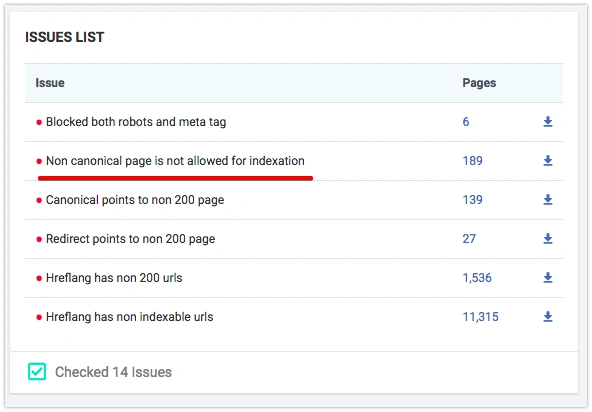
Google guidelines tell us that if the page is non-canonical, (rel=canonical tag points to the other page), this page should be open to indexation. It’s a common situation when rel=canonical tag is added to all pages indiscriminately, whether these pages are open to indexation or not. This is an easy way how to find those pages with JetOctopus:
- If the crawler finds the above-mentioned problem, you will see that the Non-canonical page is not allowed for indexation notification in the Indexation/Problems section. Once you click on the number of pages in this section, you get to the DataTable with the list of problematic URLs.
It shows:
- Total count of pages containing
rel="canonical" - How many pages point to each canonical URL
- Pagination pages and their canonical configurations
- Conflicts between canonical tags and hreflang annotations
- A detailed table of every URL, its target canonical URL, and whether that target is indexable
You can export data in Excel or CSV format.
2. Choose filters in Data Table:
- Is Canonical Page = No
- Status Code = 200
- Is Meta tag Indexable = No
Find Self-Canonical Pages Blocked by Meta Robots
Adding rel=canonical with a URL that is equal to the URL of the current page is a good practice that helps to avoid the accidental duplicate pages issue.
However, you should remember that a self-canonical page shouldn’t be closed with meta=robots noindex, as this creates a direct conflict.
Choose filters in the Data Table:
Status Code = 200
Is Self Canonical = Yes
Is Meta tag Indexable = No
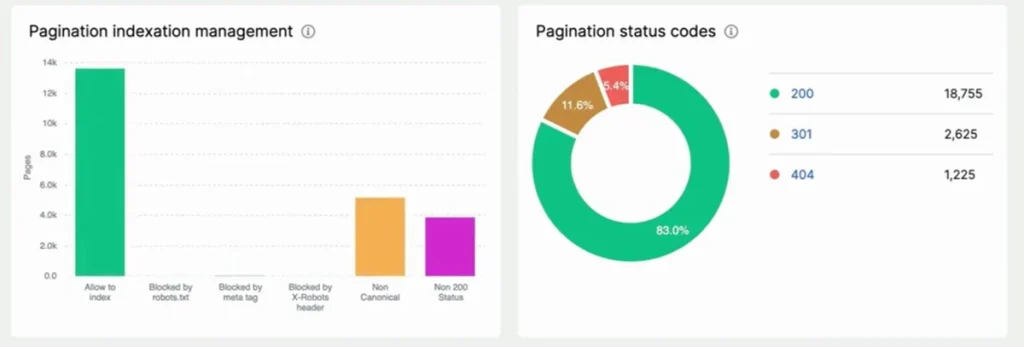
Find All Canonized Pages
The canonized page is a page on which rel=canonical tags from other pages are pointed. It’s crucial for a canonized page to have a 200 Status Code, be allowed for indexation and not to canonize the other page (which would create a chain).
Find all canonized pages in DataTable. Set filter Is Canonized Page = Yes
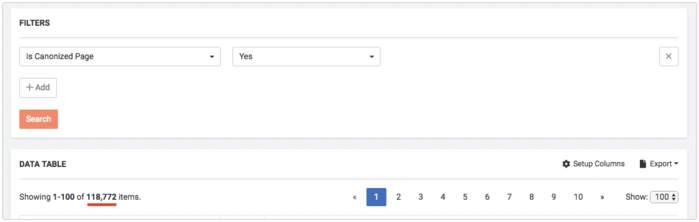
Then you can filter these pages to meet your individual requirements.
- Status Code=!NotEqual 200 – shows pages with all Status Codes except 200, so there can be different redirects, 404, 500 errors.
- Is Canonical Page = No – shows non-canonized pages or in other words, canonical chains
- Is Meta Tag Indexable = No – shows pages that are blocked for indexation by the meta tag.
The above-mentioned cases are usually treated as bugs in Technical SEO and must be fixed.
Find Non-Canonical Pages Pointing to Blocked Canonical Targets
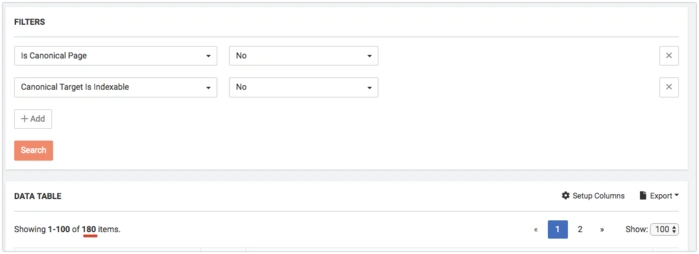
Canonicalized pages must always be opened for indexation. To find non-canonical pages whose canonical target is blocked, use these filters in DataTable:
- Is Canonical Page = No
- Canonical Target is Indexable = No
Find Non-Canonical Pages Pointing to Targets with Non-200 Status Codes
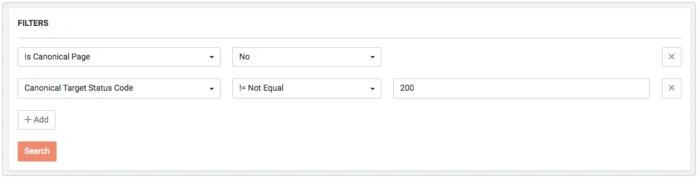
Canonized pages must have a 200 Status Code response. To see canonized pages with other Status Codes, choose the following filters:
- Is Canonical Page = No
- Canonical Target Status Code != 200
The Most Canonicalized Pages
Canonicalization works similarly to link building: one page might receive canonical signals from only one other page, while another receives them from 100,000 pages.
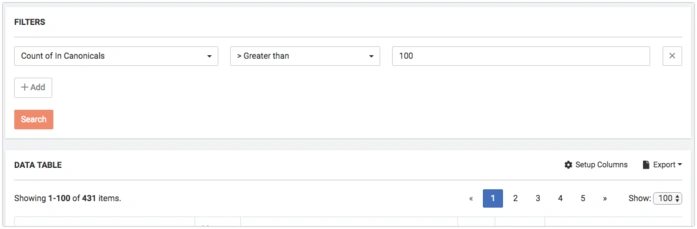
You can filter pages by values in DataTable, for instance:
- filter Count of In Canonicals > 100
- filter Count of In Canonicals = 1
Canonicalization has something in common with link building: page A can be canonized only with one non-canonical page, but page B – 100k different pages. This is a widespread situation on e-commerce websites.
Also, with the help of the Setup Column, you can add In Canonicals column
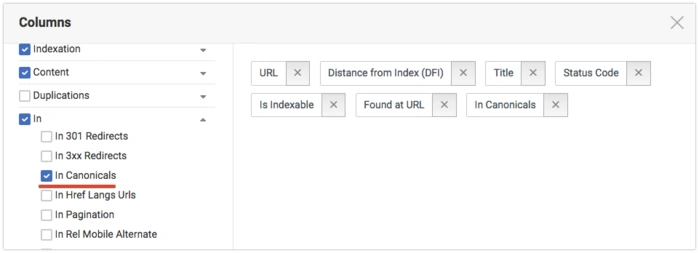
And sort pages by this column:
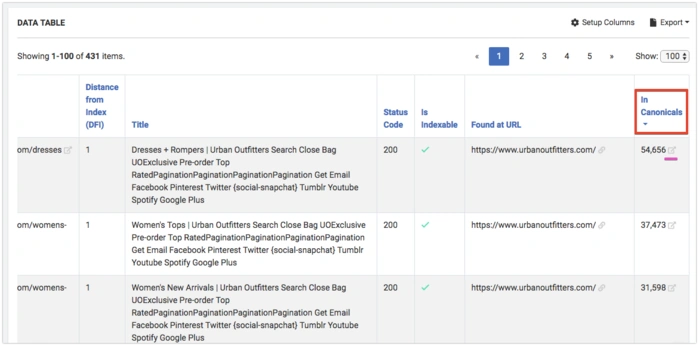
Where you can see all pages that canonize the selected page.
Cross-Reference Sitemaps with Canonical Data
Non-canonical URLs shouldn’t appear in your XML sitemaps, as it sends conflicting signals to search engines. To find them:
- Go to Sitemaps Report → export all URLs in your XML sitemaps
- Go to Canonical Links Analysis → export the pages-with-canonicals table
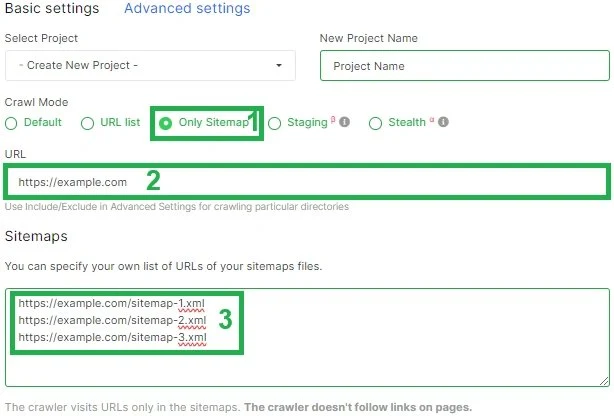
Compare the two lists and look for:
- Sitemap URLs whose canonical target is a different URL (non-self-referential)
- Sitemap URLs whose canonical target is not indexable (404 or redirect)
Remove identified non-canonical URLs from your sitemaps to eliminate conflicting signals.
GSC URL Inspection – Google’s Canonical vs. Your Declared Canonical
JetOctopus integrates with Google Search Console to show you whether Google accepted your canonical tag or chose a different URL.
| GSC Status | What It Means |
|---|---|
| User-declared canonical selected: Yes | Google accepted your canonical tag |
| User-declared canonical selected: No | Google overrode your canonical and chose a different URL |
| Alternative page with proper canonical tag | Google recognizes the page as a duplicate and points to its canonical |
To access:
- Go to Tools → GSC URL Inspection.
- Choose a preset group or upload a list of URLs.
- Start the inspection and review the results in the data table.
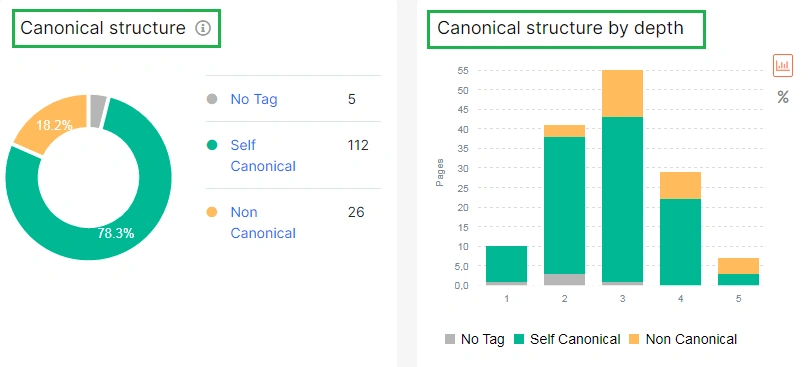
Summary: Problems You Can Detect with JetOctopus
| Problem | How JetOctopus Identifies It |
|---|---|
| Visual breakdown shows clustering on the wrong URL canonicalization | Pages pointing to another page that also has a canonical |
| All key pages canonicalized to one unimportant page | Pagination pages highlighted in the canonical report |
| Canonical to non-indexable page | Target indexable = No column flag |
| Google rejecting your canonical | User-declared canonical selected: No |
| Pagination canonical errors | Pagination pages highlighted in canonical report |
| Hreflang vs. canonical conflicts | Report highlights conflicts between them |
| Most canonized pages | Sorting by Count of In Canonicals identifies pages receiving excessive canonical signals. |
| Sitemap URLs conflicting with canonical data | Cross‑referencing sitemap exports with canonical tables reveals: non‑self‑canonical URLs in sitemaps, URLs whose canonical target is non‑indexable, or URLs pointing to redirects. |
| Missing canonicals | Pages without rel=”canonical” in coverage report |
| Canonical + noindex conflict | Coverage chart shows “Excluded by noindex tag” |
| Canonical to blocked or disallowed URLs | Indexation report shows canonical targets blocked by robots or meta directives. |
Canonical Tag Best Practices
Effective URL canonicalization demands precision, consistency, and a disciplined technical framework.
- Implementing self‑referential canonicals on every indexable page, including your homepage, to establish a clear, authoritative source for each URL. This prevents fragmentation when external sites link to alternate versions of your pages.
- Always use absolute, lowercase HTTPS URLs in your canonical tags to eliminate ambiguity across protocols, casing and trailing‑slash variations. For large, dynamic, or template‑driven platforms, routinely audit canonical outputs to ensure they aren’t generating incorrect or conflicting versions.
- When dealing with cross‑domain duplicates, apply a self‑canonical on your original page and point external copies back to it. Maintain clean, direct signals: avoid loops, chains, or mixed directives that force search engines to guess your intent.
- Validate your implementation with technical SEO tools like JetOctopus to confirm that search engines recognize the correct canonical URL every time.
When to Avoid Canonical Tags
There are a few scenarios when canonicals create ambiguity rather than clarity. Unless you have two URLs that contain the same or extremely similar content, don’t depend on canonicals and use self‑referential canonicals instead. For international or multilingual SEO websites, rely on hreflang, not canonicals.
Using canonicals on unrelated pages, paginated series or URLs you’ve blocked with robots.txt will cause search engines to ignore your signals entirely.
DON’Ts
- place canonicals in the <body>
- declare more than one per page
- create loops or chains
Each page must point directly to its final, authoritative URL. Canonicalizing to the wrong protocol or a non‑existent page also breaks consolidation and wastes crawl budget.
In enterprise SEO environments, these missteps quietly erode ranking signals, so rigorous audits are essential to prevent them.
Final Thoughts: Canonical Errors Can Turn Into Critical SEO Failures
Wrong rel=canonical implementation can lead to huge SEO canonicalization issues.
A single template error can silently canonicalize thousands of pages to the wrong URL, split ranking signals or signal contradictions that Google simply ignores. The larger the site, the higher the cost of those mistakes.
Getting canonicalization right means staying on top of several moving parts simultaneously: ensuring targets are indexable and return 200, avoiding chains and loops, keeping sitemaps free of non-canonical URLs and verifying that Google actually accepts what you declare.
This is where JetOctopus makes a real difference. You don’t have to waste time checking canonical issues one URL at a time because you get a complete picture across your entire site:
- The dedicated Canonical Links Analysis report surfaces every URL alongside its canonical target and indexability status;
- DataTable filters let you isolate any specific problem in seconds;
- GSC URL Inspection shows you exactly where Google has overridden your declared canonicals
JetOctopus can flag, filter and export for immediate action every issue, from self-canonicals blocked by noindex to mass canonicalization pointing to a single wrong page.
However, clean canonicalization is not a one-time fix. Audit it regularly and treat every deviation as a genuine SEO issue.