You can run the crawl yourself or set up a regular crawl. Also, you can set the start of a one-time crawl at the time you need, for example, at night. With a regular crawl, you can track changes to your website after releases, the number of new pages created over a while, and more.
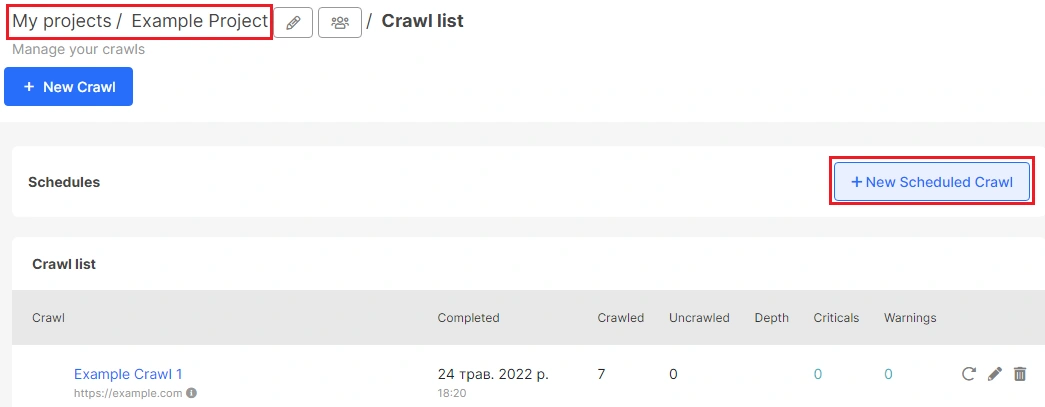
To set up a regular crawl, go to the desired project and click “New scheduled crawl”. You can schedule a crawl only in the project menu.
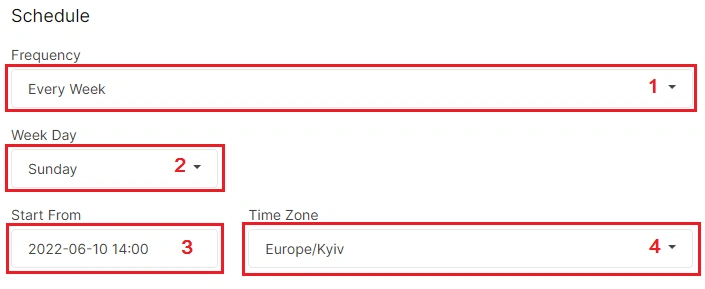
When creating a crawl, you can specify the frequency, day and time when the crawl will start. These settings can be made in the “Schedule” window.
“Frequency” – select daily, weekly, monthly or every two weeks. You can also select “Once” to start crawling later.
“Week Day” – choose the day of the week when the crawl will run.
“Start From” is the date of the first crawl.
“Time Zone” – select the time zone for running your crawl.
Next, make the default crawl settings.
More information: “How to configure a crawl of your website”.
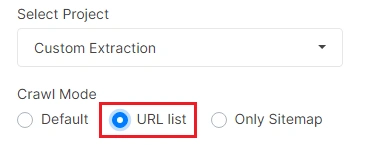
Note that you can set up a regular crawl for the URL list. To do this, select the “URL list” crawl mode in “Basic settings”.
After completing all the settings, click the “Schedule crawl” button.

Why do you need a scheduled crawl?
With JetOctopus, you can set up a regular recurring crawl or run a crawl at the time you need. This is a great option for:
- starting a crawl at a time when the website has the least number of visitors not to overload the web server;
- check the releases of SEO tasks;
- check the number of new URLs on the site during a period of a time;
- check if the bug is fixed.