When we launched the JetOctopus MCP a few weeks ago, it could read everything: crawl data, server logs, Search Console, all answerable in plain language. The most common reply we got back was a fair one. “Great. Now let me actually do something with it.”
So we did.
The MCP is no longer a read-only window onto your data. From your AI assistant you can now start crawls, schedule them, pause, resume, cancel, retune threads and page limits, rename, and archive. The work you used to open the dashboard for now happens inside the conversation. And on the analytics side, your saved Segments work through the assistant too, so the filters your team already trusts carry into every question you ask.
That is the headline: the MCP now runs your crawls, not just reads them.
If you connected the MCP a few weeks ago, you already have these tools. Nothing to reinstall. Open your assistant and ask.
Your Segments, now conversational
Every JetOctopus report can be scoped to a Segment: Indexable, Visited by Google, or any custom set your team built. Until now the MCP couldn’t see them. You had to rebuild that logic by hand in every single query. Now you don’t.
- “List my segments for this crawl.”
- “In my Indexable segment, how many pages did Googlebot visit last month?”
- “Take my ‘Money pages’ segment and show clicks and impressions from Search Console.”
That last prompt is the whole point of the MCP in one sentence. A segment defined on crawl data, joined to GSC performance, answered in a chat. Pass a segment by name or id and it ANDs with any other filter you add. The cross-source join that competitors can’t replicate now speaks plain English, and it respects the definitions your team already agreed on.
From answers to actions: crawl management
You can now drive the full crawl lifecycle without leaving the conversation.
- “Start a crawl of example.com.” Re-crawls with your last settings carried over: JS rendering, limits, location. An unknown domain auto-creates the project.
- “How’s my crawl going?” Live progress, pages crawled, and a rough ETA.
- “Pause the crawl on example.com.” Then “Resume it,” “Bump it to 10 threads,” or “Raise the page limit to 500k.” All applied to the running crawl, no stop-and-restart.
- “Schedule a weekly crawl every Monday at 6am Europe/Kyiv.”
- “Archive last month’s finished crawls.”
The crawls you used to launch with six clicks in the dashboard now launch from one sentence. For teams running audits as part of a deploy pipeline, that sentence can live in a script.
Safe by design
Write access raises an obvious question. What stops the assistant from burning your quota or killing a running crawl on a single misread? Two things.
First, the actions that spend quota or stop work (starting, cancelling, or completing a crawl, or deleting a schedule) never fire blind. The assistant returns an impact preview first: what will run, which project, how much quota it costs. Nothing happens until you say yes. Reversible actions like pause, resume, and archive run directly, because undoing them is free.
Second, permissions. On shared projects, every write action requires Manage access. View-only teammates keep their read access untouched. They can ask anything. They can’t change anything.
This is the part we cared about most. An assistant that can act is only useful if you can trust what it does with that power.
Check before you spend
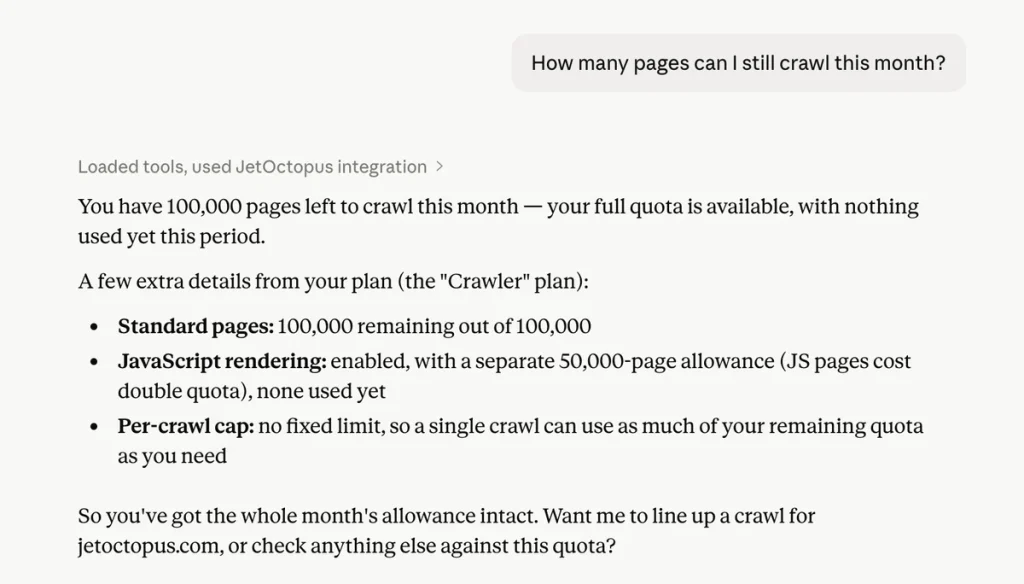
Ask “How many pages can I still crawl this month?” and the assistant reads your live quota, your per-plan thread and page caps, and your allowed locations. It sizes the crawl correctly before launching one, instead of guessing and hitting a wall halfway through a 100k run.
What stayed the same: your data is still yours
Nothing about the trust model changed. Conversations stay inside your AI client. We don’t log them and we don’t train on them. Access is tied to your account, scoped to your permissions, and revocable anytime from your profile.
The one addition is honest write-vs-read signalling, so your client can flag a destructive action before it runs, not after.
How to connect
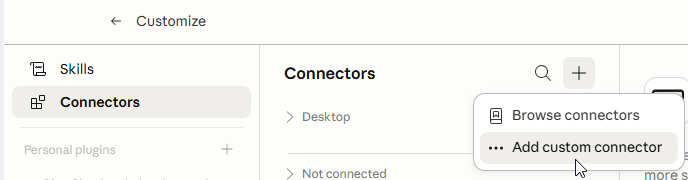
Same two clicks as before: browser sign-in for desktop clients, or a long-lived API token for automated workflows. If you already use the MCP, these tools are live in your account now. If you haven’t connected yet, the full setup walkthrough is here.
Server URL: https://my.jetoctopus.com/mcp
What’s coming next
Two things, in order.
Google Analytics 4 is next on the data side. Crawl, logs, GSC, and GA4 in one query: “Which pages lost sessions this week and also have crawl errors?” answered across four sources at once. The power of JetOctopus has always been in joining datasets. This extends the last source to natural language.
Analysis that doesn’t wait to be asked. Spotting anomalies, flagging regressions, and surfacing crawl budget waste before you think to check.
The data was already yours. First we let you read it in plain language. Now you can run it. Next, it starts watching your back.