Some of the biggest SEO losses come from a technical issue you didn’t even know existed. When Google can’t reach a page, it disappears from the SERPs. When your schema breaks, your rich results vanish. And when a JS-heavy front-end fails to render, AI bots are left staring at a blank page.
For large websites with millions of URLs, dozens of page templates and constant content velocity, an audit generates more data than most teams know what to do with.
If you live in log files, server configs and rendering waterfalls, this guide is built for you. From the crawl layer down to AI visibility signals, here’s how to read an audit like the site’s life depends on it, because sometimes, it does.
TL;DR
- A technical SEO audit confirms search and AI bots can crawl, index, render and rank your site. It runs across five sequential layers: crawl, indexing, architecture, performance and AI visibility.
- Crawl first to expose duplicate URLs, broken links, redirect chains, canonical conflicts and excessive depth. Crawl budget is only a real constraint past ~1M pages (or 10K+ daily-changing); below that, fix reachability, not budget.
- Get the index signals right: don’t block render assets in robots.txt, keep a 200-only sitemap and never mix canonical (consolidates authority) with noindex (removes the page), because together they cancel out. Keep key pages within 3 clicks and flag any with fewer than ~10 internal links.
- Judge performance on field data, not lab scores: LCP <2.5s, INP <200ms, CLS <0.1 at the 75th percentile of CrUX. Fix by return on effort, not by the length of the issue list.
- AI visibility is now non-negotiable. AI crawlers are ~28% of Googlebot’s volume and read only raw HTML: a page can rank #1 on Google yet be invisible to ChatGPT. Check server-rendered HTML, AI bot coverage, hallucinated 404s and query fan-outs in your logs.
- JetOctopus runs all five layers in one place: JS-vs-raw HTML comparison, log analysis, bulk CWV, AI bot tracking and fan-out mapping.
What Is A Technical SEO Audit
A technical SEO audit is a comprehensive evaluation of your website’s infrastructure (the code, architecture and performance) that confirms search engines can crawl, index, render and rank your pages. It’s the diagnostic layer that uncovers issues content alone can’t fix: crawl blocks, slow load times, duplicate URLs, broken redirects and structural weaknesses that quietly erode visibility.
At its core, the audit answers one question: Can search and AI bots access, understand and trust your site?
To get there, it examines four critical dimensions:
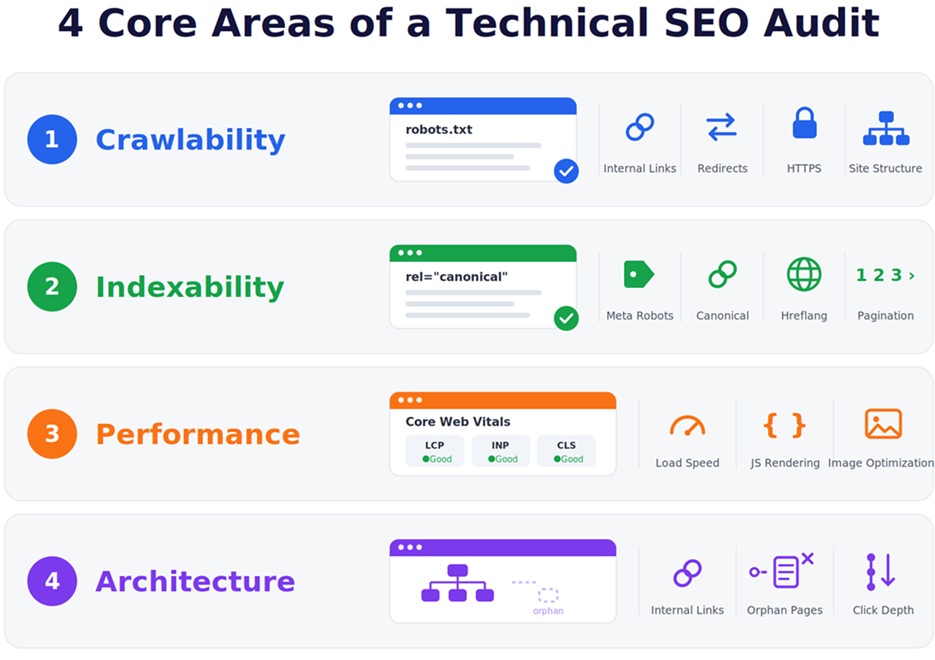
- Crawlability verifies that robots.txt, XML sitemaps and server responses allow search engines to reach every important page. It also reviews internal linking, site structure, redirects and HTTPS implementation to strengthen discoverability and authority flow.
- Indexability ensures meta robots tags, canonical tags, hreflang and pagination guide Google toward the correct version of each URL, without duplicate or thin pages diluting the index.
- Performance assesses Core Web Vitals, load speed, JavaScript rendering times and image optimization against modern UX and ranking standards.
- Architecture evaluates how authority flows through internal links, how deep key pages sit and whether the structure scales as the site grows.
The result is a clean, scalable environment for every other SEO and CRO initiative to succeed. In the workflow below, these four dimensions are audited across five sequential layers.
When Should You Make One?
The more frequently a site is modified (new pages, redirects, template updates, content pushes, dev deployments) the faster technical debt accumulates and the sooner something breaks. A small website with aggressive SEO activity needs more frequent audits than a large site where nothing moves.
That said, site size and change volume tend to correlate, so here’s a practical starting framework:
| Site Type | Frequency | Best For |
|---|---|---|
| Small/Static | 6-12 months | Professional services |
| Medium/Dynamic | 3-6 months | SaaS, blogs |
| Large | Monthly/Quarterly | Retail, e-commerce |
When to Audit Immediately
- You ship major website changes (redesigns, migrations, structural updates)
- You’re coming off a long period of SEO inactivity
- Organic traffic drops sharply
- You’re running an older or proprietary CMS
- A rebrand or domain transition is on the horizon
Fast-moving sectors like e-commerce SEO, SaaS and news need monthly or quarterly audits because of constant content and template changes. More static industries can safely operate on biannual cycles.
The Steps of an Effective Technical SEO Audit
Here’s how to perform a technical SEO audit, following a clear, structured sequence – each step feeding the next.
1. Crawl Your Website
Crawling is the foundational step of any technical SEO audit and the point where teams uncover the issues that directly impact visibility, indexation and revenue. A full crawl replicates how search engines and AI-driven systems traverse your site, exposing structural gaps (duplicate content, broken links, redirect chains, canonical conflicts and excessive click depth) that dilute crawl budget.
You can run a crawl on its own, but your findings get far more accurate when you pair it with your core analytics and diagnostic platforms: Google Analytics, Google Search Console and a schema validation tool such as Google’s Rich Results Test. None of these are strictly mandatory, but each one makes the results easier to validate and prioritize.
The right crawler depends on scale. Desktop tools like Screaming Frog, Sitebulb or Netpeak Spider are a solid choice for small-to-mid-sized sites and quick spot checks; any of them will surface the core structural issues. They run on your local machine’s memory, though and start to strain once a site reaches hundreds of thousands or millions of URLs. For the large, high-velocity sites this guide is written for, a cloud-based platform is the practical option. In this guide we’ll work with JetOctopus, which pulls crawl data together with server logs, GSC and rendering in a single place, so across a lot of URLs everything stays correlated without jumping between tools.
With JetOctopus, you’ll see the exact errors that determine whether search engines can access, understand and store your pages.
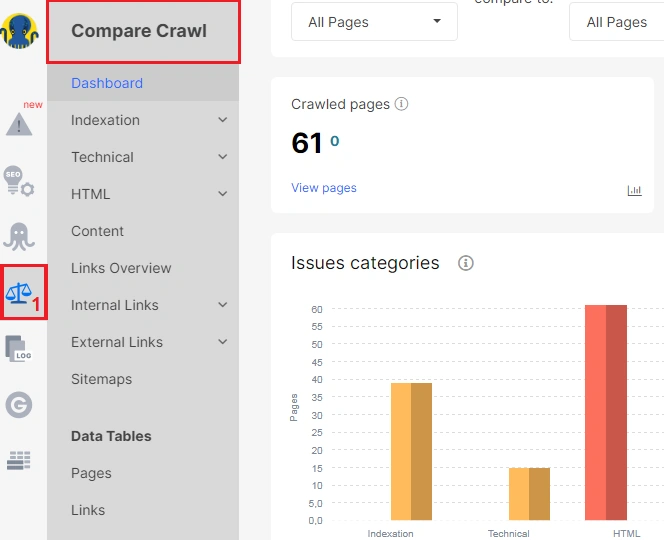
You can compare up to 10 crawls to track structural changes over time. Every crawl simulates search-engine bot behavior with precision, capturing response headers, page depth, JavaScript rendering, HTML, internal linking structure and XML sitemaps.
Here’s exactly how you can compare crawls:
Because Googlebot allocates a finite crawl budget, your goal is to confirm that priority pages are easily reachable, logically linked and free of barriers that make content discovery expensive.
Crawl budget isn’t a universal concern – and it’s worth being honest about that. Google’s own Large Site Owner’s Guide to Managing Crawl Budget states it’s primarily relevant for sites with more than 1 million unique pages that change weekly or 10,000+ pages that change daily. As Google’s John Mueller has put it, “for most normal websites, crawl budget is not something you need to focus on at all.”
If you’re running an enterprise catalog, a large publisher or a site with heavy faceted navigation, though, this is exactly where visibility problems hide. And the lever that matters most may not be page count at all: Google’s Gary Illyes has repeatedly emphasized that server speed comes first – a faster server lets Googlebot fetch more within the same budget. For a full walkthrough of this one layer, see our deep dive on optimizing crawl budget.
Layer in your server logs. JetOctopus merges crawl data with server log files, so you get visibility into real bot interactions: exactly which pages Googlebot is hitting, ignoring or wasting resources on. This is where estimates become facts: logs record what search engines actually did on your server, with no sampling and no third-party interpretation.
After that, layer in Google Search Console data and correlate crawl behavior with newly discovered or lost pages, zero-click queries and indexation gaps. The result is a prioritized map of crawl budget waste: the low-value pages pulling resources away from high-priority content.
Your next move: Build a prioritized fix list from these correlations. Address crawl errors blocking high-value pages first, then work through indexation gaps, zero-click query opportunities and low-value pages consuming crawl budget before moving on.
2. Review Sitemap, Indexing and Duplicate Content
The most common cause of pages that are indexed but generate zero traffic is a misconfigured robots.txt, a bloated sitemap or a canonical conflict – all easy to miss without a structured review.
Start with robots.txt. It should block only the AJAX endpoints or technical URLs where search and AI bots waste time; core pages and the assets required to render them must remain accessible. (Google’s robots.txt documentation is the reference here.)
Next, evaluate your XML sitemap. It should be comprehensive, up-to-date and free of non-200 status codes and non-indexable URLs. Submit it in Google Search Console under Index → Sitemaps and confirm Google can fetch it without errors. For large sites, use a sitemap index and split URLs into logical groups (products, categories, blog) – this makes indexation gaps far easier to diagnose.
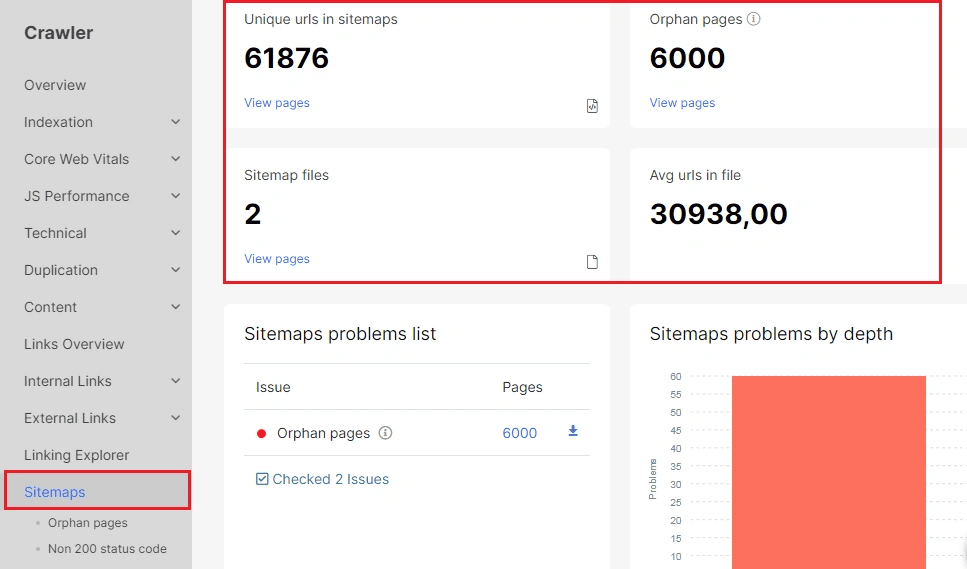
This setup matters beyond Google. AI crawlers behave much like search-engine bots: they respect robots.txt, rely on XML sitemaps and follow the signals you give them. If these foundational controls aren’t dialed in, you set yourself up for avoidable losses:
- Blocking high-value URLs that AI systems should be learning from
- Exposing non-indexable or low-quality pages that dilute your signals
- Burning limited crawl budget on noise
That misalignment creates a long lag, sometimes weeks, between the improvements you make and the results you see.
Audit duplicate content. Duplication is one of the quietest ways authority leaks across a large site: parameterized URLs, faceted navigation, session IDs, HTTP/HTTPS and www/non-www variants and near-identical templated pages all split ranking signals between versions of the same content. Crawl for pages sharing identical titles, H1s or body content, then decide the correct consolidation signal for each cluster (see the canonical guidance below).
Your next move: Validate index coverage by comparing three numbers:
- Pages gaining organic impressions in Google Search Console
- Pages crawled by Googlebot in the last 30 / 90 days
- Pages that should be indexed and ranked
If significant discrepancies appear, work through the most common culprits one by one:
- Check whether noindex has been applied at the page-template level – this is easy to miss and can silently wipe out entire page categories.
- Review your pagination setup so Google interprets page sequences correctly and doesn’t treat them as duplicate or low-value content.
- Check whether your indexable pages are sitting too deep to be reached efficiently.
- Compare the content and internal links on JS-rendered pages against their raw HTML to spot differences.
A note on canonicals and noindex – these are not interchangeable. They solve different problems:
- A canonical tag consolidates ranking signals (links, authority) onto your chosen URL. Use a self-referencing canonical by default. Use a cross-URL canonical when pages are genuinely duplicates or near-duplicates and you want to keep their combined authority on one version (e.g. parameter variants, print/AMP versions, syndicated copies).
- noindex removes a page from the index entirely and passes no authority. Use it when a page simply shouldn’t rank and you don’t need its signals (thin utility pages, internal search results, filtered listings with no search demand).
- Don’t put conflicting signals on the same page. Google treats noindex combined with a canonical as a mixed signal and may ignore both. Pick the one that matches your intent. (Here’s how to check your canonical tags at scale.)
Finally, keep the volume of internal redirects and 404s as low as possible – every hop and dead end is crawl budget you don’t get back. See how to approach auditing redirects and what each HTTP status code signals to a crawler.
3. Audit Internal Links and Site Architecture
Internal links directly influence crawl efficiency, user experience and how authority flows across key pages. Strong internal linking lets search engines interpret your hierarchy, prioritize high-value URLs and avoid wasting crawl budget on dead ends and redirect chains. (For the full breakdown, see our internal linking guide and how to analyze internal linking in JetOctopus.)
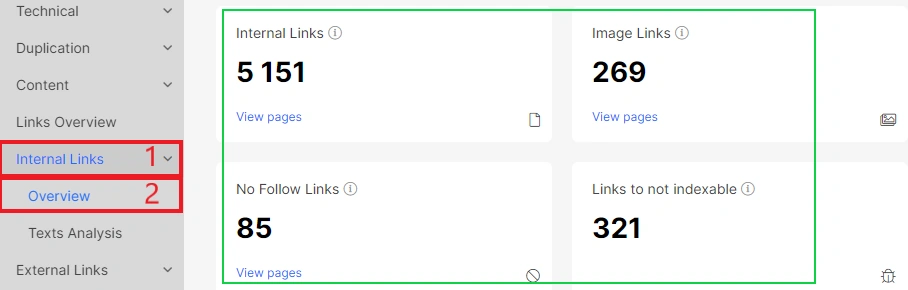
JetOctopus surfaces this in the Links and Issues reports. Pay close attention to four high-impact issue types:
- Pages with fewer than 10 unique internal links from indexable pages. Across 300M+ URLs in our crawl + log dataset, pages with fewer than 10 unique internal links were recrawled by Googlebot 2.7× less often and were 40% less likely to earn any GSC impressions.
- Links to non-indexable pages and links to pages blocked in robots.txt, which leak crawl equity into dead ends.
- Orphan pages that have no internal links at all. Either integrate them into your structure or remove and redirect them.
- Internal nofollow links that are unintentionally severing authority flow.
Clean, intentional internal linking improves discoverability and indexation and reinforces the authority of your most valuable pages. If the deeper issue is how your hierarchy is organized rather than individual links, start with site structure best practices.
Your next move: Audit anchor-text distribution across high-priority pages and ensure no important page sits more than three clicks from the homepage. Use JetOctopus’ AI Internal Linker to surface underlinked pages – it combines crawl data, log analysis and GSC keywords to identify gaps and generate AI-driven linking suggestions that improve navigation for both Googlebot and AI crawlers. Once changes ship, confirm they’re reflected in the next scheduled crawl and that previously orphaned or underlinked pages are being picked up.
4. Evaluate Page Speed and Core Web Vitals
Page speed and Core Web Vitals are non-negotiable components of a modern technical SEO audit. Slow, unstable or unresponsive pages directly suppress rankings, inflate bounce rates and lower conversions.
Google is explicit about the thresholds. Per Google Search Central, a “good” experience means LCP under 2.5 seconds, INP under 200 milliseconds and CLS below 0.1 and – this is the part audits often miss – the assessment is based on field data from the Chrome User Experience Report at the 75th percentile, not on lab scores. In Google’s words, achieving good Core Web Vitals “aligns with what our core ranking systems seek to reward.” They act as a tiebreaker rather than an override: great content still wins, but between two comparable pages, the faster, more stable one has the edge. Worth knowing before you start: according to the HTTP Archive Web Almanac, only around half of mobile sites currently pass all three – so this is a realistic place to gain ground on competitors.
JetOctopus runs bulk Core Web Vitals analysis, pulling LCP, INP and CLS across large URL sets simultaneously via Google’s PageSpeed API – no one-by-one testing.
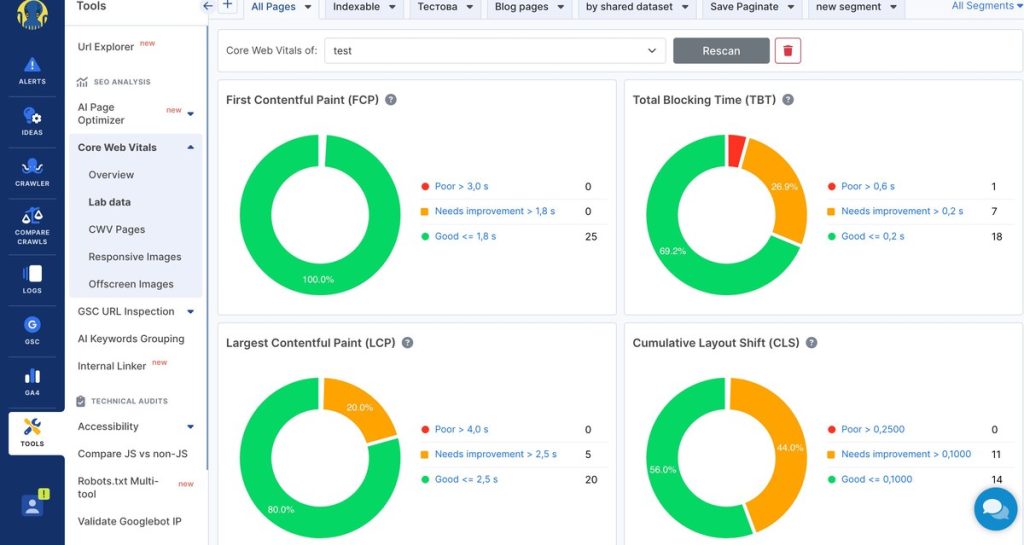
When connected to Google Search Console, it overlays real-user CrUX field data alongside lab results in a single view. Segment by folder or page type to isolate underperforming groups instantly, then kick off deeper PageSpeed analysis on the filtered set. Set automated CWV alerts to catch score drops before they compound into ranking losses.

Your next move: Review GSC’s Core Web Vitals report for the full list of failing pages, then validate the worst offenders in PageSpeed Insights for specific recommendations. But don’t just work the list top to bottom – there’s no fixed order that’s right for every site. Prioritize by return on effort: the fix that moves the most traffic for the least work goes first. That’s a judgment call the SEO makes from the data, not a template.
Two questions settle most of it: how many pages (or sessions) does the fix actually touch and how much work is it? A change to a shared template or a single render-blocking resource cascades across every page that uses it, so one fix can lift thousands of URLs at once – worth doing first. A fix repeated page by page rarely earns priority unless those pages are revenue drivers.
The same flagged “issue” can be a top priority or safe to ignore depending on context:
- Oversized images on an image-heavy template – high impact, low effort. Full-resolution JPEGs on product or article pages can be converted to WebP/AVIF and correctly sized in bulk (a script, a CDN setting or an image plugin), dropping LCP across the whole template at once.
- Three large images on a 10K-page site – skip it. PageSpeed may flag them, but they touch a rounding-error share of traffic; the time won’t move your field data.
- A render-blocking script or web font in the global header – high leverage. One change slows the LCP of every page, so fixing it often beats dozens of page-level tweaks combined.
Finally, cross-check Google Analytics’ site-speed reports for pages that underperform by browser or device – those point to render-blocking or unoptimized assets lab tests miss and show where real users actually feel the slowness so you can weight the list accordingly.
At this point, consolidate your findings. Confirm that your crawl, server logs, internal links, duplicate content and page-speed issues are all logged before moving into AI visibility.
5. Audit for AI Search Visibility
AI bots now account for a large and growing share of automated crawl activity. Vercel’s network analysis found that GPTBot, Claude, AppleBot and PerplexityBot combined generated close to 1.3 billion fetches in a single month – roughly 28% of Googlebot’s volume. And the demand side is moving just as fast: Gartner projects traditional search volume will drop 25% by 2026 as users shift to AI chatbots and multiple analysts (Gartner, McKinsey, Semrush) converge on 2028 as the window when AI-driven search begins rivaling traditional organic as a traffic source. Understanding how visible you are in these experiences is no longer optional.
An AI visibility audit gives you a precise, repeatable framework for understanding how your brand is found. It identifies exactly where your content breaks down for AI systems: whether crawlers can reach it, whether they can parse it and whether the structure is clean enough to cite. For the strategic side, how to actively shape your site for these systems, see our playbook on optimizing for AI crawlers.
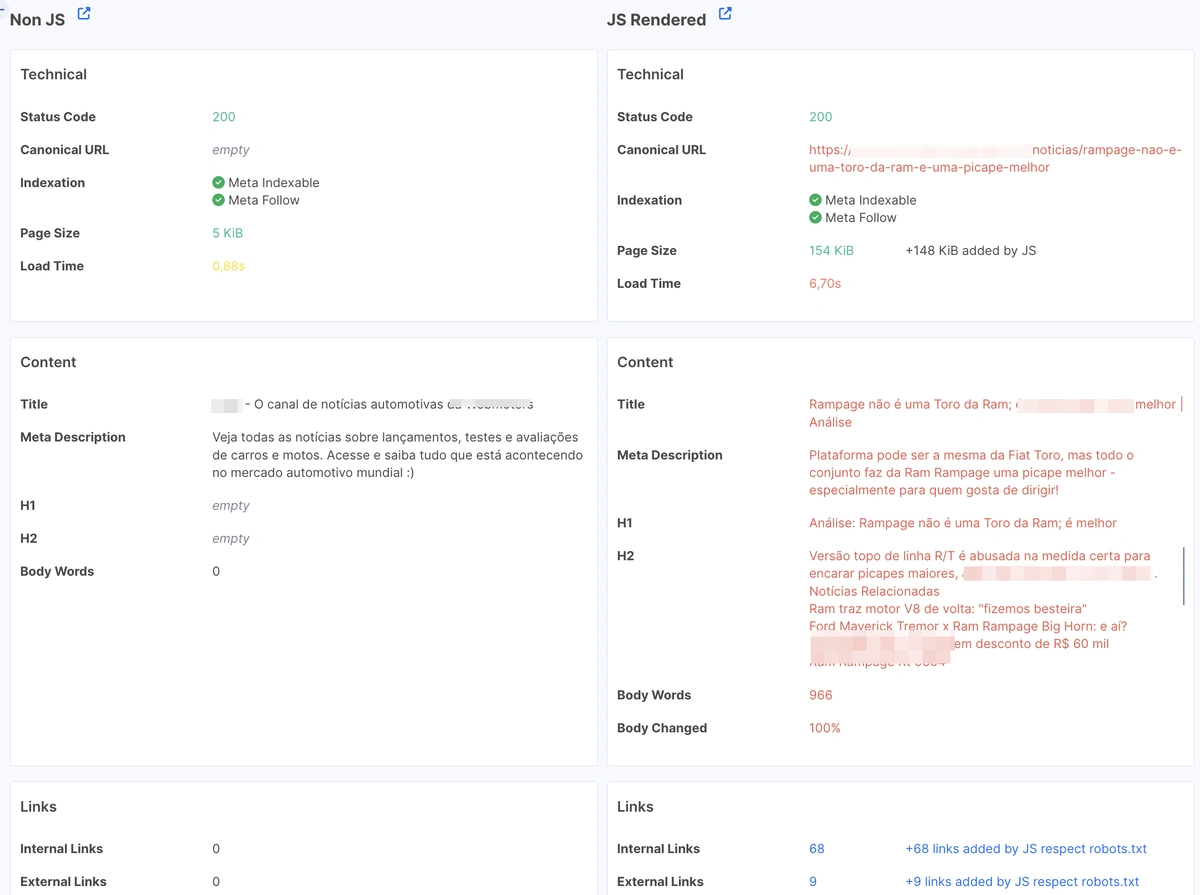
1. Start with your server-rendered HTML. This is the single highest-impact check in the AI audit and the evidence behind it is now conclusive rather than anecdotal. A joint Vercel and MERJ analysis of over 500 million GPTBot fetches found zero evidence of JavaScript execution: even when GPTBot downloaded JavaScript files (about 11.5% of the time), it never ran them. The same held for ClaudeBot, PerplexityBot and the other major AI crawlers; the only real exception is Google’s Gemini, which inherits Googlebot’s rendering infrastructure.
The practical consequence is blunt: a page can rank #1 in Google and be completely invisible to ChatGPT, Claude and Perplexity at the same time, because those crawlers see only what’s in the raw HTML.
So audit which critical elements are present at the server level: titles, H1–H3s, FAQs, internal links, canonical tags and structured data. Use JetOctopus to compare JS-rendered pages against their raw HTML and surface the gaps that are actively costing you AI visibility. Open the Compare JS vs non-JS report after a JavaScript crawl to see rendered output next to raw HTML, then drill into any URL in Data Tables to confirm exactly which elements are missing server-side.
2. Validate your structured data. Schema is how you hand machines an unambiguous description of your content. Broken or missing markup costs you rich results in Google and makes your pages harder for AI systems to interpret and attribute. Confirm that Article, FAQPage, Product, Breadcrumb and Organization schema are present, valid and consistent with the visible content. Validate against the Rich Results Test and Schema.org definitions and check that author, datePublished and dateModified are populated – provenance signals matter for citation.
In JetOctopus, the built-in Structured Data report scans every crawled page for schema types and markup errors at scale and Custom Extraction lets you confirm specific properties like dateModified or author across the whole site.
3. Audit page speed for AI bots specifically. The AI user-agents that determine what actually surfaces in answers strongly favor fast pages. As a working set of thresholds to test against: TTFB under ~600 ms, HTML payload under ~1 MB, full server response under a few seconds. JetOctopus identifies slow pages for AI crawlers directly from log data, so you can prioritize fixes by real bot impact rather than guesswork.
You’ll find this in the Bots Dynamics dashboard, which tracks HTML load time per bot so you can isolate slowdowns for AI user-agents instead of averaging them into Googlebot.
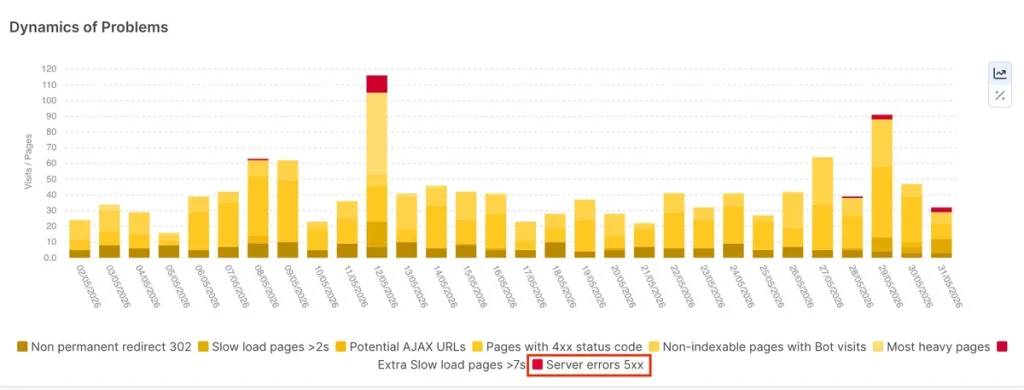
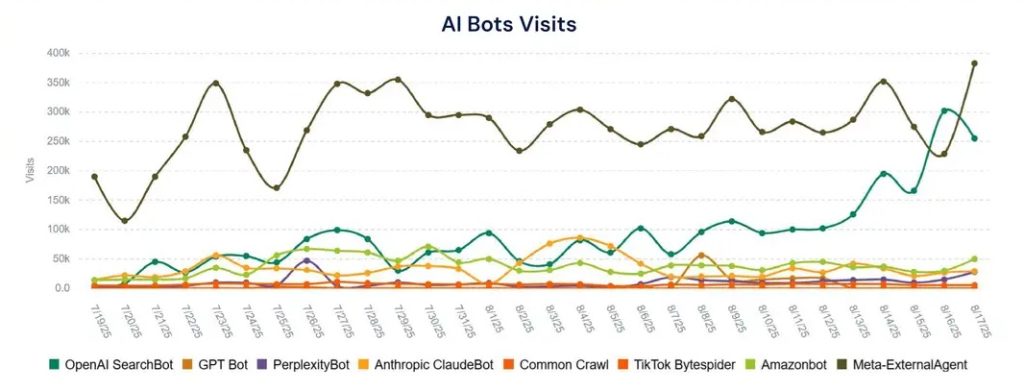
4. Pull your AI coverage ratio and bot activity from server logs. Track which platforms are hitting your site, which URLs they reach and what response codes they get back. JetOctopus surfaces all of it in one interface: AI visits by platform, non-indexable pages being crawled, 5xx error patterns and hallucinated URLs – 404s generated by AI bots constructing incorrect paths, which are direct signals of content gaps and redirect opportunities. This last pattern is more common than most teams expect: Vercel/MERJ data shows ChatGPT and Claude spend over 34% of their fetches hitting 404 pages, versus about 8% for Googlebot – a sign their crawl infrastructure is still maturing and a concrete opportunity to recover misdirected bot traffic with the right redirects.
This lives in the AI Bots dashboard inside Log Analyzer: visits by platform (ChatGPT, Claude, Perplexity), status codes and hallucinated URLs in one view. Reverse-DNS verification separates real AI crawlers from scrapers spoofing them, so the coverage ratio you report is trustworthy.
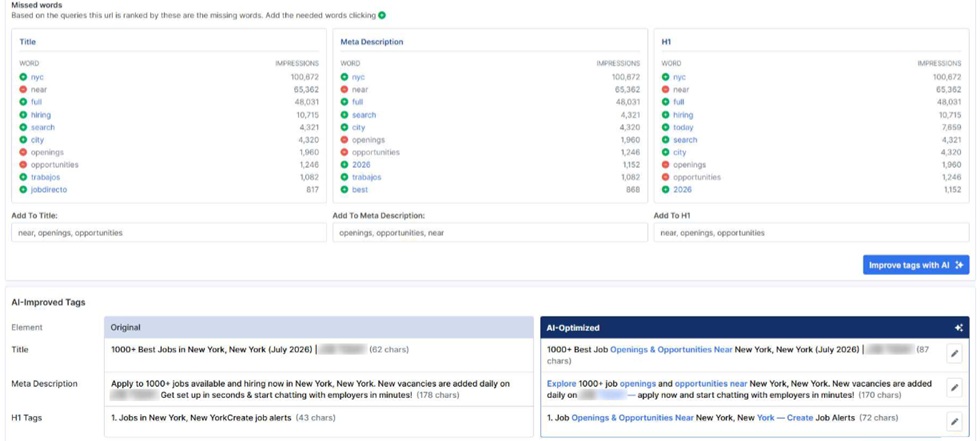
5. Audit content relevance and freshness. Content quality determines whether pages get cited. Check that titles, meta descriptions and H1s contain the terms your pages already rank for; JetOctopus’ AI Page Optimizer flags missing terms and lets you update tags across large page sets at scale. Then check freshness: stale content tends to surface less in AI-generated answers, so keep dateModified honest and refresh cornerstone pages on a schedule. Finally, review internal anchor text, since AI bots use anchors to decide whether to follow a link, so vague anchors like “read more” give no crawl signal and break the discovery path.
The AI Page Optimizer is where you flag missing terms and bulk-update tags; pull dateModified via Custom Extraction to find stale cornerstone pages and use the AI Internal Linker to fix weak anchors at scale.
6. Fan-out queries, the longer, more specific questions AI interfaces generate to research a topic, reveal exactly what users are trying to understand: their questions, pain points and competitor comparisons. JetOctopus maps query fan-out data against the pages receiving it, so you can fold those topics directly into FAQ sections and body copy. Growing fan-out with flat organic signals AI visibility outpacing traditional search. Branded fan-out indicates genuine brand awareness building through AI, one of the strongest signals your content strategy is registering at the AI layer.
Connect the GSC API (this bypasses GSC’s 1,000-row UI limit) and use JetOctopus’s Query Fan-Out detection to map fan-out queries to the pages receiving them. Watch for Zombie pages, URLs getting AI-bot hits in your logs but zero GSC impressions; each one is a citation you’re losing.
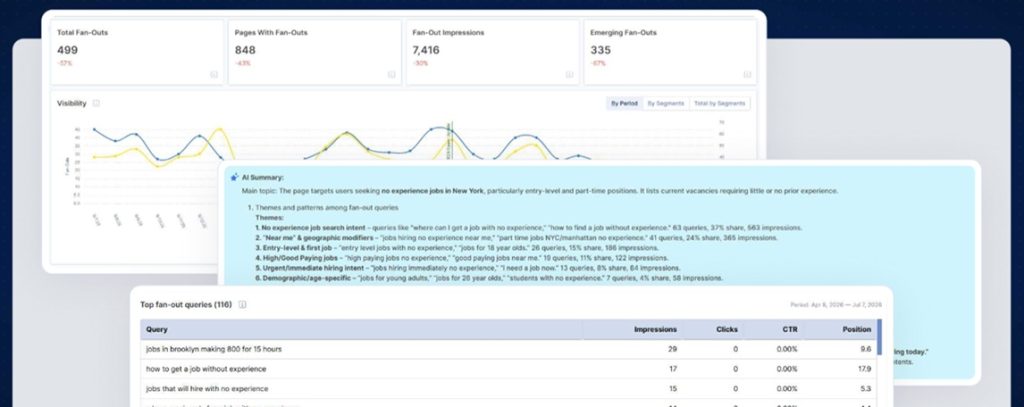
With all five layers audited, you get a full-stack diagnostic: every structural vulnerability mapped, every crawl signal traced to its source and every AI visibility gap tied to a specific, fixable cause.
Technical SEO Audit Checklist
A condensed version of the workflow above, in the order you should run it:
Layer 1 – Crawl
- [ ] Full crawl completed; response headers, depth and rendering captured
- [ ] Broken links, redirect chains and canonical conflicts logged
- [ ] Crawl data merged with server logs to map real bot behavior
- [ ] Crawl-budget waste identified (low-value pages consuming resources)
Layer 2 – Indexing
- [ ] robots.txt blocks only what it should; render assets accessible
- [ ] XML sitemap is complete, 200-only and split logically for large sites
- [ ] GSC index coverage reconciled against crawled and impression-earning pages
- [ ] noindex not accidentally applied at template level
- [ ] Duplicate content clustered and given the correct canonical / noindex signal
- [ ] Canonicals self-referencing by default; cross-URL canonicals only for true duplicates
Layer 3 – Architecture & Internal Links
- [ ] No important page more than 3 clicks from the homepage
- [ ] Pages with fewer than 10 internal links flagged
- [ ] Orphan pages integrated or redirected
- [ ] Links into non-indexable / robots-blocked pages removed
- [ ] Anchor text reviewed for descriptiveness
Layer 4 – Performance
- [ ] LCP, INP, CLS pulled in bulk; lab and CrUX field data compared
- [ ] Failing pages segmented by template and prioritized by traffic
- [ ] CWV alerts configured
Layer 5 – AI Visibility
- [ ] Critical elements present in raw server-rendered HTML
- [ ] Structured data valid, with author and dates populated
- [ ] AI bot speed thresholds checked from log data
- [ ] AI coverage, hallucinated URLs and 5xx patterns pulled from logs
- [ ] Content freshness and anchor text reviewed
- [ ] Query fan-outs mapped to pages and folded into content
Conclusion: Turn Technical Audits into Predictable Systems
Every crawl you run, every canonical you validate, every internal-linking gap you fix is an investment in the structural integrity of your site and in the ability of both search and AI bots to find, parse and trust what you’ve built. That’s why a solid technical SEO audit checklist matters and why the layers in this guide are ordered the way they are.
Each layer is built on the one before it. Crawl efficiency determines what gets indexed. Indexation determines what gets ranked. Page speed and content structure determine what gets cited in AI-generated answers. And query fan-out analysis shows whether your content surfaces across the full range of related searches people actually make.
JetOctopus brings crawl data, server logs, schema checks, AI bot behavior, Core Web Vitals and internal-linking insights into one unified, prioritized workflow: a complete picture of site health and a clear, ordered path of action.
The technical foundation you build today is what determines whether AI systems trust your site enough to cite it tomorrow. Audit with that standard in mind, fix what blocks access and keep the structure clean enough that both Googlebot and AI crawlers can move toward the pages that matter most.
FAQ
How long does a technical SEO audit take?
For a small or mid-sized site, a focused audit runs from a few hours to a couple of days. For an enterprise site with millions of URLs, the crawl and log analysis alone can run for days and interpreting the results across all five layers is an ongoing process rather than a one-off, which is why large sites move to scheduled, comparative audits.
What’s the difference between a technical SEO audit and a site crawl?
A crawl is one input. The audit is the full diagnostic: it combines the crawl with server logs, Google Search Console data, Core Web Vitals and AI bot behavior, then prioritizes what to fix and in what order. A crawl tells you what exists; the audit tells you what’s costing you visibility.
How often should you audit a large website?
Monthly or quarterly, plus an immediate audit after any migration, redesign, template change or sharp traffic drop. High content velocity is the real trigger: the faster a site changes, the faster technical debt accumulates.
Do AI crawlers change how you should audit?
Yes. Most AI bots don’t render JavaScript (a Vercel/MERJ study of 500M+ GPTBot fetches zero JavaScript execution) so anything that depends on client-side rendering can be invisible to them even when it ranks perfectly in Google. You need to audit your raw server-rendered HTML, your structured data, your AI bot coverage in the logs and your query fan-outs, none of which a traditional crawl-only audit surfaces.
Can you run a technical SEO audit for free?
You can start with free tools: Google Search Console, PageSpeed Insights, the Rich Results Test and JetOctopus’ free JS SEO tool and robots.txt multi-tool. Full-scale crawling, log analysis and bulk CWV testing across large sites need a dedicated crawler.