Researching a competitor starts with crawling their site and on sites with basic anti-scraping protection a default crawl often stops partway through. JetOctopus handles this with a dedicated Stealth crawl mode and joins what it finds with Ahrefs data and your own Search Console, GA4 and log data.
This guide shows how JetOctopus, a cloud-based technical SEO platform built for large websites, e-commerce catalogs and the agencies that manage them, covers each part of competitive analysis.
TL;DR
- Stealth crawl is a JetOctopus crawl mode for competitor sites with anti-scraping protection: it crawls slower with a less aggressive request pattern, so rate limits and simple bot detection are less likely to cut the crawl short.
- A crawl needs only public pages, which is why you can crawl any competitor and get their structure, page types, templates, index volume, internal linking and technical setup.
- Ahrefs backlink and keyword metrics and custom extraction work on competitor crawls, so link and keyword data sits next to each competitor page.
- Your own site adds Search Console, server logs and GA4 on top, which gives you demand data to prioritize every gap.
Here is how each part of competitive analysis maps to JetOctopus:
| Part of competitive analysis | How JetOctopus covers it | Section of this guide |
|---|---|---|
| Researching direct and indirect competitors | Stealth crawl of competitor domains, one project per competitor | Stealth crawl, differences from your own crawl, setup |
| Content | Competitor crawls compared with your own: sections, page types, templates, depth, index volume, custom extraction | Content and structure |
| Keywords and rankings | GSC integration for your queries, Ahrefs keyword and traffic metrics on competitor URLs | Keywords and rankings |
| Domain authority | Internal linking scheme and anchors from the crawl, backlink and referring domain data from Ahrefs | Domain authority |
| Backlinks | Ahrefs integration on your and competitor crawls, custom data import, joined per URL | Backlinks |
| Opportunities to improve rankings and traffic | Gap analysis across all layers, Internal Linker for execution, GSC and GA4 for prioritization and measurement | Opportunities |
What Is Stealth Crawl and How Does It Work?
Stealth is a crawl mode you select before launch, next to Default, URL list, Only Sitemap and Staging. It is built for crawling websites with anti-scraping measures and its mechanism is pace: the crawler sends requests more slowly and less aggressively than in Default mode, so the traffic stays under the rate limits and bot detection thresholds that stop ordinary crawls halfway.
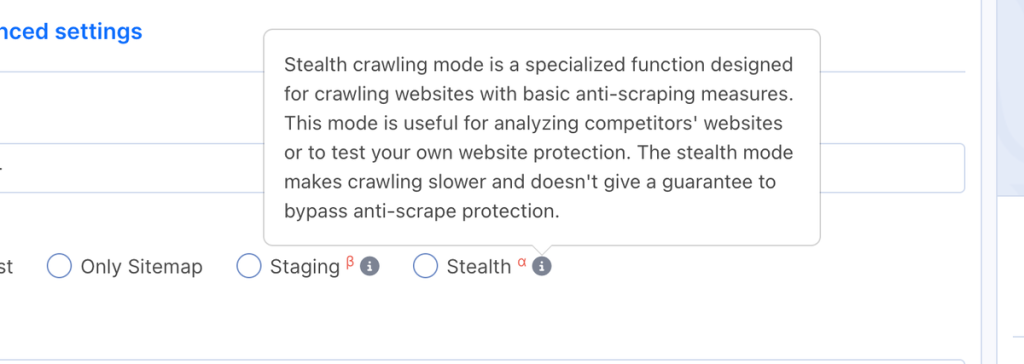
The Stealth mode description in the JetOctopus crawl settings. (Screenshot from the JetOctopus platform)
Stealth crawls take longer, so a site with millions of URLs is a job for several days. The mode is in alpha (α) and does not guarantee a way past anti-scraping protection: sites with machine learning bot scoring, JavaScript challenges or TLS fingerprinting can still block it.
How Is a Competitor Crawl Different From Crawling Your Own Site?
A crawler works with public HTML, the same material Googlebot sees, so it needs nothing from a competitor beyond their URLs. Search Console, server logs and GA4 are extra data layers that JetOctopus joins with the crawl for sites you manage. For a competitor, the crawl is the core dataset and Ahrefs data and custom extraction attach to it URL by URL.
| Dimension | Your own site | Competitor site |
|---|---|---|
| Crawl mode | Default, speed tuned with threads | Stealth, slower by design |
| Goal | Find and fix technical issues | Understand structure, templates and priorities |
| Scope | The full site | The sections you compete in |
| Data joined with the crawl | Server logs, GSC, GA4, Ahrefs, custom extraction, custom imports | Ahrefs, custom extraction, custom imports |
| Main risk | Missed issues in unmonitored sections | A crawl cut short by bot protection |
The last row changes how you read results. On your own site, a 403 is a bug. On a competitor’s site, a wave of 429, 403 or 503 responses that starts after a certain number of URLs usually means the protection kicked in and everything after that point is missing, while the report still looks complete. NGINX, one of the most common web servers, returns 503 by default when a client exceeds its rate limit, so 503s on a site that works fine in your browser are usually a rate limit in disguise.
How to Set Up a Stealth Crawl and What to Check First
Most setup decisions are about scope. Stealth is slower by design, so every URL you let into the crawl costs time.
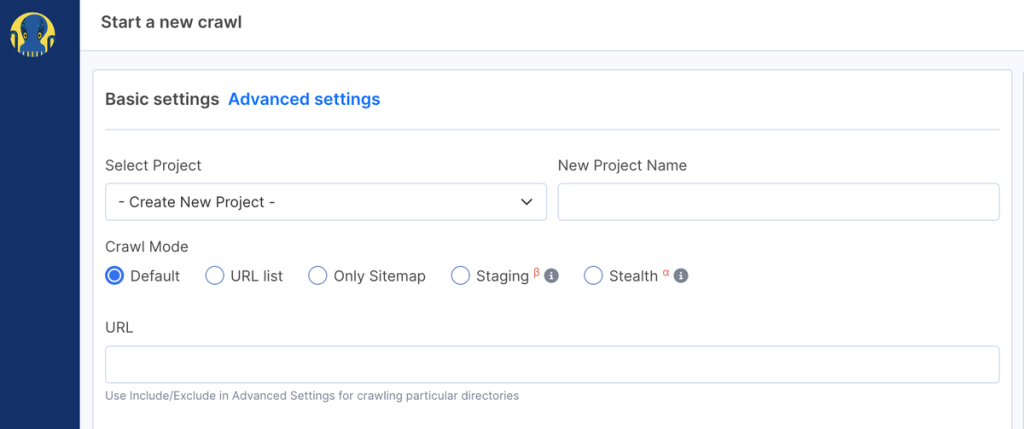
Crawl mode selection on the Basic settings screen. (Screenshot from the JetOctopus platform)
- Pick competitors: direct ones sell what you sell, indirect ones take the same queries with a different model, such as marketplaces, media or comparison sites. Take your top Search Console queries, note who ranks above you and create one project per competitor, since Compare crawls works only within one project.
- Select Stealth and scope the crawl: pick Stealth in Crawl Mode, start from the root of the section you compete in and keep the crawler there with Allow Pattern and Deny Pattern rules in Advanced settings (plain paths or regex prefixed with rx:).
- Set rendering, extraction and location: turn on Execute JavaScript for client-side sites (each rendered page counts as two against your limits), add Custom extraction rules and set the crawler location to your target market.
- Check coverage: compare crawled with discovered URLs and look for 429, 403 or 503 clusters at the end of the crawl, a sign that protection cut it short and the rest of the site is missing.
- Read the crawl in this order: index volume and the exclusion mechanism, structure and DFI (distance from index), templates and content depth, then internal linking.
Content and Structure: How Your Site Compares to Competitors
JetOctopus crawls your site and the competitor’s site with the same engine, so the fields, thresholds and definitions of indexability and depth match on both sides. Identical URL segments in both projects (built by URL rules or regex) let you compare category with category and product page with product page.
A competitor crawl returns these layers, each directly comparable with your own crawl:
| Layer | What the crawl returns | What it tells you |
|---|---|---|
| Structure | Pages per section and page type, DFI (clicks from the homepage) | Where the competitor invests and how deep key pages sit |
| Index volume | Indexable and non-indexable pages, split by noindex, canonicals, redirects and robots rules | Their real index versus noise |
| Templates | Duplicate title, meta description, headings and on-page content | Which page types are generated from templates and which scaled issues they have |
| Content depth | Word count and uniqueness by page type | How much unique content each page type carries and how much depends on client-side rendering |
| Technical implementation | Status codes, redirect chains, load time, page size and raw HTML against the rendered page | The technical level you need to match or beat, plus which content and links exist only after JavaScript runs |
| International setup | hreflang coverage by section | How they handle language and country versions |
| Keyword cannibalization | Duplicate titles and headings within a page type, plus Ahrefs keywords repeating across their URLs | Where their pages compete with each other, and where yours do the same |
| Internal linking | In links per URL, anchor text and link distribution across sections | Which pages they push hardest and which queries their anchors target |
With your numbers next to theirs, the gaps become specific. A section where the competitor has 3,000 indexable category pages and you have 300 is a content program you have not built yet. A page type where their titles and H1s carry query terms while yours do not is a template gap.
Custom extraction and page blocks work on competitor crawls too and add what a standard crawl does not store. Up to 50 CSS or regex rules per crawl pull prices, stock status, review counts, products per category, publication dates or authors into new columns, so you can compare how the two sites fill the same page type.
A monthly re-crawl in the same project, read through the “New Pages”, “Dropped out Pages” and “Exists in Both Crawls” tables of Compare crawls, shows new URL patterns, pruned sections and noindex rollouts as they happen.
Keywords and Rankings: Where Search Console and Ahrefs Data Fit In
Search Console data exists only for verified properties, a Google restriction that applies to every tool. JetOctopus uses GSC for your side of the comparison and Ahrefs for the competitor’s side and both land on crawled URLs.
On your side, the GSC integration pulls the maximum data available from the GSC API, beyond the 1,000-row limit of the Google interface and Google’s 16-month history. It merges properties, detects query fan-outs and includes Rankings, New & Lost, Cannibalization, Keyword Groups, Countries and Subfolders reports. Query on Page checks whether the queries a page gets impressions for appear in its title, meta description and H1.
On the competitor’s side, the Ahrefs integration maps keyword and traffic metrics onto the competitor’s crawled URLs, next to each page’s template, depth and internal links. Other keyword exports can be uploaded through My Data as a CSV with a URL key.
The join is what makes the comparison actionable. For queries where you sit on positions 5 to 20, find the competitor page that ranks above you and compare title formula, content depth, internal links, load time and index treatment field by field.
Domain Authority: What Internal Linking Reveals About Priorities
For this part of the analysis the data comes from two places. External signals such as backlinks and referring domains per URL come through the Ahrefs integration and attach to the competitor’s crawled pages. The crawl adds the layer a competitor cannot hide: how the site distributes attention through internal links and anchors.
- Linking Explorer: enter one URL or a mask like https://www.competitor.com/category/* to see In Links Anchors, In Links Image Alt, nofollow links and Distribution by Directories, which shows the sections that link to the page most.
- Internal Links, Text Analysis: the ratio of unique, empty and similar anchors across the site and the average anchor length in words.
- Links overview: the “Links count on page by depth” chart and the distribution of pages by number of incoming internal links.
Backlinks: What JetOctopus Covers Through Integrations
Backlink data comes into JetOctopus through integrations. The Ahrefs integration maps backlinks and referring domains onto every crawled URL, including competitor crawls and any other link dataset can be uploaded through My Data with URLs as the join key.
The value is in the join. If a competitor page has 400 referring domains, the same row shows that it sits three clicks deep, uses a templated title and links out to 120 URLs. Across a crawl, that tells you which page types attract their links and how the authority moves through the site.
Opportunities: Turning Competitor Data Into an Action Plan
Because crawl, GSC, GA4, logs and Ahrefs data share tables keyed by URL, opportunities come out as filtered lists rather than manual comparisons across exports:
| Opportunity | Where it comes from | What you do |
|---|---|---|
| Content gaps | Sections and page types where the competitor has far more indexable pages or Ahrefs shows more ranking keywords | Build the missing categories, hubs or articles |
| Template gaps | Competitor title and H1 formulas compared with your Query on Page data | Rewrite templates so they carry the queries you get impressions for |
| Near-miss rankings | GSC queries on positions 5 to 20 where a competitor page ranks above you | Close the field-by-field gap with that page |
| Internal linking gaps | Your pages with impressions but few inlinks, compared with the competitor’s scheme | Add links with the free Internal Linker |
| Link gaps | Competitor page types with strong referring domain counts that you do not have | Plan content and outreach for those page types |
| Index and technical gaps | Competitor index policy, load times and depth compared with yours | Fix index bloat, slow templates and deep pages |
Prioritize with your own data: GSC impressions show demand, GA4 shows organic traffic and conversions by page and logs show whether Googlebot visits the pages you plan to improve. After the changes ship, the GSC New & Lost and Metrics Dynamics reports track rankings and clicks and the next competitor crawl shows how they reacted.
Every report in this guide runs on a crawl you can start yourself. Choose Stealth in Crawl Mode, point it at one competitor section and read their structure, templates and internal links with the same fields you already use on your own site.