Your product team launches a new app. Users click from category to product to comparison without a single page reload, and everyone agrees it feels fast. Then someone checks Google Search Console and finds 12 indexed URLs for a catalog of 40,000 items. The app works. For crawlers, most of it simply does not exist.
That gap is what single page application SEO is about. An SPA can rank as well as any other site when every view behaves like a page for crawlers: its own URL, its own HTML response, its own status code and its own metadata. Most SPA SEO problems come from views that exist only for users. This guide covers the problems every SPA shares regardless of framework, how to fix each one and how to verify the result with a JavaScript SEO crawler and your server logs.
TL;DR
- An SPA is indexable when every view a user can reach has its own URL, its own HTML response, its own status code and its own metadata.
- Google can render JavaScript, while GPTBot, ClaudeBot and PerplexityBot do not run it, so content that exists only after rendering is invisible to major AI crawlers.
- The most common SPA failures are views without URLs, navigation without <a href> links, a 200 status on every route and metadata that never changes between views.
- Server-side rendering, prerendering or hybrid rendering solve the empty-shell problem by putting content into the first response.
- Releases can break routing, rendering or metadata without any visible error for users, so SPA indexability needs ongoing checks in crawls and logs.
What Is a Single Page Application (and What It Isn’t)
A single page application is a JavaScript app that loads one HTML document and then changes what the user sees by rewriting the page in the browser. Navigation between views happens through client-side routing: JavaScript swaps components and updates the address bar without asking the server for a new page. React, Vue and Angular apps built without a server layer are typical examples, and React SEO and Angular SEO each have their own framework-specific issues.
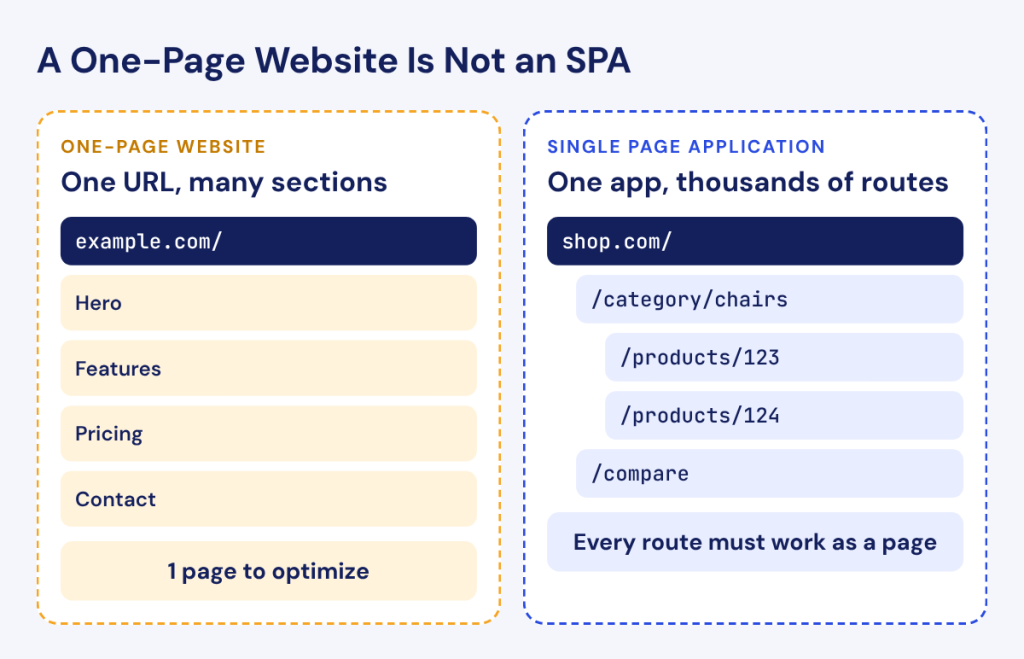
An SPA is a different thing from a one-page website. A one-page website puts all its content under a single URL, usually a landing page with sections you scroll through. An SPA can have thousands of routes, such as categories, products and articles, each meant to be a separate page. The two get mixed up constantly, and the advice for them is opposite: a one-page website has one URL to optimize, while an SPA needs every route to work as a page of its own.
Is a Single Page Application Good for SEO?
A single page application is not good for SEO by default, but the architecture itself is not the problem. The problems come from implementation choices that leave crawlers with less than users get.
Google can render JavaScript, so a well-built SPA can be indexed. Rendering is a separate step after crawling, though, and how Googlebot renders JavaScript has its own limits and delays. AI crawlers are a harder case. Research by Vercel and MERJ published in December 2024 found that GPTBot, Claude’s crawler and PerplexityBot do not execute JavaScript. A client-rendered view that is perfectly indexable in Google can be blank for every AI assistant that might cite it, which our AI crawlability guide covers in detail.
On a large site, the delay matters as much as the limits. Every rendered page costs Google more resources than a plain HTML page, and a catalog with hundreds of thousands of client-rendered URLs competes for those resources with every other site. New products and updated prices can take noticeably longer to appear in search when they exist only after rendering.
SPA SEO Problems That Stop Pages From Being Indexed
Most SPA indexing problems trace back to five causes. This section describes the symptoms; the fixes follow in the next section.
Views Without Their Own URL
If moving between views changes nothing in the address bar, or only changes the part after a #, crawlers see one page where users see many. Hash fragments such as /#/products/123 are ignored by search engines when deciding what a separate page is, and views that exist only as app state, for example a product panel opened from a list, have no address at all. You can spot this in Search Console when indexed pages are a tiny fraction of what users can reach.
Links Crawlers Can’t Follow
Many SPAs build navigation from buttons and click handlers: a <div> or <button> that calls the router when clicked. Users never notice the difference. Googlebot does not click, so it never discovers the pages behind those elements. Google states that it can only discover links that are <a> elements with an href attribute, and the same rule applies across your internal links. A section reachable only through click handlers becomes a set of orphan pages.
Navigation built with window.location in a click handler has the same problem. The page changes for users, but there is no href in the markup for a crawler to read. Menus, breadcrumbs, pagination and product cards are the places where this pattern hides most often.
Every Route Returns 200
In a client-rendered SPA, the server usually answers every path with the same app shell and a 200 status, then lets JavaScript decide what to show. A URL for a deleted product or a mistyped path returns 200 and renders a “not found” message inside the app. Google treats these as soft 404s, which waste crawl and can leave dead URLs indexed.
In Search Console, this usually shows up as a growing number of URLs under the soft 404 reason in the Page indexing report, or as obviously dead URLs that stay indexed for months. Requesting a few nonexistent paths on your own site with a crawler is the fastest way to confirm it.
Metadata That Doesn’t Change Between Views
The shell’s index.html carries one title, one meta description and sometimes one canonical. If the app does not change them on each route, every view shares the same values. If it changes them only in the browser after rendering, crawlers that do not run JavaScript keep seeing the defaults, and even Googlebot sees the right values only when rendering succeeds. A product page whose canonical points to the homepage is a common result.
Structured data has the same weakness. Product, article or breadcrumb markup injected only on the client depends on rendering to be seen at all, and markup copied into the shell describes no page in particular. Generate it per route on the server along with the rest of the metadata.
Stale JavaScript in Google’s Cache
Googlebot caches JavaScript and CSS aggressively and may ignore your caching headers. After a release, it can render a new page with an old bundle and index outdated content or broken layouts. Google’s documentation on JavaScript SEO basics recommends content fingerprinting to avoid this:
“Content fingerprinting avoids this problem by making a fingerprint of the content part of the filename.”
In practice, that means file names such as main.2bb85551.js that change whenever the content of the file changes, so Google has to fetch the new version.
The same logic applies to the data your views request. If API responses are cached for a long time on a CDN, a crawler can render a fresh bundle with stale data and index prices or stock that no longer exist. Keep cache lifetimes for indexable content short or purge them on update.
How to Optimize an SPA for SEO
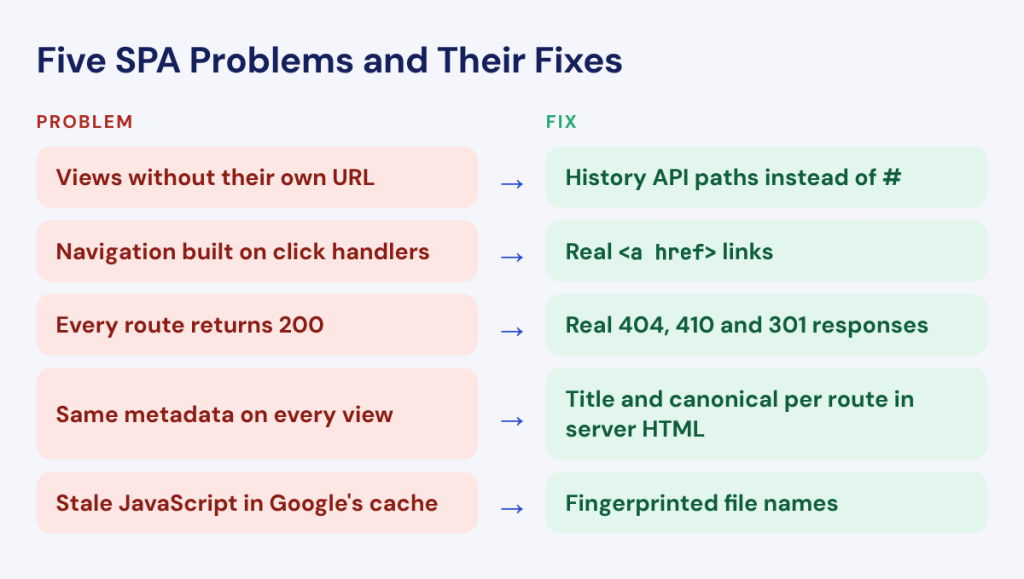
Each fix below maps to one of the problems above. Together they turn views into pages a crawler can find, read and index.
Give Every Indexable View a Real URL
Use the History API (pushState) for routing so every view gets a clean path such as /products/123 rather than a hash fragment. Google’s guidance is to use the History API to implement routing between views and not to use fragments to load different page content.
Then make every navigation element a real <a href=”/path”> link. Your router can still intercept the click for a smooth transition, but the link exists in the markup for crawlers to follow. Finally, list indexable routes in an XML sitemap so discovery does not depend on navigation alone, especially for deep pages such as individual products.
Filters and sorting need a decision of their own. A faceted category can generate thousands of parameter combinations, and giving each one a crawlable link can waste crawl on near-duplicate pages. Choose which filtered views deserve their own indexable URL, such as a brand or a main attribute, and keep the rest behind parameters with a canonical to the main category. The router should treat both cases consistently so a crawler never lands on a filtered URL that renders the wrong products.
Serve Content in the First Response
The most reliable fix for an SPA is to stop sending an empty shell. Server-side rendering generates the full HTML of each route on request, prerendering or static generation builds it ahead of time, and hybrid rendering lets you choose per route. In all three cases, crawlers get content, metadata and links in the first response, and the app hydrates in the browser to stay interactive. Our comparison of JavaScript rendering for SEO covers when each approach fits.
If a full move to SSR is not possible yet, start with the templates that carry organic traffic: categories, products and articles. Account pages and app-like tools can stay client-rendered.
Watch for hydration problems after the switch. When the HTML generated on the server and the HTML the browser builds do not match, many frameworks discard the server version and render again on the client. Users rarely notice, but the content crawlers received may differ from what users see. Hydration warnings in the browser console are worth treating as SEO bugs on indexable templates.
Return Real Status Codes
With server-side rendering, the server knows whether a route exists and can return a real 404 or 410 for missing pages and a 301 for moved ones. That is the cleanest solution.
For apps that stay client-rendered, Google documents two options. You can use a JavaScript redirect to a URL for which the server responds with a 404 status code, or you can add a <meta name=”robots” content=”noindex”> tag to error views with JavaScript. Either way, a route that does not exist should stop looking like a valid page.
Update Title, Meta and Canonical on Every Route
Every indexable route needs its own title, meta description and canonical, and those values should be present in the server HTML, with JavaScript only keeping them in sync during in-app navigation. Frameworks provide head management for this, and with SSR the correct values are rendered on the server for each URL. Check self-referencing canonicals carefully: a canonical set once in the shell and never updated is one of the fastest ways to collapse an SPA into a single indexed page.
Keep Content Reachable Without Interaction
Crawlers do not click tabs, press “load more” or scroll the way users do. Content hidden behind interaction may never be rendered for them. Put important text in the initial render rather than behind a tab click, give paginated lists real paginated URLs alongside any “load more” button and make sure infinite scroll loads content into pages a crawler can request directly. Infinite scroll and lazy loading deserve a guide of their own, and the principle stays the same: if content matters for search, a crawler must reach it without interacting.
Find Content Changed by JavaScript
How a Crawler Sees an SPA
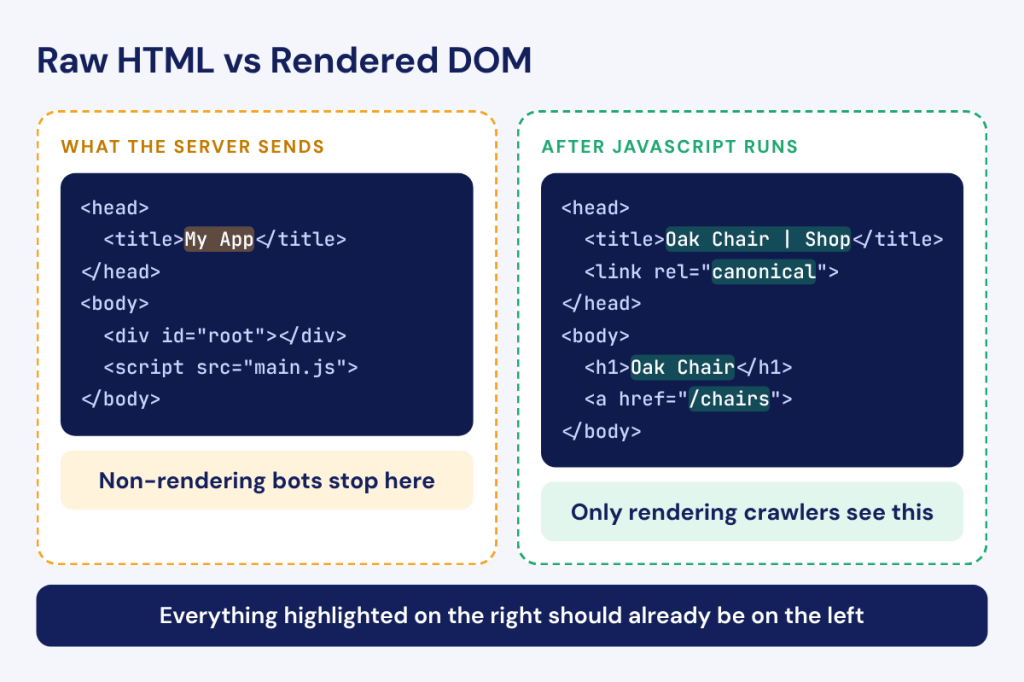
A crawler without JavaScript rendering reads the raw HTML the server returns: for a client-rendered SPA, the shell. A crawler with JavaScript rendering downloads the scripts, runs them in a headless browser and reads the DOM that results. An SPA audit needs both views, because the gap between them is where the SEO problems live. If the two match, crawlers that do not render get the same page as Google. If they differ, you need to know exactly what differs and on which templates.
Most real SPAs are mixed. The homepage and category pages may be server-rendered while filters, reviews or related products load on the client. Treat each template separately and decide which content must be in the server HTML. Product names, descriptions, prices and internal links usually belong there. Widgets that change for every visitor can stay client-side.
Crawling an SPA With and Without JavaScript Rendering
Run a crawl with JavaScript rendering and compare it with the raw HTML template by template: main content, titles, canonicals and meta robots. On a well-built SSR app, the raw and rendered versions should carry the same values. When a title or canonical appears only after rendering, the page depends on crawler-side JavaScript for something it should get from the server.
For a single URL, Compare JS vs non-JS in JetOctopus shows both versions side by side. Across the whole site, the Content change by JavaScript report lists every page where content, titles, meta descriptions, canonicals or meta robots change after rendering and flags pages where SSR is probably broken. That is usually the fastest route from “the app is not getting indexed” to a list of templates and fields to fix, and it pairs well with a full JavaScript SEO issues checklist.
Finding Failed and Blocked JavaScript Requests
An SPA view is only as complete as the requests it depends on. If an API call fails, times out or is blocked by robots.txt, the view renders without its content, and a crawler indexes a page with an empty product list or a missing description. Scripts that throw errors can stop rendering halfway with the same result.
The JavaScript requests report in JetOctopus shows load time and size of JavaScript requests across crawled pages, along with requests blocked by robots.txt. A blocked API endpoint that every product page calls shows up there as one pattern across thousands of URLs, which is far easier to act on than debugging pages one at a time.
Check load time, size and robots.txt blocks for every JavaScript request your crawled pages make.
How to Keep an SPA Indexable
Fixing an SPA once is the easier part. Keeping it indexable through releases is harder, because a deployment can break SSR, routing or metadata without any visible error for users. When SSR fails, many frameworks quietly fall back to client rendering: the browser fills in the content, the page looks fine and crawlers start receiving an incomplete version.
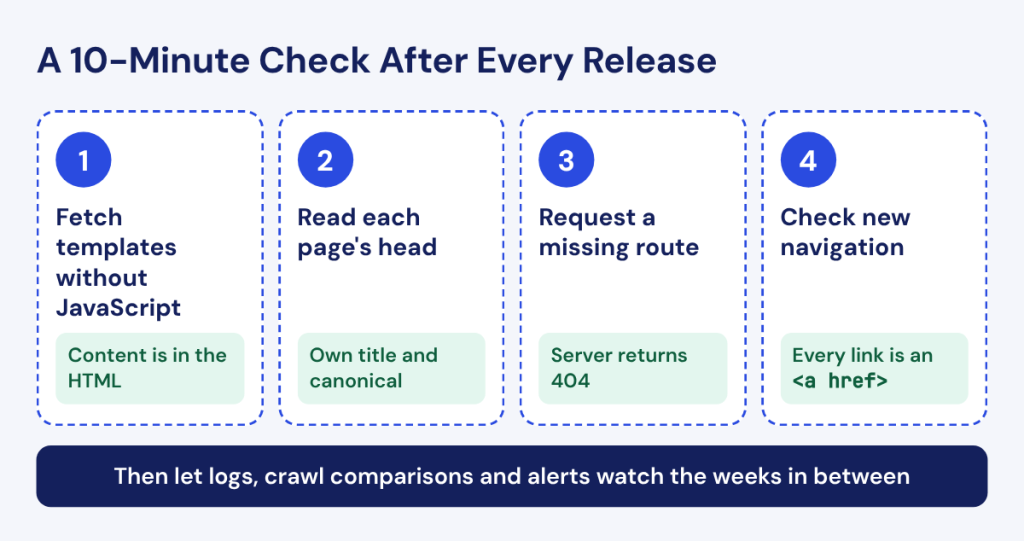
A short release checklist helps here. After each deployment, request a sample of key templates with a non-rendering client and confirm the HTML still carries the main content, the title and the canonical. Then check that a missing route still returns a 404 and that new navigation elements are still real links. Ten minutes of checks after a release costs far less than weeks of lost crawls that nobody notices until traffic drops.
Three checks catch this early:
- Logs: server logs show the HTML Googlebot actually received on every request. A template that normally returns full HTML and suddenly returns a fraction of its usual size is a template where rendering broke.
- Crawl comparisons: a scheduled crawl compared with the previous one shows new soft 404s, changed canonicals or missing content right after a release.
- Alerts: alerts on indexability, status codes and rendered content flag regressions before they reach Search Console data.
The Rendering Issues report in JetOctopus logs flags URLs where the HTML Googlebot received was much lighter than usual, with the number of broken days and the last broken date. That shows whether a problem lasted one bad deploy or has been costing you crawls for weeks.
FAQ
Should an SPA Be Rebuilt as a Multi-Page Application for SEO?
Usually there is no need. Adding server-side rendering or prerendering to the existing app gives each route full HTML, its own status code and metadata, which solves the core SEO problems. A rebuild makes sense only when the framework cannot support server rendering or the codebase needs replacing anyway.
Do Micro-Frontends Cause SEO Problems?
They can. When several independently deployed apps assemble a page in the browser, each fragment adds requests and failure points, and metadata or content may load late or not at all. Composing fragments on the server, or at least rendering critical content server-side, avoids most of the risk.
Do Progressive Web Apps (PWAs) Have Different SEO Requirements Than SPAs?
The requirements are the same. A PWA adds offline support and installability through a service worker and manifest, which do not change how crawlers index pages. If the PWA is built as an SPA, the same rules apply: real URLs, links, status codes and server-side content.
How Are Core Web Vitals Measured on SPA Route Changes?
Stable Core Web Vitals still count only the initial page load. On October 13, 2026, Chrome began publishing experimental soft navigation metrics in CrUX that measure in-app route changes separately, and it aims to move them out of experimental status in May 2027.
In practice, route changes still matter for users. If moving between views in your app feels slow or shifts the layout, the experimental data will show it before it starts to count, which gives you time to fix it.
How Should Hreflang and International URLs Work in an SPA?
Each language or regional version needs its own URL, such as a subfolder, rather than a language switch that only changes app state. Hreflang annotations should be in the server HTML or the XML sitemap so crawlers find them without rendering, and every version should reference all the others.