Tool consolidation in technical SEO rarely starts as a plan, because nobody designs a stack with seven logins. It grows one sensible purchase at a time: a desktop crawler for audits, a log tool when a client asks why Googlebot ignores half the catalog, a Search Console exporter once the 1,000-row limit gets in the way, then a monitoring add-on and a Core Web Vitals checker. Each decision made sense on the day it was signed, yet the stack still costs more than anyone budgeted.
So the useful question is what each separate tool costs you in subscriptions, in specialist hours and in data that never meets. This article stays inside technical SEO tooling, the category we map in our guide to technical SEO tools for agencies. Consolidation pays off on specific axes and only under specific conditions, so you will also see where a single platform is the wrong answer. If you run an agency, the SEO platform for marketing agencies page shows how the model works across a client portfolio.
TL;DR
- Tool consolidation pays off when several of your tools answer parts of the same question about a URL: whether it exists, whether bots visit it, whether it ranks and whether it earns traffic.
- Subscriptions are the most visible cost of a fragmented stack, while hours spent joining data and causes lost between tools usually weigh more.
- Crawling, log file analysis, extended Search Console data, monitoring and internal linking are the five technical jobs most often bought separately, and one platform can cover all five.
- The biggest gain comes from one URL-level dataset where crawl, logs, GSC and GA4 meet, because that is where the cause of a traffic drop becomes visible.
- Keyword research, backlink discovery and content optimization remain separate jobs, so consolidation narrows a stack without shrinking it to a single tool.
Why Technical SEO Stacks Grow by Accident
Technical SEO stacks grow by accident because each tool arrives to solve one problem at one moment.
Each renewal looks small in isolation, which is exactly why nobody audits the whole. Martech already takes nearly 22% of total marketing spend, according to Gartner, while its 2023 survey of 405 marketing leaders found that teams used just 33% of their martech stack’s capability.
So why are SEO tools so expensive when every one of them looks affordable on its own pricing page? Most of them price by seats, projects or domains, and an agency grows along exactly those axes.
The Real Cost of a Fragmented Technical Stack
A fragmented technical stack costs you in three layers. One of them shows up on invoices, while the other two hide in timesheets and in the decisions your team makes with half the data.
Subscriptions That Multiply With Every Client
Seat-, project- and domain-based pricing ties your bill to headcount and client count. A desktop crawler licence from Screaming Frog is sold per user, so two people need two licences. As of October 2026, Ahrefs adds extra users at $40 to $100 a month each depending on the plan and caps projects per tier, and Semrush charges for additional users starting at $45 a month. In an agency, every new hire and every new client pushes at least one of these meters.
A volume-based model ties the cost to the amount of data you analyze. JetOctopus gives every plan unlimited projects, users and domains, and the plan you pick depends on the number of crawled URLs and log lines per month. Adding a client adds pages to analyze, while the seats, logins and projects around that client cost nothing extra.
Before you compare vendors, compute one number for your own agency: tool cost per client per month. Add up every technical SEO subscription and add-on, convert annual licences to a monthly figure and divide by the number of active clients. Tracked for two quarters, it shows whether your stack scales with revenue or with headcount.
Hours Lost Between Tabs
The cost that never appears on an invoice is the time specialists spend moving data between tools: separate logins per client, CSV stitching, report formatting and routine checks run by hand on every site.
Context switching alone is expensive. In a Harvard Business Review study of 137 users across three Fortune 500 companies, workers toggled between apps roughly 1,200 times a day and spent just under four hours a week reorienting themselves, about 9% of their working time.
Vendor-published averages for SEO teams are hard to verify, so measure your own. For one week, ask two specialists to log time against four buckets:
- Exports and joins: pulling CSVs from different tools and matching them by URL.
- Report formatting: turning raw tables into something a client or manager can read.
- Routine checks: opening each client site to confirm that nothing broke.
- Drop investigations: finding the cause of a traffic or indexation change.
Multiply the weekly total by four to get a monthly figure from your own workflow.
Data That Never Meets
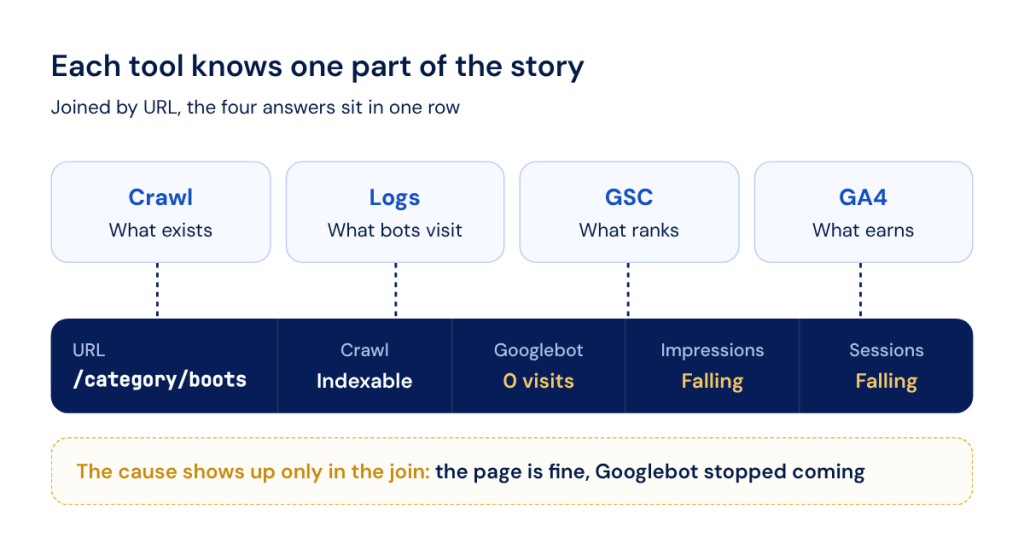
Each standalone tool knows one part of the story. A crawler knows what exists on the site, but it cannot see what Googlebot actually visits. A log tool sees every bot request, but it has no idea what ranks. Search Console knows what ranks, but it cannot tell you what is technically wrong with the page.
Kept apart, these tools give you symptoms without causes. Search Console shows impressions falling on a category while the crawler says every page there returns 200 and is indexable. Only the logs would reveal that Googlebot stopped visiting the section after a template change. If those logs live in a different tool owned by a different person, the investigation stalls at the second step.
That gap is what moved Cadastra, a large digital company in Brazil, to one platform. “The deal-breaker for sure was the ability to connect log [files] with other data sources like GA or GSC to have a holistic view of the bot behavior,” says Tiago Dada, SEO & CRO Manager at Cadastra. Since then, the agency has connected more than 35 of its clients with 55 projects, with logs, GSC and GA4 for each of them in one account.
See your own crawl, logs and Search Console data in one table.
Five Technical Jobs One Platform Can Take Over
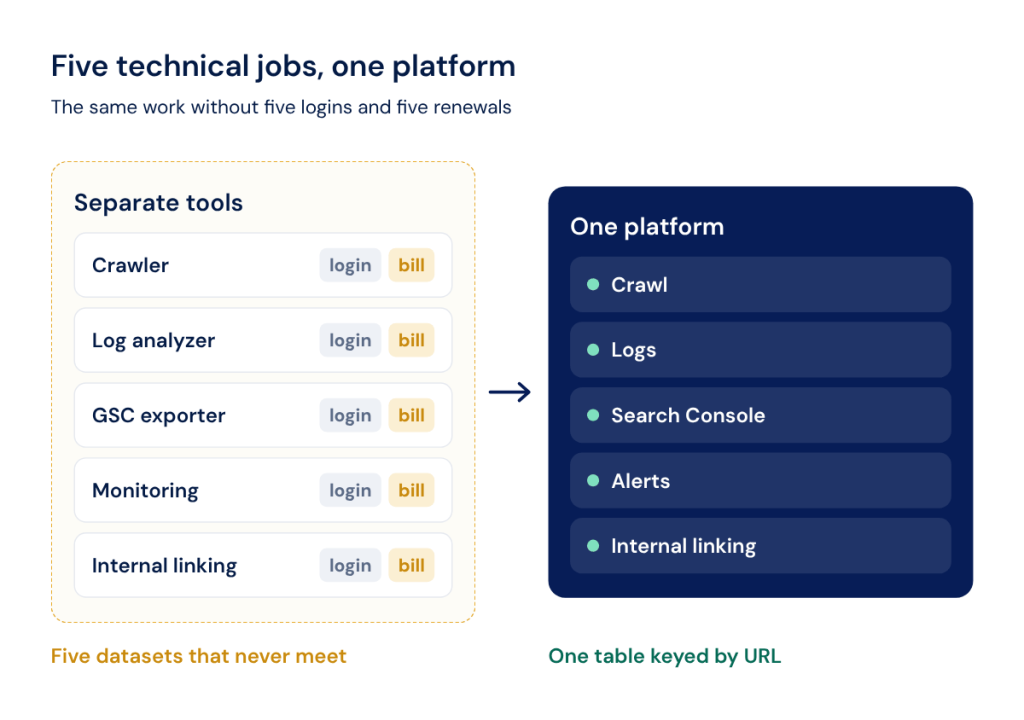
Technical SEO teams and agencies usually buy five jobs as separate tools: crawling, log file analysis, extended Search Console data, monitoring and internal linking.
Here is how each one maps to a standalone tool and to JetOctopus:
| Job | What a standalone tool typically does | How it is covered in JetOctopus |
|---|---|---|
| Site crawling | Crawls the site and finds technical issues, often from a local machine | Cloud crawler with a JavaScript rendering mode, crawl-to-crawl comparison and segmentation |
| Log file analysis | Shows how bots actually crawl the site | Logs module with Googlebot and AI bot behavior, crawl budget views and raw logs |
| Extended Search Console data | Exports or extends GSC data beyond the interface limits | GSC module with keyword dynamics, cannibalization and fan-out queries, with history kept beyond Google’s 16-month window |
| Monitoring and alerts | Notifies you about changes before traffic drops | Alerts based on logs, GSC, crawl, Core Web Vitals and GSC URL inspection in one feed |
| Internal linking | Suggests links to strengthen weak pages | AI Internal Linker, included in the platform |
Crawling and Technical Audits
A crawler tied to a local machine is limited by that machine, and re-running audits by hand for every client does not scale. Desktop crawlers such as Screaming Frog SEO Spider or Sitebulb work well for one site at a time, while a 2M URL catalog with JavaScript rendering can occupy a laptop for days.
JetOctopus runs a cloud-based crawler that processes 1M+ pages a day with no load on your own hardware. Its JavaScript crawler mode renders pages the way Googlebot does and lets you compare raw HTML with the rendered DOM side by side, so you see exactly which titles, links and body text only appear after JavaScript runs.
Crawl comparison turns audits into a regression check. Compare Crawls lines up as many as 10 crawls in a row and, since 2026, compares crawl settings as well as data, so you can see what changed between two releases. Segmentation by page type with regular expressions keeps a product listing problem separate from a blog problem, and 293 preset crawl charts replace building every report from a blank table.
Utilities teams usually keep as separate bookmarks live in the same account: Core Web Vitals testing, accessibility checks and a robots.txt multi-tool that simulates how Googlebot, GPTBot, ClaudeBot and PerplexityBot read your rules.
Log File Analysis
A crawl shows what exists on a site, and only logs show what Googlebot and AI bots actually did there. A log tool that does not know the site’s structure can only report raw hits, which tells you that a bot was busy without telling you whether it was busy on the right pages.
The JetOctopus log file analysis module tracks Googlebot, Bingbot and 40+ other crawlers over time and separates legitimate bots from fake ones that spoof their user agents. GPTBot, ClaudeBot and PerplexityBot each get separate reports, which matters because research by Vercel and MERJ found that none of the major AI crawlers render JavaScript. Crawl budget views show which sections absorb bot attention, while the raw logs table keeps every request for questions no preset report anticipated.
Connection is the part agencies dread, since every client hosts differently. JetOctopus supports 12 native integration methods, from an Nginx real-time stream and Cloudflare Logpush to Akamai, Vercel and Shopify, and any unrecognized format is integrated manually within 24 hours. For an agency, logs are set up once per client and then keep running.
Search Console Data Beyond the Interface
The Search Console interface shows a maximum of 1,000 rows per table, keeps data for the last 16 months and works one property at a time. That is why so many teams add a separate tool to extend it.
JetOctopus pulls Search Console data through the API, which exposes up to 50,000 rows per day per search type, so long-tail queries stay in the dataset instead of disappearing below row 1,000. History is kept beyond Google’s 16-month window, and on agency plans the data stays for the lifetime of the subscription, which makes year-over-year comparisons possible long after Google has deleted the source.
On top of the raw data, the GSC module lets you:
- Merge properties: combine several GSC properties into one view, which helps with subdomains, country folders and multi-site clients.
- Detect cannibalization: see which pages compete for the same queries without building a pivot table.
- Track keyword dynamics: pick any two periods and see which pages and queries gained or lost rankings, impressions and clicks.
- Map fan-out queries: see the sub-queries AI systems generate around a topic and which of them your pages rank for.
The number of connected GSC and GA4 properties depends on the plan, so check it against your client list.
Monitoring and Alerts
Without alerts, someone has to open every client site by hand, and an issue is usually found after the traffic drop rather than before it.
Automated alerts in JetOctopus draw on five sources. Log alerts run in real time with no extra crawls, while crawl alerts follow your scheduled crawl cadence. GSC alerts pull from Search Console with its standard two-day lag. Core Web Vitals alerts track LCP, CLS, INP and FCP declines by device, and GSC URL inspection alerts watch indexing status page by page.
In practice, they catch problems such as these:
- Crawl budget growth on parameters or legacy URLs that should not be crawled at all.
- Pages becoming non-indexable after an accidental noindex or a misconfigured canonical.
- A changed Google-selected canonical on pages that matter.
- Changes in page coverage status and spikes of 5xx errors.
Notifications go to email, Slack or Microsoft Teams. The Alerts Overview shows how alerts develop over time, adds an AI-written summary of the most significant changes and keeps a history of what was fixed and when.
Internal Linking
Internal links are often built by hand or with a separate tool that has no idea which pages bots ignore or which pages already earn impressions, so links go to the pages an editor remembers instead of the pages that need them.
The AI Internal Linker reads three sources at once. The crawl gives it the current link structure, logs show which pages Google and AI bots visit or skip, while GSC adds the pages that drive impressions and clicks. It finds under-linked pages, suggests links and delivers them as a CSV or through the Linker API, which returns links during page render in 10 to 20 ms. The approach behind it has a track record: on a Swiss Marketplace Group classifieds site, removing internal links to deleted ads and strengthening priority pages, combined with log-based crawl budget work, brought 350% more Googlebot visits.
What Changes When Data Flows Between Reports
The real difference of a consolidated platform is that every report reads from one URL-level dataset, which matters far more than having five modules behind one login. A page’s crawl status, bot visits, impressions, sessions and (with your own data connected) revenue sit in the same row of the same table. Separate tools cannot reproduce that without someone doing the joins by hand.
Crawl + Logs: Seeing Where Googlebot Actually Spends Its Time
Crawl budget in SEO becomes a real constraint on large sites, and Google’s own guide addresses sites with 1 million+ unique pages or 10,000+ pages that change daily. On those sites, a crawl shows what exists and logs show what bots visit, and the gap between the two is where crawl budget leaks.
The gap has two sides. Some pages sit in the site structure but never get bot visits, so they cannot rank, while others get regular visits without being in the structure: orphan pages, old parameter URLs, redirects nobody removed. Separate tools make you export and match two datasets in a spreadsheet, whereas in one platform both lists are filters on the same table and the crawl budget optimization work starts the same afternoon.
Adding GSC and GA4: From Crawled to Ranked to Earning
Adding Search Console and GA4 lets you follow a page through the whole path: it is in the site structure, Googlebot crawls it, it ranks, it reaches the top 10 and then the top 3, it gets organic clicks and finally it receives visits. Each step loses some pages, and the step that loses the most is where your team’s hours should go.
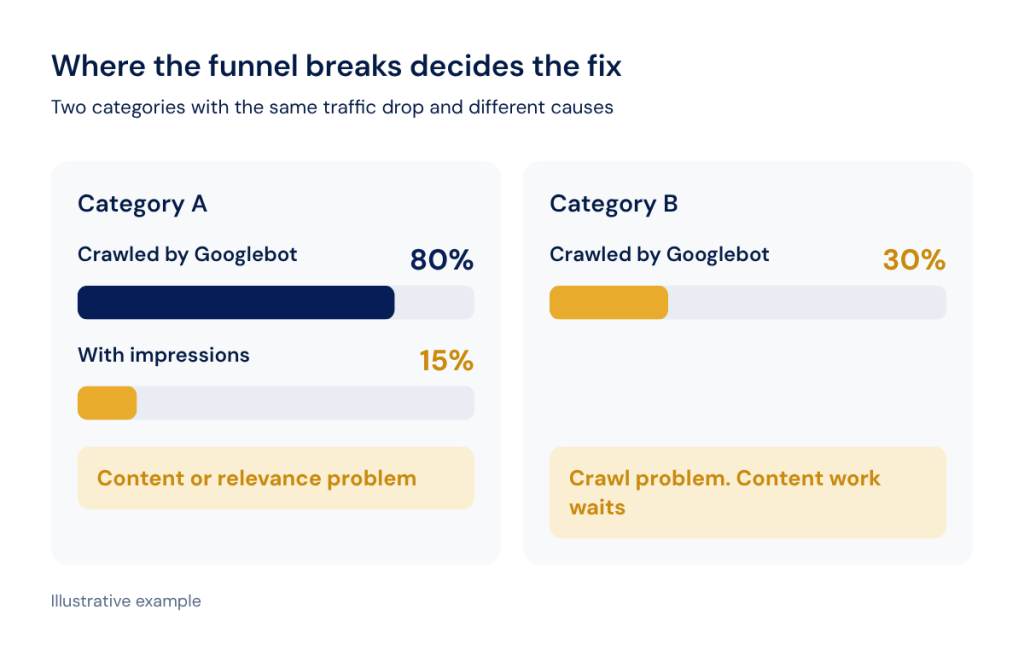
The SEO Funnel report shows that path for a whole site or a segment, while SEO Efficiency compares pages on the site with pages visited by Googlebot and pages with impressions. Both rely on every data source in one platform. Keeping the joined history matters for GA4 too, since standard GA4 properties keep exploration data for only 2 or 14 months.
Here is what that looks like in practice. If 80% of a category’s pages are crawled but only 15% have impressions, the problem sits in content or relevance, and fixing crawl depth would be a waste of developer time. If only 30% are crawled, no amount of content work will help until bots reach the rest.
One Workflow Instead of Four Tabs: A Traffic Drop, Investigated
The following scenario is illustrative and does not describe a specific client. On Monday morning, an alert reports that non-indexable pages in the product segment jumped from 2% to 18% since Thursday’s crawl. Compare Crawls shows the change: a release replaced self-referencing canonicals on filtered category pages with canonicals that point to page one. The logs show how bots reacted, with Googlebot visits to the affected pages falling by half within three days. GSC keyword dynamics show which queries lost impressions, and they belong to mid-tail category terms. The fix is defined before lunch, with a list of affected URLs attached to the developer ticket.
The multi-tool route covers the same steps with more friction. Someone exports the crawl, requests a log extract from the client’s DevOps team, downloads GSC data in 1,000-row chunks, joins the three files by URL and re-checks the result after the fix. The answer is the same, but it usually arrives days later.
Agency Economics: Paying for Pages, Not Seats, Domains or Clients
On JetOctopus agency plans, projects, users and simultaneous crawls are unlimited. Limits apply to crawled URLs and log lines per month and to the number of connected GSC and GA4 properties, so the bill follows the volume of data analyzed rather than the size of your team.
Agency plans also include lifetime data retention, Looker Studio, API and MCP access, onboarding and, on higher plans, a dedicated Slack support channel. Clients and teammates get free access to their projects, so you can share live data with a client’s in-house team instead of sending static exports.
The current plans page lists the exact limits for each tier.
Portfolio views are where this model pays off day to day. The Multidomain Dashboard in Compare Crawls puts key technical metrics of several client sites side by side in one table, so you can see at a glance which client’s indexable share fell or which site’s response time doubled after a release.
Time as the Hidden Line Item
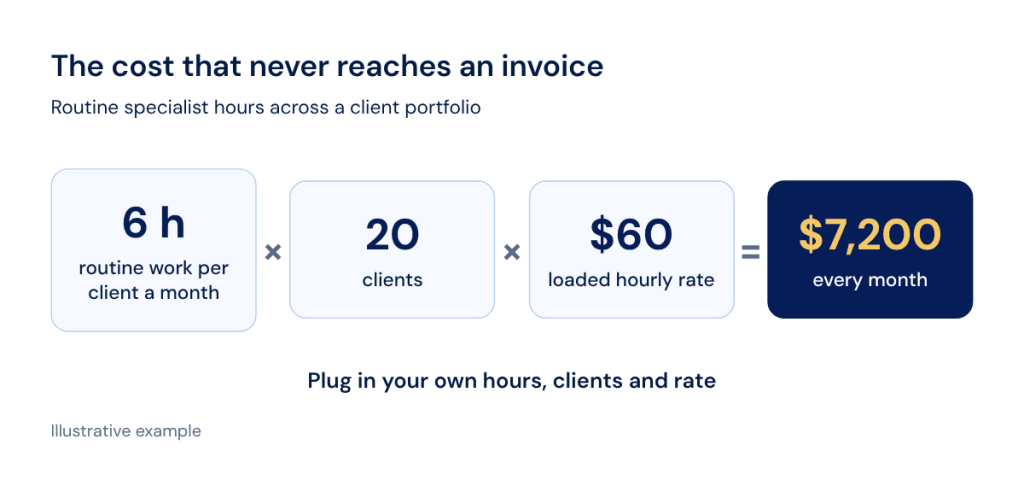
Specialist hours are the cost that never reaches an invoice: routine checks, report preparation and the hunt for the cause of a drop. Beyond alerts and crawl comparison, two features take the most routine off the table.
The AI SEO Recommender ranks problems from crawl, logs and GSC by severity, attaches recommended actions and opens the filtered URLs behind each finding in one click. The tool itself calls its AI-generated analysis “a fast, well-informed first pass”, so every finding is a lead worth verifying.
JetOctopus MCP connects live crawl, log and GSC data to assistants such as Claude, ChatGPT and Cursor. A question like “Show pages with GSC impressions but zero Googlebot visits in the last 30 days” replaces a three-tool export.
OMcollective shows what this looks like for an agency. The team manages 60+ websites for one client, Puratos, across multiple countries, and its alerts turned manual checks into a short daily routine. “Keeping an eye on the website hygiene of dozens of websites is now possible in a few minutes every day,” says Pieter Serraris, Digital Marketing Consultant at OMcollective.
Calculate your own figure with this formula:
routine hours per client per month × number of clients × loaded hourly rate
As an illustration, 6 routine hours per client across 20 clients at a loaded rate of $60 comes to $7,200 a month. Put that next to your tool cost per client per month from the subscriptions section, then plug in the hours from the four-bucket exercise above to get your own figure.
What One Platform Doesn’t Replace
JetOctopus covers technical SEO, and three jobs stay outside that scope: keyword research, backlink discovery and content optimization.
Your keyword and backlink tool stays in the stack, although its data can leave its own tab. Through the Ahrefs integration, backlink and keyword metrics land in the same URL-level table as crawl, logs, GSC and GA4, so you can filter for pages with strong backlinks that Googlebot rarely visits.
Consolidation also has an honest limit on the other side. It pays off where the overlap between tools is real. If your team uses only one of the five jobs, or uses it twice a year, a single specialist tool may be the cheaper and simpler choice.
How to Choose a Consolidation Platform and Switch Without Losing Coverage
What to Check Before You Commit
There is no universal best consolidation software, so judge every vendor against your own stack and volumes. This checklist works with any platform:
- Coverage: which of the five jobs it replaces in your current stack and which ones it only partly covers.
- Limits: crawled URLs, log lines and GSC and GA4 properties measured against your real monthly volumes, with room for growth.
- Data joins: whether sources are joined at URL level in one table or merely shown side by side on a dashboard.
- Multi-client model: how projects, users and client sharing are priced and how access is managed.
- Exit options: API access, BigQuery export and Looker Studio connectors, so your data never gets locked in.
- Support and onboarding: who helps connect client logs and how long a non-standard format takes.
A Low-Risk Transition Plan
A sound tool consolidation strategy moves in stages, so no client loses coverage during the switch:
- Inventory subscriptions with owners, costs and renewal dates in one sheet.
- Map each tool to one of the five jobs, or mark it as outside technical SEO.
- Pilot on one or two clients, ideally one large site and one with an unusual hosting or CDN setup.
- Run old and new tools in parallel for a defined period, such as one full reporting cycle.
- Cancel only after coverage is confirmed for every client and every job on the map.
The human side matters as much as the data. Switching software always means retraining, and Cadastra’s team found that the built-in how-to videos on every report helped them adapt. If you are rebuilding the stack from scratch, our guide to building an agency stack intentionally covers each category in more depth.
The Consolidation Scorecard: Five Questions Before You Cancel Anything
Answer yes or no to each question about your current stack:
- Do two or more of your tools answer parts of the same question about a URL?
- Do you regularly export from one tool to explain data in another?
- Does a new client or teammate add a new line to a bill?
- Is routine monitoring of client sites still done by hand?
- Would one URL-level view change a decision you make every month?
Three or more “yes” answers make a strong case for consolidation. Mostly “no” means your current stack may already fit the way you work, and the money is better spent elsewhere.
The 7-day trial gives full access for up to 10,000 URLs, with no credit card and no project or domain limits.
FAQ
What should we export from our old tools before cancelling them?
Export historical crawl reports for your key clients, any Search Console data older than 16 months you have stored, custom segment definitions and regex rules, alert thresholds and client report templates. Keep the exports in a shared folder or BigQuery, so year-over-year comparisons still work after the switch.
How do we present technical findings to clients who do not read technical reports?
Translate every finding into pages, visits and revenue, and show the step of the funnel where pages drop out. Live Looker Studio dashboards help, and you can automate client reports or send a client SEO dashboard instead of a spreadsheet.
How often should an agency review its tool stack?
Review it at least once a year, ideally a month before your largest renewal. A new service line or client type is another good moment for a review. Run the scorecard above each time, because tool consolidation works best as a regular habit instead of a one-off project.