AI crawlability is the ability of AI crawlers and answer engines (GPTBot, ClaudeBot, PerplexityBot, Google-Extended and the rest) to find, access, understand and revisit your content. The logic is brutally simple: if an answer engine can’t crawl your page, it can’t cite it. And if it can’t cite you, you don’t exist in AI search, no matter how strong your classic rankings are.
For a decade, technical SEO meant one crawler: Googlebot. Now there’s a second wave with different rules; they mostly don’t render JavaScript, crawl far more aggressively and rarely give you a second chance, like a re-index button when you get it wrong. Your traditional SEO workflow was never equipped to see them, let alone optimize for them.
This guide covers AI crawlability end to end: how AI crawlers differ from Googlebot, what silently blocks them, how to structure your site so bots can extract it, how to run a proper AI crawlability audit and how to build a monitoring workflow on the one data source that never lies: your server logs. Where a typical AI crawlability “checker” gives a surface score, this shows you the ground truth. In short, this is a practical playbook for AI crawler optimization.
TL;DR
- AI crawlability confirms whether AI crawlers (GPTBot, ClaudeBot, PerplexityBot, Google-Extended) can find, access, understand and revisit your content. If bots can’t reach it, AI can’t cite it.
- AI crawlers ≠ Googlebot. Most don’t render JavaScript (they read raw HTML only), they crawl far more aggressively and there’s no “request re-index” button to fall back on. The first crawl has to be right.
- A scheduled crawl shows what’s possible, not what happened; only server logs show what AI bots actually did. The real audit joins crawl + logs + GSC; anything less is a partial audit.
- What blocks AI crawlers: robots.txt/WAF blocks, JS-only content, redirect chains, 404/5xx, orphan & deep pages, weak site structure and weak internal linking.
- Real-data proof (enterprise site, 3 months of logs): an AI crawler covered 2.2× more unique URLs than desktop Googlebot, 67% of GPTBot’s visits hit 404s and GPTBot successfully reached under 1% of the site – none of it visible in analytics or GSC.
- The fix should be done by layer expose content in raw HTML, unblock the right bots deliberately, clear crawl errors, improve structure and internal links, then re-verify in logs.
What Is AI Crawlability (and Why It’s Not Just “SEO Again”)
Crawlability has always mattered. What’s new is a second set of crawlers with a different rulebook, sitting on top of the crawlers you already optimize for.
Think of AI crawlability as three layers stacked on each other:
- Access – can the bot physically reach the URL? (robots.txt, firewall/WAF, bot management, status codes, server response)
- Understanding – once it fetches the HTML, can it parse the content? (raw-HTML availability, structured data, clean semantics) Anything buried behind JavaScript or hidden behind interaction walls becomes invisible.
- Revisiting – does the bot come back often enough to catch your updates? (crawl frequency, freshness signals, internal linking are what bring it back)
Classic SEO mostly worries about layers 1 and 2 for Googlebot. AI crawlability means passing all three layers for a group of new bots that behave nothing like Google. Miss any layer and you’re invisible to that engine, which is why optimizing technical SEO for “AI crawlability audit” is a distinct exercise, not a rerun of your standard tech-SEO check.
How AI Crawlers Work Differently From Googlebot
If you optimize for AI bots using Googlebot assumptions, you’ll get burned in three specific ways.
1. Most AI Crawlers Don’t Render JavaScript
Most AI crawlers read only the raw HTML the server sends and stop there; rendering at their scale is too costly to justify. Googlebot is the only exception: it fetches the page, then runs a second rendering pass to catch JS-injected content.
The consequence is invisible: a page can look perfect to a human and be half-empty to an answer engine. If your titles, H1s, canonical tags, internal links, product details, prices, reviews or main copy are injected by JavaScript, the AI crawler may simply never see them. Your content is “on the page” in a browser and absent from the HTML the bot actually parses.
This is the single most common and most under-diagnosed AI crawlability failure. It doesn’t throw an error. It doesn’t show up in a rankings drop. It just quietly makes your best pages uncitable.
2. AI Crawlers Move Faster and Far More Often
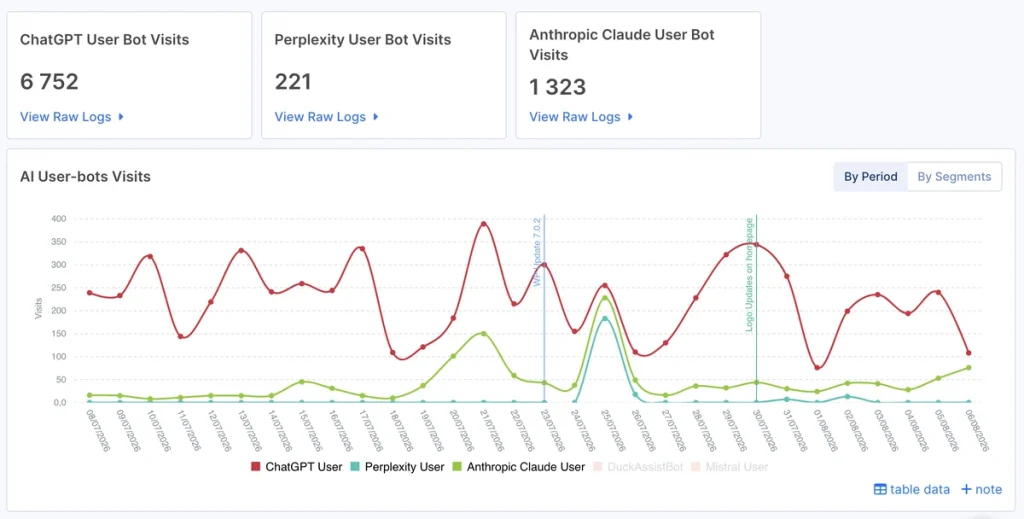
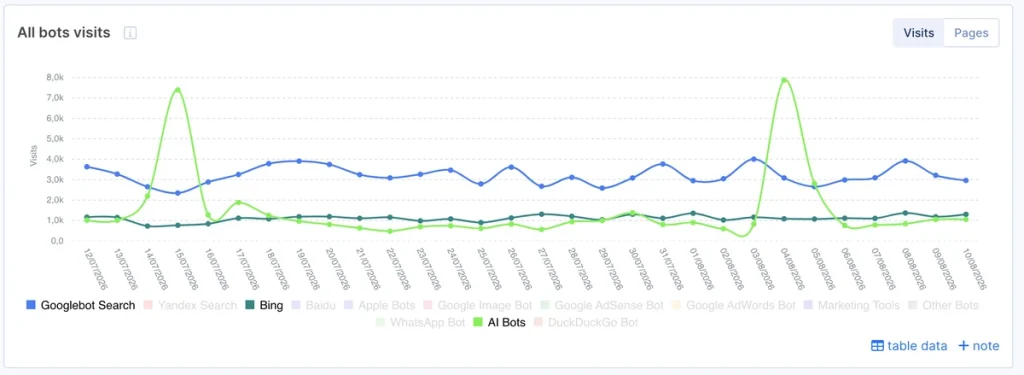
Answer engines are crawling aggressively. In many cases, AI bots hit content dramatically more often than Google or Bing over the same time frame; sometimes new or updated pages get picked up within a day of publishing.
That’s both:
- an opportunity (fresh content reaches LLMs fast)
- a risk (a broken or thin page gets “seen” and judged before you’ve finished it).
Crawl activity is also an early signal of AI visibility: if answer engines are discovering and revisiting a page regularly, they’re far more likely to use your latest content when they generate an answer. If they’re not visiting your page at all, there’s no path into an LLM response.
(Screenshot from the JetOctopus platform).
3. There’s No “Request Re-Index” Button
With Google, you have a safety net: fix a page, hit Request Indexing in GSC and Googlebot comes back. That override doesn’t exist for most AI bots. You can’t summon GPTBot. If an answer engine’s first visit finds thin content, a rendering gap or a blocked resource, it may take a long time to return, if it returns at all.
That raises the stakes of every first crawl. AI crawlability isn’t something you can fix later; it has to be right the moment you publish.
Why Scheduled Crawls Alone Won’t Protect Your AI Crawlability
Teams used to rely on weekly or monthly site crawls to catch problems, but even then it was a fragile safety net for SEO.
For AI crawlability, it’s close to useless and here’s the key insight most guides miss:
A site crawl tells you what’s possible. Only server logs tell you what actually happened.
Your own scheduled crawl simulates a bot. It can flag that a page could be blocked or relies on JS. What it can’t tell you is whether GPTBot specifically visited yesterday, got a 403 and left or whether PerplexityBot has ignored an entire section for three weeks. That behavior only exists in your logs.
And because AI bots may not return, a crawlability issue can quietly damage your standing with an answer engine days before it ever surfaces in a scheduled report. The fix isn’t “crawl more often.” It’s combining crawl data with real crawler behavior from logs, continuously.
That combination, crawl + logs + Search Console, read as one, is the foundation of everything below.
What Actually Blocks AI Crawlers (The Real Checklist)
When an AI crawler fails to access or understand a page, it’s almost always one or more of these. This is your AI crawlability audit checklist.
Access blockers (layer 1):
- robots.txt disallow. You may be blocking GPTBot, ClaudeBot, PerplexityBot, Google-Extended, CCBot, etc., sometimes intentionally, often by an inherited rule nobody remembers adding. Check each AI user-agent explicitly.
- Bot management / WAF / CDN rules. Cloudflare, Akamai and others increasingly block or challenge AI bots by default. However, in 2025, Cloudflare shifted to a default block policy for AI crawlers on newly added domains, enabling organizations to selectively grant access when appropriate. But existing domains weren’t automatically modified. Thus, a firewall serving a 403 to GPTBot is still a silent crawlability killer.
- Server errors on bot visits. 5xx responses, timeouts or rate-limiting that trigger specifically under bot load mean the content never gets fetched.
Understanding blockers (layer 2):
- JavaScript-dependent content. The big one (see above). If the raw HTML is thin, the bot’s understanding is thin.
- Missing or broken structured data. Schema helps answer engines understand what a page is. Absent or invalid markup leaves them guessing.
- Weak semantics / missing metadata. No clear title, H1 or descriptive internal anchors = less context to interpret and cite.
Revisiting blockers (layer 3):
- Orphan and deep pages. Pages with no internal links or buried many clicks deep get crawled rarely or never by any bot, AI included.
- No freshness signal. Content that never changes and isn’t re-linked gives bots no reason to come back.
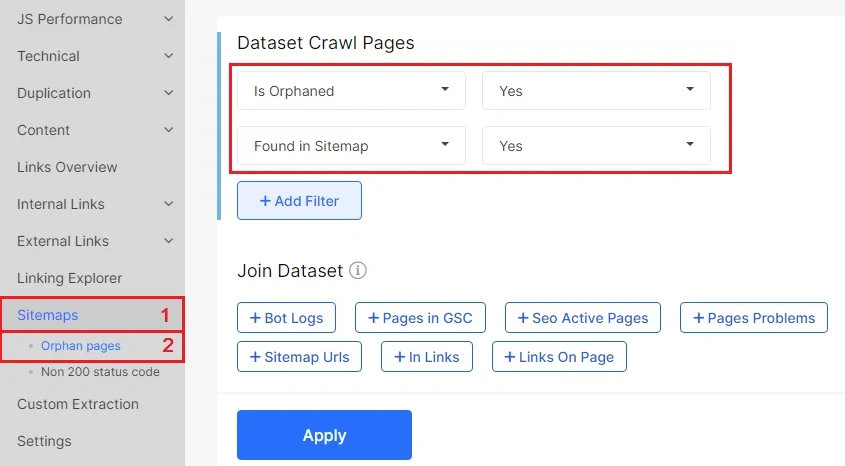
Here’s the trap: the only reliable way to know which bots are accessing your URLs is to inspect the logs and cross-reference them with your crawl activity.
How to Optimize Your Site Structure for AI Crawlers
Access and rendering get a page read. Structure decides whether the bot can extract and reuse it and how often it comes back. Most guides stop at “use raw HTML”; here’s the fuller picture.
Architecture: keep value shallow and well-linked
Crawlers (AI and classic) manage limited crawl capacity and they allocate it with precision. The deeper and more weakly-linked a page, the less often it’s crawled and the slower it’s discovered. The practical rules are:
- Keep high-value pages within 3–4 clicks of the homepage. Deep pages get less crawler attention and are discovered later.
- Use a logical, predictable URL structure (/category/subcategory/product) so bots infer relationships between pages.
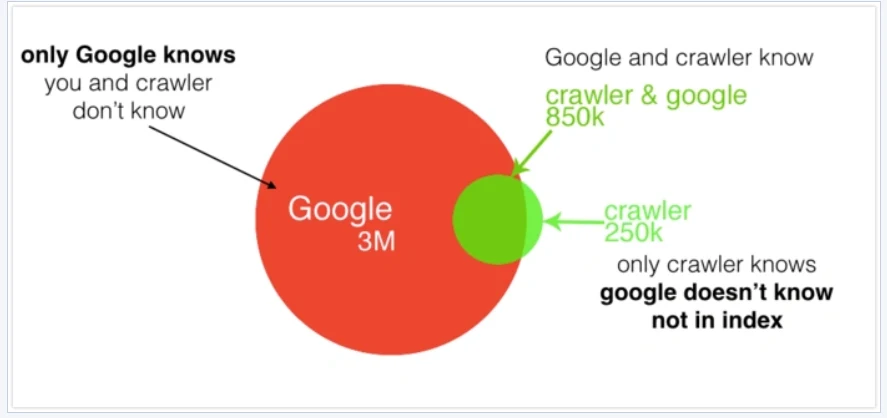
- Fix orphans. A page with no internal links is nearly invisible to AI crawlers, which lean heavily on the internal link graph for discovery. Volume makes this brutal: TemplateMonster surfaced 3 million orphaned pages that bots were still burning crawl budget on, exactly the waste that starves your real pages of AI-crawler attention.
- Build intentional intent pathways: connect related products, categories and the guides/articles that serve the same user question. This is exactly the kind of clustering that helps an answer engine assemble your content into a citation.
Semantic HTML: make content machine-extractable
AI crawlers reading raw HTML reward clean structure. Give them:
- A clear H1 → H2 → H3 hierarchy (one H1, descriptive subheads).
- Semantic tags – <article>, <section>, <p>, lists and tables instead of a soup of <div>s. Short, standalone sections are easier to extract and quote.
- Descriptive anchor text on internal links (context, not “click here”).
The end goal is for any single section to make sense pulled out on its own, because that’s how an LLM cites it.
Sitemaps, canonicals and directives
- XML sitemaps with accurate lastmod dates help bots find and re-check pages (Google ignores the priority tag so don’t rely on it).
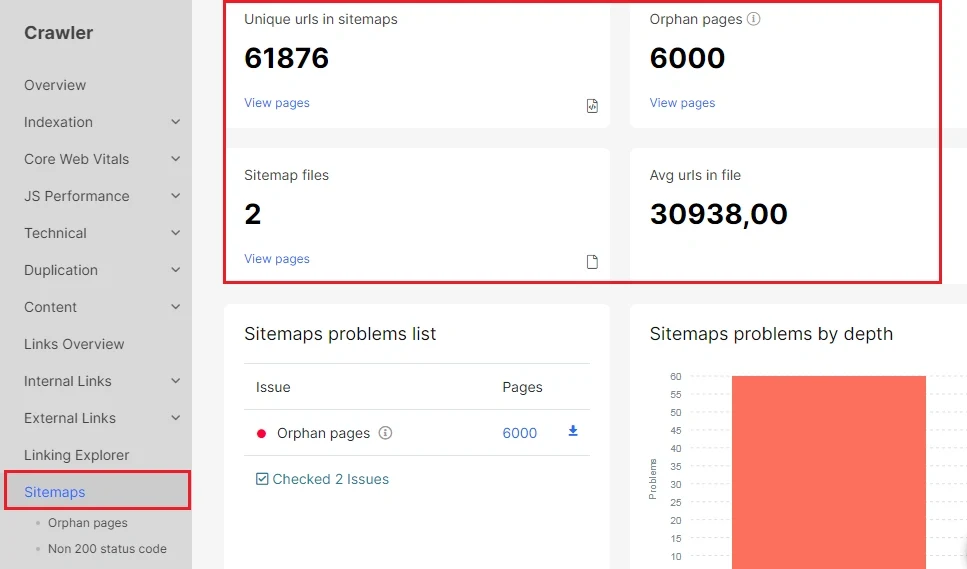
- Canonical tags consolidate product variants and prevent duplicate-content confusion. But never pair them with noindex, since the two directives cancel each other out (one consolidates authority, the other removes the page entirely).
- Meta robots / X-Robots-Tag gives you page-level control; audit these regularly so you’re not accidentally noindex-ing pages you want cited.
- Ensure rendering integrity at the template level. A solid H1/H2/H3 hierarchy is meaningless if it only appears after JavaScript executes. Compare raw HTML against fully rendered output across all major templates: product, category, blog, and landing pages. Instead of relying on a narrow sample set, validate every template to confirm your content renders consistently across your entire site
About llms.txt
You’ve probably seen recommendations urging teams to implement an llms.txt file (a machine-readable content map for LLMs). It’s fine to publish one as an optional, explanatory aid, but set expectations honestly: Google states you do not need special AI text files or Markdown to appear in Google Search or its AI features. Treat llms.txt as a low-cost nice-to-have, not a substitute for the fundamentals covered in this guide.
Real crawlability is decided by access, rendering, structure and internal links, not by a single text file.
Crawl budget now has a second consumer
Every site has a crawl budget and on large or e-commerce sites AI crawlers are now spending it alongside Googlebot, often more aggressively. If that budget is burned on faceted URLs, infinite pagination, thin or duplicate pages and redirect chains, your money pages get starved of AI-crawler attention. The fix is the classic crawl-budget playbook, now extended for AI crawlers too:
- consolidate or retire low-value URLs
- block genuinely useless parameter space
- speed up server response so bots fetch more per visit
- point internal links at the pages that convert
On big catalogs, this is where AI crawlability is won or lost and it’s exactly what server-log analysis from JetOctopus was built to diagnose.
This isn’t just theory; the payoff shows up in the numbers when sites actually run the audit. DOM.RIA, a Ukrainian real-estate marketplace adding thousands of listings daily, used JetOctopus’s crawl-plus-log analysis to tighten crawl efficiency and doubled their Googlebot visits as a result. The same mechanics that free up budget for Googlebot now free it up for GPTBot and ClaudeBot.
How to Run an AI Crawlability Audit (Step by Step)
Here’s the definitive workflow. We’ll frame it around JetOctopus, which combines crawl, server logs and GSC in one place, the three sources you need to answer “is my site AI-crawlable?” with real data
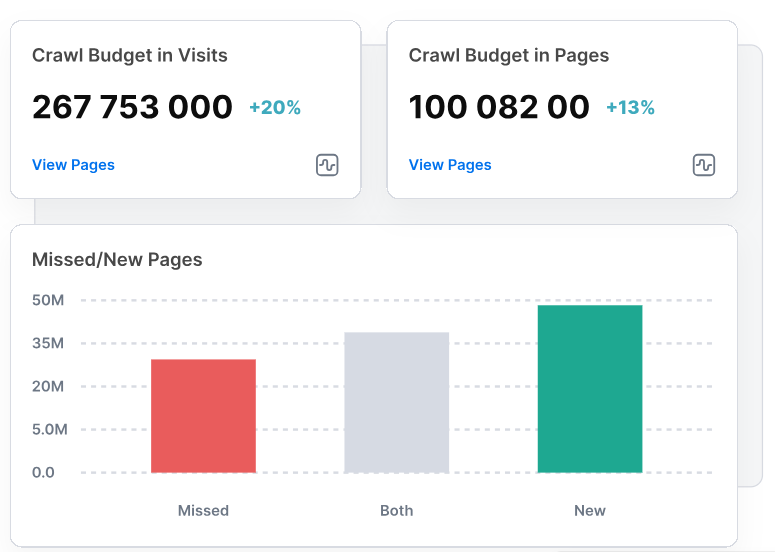
Step 1 – Crawl your site to establish what should be reachable
Run a full crawl to map every URL, its status, depth, internal links, canonical setup and critically a raw-HTML vs. rendered comparison so you can spot JavaScript-dependent content. This gives you the “ideal state”: a full picture of what exists and what an AI bot should be able to read.
Step 2 – Bring in your server logs to see what bots actually did
Stream your access logs into the platform. Now you’re looking at reality: every request, every user-agent, every status code. This is where AI crawlability stops being theory.
Step 3 – Isolate and verify the AI crawlers
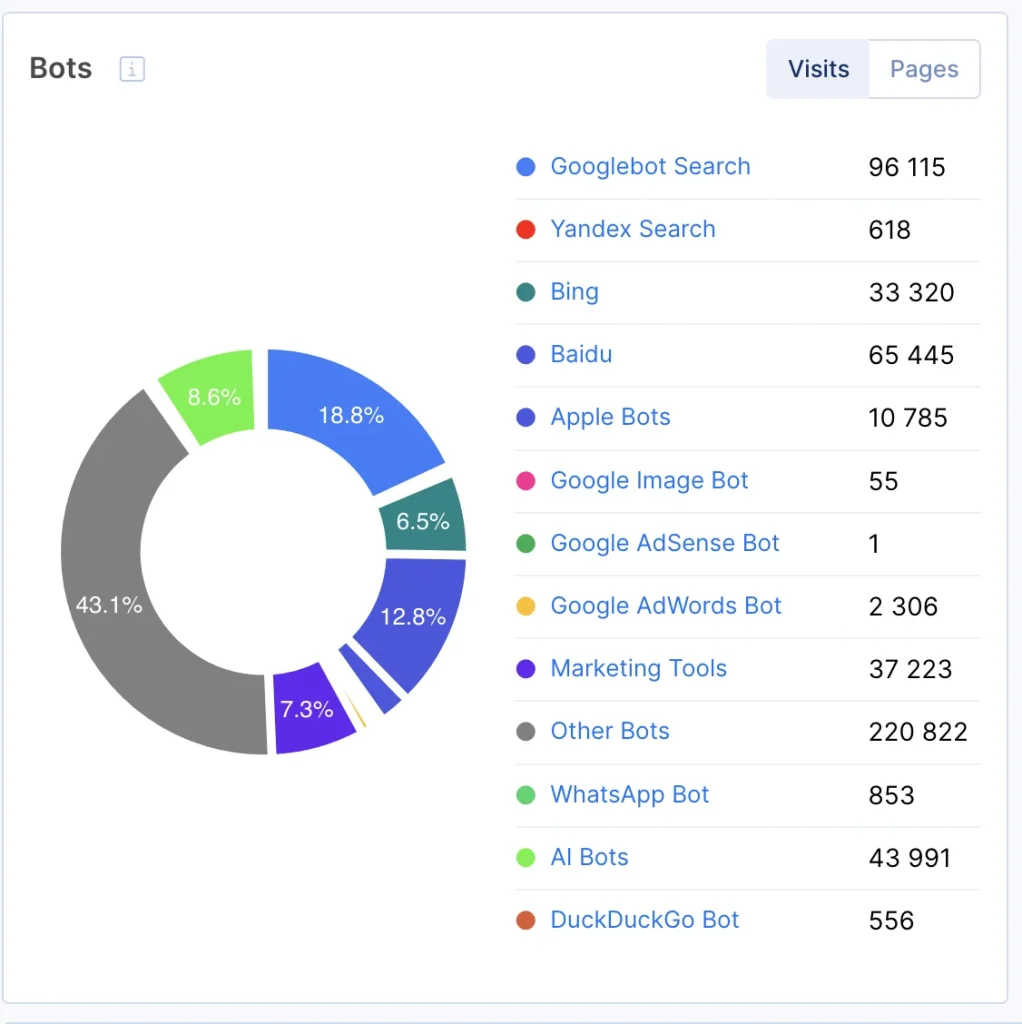
Filter to the AI bot groups that matter: OAI-SearchBot, ChatGPT-User (OpenAI); ClaudeBot, Claude-User (Anthropic); PerplexityBot, Perplexity-User.
JetOctopus recognizes 40+ bots out of the box, so you select from a list instead of hand-building regex and it filters out spoofed traffic, verifying requests against the vendors’ published IP ranges. This check-up is important because a big share of “GPTBot” hits are impostors and auditing on fake or unreliable data leads to wrong conclusions
Step 4 – Answer the five crawlability questions with data
- Coverage: which pages did AI bots actually reach? Overlay logs on your crawl to expose pages that exist but get zero AI-bot visits, your AI-invisible content. Coverage gaps scale with the site and the numbers can be stark: Depositphotos had 150M+ pages but only 20% indexed by Google until JetOctopus’s crawl-plus-log analysis exposed why and helped close the gap. The same blind spot now applies per AI bot and it’s wider, since each one reaches a different slice.
- Access failures: filter AI-bot requests by status code. What’s actually stopping them from reaching your pages? 403s point to WAF/robots blocks; 404s to broken targets; 5xx to server issues under bot load.
- Understanding gaps: cross-check AI-crawled URLs against your raw-HTML analysis. Are bots reaching pages whose key content is JS-injected? If so, it means that those are crawled-but-not-understood; the bot has the URL but not the content.
- Revisit frequency: chart AI-bot visits over time per section. Which areas get crawled often, which get ignored and how fast do bots reach new content after you publish it? Sections with slow or no revisits need stronger internal linking and freshness signals to earn a place in the crawl rotation.
- Rendering consistency: does every page template render the same way? Cross-check raw HTML vs. rendered output across your different templates (product, category, blog, landing pages) with JetOctopus, not just a handful of sample URLs. A template-level rendering gap can silently affect thousands of pages at once, so one clean spot-check isn’t proof the rest of the template is safe.
Step 5 – Prioritize by impact
Not every gap is worth fixing. A JS-rendering issue on your top commercial pages is an emergency; the same issue on a dead tag archive isn’t. Rank findings by page value (traffic, impressions, revenue) using your GSC data so engineering effort goes where citations are actually at stake.
From Audit to Fix: Optimizing Technical SEO for AI Crawlability
Once the audit surfaces the gaps, the fixes are concrete:
- Serve critical content in raw HTML. Titles, H1s, canonicals, main copy, internal links, prices and structured data should be in the initial HTML response, not dependent on client-side JS. Use server-side rendering or pre-rendering for anything an answer engine must see.
- Unblock the right bots deliberately. Audit robots.txt and your WAF/CDN for every AI user-agent. Decide per-bot whether you want it (most sites want the search/answer bots even if they block pure training scrapers) and make that choice explicit.
- Kill access errors on bot paths. Clear the 403/404/5xx patterns your logs revealed. Collapse redirect chains to single hops.
- Add and validate structured data. Give answer engines machine-readable context for what each page is.
- Fix internal linking and orphans. Surface deep, valuable pages, so AI crawlers can find and revisit them. Reinforce freshness signals on pages you update.
- Re-verify with logs. After shipping fixes, watch the logs: are the AI bots now reaching those URLs with 200s? Fixing the issue isn’t the end of the work; confirm it in real crawler behavior, as this is how you turn AI crawlability into an ongoing, not a checklist someone ticked once.
Most of these fixes are structural by nature, which is exactly why how to optimize site structure for AI crawlers isn’t a one-time task on this list; it’s the thread running through nearly every fix above, from internal linking to raw-HTML delivery.
Turning It Into Ongoing Monitoring (Not a One-Off)
AI crawlability degrades silently: a new WAF rule, a JS refactor, a robots.txt edit and because AI bots may not return, you can lose citation potential before a scheduled report flags it. Make monitoring continuous:
- Keep logs streaming so AI-bot behavior is always live.
- Save an “AI Crawlers” segment and section-level segments for one-click reporting.
- Watch trends weekly: AI-bot visit volume per family, new pages not yet AI-crawled and spikes in 403/404/5xx on bot requests.
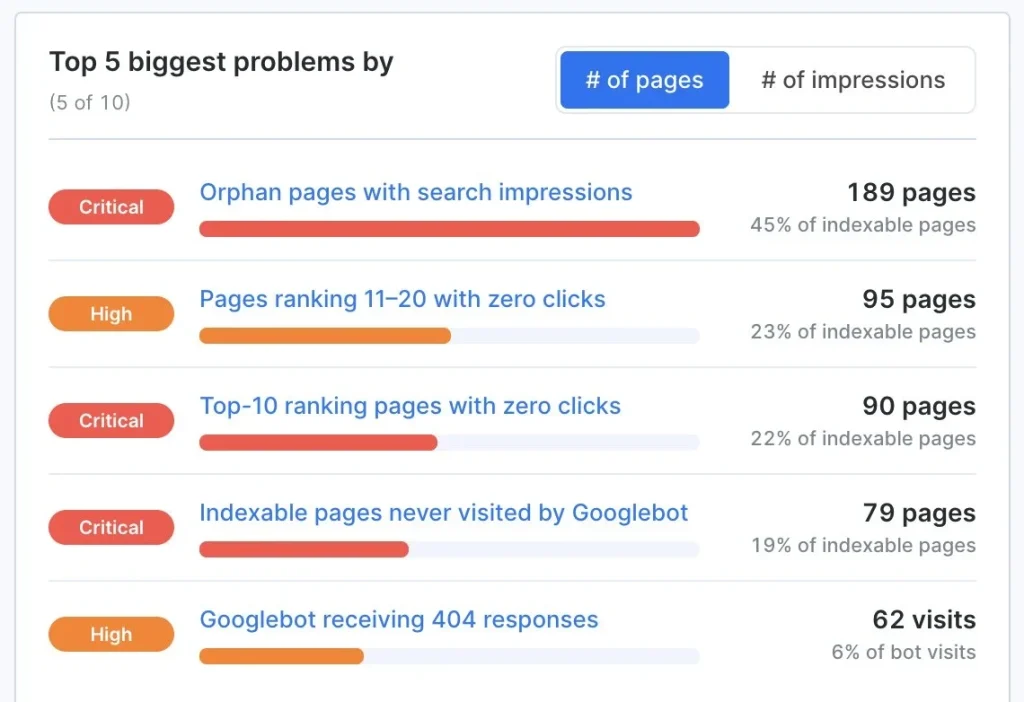
- Let the AI SEO Recommender rank your fixes. After each crawl, JetOctopus’s Recommender (an analyst built on Claude that runs across your crawl, GSC and log data) hands you a short, prioritized list of the biggest issues on your site right now: what’s broken, how many pages it touches and what to do. Instead of reading twenty reports to find where to start, you get the AI-crawlability priorities first.
- Track render reliability on your priority pages. Use JetOctopus’s JS crawler to weight your most important URLs by traffic or revenue. Run two identical crawls: one with raw HTML and one with rendered HTML, then compare both versions to see if critical content renders in raw HTML 100% of the time; a single inconsistent deploy or JS refactor can silently drop that number without ever triggering an alert elsewhere.
Continuous crawl-and-log monitoring is what drives results: SEO lead Ihor Bankovskiy grew Preply’s indexation by 300% over a year on the strength of regular crawling and log analysis. A one‑time checker gives you a snapshot; a continuous system keeps your site citable as it evolves.
AI Crawlability Implementation Checklist
✅ Full crawl completed, with raw-HTML vs. rendered comparison
✅ Server logs connected and streaming
✅ AI crawlers isolated (GPTBot, ClaudeBot, PerplexityBot, Google-Extended, and more) and spoof-filtered
✅ robots.txt reviewed for every AI user-agent
✅ WAF/CDN/bot-management rules checked for AI-bot blocks (403s)
✅ Critical content confirmed present in raw HTML (not JS-only)
✅ Structured data implemented and valid
✅ Redirect chains collapsed; 404/5xx on bot paths cleared
✅ Orphan and deep high-value pages surfaced via internal links
✅ Coverage checked: no high-value pages with zero AI-bot visits
✅ Fixes re-verified in logs (AI bots now returning 200s)
✅ High-value pages within 3–4 clicks; orphans linked
✅ Semantic HTML (H1/H2/H3, <article>/<section>) and descriptive anchors
✅ XML sitemap with accurate lastmod; canonicals correct; meta robots audited
✅ Crawl-budget waste (facets, pagination, duplicates) contained for AI bots too
✅ Weekly monitoring + Recommender review in place
Why Choose JetOctopus for AI Crawlability
Most guides on this topic end with “use a monitoring tool.” The honest question is which data that tool sees. A crawler-only tool simulates bots. An analytics tool misses them (no JS). The only complete picture joins 3 sources:
- Crawl data – what should be reachable, plus raw-HTML vs. rendered gaps
- Server logs – what AI bots (GPTBot, ClaudeBot, PerplexityBot, +40 more) actually did, spoof-filtered
- GSC – what’s ranking and worth protecting
JetOctopus reads all three as one (the join competitors can’t easily copy) and processes billions of log lines and crawled pages, so cross-source analysis is fast instead of a weekend of SQL. This is what technical SEO and AI crawlability in 2026 actually look like: crawlable first, citable everywhere.
That’s why data-driven enterprises like Adidas, Fiverr, Forbes Advisor, Bosch, Whirlpool, and others run their technical SEO on it.
Ready to see where your own AI crawlability gaps are hiding?
👉 Book a demo and we’ll walk you through auditing crawl, logs and GSC together on the JetOctopus platform.
FAQs
What is an AI crawlability audit?
An AI crawlability audit checks whether AI crawlers (GPTBot, ClaudeBot, PerplexityBot, etc.) can access, understand and revisit your content. Unlike standard tech-SEO audits focused on Googlebot, AI crawlability audits combine a site crawl (what should be reachable), server-log analysis (what AI bots actually did) and Search Console data (what’s performing) to find pages that are AI-invisible, blocked or crawled-but-not-understood.
How is AI crawlability different from a normal SEO crawl?
A normal crawl simulates a bot and tells you what’s possible. AI crawlability adds server logs, which show what specific AI bots actually did; the only way to confirm whether GPTBot reached a page, got blocked or ignored it. It also weights JavaScript rendering more heavily, since most AI crawlers don’t execute JS.
Do AI crawlers render JavaScript?
Mostly no. Googlebot renders JS; most AI crawlers read only the raw HTML the server sends. If your key content is JS-injected, answer engines may never see it, even though it looks fine in a browser.
How do I check if AI bots are crawling my site?
Analyze your server logs, filtering for AI bot user-agents and verifying them against the vendors’ published IP ranges (to exclude spoofed traffic). A platform like JetOctopus recognizes 40+ bots and filters spoofing automatically, then overlays that behavior on your crawl and GSC data.
Should I block AI crawlers?
It depends on your goal. If you want AI visibility and citations, you generally want the AI bots (OAI-SearchBot, PerplexityBot, ChatGPT-User) to reach you. You may still choose to block pure training scrapers. The key is to make that decision deliberately, per user-agent, not by accident via an inherited robots or WAF rule.
Should I add an llms.txt file?
It’s an optional extra, not a requirement. You can publish one as an explanatory content map, but Google has explicitly said no special AI text files are needed to appear in Search or its AI features. Prioritize raw-HTML access, site structure, internal linking and log-verified crawlability first; those determine whether AI bots can actually read and revisit you.