Two Shopify stores in unrelated categories, different themes, different agencies, and the crawl comes back with the same eight problems. That repetition is the useful part of Shopify eCommerce SEO. The platform is hosted and templated, so the issues arrive pre-installed rather than accumulating over years of bad decisions: fixed URL prefixes, collection-scoped product URLs, filter parameters nobody blocked, app scripts stacked on top of the theme. It also means the fixes are known. The work is finding every instance across a catalog of thousands of products instead of arguing about what is wrong. This guide is a diagnostic checklist, ordered the way an audit actually runs, and it is honest about which items Shopify will not let you touch.
TL;DR
- Shopify’s /products/ and /collections/ prefixes cannot be changed or redirected. Shopify’s own documentation calls them fixed paths. Everything else in the URL, from the handle to the canonical, is yours.
- Shopify’s default robots.txt blocks multi-filter and multi-tag combinations only. Single-filter URLs are crawlable and ?variant= is not blocked at all, so a 2,000 product catalog clears Google’s 10,000 URL crawl budget threshold without anyone noticing.
- Stock Dawn clears Google’s required Product schema properties and misses most of the recommended ones. There is no breadcrumb markup and no collection page markup anywhere in the theme.
- Shopify origins pass all three Core Web Vitals on mobile at 76%, against 35% for WooCommerce and Magento. Almost all of that advantage is LCP, which comes from Shopify’s infrastructure. A slow Shopify store has an app and theme problem.
- Google states there is no AI-specific structured data and no extra requirement to appear in AI Overviews. The case for fixing Shopify schema is the ordinary commercial one: rich results, merchant listings and accurate product data.
Why Shopify SEO Problems Look the Same Across Every Store
On an open platform, technical debt is personal. Someone chose a URL pattern in 2019, someone else bolted faceted navigation onto it, and the audit becomes archaeology. Shopify does not work that way. Routing is fixed by the platform, the theme layer is shared across hundreds of thousands of stores, and apps inject scripts and markup through the same handful of hooks. The surface area is small and it repeats. A store selling coffee equipment and a store selling running shoes will both have products reachable at two URLs, both have variant parameters multiplying the catalog, both have a theme shipping Product schema without a single breadcrumb.
That is good news for anyone running SEO at scale, because a checklist genuinely works here. The catch is that most published Shopify advice is out of date. It still says robots.txt cannot be edited, which stopped being true in 2021. What follows is the current version, sourced to Shopify and Google documentation, with the report that finds each issue across a whole catalog. For the content side of the same pages, our guide to eCommerce product pages SEO covers what sits on top of this technical layer.
Crawl your catalog once and see every URL variant of every product, grouped and countable.
Shopify SEO Issues at a Glance
Here is the full list before the detail. Each row gets its own section below.
| Issue | Why It Happens | How to Fix |
|---|---|---|
| Duplicate product URLs | The within filter makes a product reachable at /products/x and at every /collections/y/products/x it belongs to | Verify the canonical target, keep internal links on the clean URL, crawl to find every variant |
| Variant and session parameters | ?variant=, _pos, _sid, _ss, _fid are generated by Shopify and blocked by nothing | Canonical to the clean URL, stop linking internally to parameterized versions |
| Single-filter URL bloat | The default robots.txt only blocks two or more filters combined | Add single-filter rules in robots.txt.liquid, or canonical the filtered view |
| Fixed URL prefixes | Shopify controls /products/, /collections/, /pages/, /blogs/ | Work the handle, breadcrumbs and internal linking instead |
| Accidental noindex | Theme edits, duplicated templates and apps inject meta robots with no admin warning | Site-wide indexation crawl, run after every theme or app change |
| Thin default schema | Shopify’s structured_data filter outputs a minimal Product object | Extend with sku, gtin, aggregateRating, review, shippingDetails, add BreadcrumbList |
| App script bloat | Every app adds JavaScript that nobody owns end to end | Measure page weight and load time per template, remove or defer |
| Orphan and weakly linked pages | Collections and products with no internal link path, including anything past the 25,000 item pagination ceiling | Map the internal link graph, link from strong pages to weak ones |
Shopify URL Structure: What Creates Duplicates and What You Cannot Change
URL structure comes first because Shopify’s defaults create most of the duplication that follows. Crawl budget, indexation and internal linking are all shaped by how many URLs the platform generates for one product.
How Multi-Collection Products and Filters Create Duplicate URLs
Shopify’s within Liquid filter produces the collection-scoped product URL: a product at /products/draught-of-immortality also lives at /collections/sale-potions/products/draught-of-immortality. Shopify is not quiet about the consequence. Its developer documentation tells theme developers that a standard product page and the same page in the context of a collection have the same content on separate URLs, and that you should consider the SEO implications.
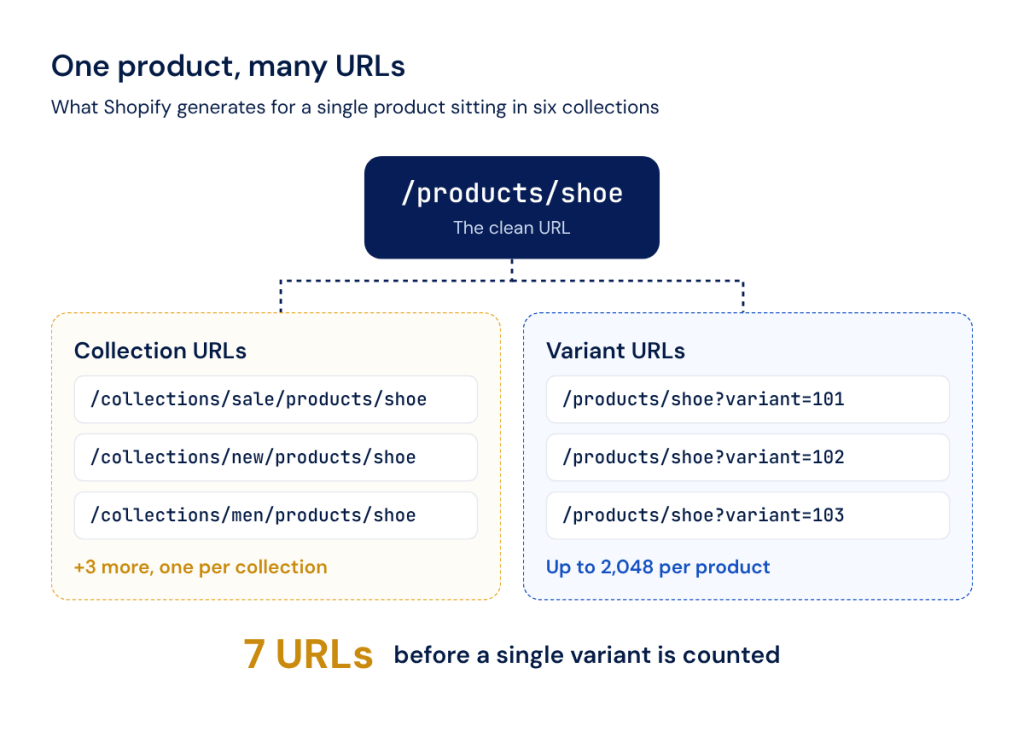
One product in six collections already lives at seven URLs, and every variant adds another.
Assign a product to six collections and you have seven URLs before anything else happens. Variants are the bigger surface, though. variant.url returns /products/handle?variant=ID, and since October 2025 the variant limit is 2,048 per product for every merchant, not just Plus. Shopify’s default robots.txt does not block ?variant=. Search and filtered views append _pos, _sid, _ss and _fid, exactly the temporary parameters Google’s eCommerce URL guidance tells you not to link internally.
One thing to check rather than take on faith. Shopify states that auto-generated canonical tags are added to prevent duplicate content, and Dawn does output <link rel=”canonical”>, but Shopify has never documented what that canonical resolves to on a collection-scoped URL. View the source on one and confirm it points at /products/handle. If it does not, that is your first finding.
What You Cannot Change About Shopify’s URL Pattern (and What You Can)
The prefixes are not negotiable. Shopify’s redirect documentation states that you cannot redirect URLs using fixed Shopify paths, naming /products, /collections and /collections/all. Anyone selling you a flat URL structure on Shopify is selling you a headless rebuild.
What is genuinely yours: the handle, which is the only part of the path you write; canonical tags, which you control in theme.liquid; breadcrumbs, which Dawn does not ship at all; and internal linking. That last one carries more weight here than on most platforms, because the URL path tells Google almost nothing about where a product sits. Internal links are the hierarchy.
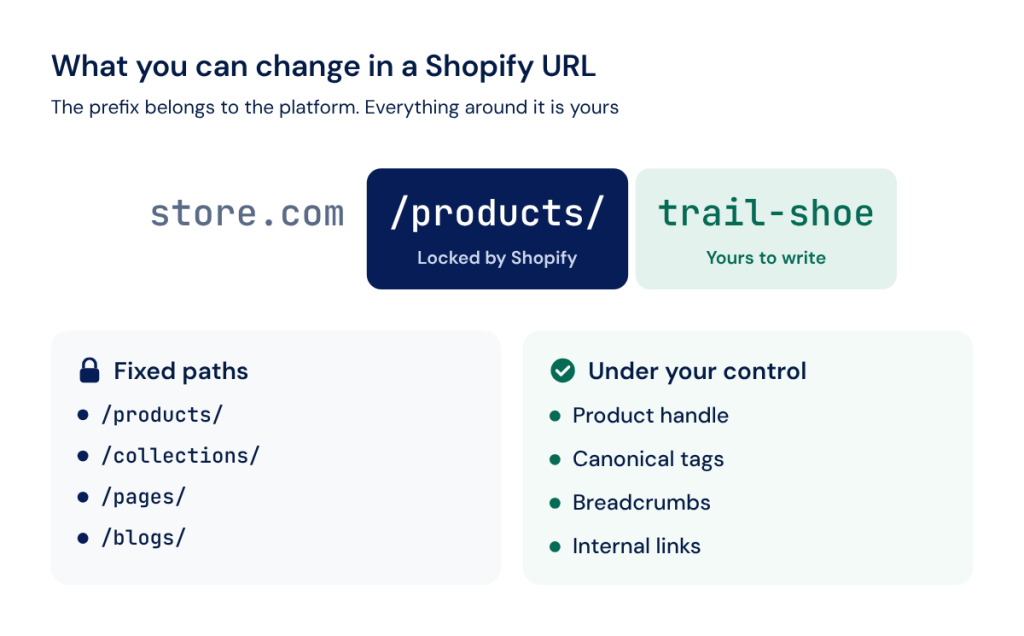
Shopify locks the URL prefix, so the handle, canonicals, breadcrumbs and internal links do the work.
Finding Every Duplicate Across the Catalog
Spot-checking works up to a few hundred products. Past that you are sampling, and duplication clusters in the collections with the most products and the most filters, which are usually the ones carrying revenue. A full crawl settles it. The JetOctopus Duplication report groups pages sharing the same title, meta description and headings, with sub-reports per element and a Duplication by indexability chart splitting results into indexable and non-indexable. The similarity threshold is adjustable, so near-identical product descriptions across variants surface alongside exact matches, and every chart drills through to the data table with the actual URLs.
Crawl Budget, Pagination and Indexation at Scale
Standard crawl budget advice assumes you know how many URLs your site has. On Shopify you usually do not, because the platform generates them.
Google’s crawl budget guide names the thresholds where this starts to matter, and the one that catches Shopify stores is 10,000 unique pages. A catalog of 2,000 products with six collections each, eight variants on average and a dozen filter facets is well past it, and none of those URLs came from a decision anyone made.
One default is worth reading carefully. Shopify’s stock robots.txt blocks /collections/*sort_by*, multi-tag combinations joined with +, and the pattern */collections/*filter*&*filter*. That & means it catches two or more filters combined. A single-filter URL like ?filter.p.vendor=acme is fully crawlable, and single-filter URLs are the ones your faceted navigation links to first. Google’s faceted navigation guidance describes what happens next: crawlers cannot tell whether a faceted URL is useful without crawling it, so they crawl a very large number of them.
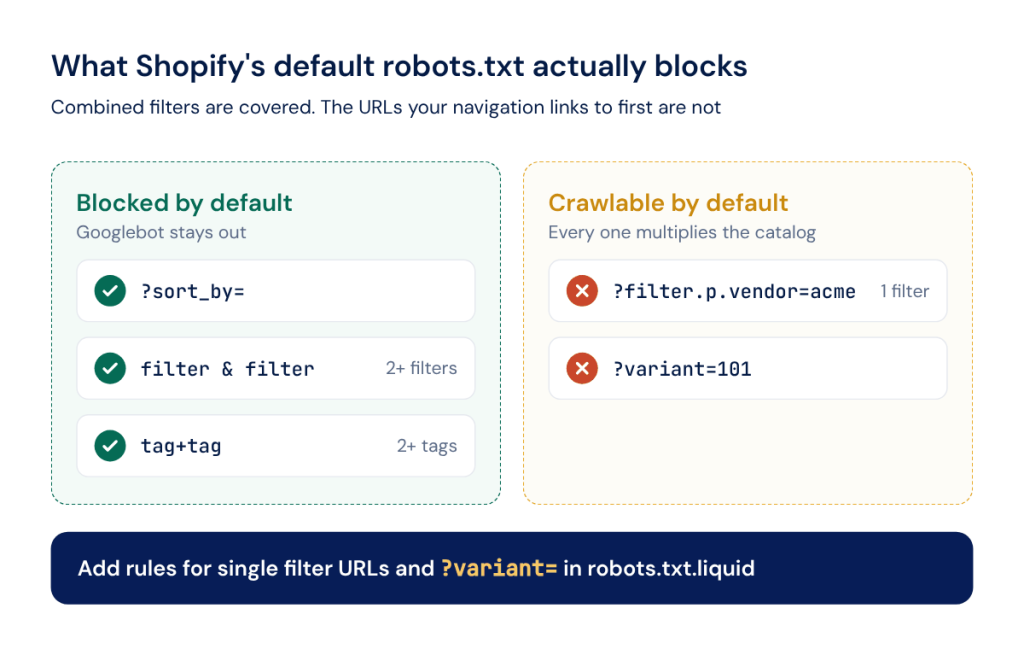
Shopify’s default robots.txt blocks combined filters and leaves single filter and variant URLs open.
There is also a structural ceiling few teams know about. Liquid’s `paginate` tag stops at the 25,000th item in an array, which at 250 items per page is page 100. Products past that point sit in the sitemap with no internal link path from the collection at all.
Pagination and Infinite Scroll Crawlability
Dawn’s default pagination is already correct, which surprises people. It outputs numbered ?page=n links as plain <a href> elements and no rel=”next” or rel=”prev” anywhere. Google confirms that is right: it no longer uses those tags, it wants ordinary anchor links between pages, and it explicitly warns against canonicalizing a paginated sequence back to page one.
The damage usually comes from the fix. An app swaps numbered pagination for infinite scroll and the anchor links disappear, or a theme edit canonicals page two onward to page one and takes those products out of the index with it. Google accepts infinite scroll when each chunk has its own linkable URL reachable through an <a href>, which most implementations do not.
Seeing Where Googlebot Actually Spends Its Time
Search Console Crawl Stats gives you totals by response code and file type, with no URL list. That is the gap, because the question is never how much Googlebot crawled. It is which pattern ate the budget.
Crawl data joined with Search Console answers most of it: which URL patterns exist, how many are indexable, which have impressions and which have never had one. Segments are what make that usable on a Shopify catalog. Define a segment by URL pattern or regex, /collections/*/products/* in one, *?variant=* in another, *filter.* in a third, and every report reads per segment across crawl, log and GSC data at once. The GSC integration pulls impressions, clicks, CTR and position through the API rather than the 1,000 row UI export, and bulk URL Inspection runs coverage checks at roughly 600 URLs a minute, which is how you size the Discovered, currently not indexed pile.
Server logs go further, and here Shopify sets a real limit: standard Shopify hosting does not hand merchants raw access logs. If your storefront is headless, running on Vercel, a CDN or an edge layer you control, those logs are available and JetOctopus reads them. The Bot Details dashboard reports Crawl Budget in Visits and Crawl Budget in Pages alongside page refresh rate and average daily visits, broken down by segment. Our guide to crawl budget optimization covers the prioritization side.
Robots.txt, Meta Robots and Accidental Deindexing
Half the advice online still says Shopify’s robots.txt is locked. It has been editable since 21 June 2021, and since March 2025 you can write domain-specific rules with request.host for multi-domain Markets setups.
What Shopify Lets You Control Now
Through robots.txt.liquid you can allow or disallow URLs, add crawl-delay rules, add extra sitemap URLs and block specific crawlers. Shopify’s documentation is blunt about the trade: this is an unsupported customization, support will not help with edits, and an incorrect rule can cause loss of all traffic. The realistic edit on a large catalog is narrow. Block the single-filter and ?variant= patterns the defaults miss, and leave the managed file alone.
One warning is worth putting in writing, because it is costing stores visibility right now. Copy-pasting a block-the-AI-bots snippet into robots.txt.liquid usually blocks both GPTBot and OAI-SearchBot. Those are different crawlers with different consequences: GPTBot collects training data, and OAI-SearchBot is what surfaces your products in ChatGPT search results. Blocking the second removes you from answers people are already shopping with.
The sitemap has no editing mechanism at all. What you get is exclusion, either by setting a product to Unlisted or by setting the seo.hidden metafield to 1. And private mode, the password page, blocks sitemap access entirely, which quietly catches staging stores every time.
Catching Accidental Noindex Before It Costs Rankings
Dawn ships zero <meta name=”robots”> tags, which means every noindex on a Shopify store came from somewhere: a theme edit, a duplicated template, an app injection or the seo.hidden metafield. There is no admin screen listing them, no warning and no diff when an app updates.
This is the failure mode that costs the most and gets noticed last. A template edit before a seasonal launch adds a conditional noindex, it ships to 400 product pages, and traffic decays for six weeks before anyone connects it to the release.
The Indexation report breaks every non-indexable page down by reason: non-200 status, blocked by robots.txt, canonicalized elsewhere, noindex in the meta robots tag, and noindex or none in the X-Robots-Tag header. Run it after every theme change and every app install and the six-week version of that story does not happen.
Structured Data: Default Schema vs What You Actually Need
Shopify ships schema out of the box, which is why most stores never audit it. The default is thinner than it looks.
What Shopify’s Default Schema Covers (and Misses)
Modern Dawn emits exactly five JSON-LD blocks: Product or ProductGroup on the product and featured-product templates, Article on blog posts, Organization in the header, and WebSite with SearchAction on the homepage. Product markup comes from Shopify’s `structured_data` filter rather than from theme code, so Shopify controls the output and you cannot extend it by editing Liquid around it. That output covers name, description, category, image, brand, url and a nested offers object. Measured against Google’s merchant listing requirements, it clears the required bar and misses most of the recommended set: no sku, no gtin, no aggregateRating, no review, no itemCondition, no shippingDetails, no hasMerchantReturnPolicy.
Two absences matter more than they sound. There is no BreadcrumbList markup anywhere in Dawn, on a platform where the URL already communicates no hierarchy. And collection templates emit no JSON-LD at all, so your highest-value category pages carry no structured data whatsoever.
Conflicting Schema From Themes and Apps
Then the review app adds its own Product block so it can attach aggregateRating. The upsell app adds another. A legacy theme fragment leaves microdata behind. Now one page carries three descriptions of the same product at three different prices, and Google is choosing between them.
Google recommends JSON-LD as the format, which stock Shopify already uses. The problem is never the format. It is the count.
Finding this across a catalog is not a manual job. JetOctopus extracts structured data during the crawl with no extra configuration: open the Extraction dashboard, select Structured Data Extraction, and you get pages missing schema, pages carrying incorrect schema, the distribution of schema types across the site and field-level analysis of what each one contains.
Site Speed and the App Bloat Problem
Shopify gives you a high performance floor. Web Almanac’s 2025 eCommerce chapter, built on real Chrome user data, puts 76% of Shopify origins passing all three Core Web Vitals on mobile, against 35% for WooCommerce and 35% for Magento.
Read the breakdown before celebrating. Shopify’s mobile LCP passes at 86% against WooCommerce’s 39%, while INP is nearly level at 90% against 88%. The gap is almost entirely load performance, which comes from Shopify’s hosting and CDN rather than from anything a merchant did. The honest reading is also the useful one: the platform floor is high, so a Shopify store with bad Core Web Vitals has a problem it installed itself.
That problem is usually the app stack. Reviews widget, live chat, loyalty program, personalization engine, two analytics pixels, an ad tag. Each was approved separately, each looked small, and none of them belongs to anyone. Across the web, at least 90% of pages include a third party, the median page carries 79 third-party requests on mobile, and the median inclusion chain runs three levels deep, meaning your tag manager loads a vendor that loads another vendor.
Testing the homepage and one product page tells you about the homepage and one product page. The pages carrying revenue are deeper: filtered collection views, paginated category pages, the seasonal landing pages that took last quarter’s budget. A crawl measures every template at once. Under Technical, the Performance reports split this into Slow pages and Big pages: load time in seconds with a two second flag, page weight with a one megabyte flag, both filterable and exportable, with Core Web Vitals in a report of their own. If you have edge logs from a headless build, the Heavy Pages report shows what was actually served in kilobytes, which is where a template that tests clean and ships four megabytes in production stops hiding.
Internal Linking and Orphan Pages at Scale
Internal linking is where every problem above compounds, and on Shopify it carries extra load. The URL path communicates no hierarchy, the theme ships no breadcrumbs, and the platform generates URLs faster than anyone links to them.
Internal Links Pointing to the Wrong URL
Faceted navigation links to filtered URLs. Collection grids link to collection-scoped product URLs rather than clean ones. Apps inject links to parameterized versions. Each one is a signal pointing at a page you canonicalized away, and Google treats `rel=”canonical”` as a signal rather than a directive, which it can and does override.
Worth saying plainly, since the Shopify SEO ecosystem repeats the opposite: duplicate content is not a penalty and does not appear anywhere in Google’s spam policies. It is a dilution and crawl efficiency problem. Hand Google five URLs for one product and Google picks one, and it may not pick yours.
Finding Orphan Collection and Product Pages
Orphans on Shopify come from predictable places. Products removed from a collection but still published. Seasonal collections unlinked from navigation after the season. Everything past the 25,000 item pagination ceiling. Products set to Unlisted, which pulls them from collections and recommendations while the URL stays live.
The Internal Links and Links Overview reports map the full link graph: inlink counts per page, follow and nofollow splits, and a problems list flagging pages with one inlink, pages with fewer than ten, and orphans, all broken down by distance from index. The Orphan Pages report cross-references crawl results against your XML sitemaps and Search Console. For fixing it at catalog scale, the AI Internal Linker uses crawl, log and GSC data to match weak and orphan pages to strong donor pages semantically, and returns the links as a CSV or through an API.
Is Shopify Technically Ready for AI Search?
Mostly yes, and the reason is unglamorous.
Google is on the record here, and it contradicts most of what is being sold as AI optimization. Its AI features documentation states that to be eligible for AI Overviews or AI Mode a page must be indexed and eligible to appear with a snippet, and that there are no additional technical requirements. It adds that you do not need new machine-readable files, AI text files or markup, and that there is no special schema to add.
So the AI readiness checklist for a Shopify store is the checklist you just read. Pages Google can reach, indexable, fast, with accurate product data in them.
What is genuinely new is measurement. Each AI platform runs several crawlers with different jobs, which is why the blanket blocks are so costly: OpenAI alone runs GPTBot, OAI-SearchBot, ChatGPT-User and OAI-AdsBot, and both OpenAI and Perplexity state openly that their user-initiated fetchers generally ignore robots.txt. Few sites are watching any of it. GPTBot appears in 4.5% of desktop robots.txt files and ClaudeBot in 3.6%.
With edge logs, the JetOctopus AI Bots report shows which of these actually visit, how often and what status codes they receive, with spoofed bots filtered out by reverse DNS. Our guide to tracking AI crawler activity covers the method. Without logs, the crawl side still answers what matters most: whether the pages you want cited are reachable, indexable and carrying the data an AI system needs to describe them correctly.
FAQ
Does switching Shopify themes undo SEO fixes you have already made?
Any fix living in theme code does not survive: custom canonical logic, conditional noindex rules, breadcrumb markup, extended Product schema, hardcoded internal links. What does survive are redirects, product handles, meta titles and descriptions set in the admin, the seo.hidden metafield, and robots.txt.liquid, which is a separate template. Keep a written list of every theme-level change, and crawl for indexation and structured data the day a new theme goes live.
Is Shopify Plus meaningfully different for SEO than standard Shopify?
Not in features. There is no canonical control, URL structure control, sitemap control or robots.txt capability that Plus has and standard plans do not. The difference that matters at scale is the redirect limit: 100,000 on standard plans against 20,000,000 on Plus, which decides whether a large catalog migration is workable. Plus also allows 25 headless storefronts against one, and higher API limits for bulk metadata edits.
Does duplicate content from collections get a store penalized, or just diluted?
Diluted. Duplicate content is not listed in Google’s spam policies and is not a penalty. The cost is that Google chooses which of your URLs to index, since canonical is a signal rather than a directive, and spends crawl on the copies it did not choose. On a large catalog where crawl demand is already stretched, that cost is real without ever being a penalty.
Do SEO optimization apps actually fix these issues, or just mask them?
It depends which layer the app touches. Apps writing metafields, generating redirects or bulk-editing titles and descriptions change real data, and the changes persist. Apps injecting schema or rewriting canonicals client-side usually add a second signal on top of the existing one, which is how stores end up with three Product blocks on one page. Crawl before installing, crawl again after, and diff.
How long until rankings improve after fixing Shopify technical SEO issues?
It depends what you fixed and how fast the affected URLs get recrawled. Removing an accidental noindex can recover within days. Consolidating duplicate URLs works on a slower cycle, because Google has to recrawl enough of the catalog to update what it treats as canonical. The measurement worth watching is not position. It is whether the fixed pages are crawled more often, indexed, and picking up impressions, all of which move first.
Your Shopify SEO Fix-Priority Roadmap
Not everything on this list deserves the same week.
Immediate, and mostly configuration rather than development. Run the indexation crawl and clear any accidental noindex, because that is the only item here actively removing pages from Google right now. Verify what your canonicals point to on collection-scoped product URLs. Check that the sitemap is reachable and that robots.txt.liquid does not carry a copy-pasted AI bot block costing you ChatGPT visibility.
Short-term, measured in days of development. Extend Product schema past Shopify’s default with sku, gtin, aggregateRating and the shipping and returns properties, and add the BreadcrumbList markup Dawn does not ship. Add robots.txt rules for the single-filter and ?variant= patterns the defaults leave open. Audit the app stack against the Performance reports. Fix internal links pointing at filtered and parameterized URLs.
Ongoing, because these regenerate. Crawl after every theme change and app install, since both can inject noindex tags and duplicate schema without warning. Watch orphan pages as collections and campaigns come and go, and track which URL patterns absorb crawl and return nothing.
None of this is exotic work. The hard part of Shopify eCommerce SEO has never been knowing what to fix, because the platform creates the same problems on every store. It is seeing all of it at once, across a catalog large enough that sampling lies to you.