Most agencies already own the data for a technical SEO client dashboard. The trouble is that it lives in reports built for the SEO team, full of status codes, crawl depth charts and filters that make sense only to the person who set them up. Send that to a client, and the call turns into a glossary session.
The technical story is also scattered across tabs. Indexation sits in the crawler, bot behavior in the logs and rankings in Search Console, while each month someone stitches the pieces together by hand. This guide shows which JetOctopus reports to use for each part of a client-facing technical layer, how to set it up once and how to send it again next month without rebuilding it. If you manage several client sites, the SEO platform for marketing agencies page explains how one account covers them all.
TL;DR
- A technical SEO client dashboard answers six client questions: are pages indexable, how do bots treat the site, where the funnel loses pages, which factors move the numbers, what changed and how site-specific sections perform.
- A dashboard is opened on demand, while a client SEO report is sent on a cadence with commentary attached, so build the first and send the second.
- Crawl, log, Search Console and GA4 data in JetOctopus are joined by URL, so every panel describes the same pages from a different angle.
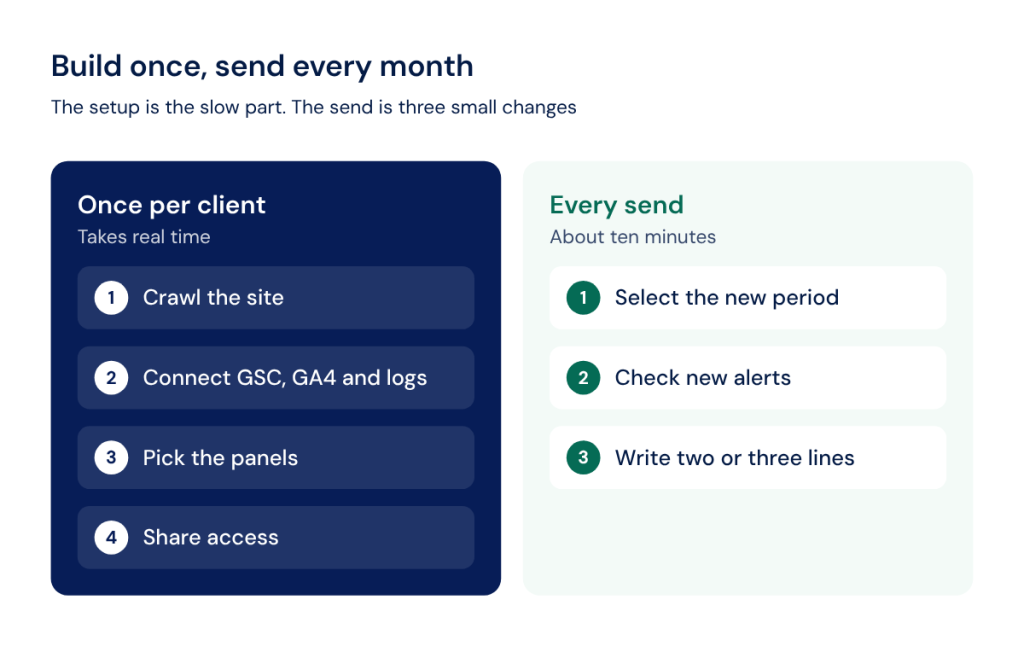
- The setup happens once per client, and each later send needs a new period, a check of new alerts and two or three lines of commentary.
- Clients act on business outcomes, so each chart needs a one-line takeaway in plain language before it goes out.
What a Technical Dashboard Is, and What It Skips
A dashboard is something the client opens when they want to check on the site. A report is something you send on a schedule, with a narrative that explains what changed and what you plan to do about it. A working setup usually needs both, and the dashboard becomes the source the monthly client SEO report is built from.
General-purpose SEO agency reporting software tends to reduce technical SEO to a single health score widget. That number moves up or down, yet it cannot tell a client why Google stopped crawling a category or which pages lose impressions after a release. Those answers need URL-level data from crawls, server logs and Search Console in one place.
That is the premise of this guide. Every report type below already exists inside JetOctopus, and each one reads from every data source in one platform keyed to the same URL: crawl results, logs, GSC, GA4 and custom data you import yourself.
The boundary is worth stating once. Rankings beyond GSC, backlink profiles, PPC and multi-channel marketing reports belong to general-purpose SEO reporting tools for agencies. The technical layer feeds them through Looker Studio or the JetOctopus API, and Ahrefs backlink and keyword data can join the same URL-level table through the Ahrefs integration.
Six Technical Panels That Tell the Story
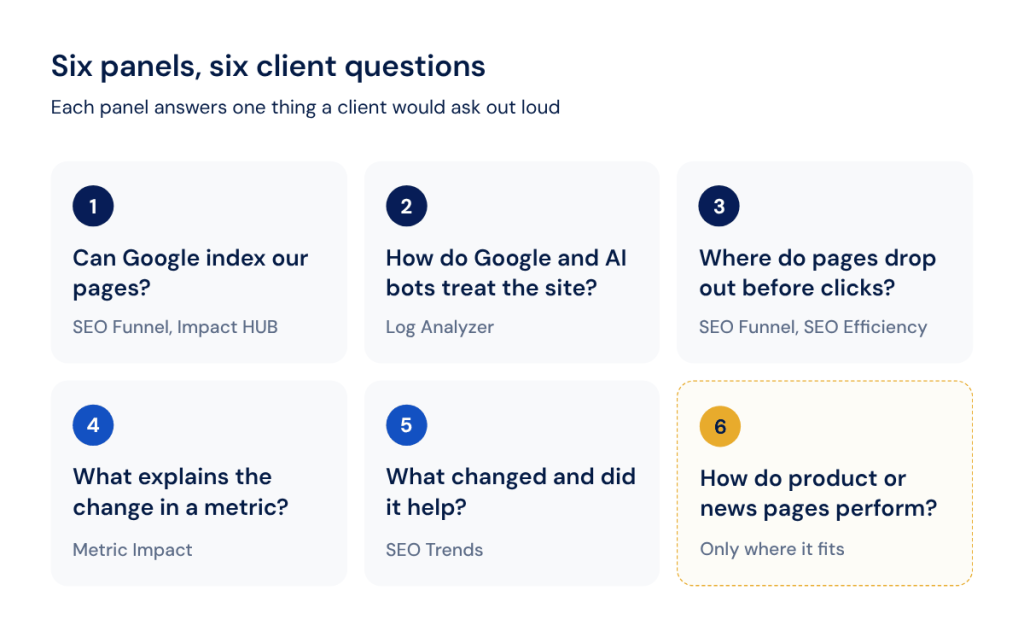
A technical client dashboard works when every panel answers one question a client would ask out loud. Here are the six questions and the JetOctopus reports that answer them:
| Client Question | What to Show | Where It Comes From in JetOctopus |
|---|---|---|
| Are our pages actually indexable and being crawled? | Share of indexable and non-indexable pages, crawl budget spent on each, orphan pages | SEO Funnel; Impact HUB: Crawl Budget and Indexation & Pagination |
| How do Google and AI bots actually treat the site? | Bot visits by depth, inlinks, load time, content size and schema type | Log Analyzer (Bot Dynamics, AI Bots); Impact HUB: Crawl Budget breakdowns |
| Which pages go from crawled to ranked to clicked? | The full page path from site structure to organic clicks; pages with impressions and zero clicks | SEO Funnel; SEO Efficiency; Impact HUB: Impressions |
| What technical factor explains a metric’s movement? | A chosen metric (for example, GSC impressions) broken down by a technical dimension | Metric Impact Tool |
| What changed, and what did it do to performance? | A trend with change events marked on the timeline, plus a before and after summary | SEO Trends (Traffic, SERP, Crawl Budget) |
| How do news or product pages perform? | Article or product funnels by category | News Performance; E-Commerce Performance |
Read together, the six panels answer one question a client cares about: is search sending the right pages to the right people? Each panel covers one link in that chain, and the SEO KPIs worth tracking and SEO metrics worth tracking guides cover the KPI layer that sits on top of it.
See how the six panels look on your client's site.

Indexation and Crawl Budget
Are the pages that matter reachable and indexable? This is usually the first panel a client asks about after a redesign or a migration.
Crawl budget is a real constraint mainly on large sites. Google defines it as the set of URLs that Google can and wants to crawl, and its guide addresses sites with 1 million+ unique pages or 10,000+ pages that change daily. On those sites, a client needs to see where Googlebot’s attention goes.
The SEO Funnel gives the top-level answer: how many pages exist in the site structure, how many Googlebot visits and how many make it further. The Impact HUB adds a dedicated Crawl budget report with the Crawl Ratio and missed pages, plus an Indexation & Pagination section that splits budget by indexability and shows how much goes to paginated URLs.
Orphan pages deserve a line of their own. Google’s guidance is that every page you care about should have a link from at least one other page on the site, and JetOctopus calls orphans a real crawl budget issue on large sites. For the deeper fixes, link the client to a crawl budget optimization plan rather than packing them into the dashboard.
Bot Behavior: Google and AI Crawlers
Do bots reach the best content? This panel turns “traffic dropped” into “bots stopped visiting this section”, which is a statement a developer can act on.
Log file analysis in JetOctopus covers Googlebot, Bingbot, GPTBot, ClaudeBot and 40+ other crawlers. Its Bot Dynamics report tracks changes in crawl frequency over time and correlates behavioral shifts with site changes, while the AI Bots report shows visits from AI crawlers in one dashboard.
AI bots deserve a separate chart for one practical reason. Vercel’s research found that none of the major AI crawlers currently render JavaScript, even though OpenAI’s GPTBot made 569 million requests across Vercel’s network in one month. If a client’s product descriptions load through JavaScript, GPTBot, ClaudeBot and PerplexityBot may never see them.
Impact HUB breakdowns show where bot visits concentrate by click depth, internal links, load time and content size, as well as by schema type and hreflang. A chart showing that deep pages get far fewer bot visits than pages close to the homepage is usually enough to win budget for internal linking work.
From Crawled to Ranked to Clicked
Where does the funnel lose pages? This panel follows every page from creation to traffic.
The SEO Funnel tracks the path in which a page is created, visited by Googlebot, ranked and finally brings organic traffic, and on larger plans it follows pages crawled, ranked, clicked and revenue generated, with MoM comparison. SEO Efficiency shows the same idea as three overlapping circles: pages on the site, pages visited by Googlebot and pages with impressions. Ideally, the three circles should completely overlap.
The Impressions module in Impact HUB analyzes on-page SEO efficiency by impressions, and the Search Console data problem reports surface pages with high impressions but zero clicks and non-200 pages still receiving traffic. In Google’s terms, an impression means a user has seen or potentially seen a link to your site in Search, Discover or News, so impressions without clicks point to a snippet or intent problem.
Two Search Console limits make this panel stronger in JetOctopus than in a GSC screenshot. The GSC interface shows a maximum of 1,000 rows per table, while JetOctopus pulls the maximum data available from the GSC API. Google also deletes data after 16 months, and JetOctopus keeps the history, so a client can compare this year with the one before last.
What Technical Factors Are Behind the Numbers
Why did a number move? The Metric Impact tool in Impact HUB lets you pick a metric, such as GSC impressions, and break it down by a technical dimension, such as load time or click depth.
This panel is where technical work earns its place in a client meeting. If the fastest pages in a section collect most of its impressions, the case for a performance sprint makes itself. Google’s own Core Web Vitals thresholds give the targets: LCP within 2.5 seconds, INP of 200 milliseconds or less and CLS of 0.1 or less.
The Trend and the Story Behind It
What changed, and did it help? SEO Trends was built as a manager’s dashboard with three views: traffic trends (total against SEO), SERP efficiency in dynamics and crawl budget dynamics.
The report covers a six-month view with change events marked on the timeline and a before and after table for each event. That makes it the natural centerpiece of a quarterly review, since a client can see the date of a migration, the dip that followed and the recovery in one chart.
Site-Specific Add-Ons: News and Ecommerce
Two panels are situational and belong only on dashboards where they fit. News Performance tools serve publishers who care about quick article indexation and the long lifecycle of an article, with efficiency by category, article and author. E-Commerce Performance tools analyze the SEO efficiency of products by category, from indexation and crawling to rankings and organic traffic. The e-commerce view relies on Product schema on product pages, so check the client’s markup against Google’s Product structured data guidelines before you promise this panel.
Building the Dashboard in JetOctopus, Step by Step
The build has three stages, and only the first one takes real time. After that, the dashboard is a matter of choosing views and sharing them.
Connect the Data Once
Start with a crawl of the client’s site, then connect Search Console, GA4 and server logs in the same project. Logs can come through 12 native integration methods, including an Nginx real-time stream, Cloudflare, AWS CloudFront, Fastly, Akamai, Vercel and Shopify, as well as manual file upload. If a log format is not recognized, the technical team integrates it manually within 24 hours.
GA4 brings organic traffic into the same rows, and the guide on how JetOctopus and Google Analytics work together shows what that adds. Joined history matters here as well, since standard GA4 properties keep exploration data for only 2 or 14 months.
Turn Reports into Client-Ready Views
Use the six panels above as the structure, and pick only the ones the client needs. There are two ways to package them.
For a quick send, export the reports as PDF. You can save reports from Logs, Crawler, GSC and most other sections as PDF with the Export button in the upper-right corner. If you already run audits this way, the guide on how to audit a site with JetOctopus follows the same report order.
For the agency’s own look, pipe crawl, log and GSC datasets into Looker Studio through the JetOctopus partner connector. Google has since renamed Looker Studio to Data Studio, and its self-service tier is available at no charge for creators and viewers. Larger teams can also export crawl and GSC data to BigQuery and join it with their own data warehouse.
Share It With the Client
You have two options for delivery. Send the PDF with a link back to the live report, or give the client direct access to the project. JetOctopus lets you share project access with a View role for viewing and filtering data or a Manager role with full access, and you can share as many accesses as you need. Seats are unlimited on every plan, so adding a client contact costs nothing extra.
SEO Trends is the view that turns these panels into a client-ready narrative. A timeline with change events and a short before and after summary shows the client what the team did and what it changed, which a single health score can never do.
Making It Repeatable Instead of Rebuilt Every Time
SEO reporting for agencies gets expensive when the dashboard is rebuilt for every send. Most SEO report software can schedule a delivery, so the real cost sits in rebuilding the content, and the fix is to separate the one-time setup from the recurring send.
Once sources are connected, the panels recompute for a new period on their own. Three things change each time: the period you select, any new alert that fired and the commentary you write. Automated alerts help with the second part. They arrive by email, Slack or MS Teams, log alerts run in real time, while GSC alerts follow Search Console’s standard two-day lag.
OMcollective shows what this looks like at scale. The agency manages a digital footprint of over 60 websites for one client, with all locations in one account shared across the team. “Keeping an eye on the website hygiene of dozens of websites is now possible in a few minutes every day,” says Pieter Serraris, Digital Marketing Consultant at OMcollective. It is a good model of how one agency monitors 60+ client websites from one platform.
Vendor averages for reporting time are hard to verify, so measure your own gap. Time the first dashboard for a client, from connection to first send, and then time the second send for the same client a month later. The difference is the work that has become repeatable, and it grows with every client you add.
There is also a commercial reason to keep the cadence steady. In a 2025 survey of 500 US small businesses by vcita, 40% of SMBs that outsource marketing ended up discontinuing or switching their agency, and 56% of that churn happened within 6 to 12 months. A regular send with visible progress is one of the few things an agency fully controls during that window.
My KPI is the tool that holds the repeatable part: a segmented, period-over-period tracker built once per client and reused every cycle. Pick the segments the client cares about, set the KPIs once and compare each new period with the last.
Translating Technical Data into Client Language
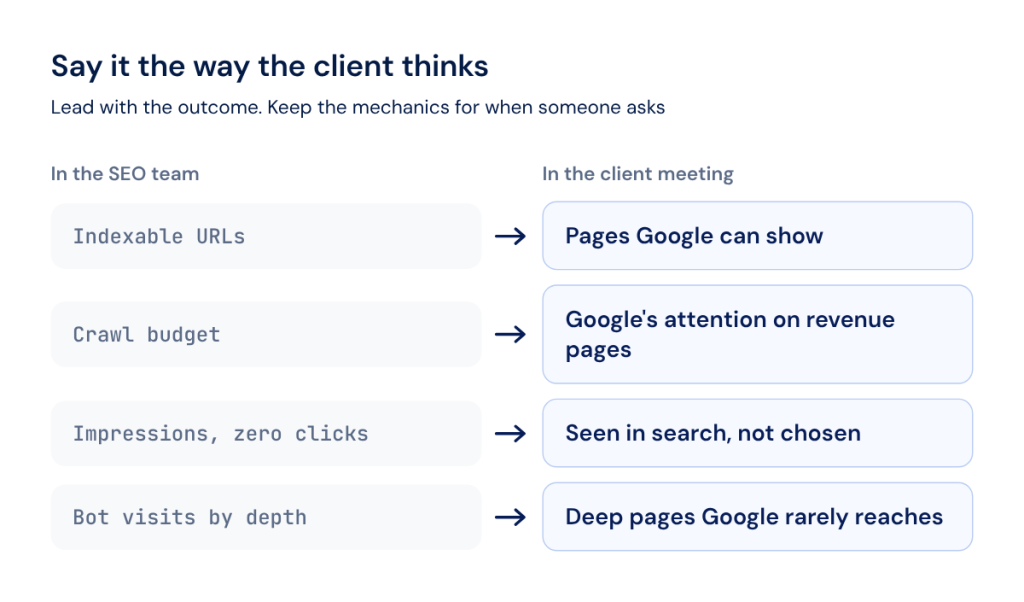
How do you walk a non-technical client through the finished dashboard? Start with the outcome and keep the mechanics for the moment someone asks how you know.
Crawl budget is a good example. What a client needs to hear is “this is how much of Google’s attention goes to your revenue pages”. Indexation works the same way: “out of all your product pages, this is how many Google can show in search”. The Search Console data then becomes proof instead of the headline.
Give every chart a one-line takeaway written above it, such as “Category pages lost impressions after the March release, and the fix ships next sprint.” If you cannot write that line, the chart probably belongs in the internal report.
A few habits keep the dashboard readable:
- Lead with business panels: the funnel and the trend go first, and bot-behavior charts follow as supporting evidence.
- Hide raw tables: status-code tables and long URL lists stay in the project, linked for anyone who wants them.
- Rename metrics: “pages Google can show” works better than “indexable URLs” in a client meeting.
- Separate branded traffic: Search Console now offers a branded queries filter, and non-branded traffic is the cleaner measure of SEO work.
The same logic applies when you pitch a new client with a technical audit. A good SEO audit tool for agencies produces findings, while the agency’s job is to sort them by what they cost the client. The AI SEO Recommender helps with the first pass, since it queries crawl results, Search Console performance and server logs and returns a short, ranked list of the biggest problems.
The 10-Minute Pre-Send Checklist
A technical dashboard earns trust when it looks the same every month and changes only where the site changed. The checklist below takes about ten minutes and catches the mistakes clients notice first.
Run through these five checks before each send:
- Period: the date range matches the agreed reporting cycle and compares with the previous one.
- Data freshness: Search Console data usually appears after 2 to 3 days, so the last days of the period are complete.
- Alerts: every alert that fired during the period is either explained or listed as an open task.
- Takeaways: each panel has a one-line takeaway in plain language above the chart.
- Access: the client contact can open the PDF or the shared project without asking for a password.
A checklist keeps the send consistent, while a first dashboard built on real client data shows whether the panels answer that client’s questions. The 7-day trial gives full access to all modules with no credit card, which is enough to connect one client and build the first SEO client dashboard before the next reporting cycle.
Connect one client's crawl, logs and Search Console and send your first technical dashboard this week.
FAQ
How much history can a technical dashboard show before older data loses relevance?
For monthly sends, show the current period against the previous one plus a year-over-year line where data allows. Search Console’s report view defaults to the past three months, and JetOctopus keeps GSC history beyond Google’s 16 months. Data older than the last major redesign usually adds noise.
Should the dashboard show every technical issue found, or only the ones tied to traffic?
Show the issues tied to traffic, indexation or revenue pages, and keep the full list in the shared project. A client dashboard works as a decision tool. Long issue lists belong in the audit, where the team can sort and assign them.
What if the client’s site doesn’t have server log access set up yet?
Start with crawl, Search Console and GA4 panels, and add logs when access is ready. JetOctopus also accepts manual file upload, so a single exported log file is enough for a first look at bot behavior.
Does adding more client sites to the same account change how a dashboard is built?
The build stays the same for each site, since every client gets its own project. Agency plans include unlimited projects, users and domains, so a new client adds pages to analyze without new seats or accounts.
How do multiple team members keep a shared client dashboard consistent?
Agree on one set of panels per client, name segments the same way across projects and give clients the View role. JetOctopus project sharing keeps one source of data for everyone, so a technical SEO client dashboard never splits into personal versions.