Ecommerce pagination SEO produces more internal tickets than almost any other technical topic, and most of them open the same way. Page 2 of a category is not ranking, and somebody wants it fixed.
Settle one thing before you touch a canonical tag. Page 2 not ranking is the expected outcome. Nobody searches for page 2 of anything, so the demand, the external links and the navigation links all arrive at page 1, and every page after it inherits a single internal link and very little else.
The questions worth your time are different. Is the series quietly costing page 1 anything in crawl budget, link depth or duplicate signals? And is there inventory sitting deep in it that deserves a page of its own? This guide answers both, and it covers the platform defaults and the parameter arithmetic that usually turn out to be the real problem. For the wider context, it sits alongside our general crawl budget strategy that applies to any large ecommerce site.
TL;DR
- Page 2 not ranking is correct behaviour rather than a misconfiguration. Every signal that makes a category rank arrives at page 1, so the useful question is whether the series costs page 1 anything.
- Google retired rel=”next” and rel=”prev” as indexing signals in March 2019, and it had already stopped using them years before the announcement. Nothing in the head of a paginated page reassembles the series.
- Google’s ecommerce documentation is explicit that you should not canonicalise page 2 to page 1. Every page in the series gets its own self-referencing canonical.
- Noindexing paginated pages saves no crawl budget. Google still has to request the page before it can see the tag, and its crawl budget guidance says exactly that.
- Sort and filter parameters, rather than pagination itself, are usually what turns one category into six figures of crawlable URLs.
Why Pages 2, 3 and Beyond Were Never Going to Rank the Way Page 1 Does
Nobody types “page 2 of running shoes” into a search box. That one fact explains most of what follows, and it is the reason a pagination audit that starts from “why does page 2 not rank” starts from the wrong place.
Think about where a category page gets its ranking signals. Query demand exists for the category. External links point at the clean URL, because that is what an editor or an affiliate links to. Navigation links point at the same URL from every template on the site. All of it lands on page 1.
Page 2 receives one internal link, from page 1, and it arrives looking like a near-duplicate. Same title pattern, same intro copy, same breadcrumb, same facets, same everything except 24 product tiles. Calling it thin content misses slightly, since the products on it are real, yet there is no separate query it answers and no independent reason for anyone to link to it.
For a while, rel=”next” and rel=”prev” were supposed to tie the series together so Google could treat it as one unit. That ended on 21 March 2019, when Google announced it had retired the markup as an indexing signal and revealed it had not been using it for years before that. John Mueller’s guidance at the time still describes the situation now.
“For the most part, we just index the pages as we find them, so as we’ve recommended for a long time, it’s good to make sure that all pages can stand on their own.”
John Mueller, Google, reported by Search Engine Journal
Read that as the rule it is. Every page is judged on its own, and page 37 of a category has nothing of its own to be judged on.
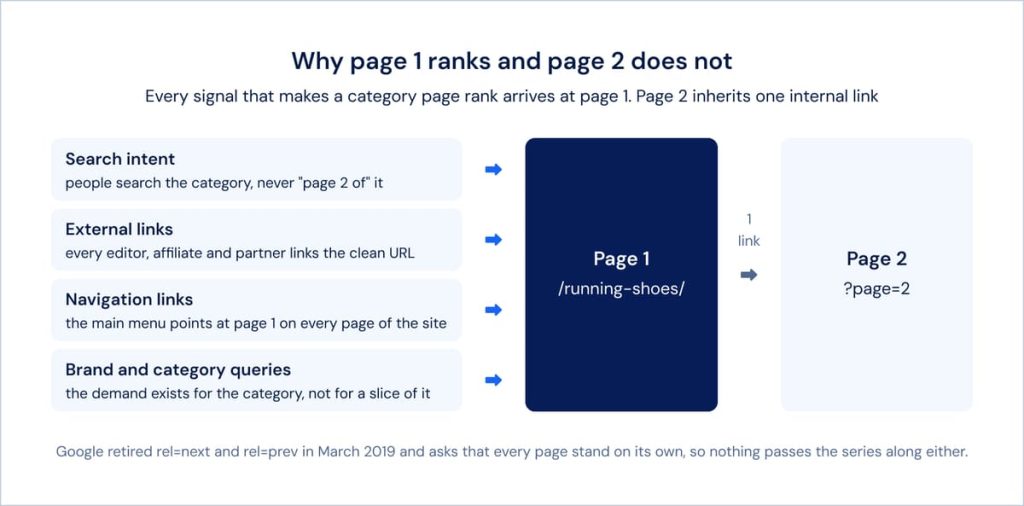
Four sources of ranking signal, one destination. The series carries almost nothing forward.
The same logic now keeps paginated pages out of AI answer engines, for the same reason rather than a new one. An answer engine cites a page that resolves a question by itself, and a slice of a product grid resolves nothing by itself. There is no separate fix for that channel, because there was never a separate cause.
What Pagination Actually Costs You, Even When Nobody Expects Page 2 to Rank
Three things, and only one of them ever shows up in a rankings report. The cost of ecommerce pagination SEO is paid in crawl budget, in link depth and in near-duplicate signals, which is why it stays invisible until something else breaks.
Here is what each one looks like on a real catalog:
- Crawl budget spent on depth. A category of 10,000 products at 24 per page is 417 paginated URLs. Multiply that by every category you run, then add the parameter variants. JetOctopus defines distance from index, or DFI, as the number of clicks from the homepage to a page, and its own guidance notes that when the early levels already hold a lot of pages, the crawler is less likely to reach DFI 6 and beyond because the budget runs out first.
- Link depth that grows with the series. Internal link equity thins with every hop, so a product sitting on page 40 receives whatever survives forty divisions. When page N is reachable only from page N minus 1, page 40 sits 41 clicks from the homepage, and so does any product whose only other route runs through it. A numbered pager that exposes the first and last pages flattens the same series to three or four clicks.
- Near-duplicate signals stacking up. Four hundred URLs sharing a title, a meta description and an intro paragraph is a lot of sameness to hand a classifier, and none of it is doing any work for you.
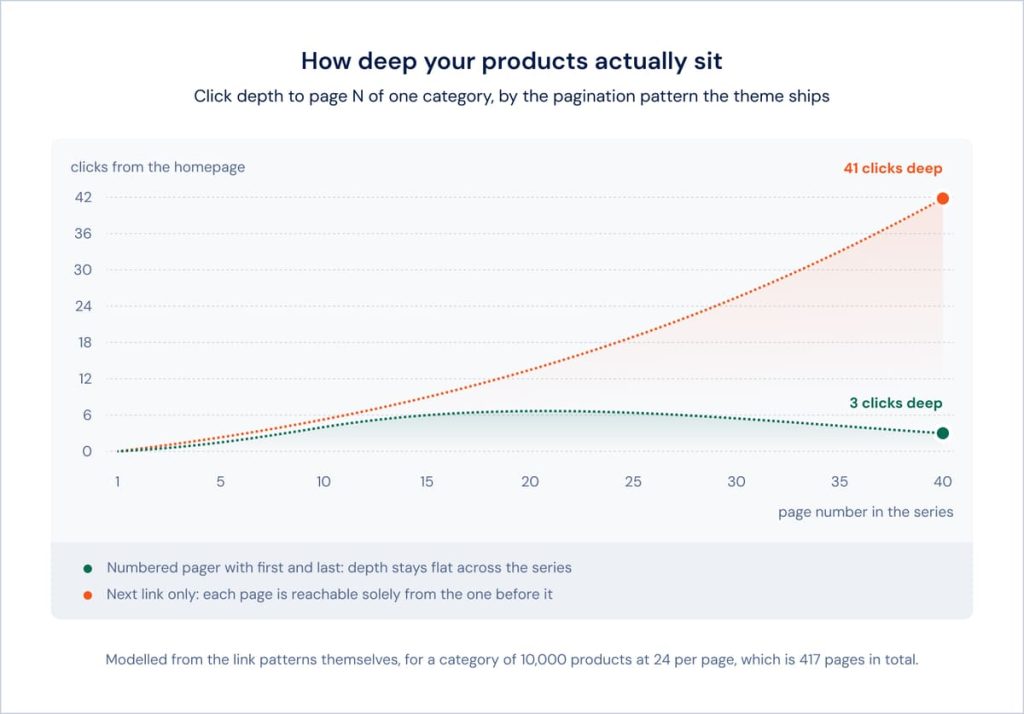
The same 417 page series under two link patterns. The pattern is a theme decision, and it decides how deep your inventory sits.
Both of the first two are measurable today, without waiting for a ranking to move. JetOctopus is a cloud-based technical SEO platform built for large websites, e-commerce catalogs and the agencies that manage them, and its crawl results carry distance from index for every URL next to the inlink count that put it there. Filter a crawl to one category template, sort by DFI and you can see in a single screen whether your deep listings sit three clicks from the homepage or thirty.
See How Deep Your Listings Really Sit
When Deeper Inventory Deserves Its Own Page, and When It Is Just Pagination Depth
Occasionally what sits behind page 4 is a category in its own right that nobody ever created. Far more often it is 24 more products from the same set, and the correct action is to leave it alone. Telling those apart is the decision this whole audit exists to support.
The test has two parts. Does the subset have demand of its own, expressed as phrases people actually type? And does it have a boundary a shopper would recognise, rather than one set by your products-per-page value? The table below is how that usually reads in practice.
| Signs of Real Demand for Its Own Page | Signs It Is Just Pagination Depth |
|---|---|
| Search volume exists for the subset as a phrase, such as “waterproof trail running shoes” | The only way to describe the subset is by its position in the series, as in “more running shoes” |
| The boundary is something a shopper recognises: a brand, a use case, a size range, a material | The boundary is arbitrary and moves whenever you change how many products fit on a page |
| Deep pages already pick up Search Console impressions for terms the category page does not cover | Search Console shows the category term only, spread thinly across the whole series |
| Membership is stable, and the same products stay in the subset as stock turns over | Membership changes every time the sort order, the stock level or the price does |
| You could write a hundred words about the subset that are true and specific to it | Any copy you wrote would apply just as well to page 3 and to page 9 |
When the left column wins, there are two ways to resolve it, and which one fits depends on the size of the catalog.
Build a dedicated landing page. That means a real category or a curated collection with its own URL, its own title, its own copy and its own place in the navigation, so it can attract external links and internal links the way page 1 does. Promoting a paginated URL in place achieves none of that, because the URL still carries the shape and the history of a slice.
Or stop splitting at all. On a small catalog, a single View All page removes the series and everything lands on one URL that can hold links and rank. The constraint is render time, which keeps this a small-catalog answer: once the page is slow enough that people abandon it, you have traded a crawl problem for a conversion problem.
Common Mistakes That Quietly Undo Your Pagination Setup
These are the implementation details that look finished and are not. Each one below pairs the failure with what a correct setup looks like, because knowing a canonical is wrong helps only if you know what right would have been.
1. Canonicalising Every Page to Page 1
This is the most widely repeated piece of pagination advice and Google contradicts it directly. Pointing page 2 at page 1 tells Google that the content of page 2 is the content of page 1, which is untrue, and it can leave the products that only appear deeper in the series without a route into the index.
“Don’t use the first page of a paginated sequence as the canonical page. Instead, give each page its own canonical URL.”
Google Search Central, ecommerce pagination documentation
What correct looks like: a self-referencing canonical on every page in the series, page 1 included.
2. Canonical and Noindex Signals That Contradict Each Other
These two directives answer different questions, so a URL that sends both gets neither handled the way you intended. A paginated page carrying a noindex tag alongside a canonical pointing at page 1 is telling Google to drop the page and to treat it as a copy of another page at the same time, and Google has to pick one. The combination is almost always accidental: an SEO plugin writes the canonical, somebody adds the noindex for an unrelated reason, and nobody reads the rendered head where the two finally meet.
A blanket self-referencing canonical causes the mirror-image problem. Applied by a template to every URL the site can produce, parameters included, it quietly declares every sort order and every filter state a canonical page in its own right. That is the opposite of what the rule is usually added to achieve, and it hides well: the template is correct and only the rendered output is wrong.
What correct looks like: one job per URL, verified in the rendered head rather than in the template. Paginated pages get a self-referencing canonical and stay indexable. Parameter variants get either a canonical pointing at the clean URL or a robots.txt rule, never a canonical pointing somewhere while a noindex says the page should not exist at all. If you cannot say in one sentence what a given URL is for, the directives sitting on it will not manage it either.
3. Noindexing the Series to Save Crawl Budget
The intention is sound and the mechanism does not work. A noindex tag lives in the page, so the page has to be fetched before the tag can be read, which means the crawl happens either way. Google states it plainly in its crawl budget guidance: “Don’t use noindex, as Google will still request, but then drop the page when it sees a noindex meta tag or header.”
What correct looks like: use noindex when your goal is keeping something out of the index, and robots.txt when your goal is not spending crawl on it. Google recommends robots.txt for exactly this case, and it is the right lever for sorted and filtered variants rather than for the pagination path itself.
4. JavaScript-Only Pagination With No Crawlable Link
Infinite scroll and Load More buttons are fine for people and invisible to crawlers when nothing sits behind them. Google is unambiguous about the limit: “Google’s crawlers don’t ‘click’ buttons and generally don’t trigger JavaScript functions that require user actions to update the current page contents.” A button with no href is where the crawl stops.
What correct looks like: every page in the series reachable at a unique URL through an ordinary anchor tag. Keep the infinite scroll for shoppers and put real links behind it, which Google’s own guidance describes as the supported pattern.
5. Duplicate Titles and Meta Descriptions Across the Series
Four hundred URLs carrying an identical title is a lot of near-identical pages to publish, and it makes a series that is merely long look like a series that is duplicated.
What correct looks like: append the position, as in “Running Shoes (Page 2 of 417)”. This will not make page 2 rank and it was never going to. It stops the series from reading as the same page repeated, which is the only job it has.
6. Blocking Pages in Robots.txt That You Still Link To
Blocking the pagination path while still linking through it puts your products behind a door the crawler cannot open. If the series is the only route to a product, blocking it removes the product.
What correct looks like: decide first whether the series is a crawl path. When products depend on it, the series stays crawlable and the parameters get blocked instead. When products have other routes, blocking the series becomes an option worth modelling.
What Your Platform Already Decided for You
Before you plan any change, find out which parts of your pagination are actually yours to change. Every major platform ships an opinion, and some of it is not overridable without leaving the platform. The table covers the defaults as they stand in the current source of each platform and its reference theme.
| Platform | Paginated URL | Default Canonical on Page 2 | Fixed | Changeable |
|---|---|---|---|---|
| Shopify | ?page=2 | Self-referencing, keeps ?page= | 250 items per page ceiling, pagination stops at item 25,000, the page parameter name | Products per page, 16 in Dawn with a range of 8 to 36. The canonical line in theme.liquid. robots.txt through robots.txt.liquid |
| WooCommerce | /page/2/, or ?paged=2 without pretty permalinks | WordPress core outputs no canonical on archives. Yoast and Rank Math both add a self-referencing one | The URL shape follows the permalink setting. Shortcode loops use ?product-page= | Products per page, 16 by default as 4 columns by 4 rows. Canonical and adjacent links through plugin filters |
| Magento 2 | ?p=2 | Off by default. Once enabled, 2.4.8 and later give a self-referencing canonical that keeps ?p= | Which parameters the canonical keeps, and the p, limit and product_list_ parameter names | The canonical setting itself, products per page at 12 grid and 10 list, default sort, Allow All Products per Page |
| BigCommerce | ?page=2 | Injected by the platform and not exposed in the theme layer | The canonical tag, and the page and sort parameter names | Products per page, 12 in Cornerstone. rel=prev and rel=next, which Cornerstone emits from the category template |
One row changed recently enough to catch people out. Up to Magento 2.4.7, every paginated category page canonicalised to page 1, which is precisely what Google’s documentation tells you not to do. Version 2.4.8 fixed it under ticket ACP2E-3653, and paginated pages now carry a self-referencing canonical that keeps the ?p= parameter while dropping the others. No setting restores the old behaviour, so which one you have depends on the version you are running.
Sort and Filter Parameters Are Usually the Real Problem
When a pagination audit turns up tens of thousands of URLs, pagination itself is rarely what produced them. The series grows in a straight line with your catalog. Parameters grow by multiplication, and they multiply the series along with everything else.
Run the arithmetic on a single category and the shape becomes obvious.
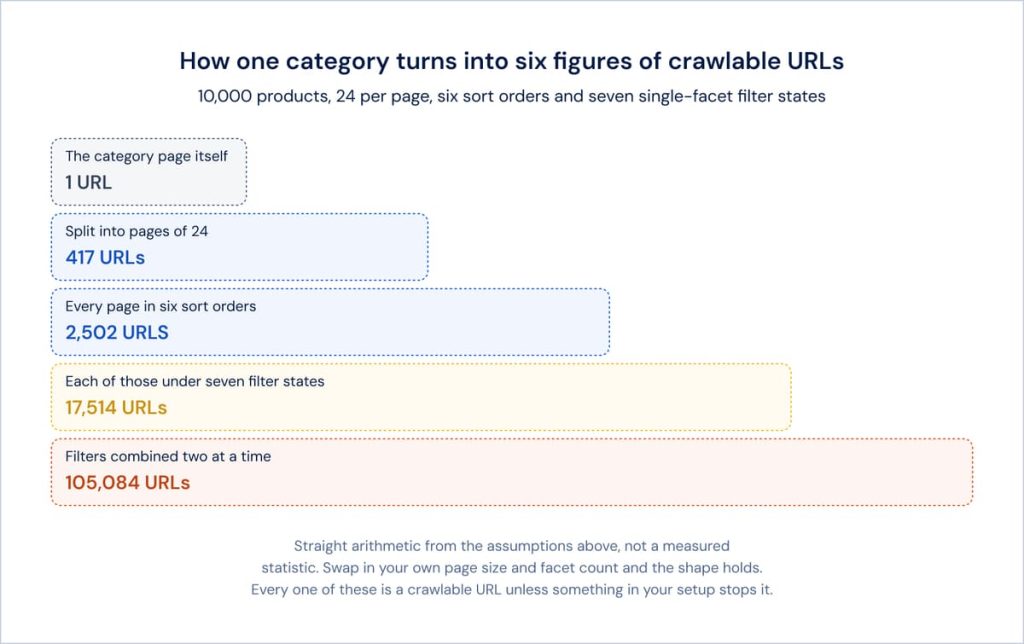
One category, one page size and a modest set of facets. The last row is a single category, not a whole site.
Nothing in that chart requires an unusual setup. It is one category with six sort orders and a handful of filters, which is a plain ecommerce build. It is also how faceted navigation multiplies crawlable URLs the same way.
Google treats these as low value by default. Its crawl budget guidance names “differently sorted versions of the same page” among the URLs worth blocking, and its ecommerce documentation advises keeping filtered and sorted variations out of the index with noindex or robots.txt. The pagination path is the part you keep. The parameter layer sitting on top of it is the part you control.
This is the diagnostic step most pagination advice skips, and it needs data rather than an opinion. Segment your crawled and indexed URLs by parameter pattern, and the split between what is genuine inventory depth and what is machine-generated combinations answers itself. If ninety per cent of your paginated URLs also carry a sort parameter, the canonical strategy on page 2 was never the thing to fix first.
Segment Your Paginated URLs by Pattern
Auditing Ecommerce Pagination Without Waiting for Rankings to Drop
Most problems of pagination on ecommerce sites surface long before a ranking does, which is the good news. A pagination problem does not announce itself as a ranking drop. It shows up as products that never get crawled, which becomes products that never get indexed, which becomes a revenue question about six months later. These are the five things worth checking on a schedule:
- What share of Googlebot’s requests goes to paginated and parameter URLs, taken from log file analysis rather than estimated from a crawl
- How far past page 1 anything in the series is actually indexed
- How deep the deepest listings sit, counted in clicks from the homepage rather than in URL segments
- Whether the canonical and robots directives on the series match the strategy you believe you have
- How much of your indexed volume is parameter-driven rather than inventory-driven
Those five map onto reports you can open in one sitting. The crawl budget dashboard in the Logs section answers the first from raw log lines, and Raw Logs lets you filter to a single bot and period when a number looks wrong. The Rel Tags report under Indexing carries a Pagination Pages section for the directive check. Distance from index in the crawl results answers the depth question, and segments make all of it repeatable per category template instead of per audit.
For the click-by-click mechanics we wrote the full step-by-step walkthrough for auditing pagination separately, so this section stays on what to look at and why it matters.
Audit Your Pagination Right Now
The Goal Was Never Making Page 2 Rank
Everything above comes back to the same throughline. Page 2 was never going to rank, chasing it was never the job and the audit exists to answer two other questions: whether the series is costing page 1 anything, and whether anything buried in it deserves to become a page in its own right.
Both are measurable, so you can tell whether the work landed without waiting for a ranking to move. Three numbers make a usable scorecard, and they are the same three this article has been using throughout:
- The share of Googlebot requests going to paginated and parameter URLs, which should fall as you tidy the parameter layer
- The click depth of your deepest listings, which should fall as the pager exposes more of the series
- The parameter-driven share of your indexed URLs, which should fall as blocking and consolidation take effect
Watch those three over quarters rather than weeks, because they move with releases and seasonal catalog changes rather than on a schedule of your choosing. A recurring crawl turns this from a cleanup you did once into a scorecard that tells you when something shipped, and that is the whole point of treating ecommerce pagination SEO as monitoring rather than as a project with an end date.
See How Deep Your Pagination Goes
Crawl your catalog and see the click depth of every listing, how many paginated and parameter URLs your filters create and how much of Googlebot's attention they take. The 7-day trial gives full access with no credit card.
FAQ
Does noindexing paginated pages actually save crawl budget, or does Google still have to crawl them to see the noindex tag?
Google still has to crawl them, so no budget is saved. Its crawl budget guidance says it directly: “Don’t use noindex, as Google will still request, but then drop the page when it sees a noindex meta tag or header.” The tag lives inside the page, so the fetch has already happened by the time it is read. Use noindex to keep something out of the index and robots.txt to stop spending crawl on it.
If a paginated page is already ranking for a long-tail term by accident, does fixing its canonical or noindex setup risk losing that ranking?
Check what it ranks for before you change anything, because that ranking is useful information. A deep page picking up a long-tail term usually means the subset behind it has demand of its own, which calls for a dedicated landing page rather than a canonical change. Adding a self-referencing canonical rarely disturbs an existing ranking. Canonicalising the page to page 1 can remove it, which is one more reason not to.
Is there an ideal number of products per page for SEO, or does that only affect load time and user experience?
There is no SEO number, though the choice has SEO consequences. Page size decides how many URLs the series produces, how deep the last page sits and how long the page takes to render. A larger page size means fewer paginated URLs and more products per unit of crawl, up to the point where render time starts costing you. Platform defaults sit between 10 and 16, while 24 to 48 is common on large catalogs.
Does infinite scroll ever make sense for SEO if a crawlable fallback is implemented, or is standard pagination always safer?
Infinite scroll works when the crawlable fallback exists, and the fallback is doing all of the SEO work. Google states that its crawlers do not click buttons and generally do not trigger JavaScript functions that require user actions, so the scroll is for shoppers while every page still needs a unique URL reachable through an anchor tag. Standard pagination is safer for one reason: it makes that fallback the default instead of something a developer has to remember.
Should paginated URLs be included in the XML sitemap, or only the first page of each series?
List page 1 of each series and leave the rest out. A sitemap is a discovery hint for URLs you want crawled and indexed on their own merit, and deep paginated URLs rarely qualify. One exception is worth knowing: on a site where products are reachable only through the series and logs show Googlebot is not getting far enough into it, listing the series can help discovery while you fix the internal linking underneath.
If sort or filter parameter URLs are already indexed and pulling long-tail traffic, is it safe to noindex or block them retroactively?
Measure first, then act in the right order. Pull impressions and clicks for those URL patterns in Search Console, because a handful of filter combinations that earn real traffic are candidates for proper landing pages rather than for blocking. For everything else, apply noindex and let the URLs drop out before you add a robots.txt rule. Blocking a URL that is already indexed leaves it in the index with nothing readable behind it.
Does pagination depth matter differently for a blog archive than for an ecommerce category page?
The mechanics are identical and the stakes are not. Posts in a blog archive have their own titles, links and routes in from search, so depth there costs comparatively little. On a category page, pagination is frequently the only path to a product, so the same depth quietly removes inventory from the index. Judge it by the question ecommerce pagination SEO keeps returning to: does anything behind page 2 have another way to be found?