A year ago, SEO teams and marketing managers were asking, “Is GPTBot crawling my site?” mostly out of curiosity. Today, it’s something you actually see in your traffic reports. More qualified leads are now coming from ChatGPT, Perplexity and Google’s AI Overviews, all of which generate their answers by pulling from pages that AI crawlers have already fetched, parsed and decided to cite.
But here’s the uncomfortable part: most teams have no idea which AI bots visit their site, which pages those bots actually reach or whether the crawler seen in the logs is the real GPTBot or something wearing its user-agent as a mask. Google Analytics won’t tell you because it runs on JavaScript and most AI crawlers don’t execute it. GSC won’t tell you either because it only reports Googlebot. The only place the truth lives is your server logs.
This AI crawler activity tracking setup guide walks you through the process end to end: what to track, how to separate real bots from spoofed ones and how to build a repeatable monitoring workflow using JetOctopus.
By the end, you’ll know exactly which AI crawlers touch your site, where they go, where they get stuck and what to do about it.
TL;DR
- AI crawler tracking is log-based, not tag-based. Analytics misses AI bots (no JavaScript) and GSC only reports Googlebot; your server logs are the only place that covers the complete record of what GPTBot, ClaudeBot, PerplexityBot & co actually did.
- Getting a full picture means: stream logs → isolate AI bots → filter spoofed traffic → analyze coverage & errors → join with crawl + GSC → let the AI SEO Recommender rank the fixes.
- Verify before you trust. Any script can fake a GPTBot user-agent; validate against vendor IP ranges so you’re not optimizing for impostors. JetOctopus recognizes 40+ bots and spoof-filters automatically.
- What to look for: which pages AI bots reach (coverage gaps), where they hit 404/301/5xx, how crawl budget is spent and how often key sections get revisited.
- Why it’s worth it (enterprise logs we’ve reviewed): AI bots now run at 40–50% of Googlebot-level activity, an AI crawler covered 2.2× more unique URLs than desktop Googlebot and 67% of GPTBot’s visits hit 404s. This is wasted budget you can’t see anywhere but the logs.
- Treat this as an ongoing habit: keep logs streaming, save an “AI Crawlers” segment, review weekly and re-run the Recommender each crawl.
Why Tracking AI Crawler Activity Matters Now
Classic SEO revolved around one question: is Googlebot crawling and indexing my important pages? AI visibility adds a second, parallel question: are AI crawlers reaching the pages I want cited in LLM answers?
And AI crawlers don’t all behave the same way, either. GPTBot, ClaudeBot and PerplexityBot each have their own budgets, their own priorities and their own blind spots. A page that Googlebot hits daily might go untouched by GPTBot for weeks. If that page is the one you want quoted in ChatGPT, that gap is a direct hit to your AI visibility and no standard SEO tool will highlight or alert you about it.
And this isn’t a fringe slice of traffic anymore. AI bots now account for roughly 40–50% of Googlebot-level crawl activity across the web and AI-driven search is on track to overtake traditional organic search by 2028. If AI bot tracking on your website isn’t part of your workflow yet, that gap is quickly becoming as important as the one you’re watching.
Three reasons this belongs in your workflow today:
- Referral and brand traffic from LLMs is real revenue. When an LLM cites your brand, users remember it, search it and land on your site. Tracking which pages get crawled is the first step to controlling what gets cited.
- Crawl budget now has a second consumer. AI bots hammer large sites and they burn budget on exactly the same waste Googlebot does: faceted-navigation duplicates, URL-parameter explosions and redirect chains where every hop is another wasted round trip (a 3-hop chain triples the cost). On a big catalog, that’s crawlers spending their budget on ghosts instead of your money pages. The mechanics of reclaiming it are the same as for classic search (check our full guide to crawl budget optimization).
- Spoofing is rampant. A meaningful slice of traffic claiming to be GPTBot is scrapers and bad actors riding the user-agent. Acting on unverified data means optimizing for ghosts.
You can’t manage what you can’t measure. So, before you can measure it properly, there’s a short AI crawler activity tracking setup guide to get through; here’s what you’ll need.
What You Need Before You Start Tracking
As we already know, AI crawler tracking is log-based, not tag-based. That single fact determines your setup.
1. Access to your raw server logs.
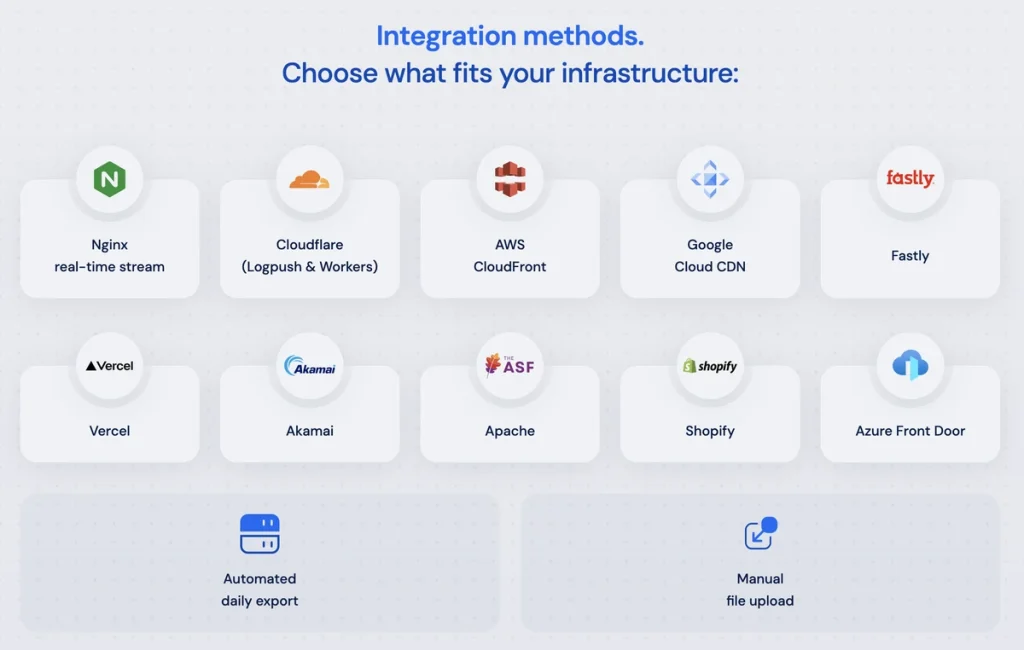
This is the non-negotiable input. Most AI crawlers don’t run JavaScript, so analytics tags miss them almost entirely. Your logs, on the other hand, record every single request (bot or human, JS or no JS) with zero sampling. Look for “Raw Access Logs,” “Log Manager,” or a Logpush / log-streaming option in your hosting or CDN panel (Cloudflare, Fastly, Akamai, AWS all support this).
2. A recent crawl of your site.
Log data tells you what bots did. A crawl tells you what exists. The magic happens when you overlay the two: a page that exists but no AI bot ever visits is invisible to that behavior.
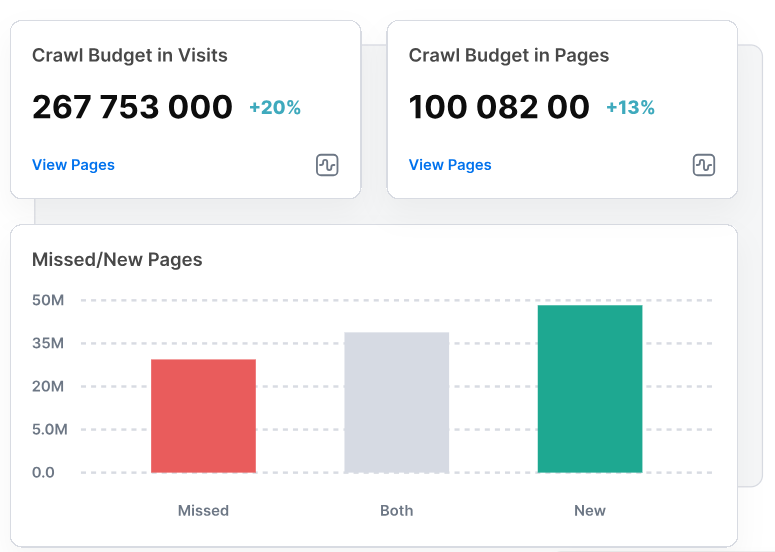
The crawl also surfaces the structural reasons why: pages with fewer than ~10 unique internal links from indexable pages (roughly the bare minimum to get reliably re-crawled), orphan pages sitting outside the link graph and pages buried too deep for any bot to reach.
JetOctopus crawls all of this for you and it’s the same crawl layer that anchors a full technical SEO audit.
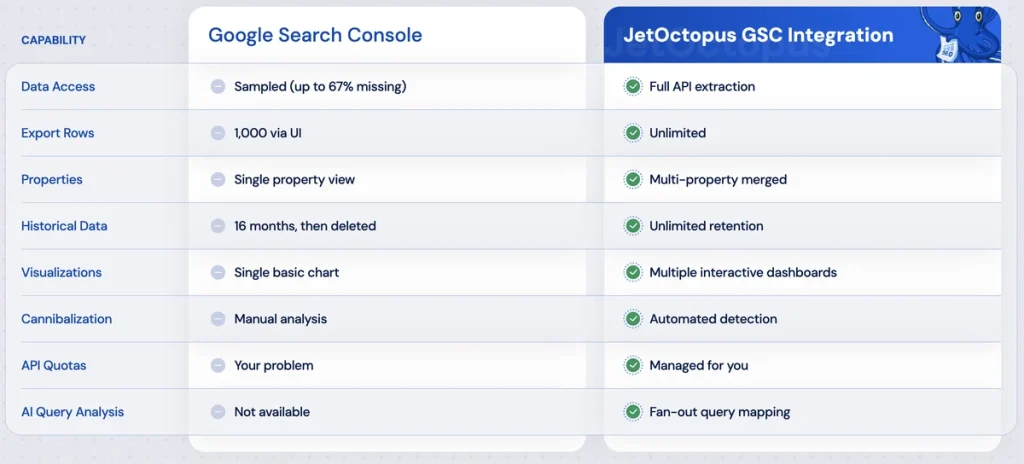
3. GSC connected (optional but powerful).
Adding Google Search Console lets you cross-reference crawl behavior against ranking and impression data, so you can see not just what got crawled but whether it’s actually performing.
JetOctopus pulls the maximum possible data from GSC’s API, combining multiple properties to give you the complete picture, so you can spot fan-out patterns, optimize for AI citations and capture traffic other tools simply can’t see.
4. A log analyzer that already knows AI bots.
You can grep your logs by hand, running a separate search for each crawler name: grep “GPTBot” access.log, then repeating it for ChatGPT-User, PerplexityBot, Perplexity-User, ClaudeBot and so on. But grep won’t verify the IP, won’t join crawl data, won’t chart trends over time and won’t scale to billions of log lines on an enterprise site. This is where a purpose-built tool earns its keep. JetOctopus ships with 40+ bots preconfigured (Googlebot, GPTBot, ClaudeBot, PerplexityBot and more) in one dashboard, built for proper AI bot activity analysis with spoof filtering built in.
So, it automatically identifies and filters spoofed or fake bots, like malicious scrapers or spammers emulating Googlebot, by performing a reverse DNS lookup on server log files and cross-checking IP addresses against official search engine validation rules.
Step 1. Connect Your Logs to JetOctopus
Start by feeding JetOctopus your server logs. There are two common paths:
- Log streaming (recommended for ongoing monitoring): point your CDN or server log stream at JetOctopus so data flows in continuously. This is what turns a one-off audit into live monitoring.
- Manual upload/integration: for a first look, you can upload historical log files or connect via your hosting’s log export.
Once logs are integrated, JetOctopus parses every request line: user-agent, IP, requested URL, HTTP status, response size, timestamp and normalizes it into a structured dataset you can slice by any dimension. On large sites, like ecommerce ones, that means billions of lines and without the right infrastructure, that’s a dataset most teams simply can’t query, let alone act on before the insights go stale; JetOctopus platform is built specifically so that reads across that volume are fast, turning what would otherwise be a weekend of SQL into answers you can act on the same day, before crawl budget gets wasted on pages that were never going to earn you revenue.
Checkpoint: you should see log data populating with a date range covering at least the last few weeks. AI crawl patterns are spiky, so for accurate AI bot log analysis, a wider window gives you a truer picture.
Step 2. Isolate AI Crawler Traffic
This is the core of AI crawler activity tracking. In the JetOctopus Logs module, filter the bot dimension down to the AI crawlers you care about. The important crawler groups to watch in 2026:
- OpenAI: GPTBot (training), OAI-SearchBot (search index), ChatGPT-User (live user fetches)
- Anthropic: ClaudeBot, anthropic-ai, Claude-User, Claude-SearchBot
- Perplexity: PerplexityBot, Perplexity-User
Because JetOctopus already recognizes these user-agents, you don’t build regex by hand; you select the bot and the platform does the rest.
Save this as a segment (e.g. “AI Crawlers”) so every future report can be scoped to AI bots in one click.
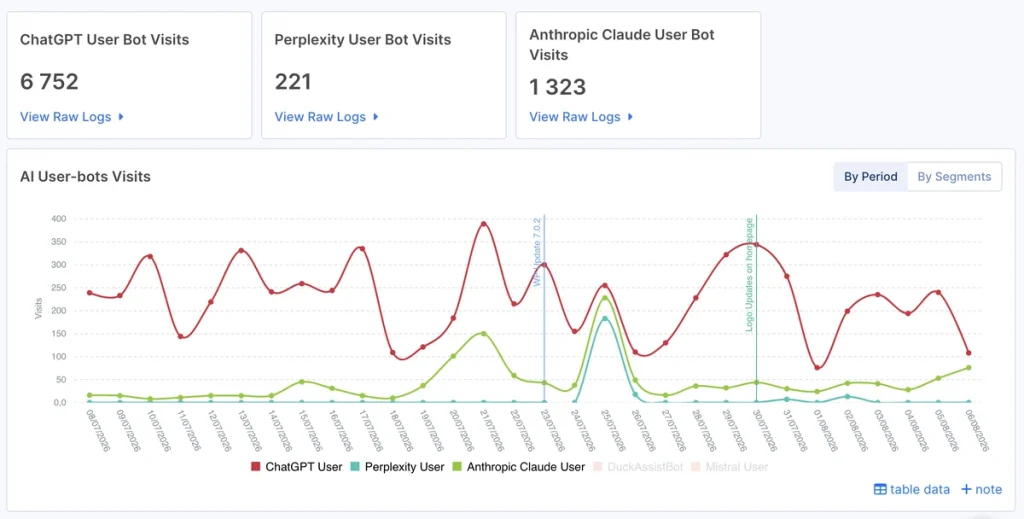
Pay attention to the purpose split:
- a training bot (GPTBot) hitting your pages feeds future models;
- a live-fetch bot (ChatGPT-User) hitting a page means a real user is getting your content in an answer right now.
Those are different signals and deserve different reactions.
A training visit just means the model knows your content exists, so there’s nothing to act on beyond making sure the content is worth training on in the first place.
A search-bot visit means the content is fresh and accessible, so if these visits are sparse, check click depth and internal linking, since these bots behave like Googlebot and drop off fast beyond two or three clicks.
Step 3. Filter Out Spoofed Bots (Don’t Skip This)
Here’s the step most DIY setups miss. Any script can send User-Agent: GPTBot. If you trust the user-agent blindly, a big chunk of what you think is “AI crawler activity” is actually scrapers, competitors and bots hiding behind a trusted name.
JetOctopus automatically filters out spoofed traffic, verifying that a request claiming to be GPTBot actually originates from OpenAI’s published IP ranges (and the same for Anthropic, Perplexity, etc.). The vendors publish these ranges (OpenAI ships gptbot.json, Anthropic exposes its ranges at claude.com/crawling/bots.json) and the platform validates against them so your dashboard reflects real AI crawlers, not impostors.
Why this matters: if you’re about to make an engineering case (“GPTBot is wasting budget on our faceted URLs”), you do not want that argument built on spoofed hits. A request backed by verified data gets taken seriously; one without it usually doesn’t. A request backed by verified data gets taken seriously; one without it usually doesn’t.
Step 4. Analyze Where AI Bots Actually Go
Now the interesting part. With AI traffic isolated and verified, dig into behavior:
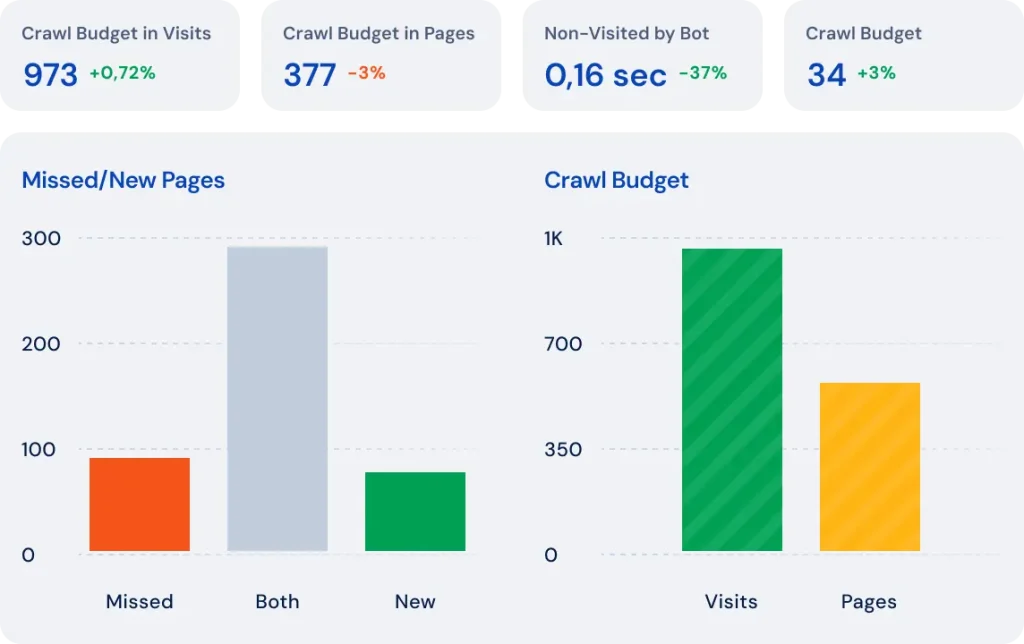
Coverage — which pages do AI bots reach? Cross-reference your log data against your crawl. JetOctopus surfaces pages that exist in your crawl but receive zero AI-bot hits, which are your AI-invisible pages. If your best commercial or thought-leadership content is in that bucket, that’s your priority fix list.
Crawl distribution — where is the budget going? Group AI-bot hits by URL structure (section, directory, template). It’s common to find AI crawlers spending disproportionate effort on low-value URLs, like parameters, pagination and redirect chains, while money pages get scraps. The same wasted-budget patterns you’d hunt in classic crawl budget optimization now apply to AI bots too. Segment by Depth From Index (DFI) and internal links to see whether deep, poorly-linked pages are being skipped entirely. Also check your anchor text while you’re there: AI bots use anchors to decide whether to follow a link, so vague anchors like “read more” give them no crawl signal and quietly break the discovery path.
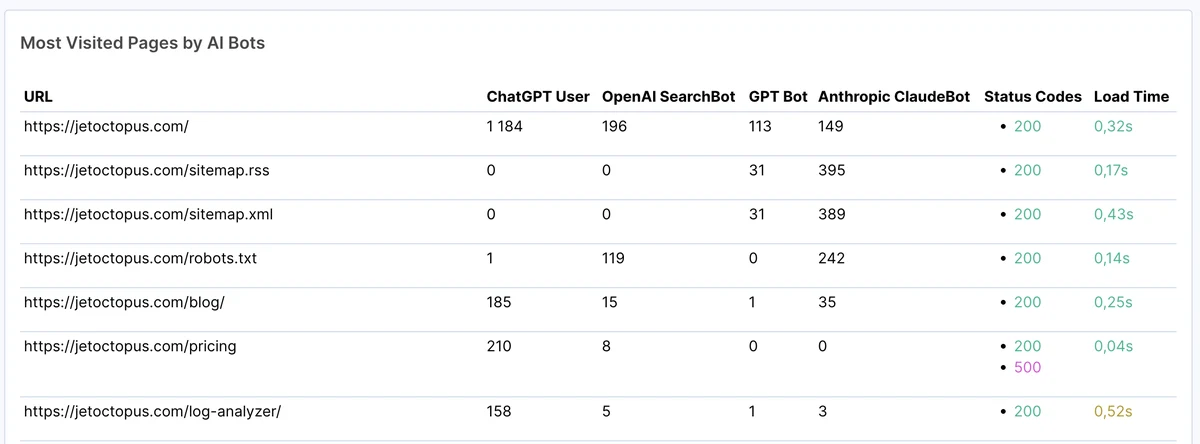
Status codes — where do bots get stuck? Filter AI-bot requests by HTTP status. A pile of 404s means AI crawlers are chasing dead URLs. 301/302 chains waste budget and bleed link equity at every hop. 5xx errors during AI-bot visits mean your content simply isn’t getting fetched. Each of these is a concrete, fixable leak.
Frequency and freshness — how often are AI bots visiting and how recent is that activity? Chart AI-bot visits over time per section. A page updated weekly but crawled by GPTBot once a quarter won’t reflect your latest content in answers. Frequency gaps tell you where to strengthen internal linking and freshness signals.
Content freshness — how old is what they’re crawling? Freshness isn’t only about crawl frequency; it’s about the content itself. Material older than about a year surfaces significantly less often in AI-generated answers, so a page GPTBot last fetched six months ago that shows stale content is a page quietly losing citation potential. Pair crawl recency from your logs with actual content age to find what needs a refresh.
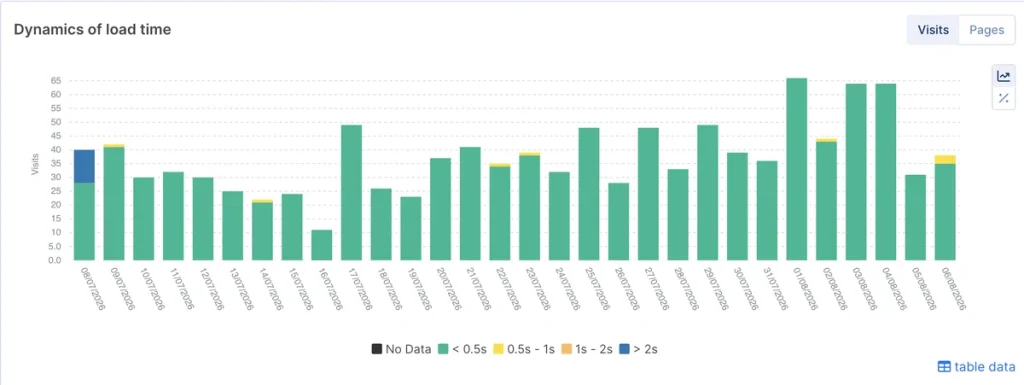
Speed — are your pages fast enough for AI user-bots? The live-fetch bots that decide what actually surfaces in an answer strongly favor fast pages: as a working benchmark, aim for TTFB under 600ms, HTML under 1MB and server response under 2 seconds. JetOctopus flags slow pages for AI crawlers specifically straight from log data, so you prioritize speed fixes based on real bot impact. This is the same server-performance signal that governs classic crawl rate.
Hallucinated URLs — the 404s AI bots invent. Watch for 404s where the AI bot constructed a path that never existed, like a page it expected to find based on your structure. These “hallucinated URLs” are a direct signal of content gaps and redirect opportunities: the bot is telling you what it thinks should be there. The solution here isn’t to just fix the 404; you should check whether that page should exist.
Step 5. Join Logs With GSC and Crawl Data
Single-source analysis only gets you so far. The insights that drive real decisions live at the intersection of your data sources and reading crawl, logs and GSC as one is exactly what JetOctopus is built to do.
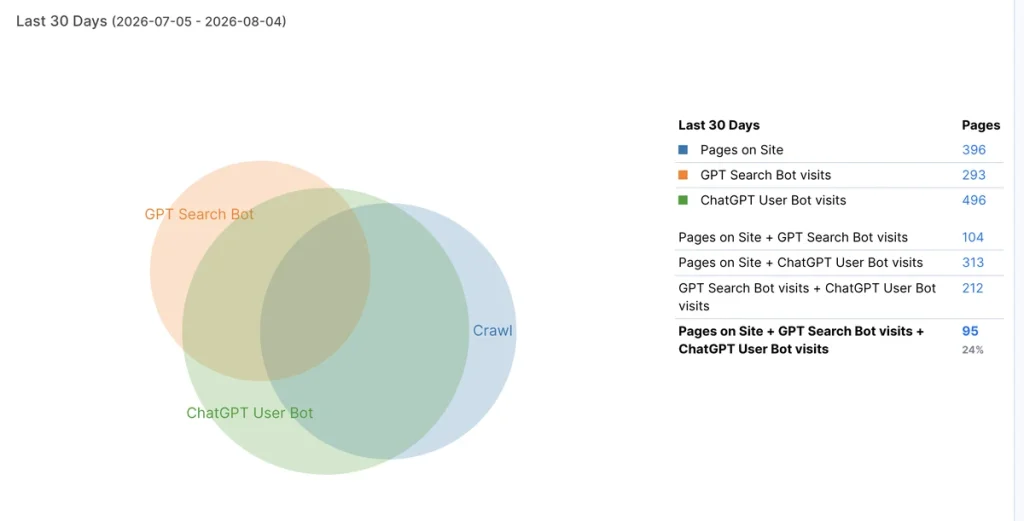
A few patterns that only appear when you join sources:
- Indexable but unseen: your crawl confirms a page is fully indexable and healthy. Your logs say no AI bot (or even Googlebot) has arrived in weeks. Neither report alone reveals this, but together they do.
- Ranking but not AI-crawled: GSC shows a page pulling impressions, but AI crawlers never touch it. That page ranks in classic search yet is a non-entity in LLM answers, which is a clear AI-visibility gap on a page that’s already proven valuable.
- Cannibalization AI can see: multiple URLs competing for the same query. When AI crawlers and rankings both point at overlapping pages, you’re splitting your citation potential across duplicates.
- Query fan-outs vs. organic volume: long fan-out queries (8–9 words or more) reveal the exact questions users are researching through AI interfaces. Map them against the pages receiving them: if fan-out is growing while your organic signal stays flat, AI visibility is outpacing classic search; and branded fan-outs are one of the strongest signs your brand is registering at the AI layer.
This cross-source join is the hard part to replicate with grep or single-purpose bot trackers and it’s where the real decisions get made.
Step 6. Turn Findings Into Action With the AI SEO Recommender
Isolating, verifying and joining data is powerful but on a large site it still produces thousands of data points and a standup in twenty minutes. That’s where the JetOctopus AI SEO Recommender closes the loop.
After a crawl completes, the AI SEO Recommender (an analyst built on Claude that runs against your JetOctopus data (crawl + GSC + logs) reads the output and hands you a short, ranked list of the biggest problems on your site right now, written the way a senior SEO would brief a client:
- What’s broken — the issue in plain language
- How bad it is — how many pages it touches
- What to do — a clear, actionable fix
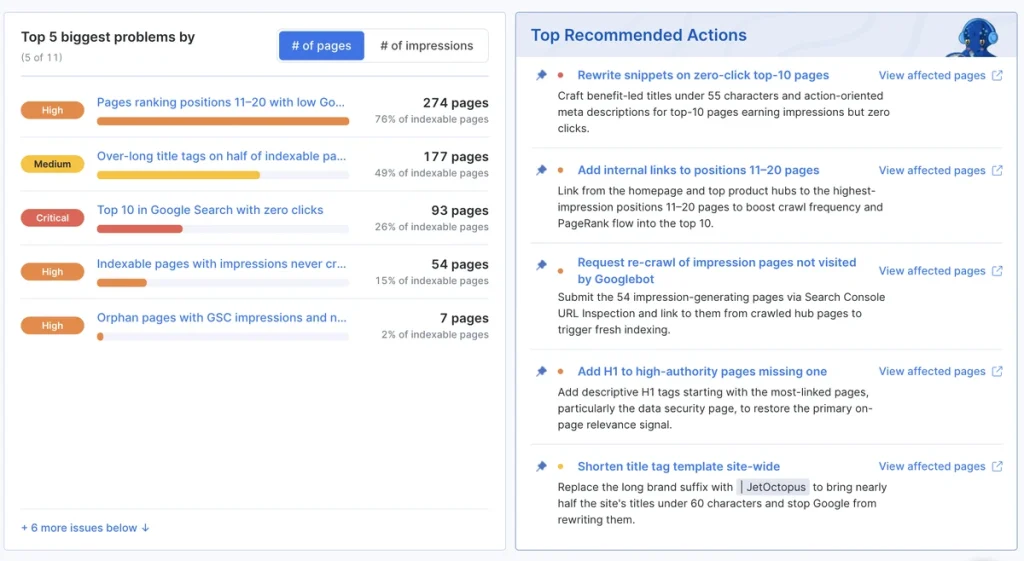
Because it draws from all three sources, it surfaces exactly the AI-crawler blind spots this guide is about: indexable-but-unvisited pages, wasted budget on redirect chains, cannibalization and reflects your most recent 30 days of data. You no longer have to manually read twenty reports to find where to start; you get the priority list first and spend your time fixing, not sifting. Book a call to see the AI SEO Recommender in action.
Step 7. Keep the System Running with Alerts
AI crawl behavior shifts constantly: new bots launch, vendors adjust their budgets and your site continues to evolve. One audit is a snapshot; but AI bot monitoring is the goal.
You could do a manual check, but that would mean you’d only catch problems after you go looking for them and by then, a lost citation or a chunk of wasted crawl budget may already be underway.
This is where JetOctopus Alerts turns monitoring from a manual task into something that runs on its own. You no longer review logs on your own schedule, you set the conditions once and get notified the moment something breaks, via email, Slack or MS Teams.
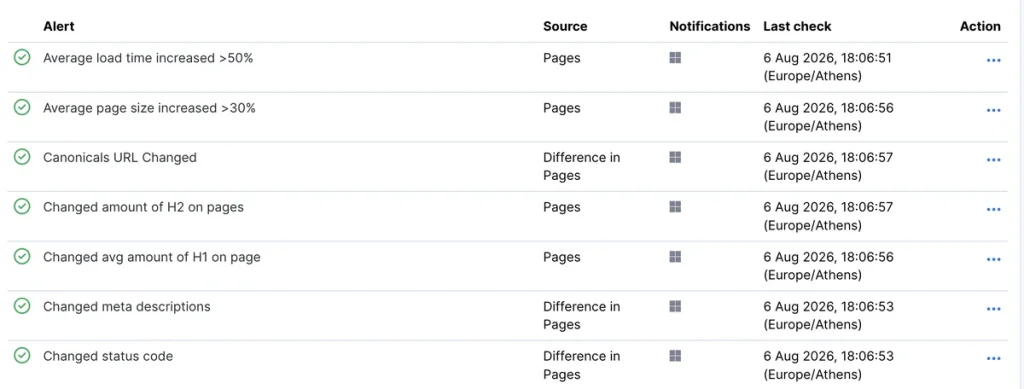
For AI crawler tracking specifically, Log Alerts run in real time with no extra crawls required, so you’re notified the moment AI bots crawl non-indexable pages, fail to reach your homepage or hit crawling gaps caused by weak internal linking, all before they show up as a drop in citations.
Pair that with Crawl Alerts for indexation issues, and GSC Alerts for position or CTR shifts and monitoring covers the full path from crawl to citation to ranking, not a single data source in isolation.
The Bottom Line
You can’t optimize for AI answer engines while flying blind on which AI crawlers reach your content. Standard website analytics wasn’t built for AI crawler tracking, GSC ignores them and raw grep can’t verify or scale.
Server-log analysis is the authoritative source and JetOctopus is the platform built to turn that raw log data into decisions. It recognizes 40+ bots out of the box, filters spoofed traffic automatically and joins logs with crawl and GSC data, so instead of just seeing what happened, you know what to fix.
You only need to follow this AI crawler activity tracking setup guide once: stream your logs, isolate and verify AI bots, analyze coverage and errors, join your sources and let the AI SEO Recommender hand you the priority list. Once you do that and “is GPTBot crawling my site?” stops being a curiosity; it becomes a metric you own.
Ready to track your own AI crawler activity? Book a demo and we’ll happily showcase how to do it with ease on the JetOctopus platform.