Today there are a lot of SEOs who have already realized that the indexability of a website has a crucial impact on organic traffic increase. Those guys are doing their best to optimize the crawl budget and get really excited when Googlebot visits rate increases. But this case talks the opposite.
TL;DR
- A healthy ecommerce store with fewer than 100,000 pages suddenly had Googlebot crawling more than 500,000 pages a day, with no changes made on the client’s side.
- Server logs showed over 8 million Googlebot requests to URLs carrying a PageSpeed=noscript parameter, a URL type the site was never meant to generate.
- Two robots.txt rules brought it under control: Disallow: *PageSpeed=noscript* cut part of the traffic, and Disallow: *?* returned the server to normal within an hour.
- The most likely trigger sat on Google’s side. The old Chrome 41 renderer inside Googlebot was switched off in late May 2020, after which the bot started walking into faceted URLs it had previously skipped.
The Problem: A Healthy Site Under Sudden Attack From Its Own Search Engine
Our client is an e-commerce website with up to 100K pages. They contacted us back in June 2020 with a very unusual issue – Google began to actively crawl their online store. Usually, website owners are happy when the crawling budget on their site increases, but in this particular case the server became overloaded and the site has almost stopped working.
The very first question we tend to ask in these situations: what changes were implemented on the site? But the client assured us that there were no changes made.
Primary Analysis And Our Actions
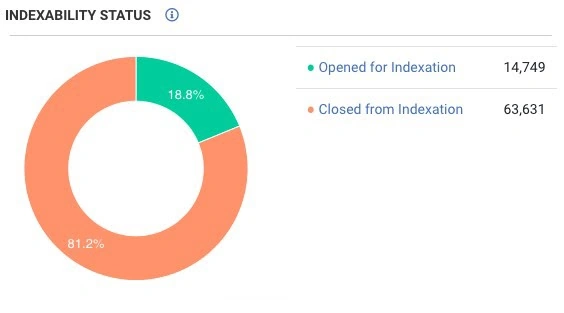
First of all, we crawled the site and were extremely surprised – there were less than 100 thousand pages on the site, and 80% of them were closed from indexation.
At the same time, Googlebot crawled an average of 500 thousand pages per day!
(Closer to the topic of bot activity check out our article: Wanna know which pages bots visit/ignore and why?)
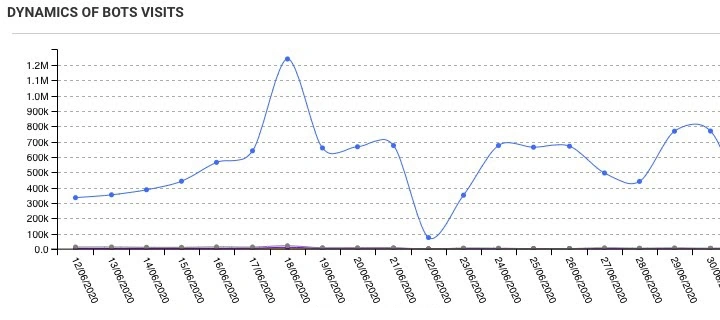
The site itself consists of two parts – an online store and a forum. Usually, we suspect the forum as a source of the issue in the first place, but in this case, it had worked correctly.
Having looked at the logs, we noticed the pages with PageSpeed=noscript element.
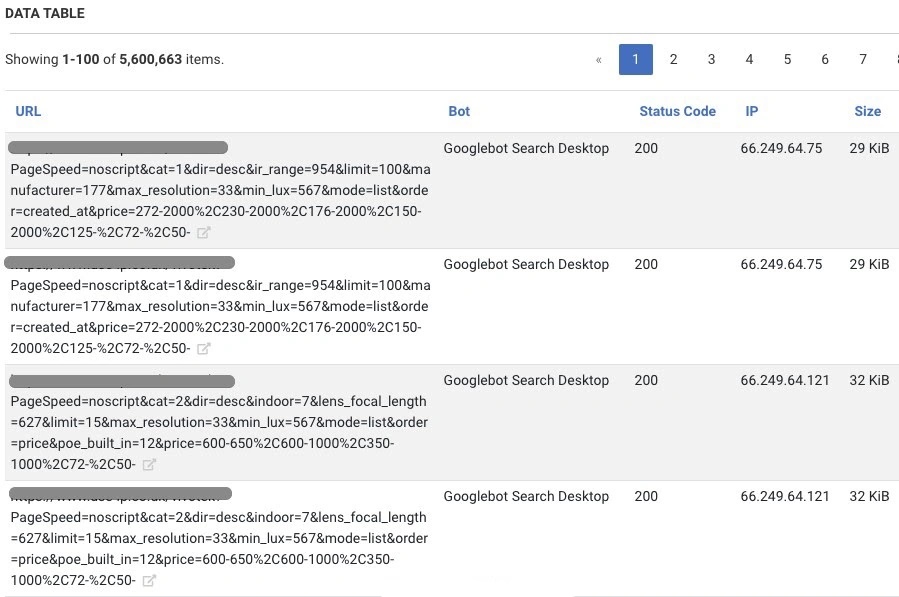
We have compared the data, and it turned out that more than 8 million requests from Googlebot were made to the pages that contained the “PageSpeed=noscript” element. It is obvious, this type of pages is not normally generated type of URLs on the site.
We added Disallow: *PageSpeed=noscript* to robots.txt, and it partially solved the problem, but still, the search bots were crawling a lot of needless pages.
Further analysis showed that the bot walks through a combination of faceted filters that generate almost an endless number of pages. Such URLs were not blocked by robots.txt, and the page contained a tag:

And it led to an even worse situation.
As a result, we added another line to robots.txt Disallow: *?*.
The number of requests from Googlebot dropped and the site returned back to normal.
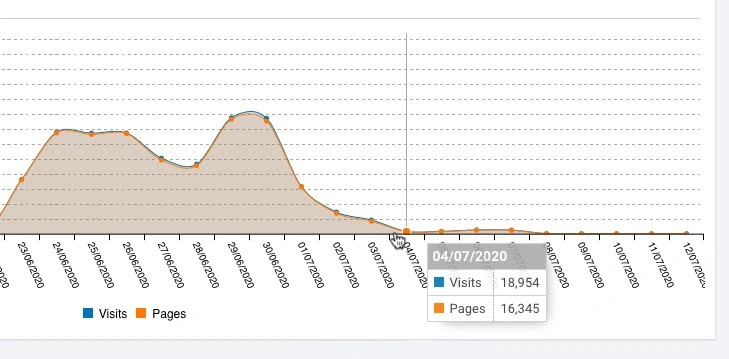
We now have time to analyze the cause of this issue.
Finding the Reason of Collapse
If you go into the theory of problems in computer systems, the main principle is that nothing breaks by itself, there is always a reason.
It may not be an obvious one, there is often a complex chain of reasons connected. But if a computer has a task, for example, to take X, add it to Y and then put them to Z, it will process this task for an almost infinite amount of time – this is the essence of the computer’s work.
In this particular case, the client claimed that he had not performed any changes or actions on the website. From our experience, we know that different people have different understandings of the words “we did nothing”. But this time it was true.
We decided to have a look at the opposite side – at Googlebot. Over the past few years, there were just a few changes that were publicly discussed, and the main one among them was the update of the Chrome version of inside the bot and switching to “evergreen”.
Initially, what caught our attention was the PageSpeed = noscript parameters in the URLs. They are generated by mode pagespeed, specifically for Apache and Nginx in case if the client has JS disabled. This module is designed to optimize pages and was very popular several years ago. Today, however, its efficiency is rather questionable.
By now the module has fallen out of use entirely, so if those parameters still show up in your logs, treat them as a leftover to clean up rather than an optimization that is working for you.
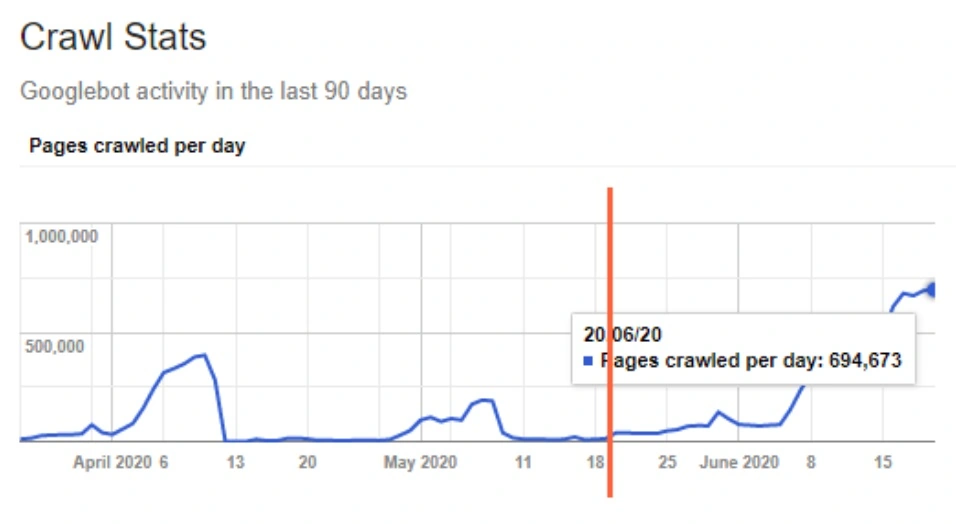
And let’s take another look at the screenshot from GSC:
(Find out how to get the most use out of GSC integration to JetOctopus in Video Guide)
The last leap occurred approximately on May 20, which led to a huge increase in bot crawling.
And then we realized that Chrome / 41 was certainly gone exactly in May, and I have mentioned it on Twitter as well.
We see that the old Chrome / 41 shutdown inside Googlebot happened on May 19-20.
Was it the reason for this issue? I can’t tell for sure, because we do not have historical logs for May that could fully clarify the situation. But my personal opinion is that most likely it was the Chrome update inside Googlebot that could have led to extreme crawling of irrelevant pages, which were previously not processed due to the old version.
The Results
After analyzing this case, several conclusions can be drawn:
- Meta tag “noindex, follow” works the same way as “follow” and it takes a long time for Googlebot to treat it as “nofollow”. In the case above, 40 days was not enough for the bot.
- It took Googlebot about 17 hours to apply new “robots.txt” rules to block “PageSpeed=noscript”. And after we`ve added *?* to robots, it was blocked within an hour.
- The heuristic inside the bot is not so fast. In our case, the site`s performance has noticeably slowed down and the page load time became 2-5 seconds, but Googlebot was only growing the volume of crawling.
My advice is – do collect logs! This can be very helpful in the future in identifying problems and analyzing the site.
Modern storages are quite cheap, you can even get 2TB of data in Dropbox for 10 USD/mo. If you have a large site with huge volumes of traffic, suggest your DevOps the Amazon Glacier, where you can store 25TB of data for 10 USD/mo. Believe me, this will be enough for many years ahead.
Postscript: The Same Problem, Now With AI Crawlers
This case is from 2020 and its specific trigger, an old Chrome renderer being switched off inside Googlebot, is long gone. The pattern behind it is not.
What Googlebot did here by accident, AI crawlers now do as a matter of routine. Across enterprise logs, AI bots account for roughly 40 to 50% of Googlebot-level crawl activity, and on one site a single AI crawler covered 2.2 times more unique URLs than desktop Googlebot did. The same analysis found that 67% of GPTBot visits landed on 404s, which means a large share of that load buys the site nothing at all.
For a catalog with faceted navigation the arithmetic gets uncomfortable quickly. Parameter combinations like the ones that nearly took this store down are exactly the URL space an AI crawler wanders into, and these bots treat crawl-delay and other politeness signals far less predictably than Googlebot does.
So the advice from 2020 stands with one amendment. Do collect logs, and stop reading them as a Googlebot report. Who is requesting what, how often and with which response code is the only place this shows up before your server starts telling you. We covered the full picture in log analysis in the age of AI crawlers and in the guide to tracking AI crawler activity.