Your team moves the catalog to a headless CMS, the new front end gets a green Lighthouse score and six weeks later someone notices that every category page carries the same title tag. The plugin that used to write titles, redirects and the sitemap simply did not move with the content.
That is what headless CMS SEO comes down to. Search engines need the same things from a headless site as from any other: crawlable HTML, consistent signals and stable URLs. What changes is who delivers them, because SEO work moves out of plugins and into the content model, the front end and the build and deploy pipeline. So is headless good for SEO? By itself it is neither good nor bad, and the outcome depends on implementation. Below are the benefits, the risks, the rendering choices and how to audit the result with a JavaScript SEO crawler and server logs.
TL;DR
- A headless CMS changes who owns SEO: titles, canonicals, sitemaps and redirects move from plugins to the content model and the front end.
- Search engines and AI crawlers never see the CMS, only the HTML, status codes and headers the front end returns.
- GPTBot, ClaudeBot and PerplexityBot do not execute JavaScript, so content added by client-side rendering is invisible to them even when Google indexes it.
- SSR, SSG and ISR all put complete content into the first HTML response, while client-side rendering leaves the crawler to build the page.
- A headless migration changes URLs, markup and rendering at once, so the old and new site should be crawled and compared around launch.
What Is Headless SEO?
Headless SEO is the practice of optimizing a website whose content is managed in a headless CMS and delivered through APIs to a separately built front end. Because the CMS has no presentation layer, every signal search engines read, from the title tag to the HTTP status code, has to be produced by the content model, the front end or the deploy pipeline.
How a Headless CMS Differs From a Traditional CMS
In a traditional, or coupled, CMS such as WordPress or Drupal, one system stores the content and renders the pages. That gives SEO a lot for free: the CMS generates each URL and updates the sitemap on publish, while a plugin like Yoast or Redirection adds a 301 when a slug changes.
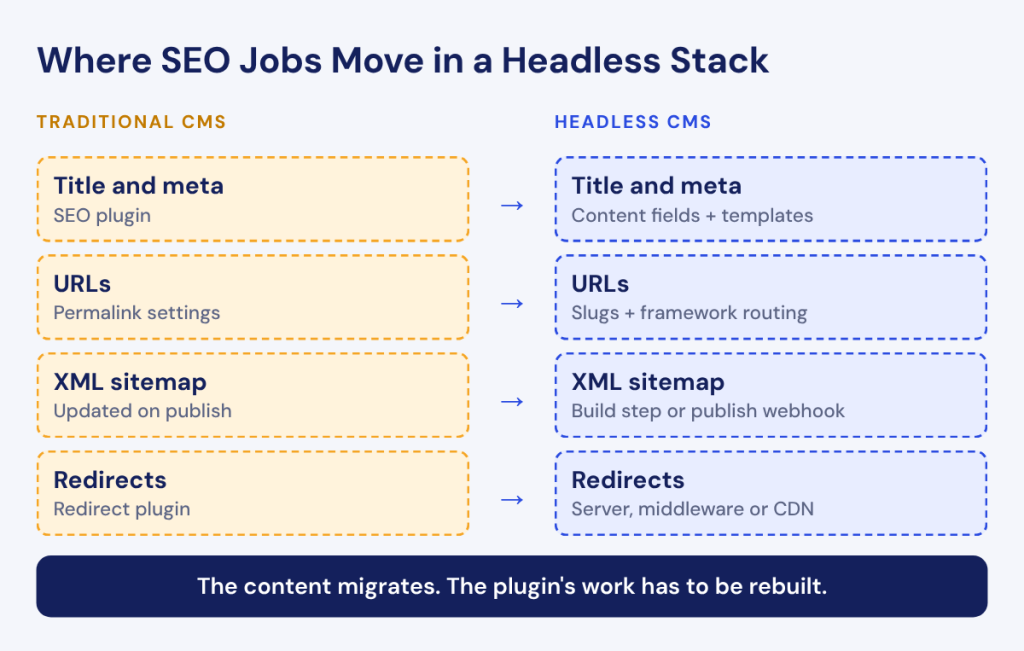
A headless CMS such as Contentful, Sanity, Strapi or Storyblok stores content as structured entries and exposes it through a REST or GraphQL API. The website is a separate application, often built with Next.js, Nuxt or Astro, and the CMS cannot redirect a URL it never served. These jobs move to the front end:
- Titles and meta descriptions: rendered by templates from content fields.
- URLs: built from slugs by the framework’s routing layer.
- XML sitemaps: generated at build time or on request.
- Redirects: stored somewhere and applied by the server, the framework or the CDN.
Hybrid CMS platforms sit in between, keeping an API for other channels while offering page building and some built-in SEO features.
How Search Engines Crawl and Render a Headless Site
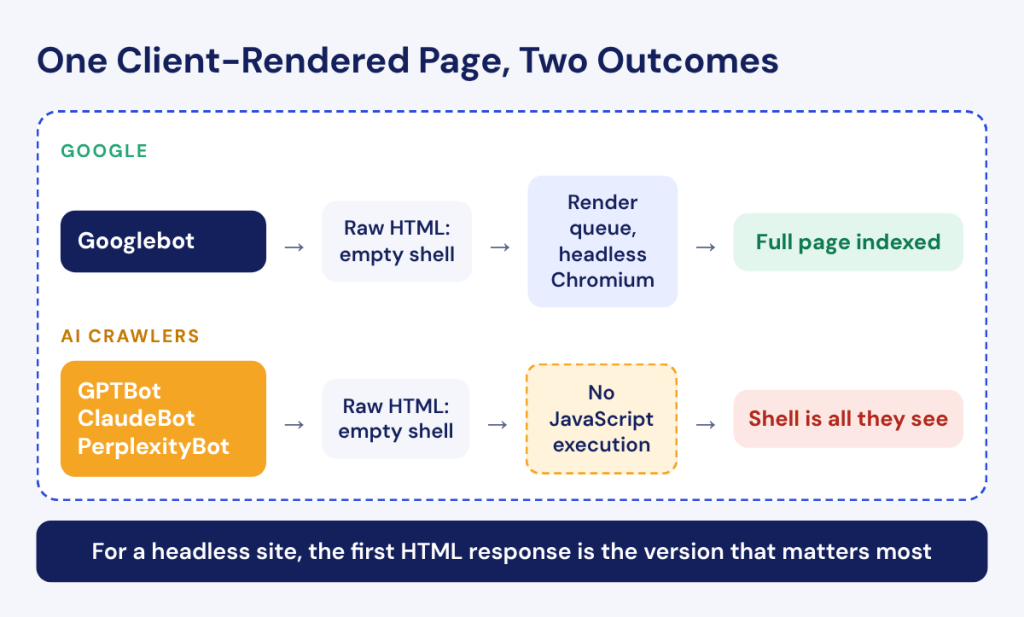
Crawlers never see the CMS. Googlebot, Bingbot and AI bots request a URL from the front end and get whatever HTML, status code and headers it returns. A server-rendered front end puts the content into that first response, while a client-side app may return a near-empty shell that fills in only after JavaScript runs.
Google handles the shell with a separate rendering step: pages that return a 200 status go into a render queue and are processed later by headless Chromium, under conditions that the topic of how Googlebot renders JavaScript covers in detail. Most AI crawlers skip that step entirely. In research done with MERJ in December 2024, Vercel found that GPTBot and Claude’s crawler fetch JavaScript files without executing them and that PerplexityBot does not render either. GPTBot alone made 569 million fetches across Vercel’s network in one month. For a headless site, the first HTML response is therefore the version that matters most, as our guide to AI crawlability explains.
How Headless CMS Helps SEO
The SEO benefits of a headless CMS are real, and each of them depends on how the front end is built. Headless gives a team the means to build a fast, clean site, and whether the team actually builds one is a separate question.
Faster Pages and Better Core Web Vitals
A headless front end can ship far less code than a theme-based site, since there is no page builder and no stack of plugins injecting scripts into every template. Pages can be generated in advance and served from a CDN edge, so the main content arrives in the first response. Google’s Core Web Vitals documentation describes LCP, INP and CLS as measures of real-world loading performance, interactivity and visual stability, and a lean static front end is well placed on all three.
Speed is not automatic, though. A front end built as a client-side React app can end up slower than the WordPress site it replaced: the browser downloads a large bundle, runs it, calls the CMS API and only then paints the main content. Hydrating a long product page also keeps the main thread busy, which hurts INP. A few sprints of feature work can add the removed plugin weight back in JavaScript before anyone checks the field data.
Full Control Over HTML, URLs and Structured Data
With a theme and plugins, the markup is whatever the theme author wrote, URLs follow the CMS’s permalink rules and structured data covers only the schema types a plugin supports. In a headless front end, developers write the templates directly. You can build category URLs that mirror the taxonomy, output Product markup with every property your data supports and keep filter combinations out of crawlable links from day one. The same freedom lets a developer ship a template without a canonical tag, which is the other side of this benefit.
One Content Source for Every Channel Without Duplicates
A headless CMS stores content once and delivers it to the website, mobile apps, marketplaces and in-store screens. Product specs stay consistent everywhere, and fixing a wrong one takes a single edit instead of five. That helps search only when each piece of content has one indexable home. If the same article appears on the main site, a regional microsite and the web version of an app, three pages compete for one query until canonicals point them to the preferred URL, a risk the next section covers.
Where Headless CMS SEO Goes Wrong
Most headless SEO problems come from tasks a coupled CMS did silently that nobody rebuilt on the new stack. This section covers the problems and their cost, while the fixes follow in the sections on rendering and best practices.
Client-Side Rendering Hides Content From Crawlers
A client-side rendered front end sends a minimal HTML document: a root div, a few script tags and often a generic title from the app shell. The product name, description, price, internal links, canonical and meta robots appear only after the bundle runs and fetches data from the CMS API.
For Google, this adds a dependency on rendering. The page waits in the render queue and every API call has to succeed for Googlebot. A placeholder noindex or a default canonical in the shell can also be read before the real values load. Google’s JavaScript SEO basics page still says that “server-side or pre-rendering is still a great idea because it makes your website faster for users” and for crawlers, since not all bots can run JavaScript. AI crawlers simply receive the shell. SPA SEO covers the single-page application side of this problem in more depth.
No Built-In SEO Plugins or Metadata Fields
A fresh headless CMS space contains only the content types developers create, and those are designed around what the page displays: a heading, a hero image, body text. Fields for the title tag, meta description, canonical, robots directives and Open Graph tags do not exist until someone adds them.
The consequences surface weeks after launch. Templates fall back to the H1 as the title, so thousands of product pages lose the brand and category from their titles. Editors who used to fix a title in Yoast in thirty seconds now file a developer ticket, and the fix ships in the next sprint if it ships at all. None of this breaks the site visibly, which is why it can go unnoticed for months.
Lost Rankings After Migration Due to Broken Redirects
A move to headless rarely changes content alone. URL structure, markup, internal linking and rendering change in the same release, while Google’s site move guidance recommends the opposite:
“Plan your changes to your site one after the other, not everything at the same time.”
A headless relaunch usually can’t follow that advice, because replacing the stack is the whole project. Redirects suffer most: they lived in a plugin database or in .htaccess rules nobody had opened in years, and the new front end inherits none of them. When /product/blue-oak-chair/ starts returning a 404, the links pointing to it stop helping the new page. Custom titles, editor-set canonicals and hreflang entries stored in plugin tables often stay behind too, because the migration script exported only the body text. Rankings fluctuate during any move, and with redirects and metadata missing, they have little reason to come back.
The quickest check is to crawl the old site before launch and the new headless front end after it. The Compare Crawl report in JetOctopus puts both crawls side by side and shows what changed in indexation, redirects and technical issues, so a template that lost its canonical appears as one changed segment.
Compare Your Old Site With the New Front End.
Duplicate URLs From Multiple Frontends and Preview Environments
One CMS API might feed the main site, a regional site on its own domain and a campaign app, and each can render the same product at a different URL. Google’s canonicalization documentation names two reasons to pick one URL: consolidating signals such as links and avoiding crawl time spent on duplicates. Without a clear choice, signals split and Google picks a canonical on its own.
Preview and staging environments add another layer. Hosting platforms for headless front ends create deployment URLs for branches and pull requests, and CMS preview mode often runs on its own subdomain. Depending on the platform settings, anyone with the link can open these URLs. A staging sitemap submitted by mistake is enough for Googlebot to find a full copy of the site, sometimes with content that was never meant to go live.
Choosing the Right Rendering Method for Headless SEO
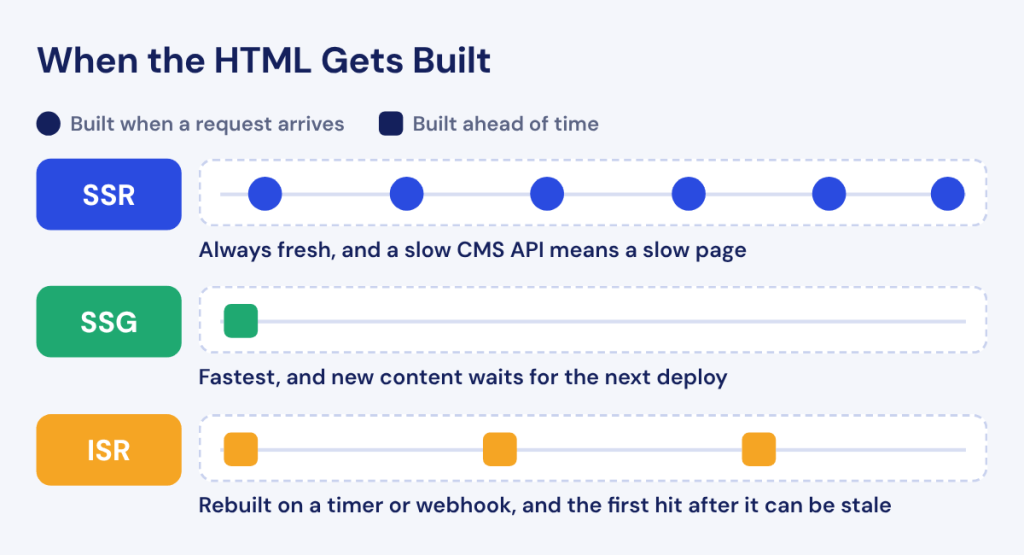
For SEO, the rendering method decides what the first HTML response contains. Headless front ends usually pick from three server-side approaches, and frameworks such as Next.js, Nuxt and Astro let you mix them route by route.
Server-side rendering (SSR) builds the HTML on the server for every request. Crawlers get complete content immediately, and the page always reflects the latest CMS data, which suits internal search results or product pages with live stock. A slow CMS API, however, becomes a slow server response.
Static site generation (SSG) builds the HTML once at deploy time and serves it from a CDN. It is the fastest option and fits blog posts, documentation and evergreen landing pages. Trouble starts at scale: a catalog of 500,000 products cannot be rebuilt for every price change, and anything published between builds does not exist on the site yet.
Incremental static regeneration (ISR) serves static files and regenerates them in the background after a set interval or when the CMS sends a webhook. The Next.js ISR guide presents it as a way to update static content without rebuilding the entire site. Once the revalidation window passes, though, the next request still receives the cached, stale page while a fresh one is generated, and that request can come from Googlebot.
Dynamic rendering, which serves prerendered HTML only to bots, still shows up in older guides. Google’s dynamic rendering page calls it “a workaround and not a recommended solution” and points to server-side rendering, static rendering or hydration instead. JavaScript rendering for SEO compares these strategies in full, and our pieces on Next.js SEO and on Vue.js and Nuxt SEO cover the framework details.
| Method | What Crawlers Get | Best For | Watch Out For |
|---|---|---|---|
| SSR | Complete HTML with content and metadata, built on every request | Pages that change often or depend on the request: internal search, live prices and stock | Slow CMS API calls raise server response time; a misconfigured cache can serve the wrong variant |
| SSG | Complete prebuilt HTML served from a CDN | Content that rarely changes: blog posts, documentation and evergreen landing pages | Build time grows with page count; new content is missing until the next deploy |
| ISR | Complete cached HTML, regenerated after an interval or on a CMS webhook | Large catalogs and content hubs that change regularly | The first request after the window can get a stale page; if regeneration fails, the last good version keeps being served |
SEO for Headless CMS: Best Practices
In a headless setup, SEO requirements have to be designed into the content model and the front end before launch. Adding them later means a second migration across tens of thousands of entries.
Build SEO Fields Into Your Content Model
Every content type that becomes a page needs its own group of SEO fields:
- SEO title: a separate field that falls back to the entry name.
- Meta description: optional, where an empty value lets the template generate one.
- Slug: validated for lowercase and uniqueness, with a redirect created automatically when it changes after publishing.
- Canonical URL: empty by default for a self-referencing canonical and editable for syndicated content.
- Robots directives: noindex and nofollow toggles that are off by default.
- Social tags: Open Graph title, description and image that fall back to the SEO fields.
- Image alt text: stored on the asset, so it travels with the image to every channel.
- Structured data inputs: the fields your schema needs, such as author, brand or price.
Most headless platforms let you define this group once as a reusable component and attach it to every content type, which gives editors one familiar place to work.
Generate Canonicals, Sitemaps and Robots Rules Automatically
Anything that depends on the full list of URLs should be generated from CMS data rather than maintained by hand. Canonicals should be self-referencing by default and built from a production domain stored in an environment variable, because a preview build that takes the current host will canonicalize every page to the preview domain. XML sitemaps should be built from published entries, with lastmod taken from the entry’s updated date. A CMS webhook on publish and unpublish can trigger sitemap regeneration and a cache purge, so the sitemap never lists a page that already returns 404.
Robots rules should be generated per environment. Production serves the real robots.txt, while every other environment serves a disallow-all file, sends an X-Robots-Tag: noindex header on every response and ideally sits behind authentication.
Render Structured Data in the Server HTML
Structured data should be built from content fields and printed into the server HTML as JSON-LD. Google can read markup injected with JavaScript, and its structured data guide confirms that “Google Search can understand and process structured data that’s available in the DOM when it renders the page.” The same guide warns that “dynamically-generated markup can make Shopping crawls less frequent and less reliable”, which matters for any catalog with changing prices. AI crawlers that skip rendering never see injected markup at all.
Building schema from fields also keeps it honest: when Product JSON-LD takes its price from the field the page displays, the two cannot drift apart after a promotion ends. Schema for AI search covers what to mark up and how to validate it.
Handle Redirects and Status Codes on the Frontend Layer
Redirects in a headless stack need a home and an executor. The home is a redirect content type in the CMS, so editors can add one without a deploy. The executor is the server, framework middleware or CDN edge, which reads that list and returns a real 301 or 308 before any page renders. Google’s redirects documentation states the preference plainly:
“We recommend that you use a permanent server-side redirect whenever possible.”
Status codes need the same care. An unpublished entry should return a real 404, or a 410 if the content is gone for good. The classic failure is an app shell whose router catches every path, returns 200 and then displays “Page not found” in the browser. Search Console reports such pages as soft 404s, and a crawler without JavaScript sees a valid, empty URL. Each route should check on the server whether the entry exists before any HTML goes out.
How to Audit and Monitor Headless Website SEO
Audit what crawlers get from the front end rather than what is stored in the CMS. The CMS can hold a perfect title and canonical for every entry while the front end renders none of them.
Compare Raw HTML With Rendered Content Using a JavaScript Crawl
Crawl the site twice, once reading only the raw HTML and once with JavaScript rendering, and compare the results by template. For product, category, article and landing templates, check the main content, title, meta description, canonical and meta robots in both versions. Where they differ, you know which template depends on rendering and what a crawler without JavaScript sees. On headless sites these gaps often appear after a framework upgrade quietly moves a component from the server to the client. A JavaScript SEO issues checklist covers the other problems worth checking in the same pass.
In JetOctopus, the Content change by JavaScript report runs this comparison across the whole crawl. It lists pages where content, titles, meta descriptions, canonicals or meta robots change after rendering and flags pages where server-side rendering is probably broken.
Check Log Files to Confirm Googlebot Crawls Key Pages
A crawl shows what your front end can deliver, and server logs show what Googlebot actually requested and received. Three questions matter most on a headless site:
- Which key pages does Googlebot request and how often? Templates that drop out of its requests after launch point to a discovery or internal linking problem.
- Which status codes does it get? A spike of 404s on old URLs means missing redirects, while 5xx errors on SSR routes mean the API behind them fails under crawl load.
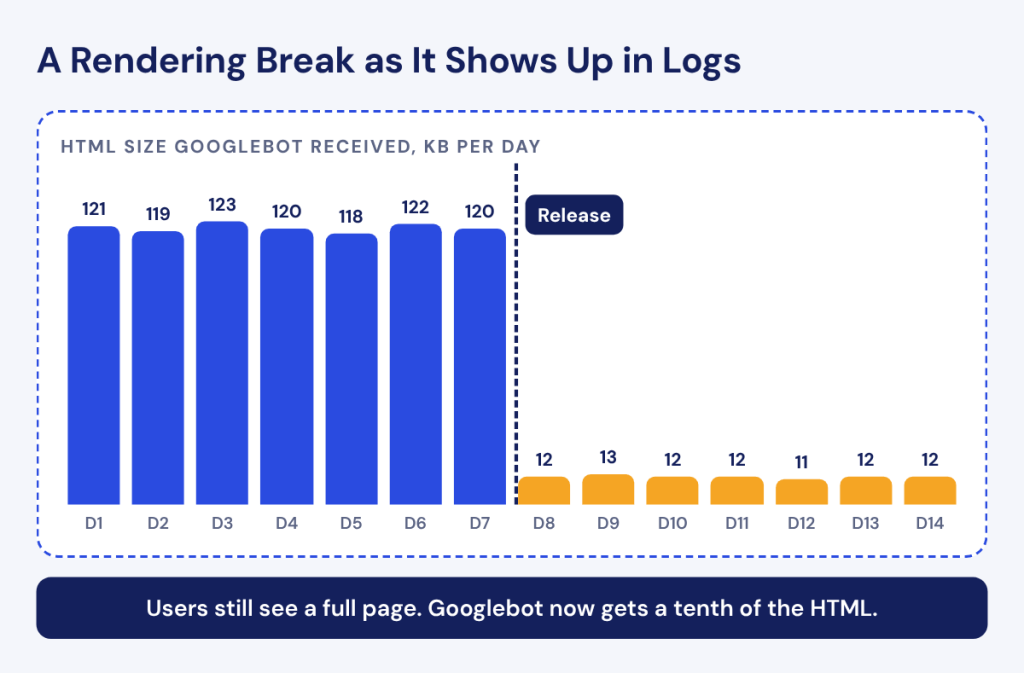
- Does the HTML stay complete after deploys? The response size of a template should stay stable from day to day.
On headless stacks the logs often come from the CDN or a log drain, and a log analyzer with months of history lets you line up changes in Googlebot’s behavior with deploy dates.
The third question is where headless sites break most quietly. A template that usually returns 120KB of HTML to Googlebot and suddenly returns 12KB after a release has lost its server-side rendering, even though browsers still fill the page in for users. The Rendering Issues report in JetOctopus logs flags URLs where the HTML Googlebot received was much lighter than usual, with the number of broken days and the last broken date, so a single bad deploy looks different from a problem that has run for weeks.
Headless CMS and SEO: Traditional vs. Headless Compared
Here is how the two architectures compare for search.
| Criterion | Traditional CMS | Headless CMS |
|---|---|---|
| Speed | Depends on the theme and plugins; heavy themes and stacked scripts are common | Can be very fast with SSG, ISR and CDN delivery; can get slower with heavy client-side JavaScript |
| Control | Limited by theme templates, plugin output and permalink rules | Full control over HTML, URL structure, internal links and structured data |
| SEO tools | Mature plugins for titles, sitemaps, redirects and schema that marketers use on their own | Nothing built in; every SEO function is built into the content model and front end |
| Risks | Plugin conflicts, bloated markup and constant updates | Client-side rendering, missing metadata, lost redirects and duplicate front ends or preview URLs |
| Dependency on developers | Low for everyday SEO changes | High at launch and lower once SEO fields and redirect tools exist for editors |
Headless makes sense for SEO when you run a large or fast-changing catalog, deliver content to several channels and have developers who treat SEO requirements as part of the definition of done.
A traditional or hybrid CMS is the safer choice when the site is mostly editorial, marketers change titles and redirects every day and developer time is scarce. A well-configured WordPress site often holds its rankings better than a headless relaunch that shipped without its redirects, however good the new Lighthouse score looks.
Whichever architecture you pick, the risk lives in releases. Every deploy can change what search engines receive, and recurring crawls with automated alerts on status codes, indexability and rendered content show that change on the day it happens.
FAQ
Which Headless CMS Is Best for SEO?
The CMS never serves pages to crawlers, so no headless CMS is better for SEO on its own. Look for flexible content modeling, reusable SEO field groups, a redirect content type, publish webhooks and preview support. Contentful, Sanity, Storyblok, Strapi and Hygraph all offer these in some form, which makes front end and rendering choices more important.
Is Headless WordPress Good for SEO?
Headless WordPress can work well for SEO and keeps the editor your team already knows. The catch is that plugins like Yoast no longer control the front end. Their data can still be exposed through the REST API or GraphQL, but the front end has to fetch it and render titles, canonicals, sitemaps and redirects itself.
Can Marketers Manage SEO in a Headless CMS Without Developers?
Marketers can manage SEO in a headless CMS once developers have built the tools for it. With SEO field groups, a redirect content type and automatic sitemaps in place, editors change titles, descriptions, noindex settings and redirects themselves. Template changes, new structured data types and rendering problems still need a developer.
How Does Hreflang Work With a Headless CMS?
In a headless setup, the front end generates hreflang from locale data in the CMS. Google’s hreflang documentation accepts HTML tags, HTTP headers or sitemap entries and says that “Each language version must list itself as well as all other language versions.” Building the full set from linked locale entries keeps return links consistent.
Does the Hosting Platform Affect Headless SEO?
The hosting platform affects headless SEO through response time, caching and server errors. Google’s crawl budget guide notes that “If Google can load and render your pages faster, we might be able to read more content from your site.” Platform settings also control preview URLs, edge redirects and log access, which hosting and CDN for SEO covers in detail.