

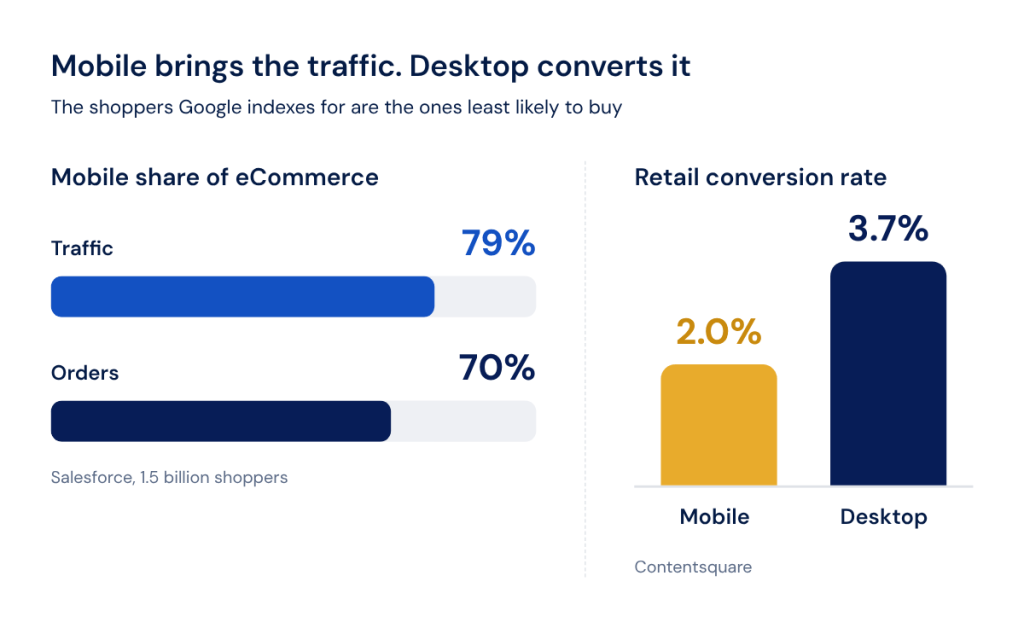
Your phone traffic and your phone revenue do not match, and the gap is bigger than most teams think. Across 1.5 billion shoppers, Salesforce measured mobile at 79% of eCommerce traffic and about 70% of orders. Contentsquare puts the same thing in conversion terms: in retail, mobile converts at 2.0% against 3.7% on desktop. Some of that gap is behavioural, since people browse on a phone and buy on a laptop. A large part of it is speed.
That is what makes mobile SEO for eCommerce a revenue problem rather than a technical hygiene problem: Google indexes the mobile version of your pages, and the shopper who arrives there is the one most likely to leave before the page finishes rendering.
TL;DR
- Mobile carries roughly 79% of eCommerce traffic and 70% of orders, and retail conversion on mobile runs at about half the desktop rate.
- Google indexes and ranks from the mobile version, and Core Web Vitals are an input to its ranking systems, but Google states plainly that good scores do not guarantee a ranking benefit. The commercial case for mobile speed rests on conversion.
- Only 48% of sites pass all three Core Web Vitals on mobile against 56% on desktop, and on eCommerce platforms the spread is severe: 76% of Shopify origins pass on mobile against 35% for WooCommerce and Magento.
- The mobile gap is almost entirely LCP and INP. Layout shift is actually better on mobile than on desktop on every major eCommerce platform.
- Images and JavaScript make up around 71% of the median mobile page, and the median page pulls in third parties three inclusion levels deep.
Why Mobile Speed Hits eCommerce Revenue Twice
Google finished moving to mobile-first indexing in October 2023, and since July 2024 it crawls with Googlebot Smartphone only. The current documentation puts it directly: Google uses the mobile version of a site’s content, crawled with the smartphone agent, for indexing and ranking.
It is worth being precise about what that does and does not mean, because most articles overstate it. Google says a mobile version is not required but very strongly recommended, and the July 2024 change removed from the index only content that is completely inaccessible on a mobile device. A slow page is not a deindexed page.
On ranking, Google’s page experience documentation is similarly careful. Core Web Vitals are used by its ranking systems, and at the same time good results in Search Console or a third-party tool do not guarantee that your pages rank at the top. There is no threshold that buys you a position.
So the second cost is the one that actually pays for the work. Google and Deloitte tracked mobile load times hour by hour across 37 retail and travel brands and more than 30 million sessions, and found a 0.1 second improvement in mobile speed associated with an 8.4% lift in retail conversion and a 9.2% lift in average order value. That study is observational rather than experimental, and its data is from 2019, which is worth saying out loud: no large-sample study published since has replaced it.
The individual results are stronger. Rakuten 24 reported a 53% increase in revenue per visitor after Core Web Vitals work, and Vodafone Italy measured 8% more sales after improving LCP by 31%. Those sit on Google’s own business impact page, which has not been updated since September 2021, so treat them as directional evidence rather than as current benchmarks.
For the wider picture of what else moves on these pages, our guide to optimizing eCommerce product pages for SEO covers the non-speed side.
The Real Mobile Speed Killers on eCommerce Sites
Most advice on mobile SEO for eCommerce tells you to compress your images and defer your JavaScript. That is true everywhere and it explains nothing about why eCommerce sites specifically sit at the bottom of every performance distribution.
Two structural things separate a storefront from a content site. It ships a gallery on every product page, and it runs a stack of third-party apps that nobody owns end to end.
Product Image Carousels and Galleries That Weigh Down Every PDP
Images are the single heaviest resource type on the median mobile page, at 911 KB out of 2,164 KB total. Add JavaScript at 632 KB and roughly 71% of the page is two resource types.
A product page makes that worse by design. A gallery of six images is six full-size files plus six thumbnails, and on many templates the zoom view loads a seventh copy at a higher resolution. Multiply by the variant count and you have a page that ships twenty image files so a shopper can look at one.
The damage shows up in the metric that matters most. An image is the Largest Contentful Paint element on 76% of mobile pages, so the gallery is not competing with the page, it is the page as far as LCP is concerned.
Third-Party App Scripts Stacking Up
Reviews widget, live chat, personalization engine, loyalty app, two analytics pixels and an ad tag. Each one was approved separately, each one looked small on its own, and none of them is anybody’s job.
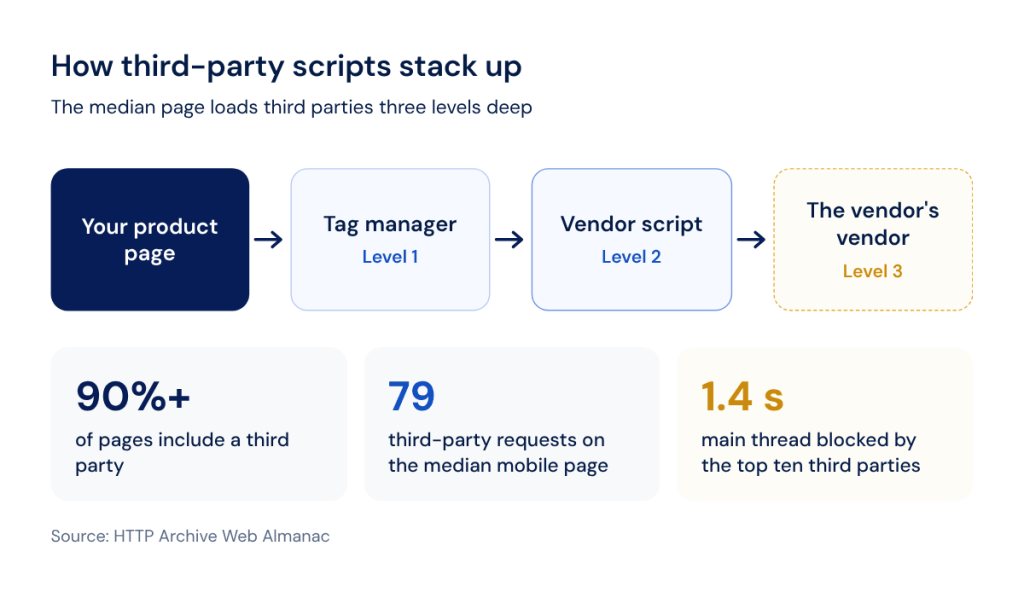
At least 90% of pages include a third party, and the median page carries 79 third-party requests on mobile. The detail that explains the compounding is inclusion depth: the median chain runs three levels deep, meaning your tag manager loads a vendor that loads another vendor.
The cost lands on the main thread, which is where mobile devices have the least headroom. Lighthouse flags third-party code that blocks the main thread for 250 milliseconds or longer, and the Web Almanac’s 2022 measurement put the median blocking time of the ten most popular third parties at 1.4 seconds. That is the Interaction to Next Paint story, and INP is exactly where mobile falls apart: 97% of desktop origins score good against 77% on mobile.
Finding Which Pages Are Actually Slow, Not Guessing
Testing the homepage and one product page tells you about the homepage and one product page. The pages that carry revenue are deeper: filtered collection views, paginated category pages, the seasonal landing pages that took last quarter’s budget.
A crawl answers this at the level of the whole catalog. In JetOctopus the Load Time report, in the JavaScript Performance section of crawl results, records First Paint, First Contentful Paint, Page Loaded and All Requests Completed for every crawled URL, and the Load time distribution chart shows how many pages fall into each speed bucket. Clicking a column opens the data table behind it, which is where the slow pages actually live.
Server logs add the half a crawl cannot see. The Heavy Pages report in the Logs section measures page weight in kilobytes as it was actually served, so a template that looks fine in a test and ships 4 MB in production has nowhere to hide.
Core Web Vitals, Measured at Scale Rather Than Guessed Page by Page
Most free speed tools test one URL at a time, and several of them run the test from the checker’s own machine and connection. Neither property survives contact with a catalog. You cannot check forty thousand product URLs one at a time, and if you could, the numbers would drift with whoever ran them.
The thresholds themselves are fixed and worth restating, because they are assessed at the 75th percentile of page loads and separately for mobile and desktop. Good is 2.5 seconds or less for LCP, 200 milliseconds or less for INP and 0.1 or less for CLS. INP replaced First Input Delay as a Core Web Vital on 12 March 2024.
Measured across the web, 48% of sites pass all three on mobile against 56% on desktop. On eCommerce the spread by platform is much wider, and the pattern is instructive:
| Platform | All three CWV, mobile | LCP good, mobile | INP good, mobile |
|---|---|---|---|
| Shopify | 76% | 86% | 90% |
| Squarespace Commerce | 69% | 76% | 96% |
| Wix eCommerce | 66% | 76% | 85% |
| PrestaShop | 50% | 65% | 89% |
| WooCommerce | 35% | 39% | 88% |
| Magento | 35% | 52% | 87% |
Source: HTTP Archive Web Almanac 2025, eCommerce chapter.
Two things in that table run against the common wisdom. The mobile gap is driven by LCP and INP, not by layout shift, and in fact CLS scores better on mobile than on desktop on every platform listed. And the two most customizable platforms sit at the bottom, which is a statement about how much weight a storefront accumulates rather than about the software.
Measuring your own catalog against that needs a bulk method. The Core Web Vitals report in JetOctopus runs through Google’s PageSpeed API rather than the checker’s own connection, which is what keeps the numbers consistent between runs. You add your own API key, choose the device, set a URL limit and point the analysis at a URL segment rather than at a single page. The Overview report gives the score breakdown across that segment, and the Lab Data report carries First Contentful Paint, Total Blocking Time, Largest Contentful Paint, Cumulative Layout Shift, Speed Index and Time to Interactive.
Segments are what make that useful on a catalog. A segment built on a contains rule for /category/ or /product/ lets you compare template against template rather than reading a site-wide average that no individual page resembles.
Run Core Web Vitals across a whole segment through Google's API and compare templates instead of pages.
Product Images That Are Not Actually Optimized for Mobile
A compressed image can still be the wrong image. Two failures account for most of the waste on mobile product pages, and neither one is caught by asking whether the file was compressed.
Serving the Right Image Size for the Screen, Not Just a Compressed Original
A 1600 pixel product photo displayed at 380 pixels on a phone still downloads at 1600 pixels. CSS resizes what arrived, it does not change what was requested. Responsive markup is the only thing that reduces the bytes.
Adoption is still partial. The Web Almanac’s 2024 media analysis found srcset on 42% of mobile pages, and among pages that do use it, the sizes attribute is frequently wrong: the median value is 16% too large on mobile, and one in five sizes attributes on desktop is inaccurate enough that the browser picks the wrong file from the set. At the 90th percentile that waste reaches around 400 KB on mobile.
Lighthouse checks this under the audit that flags images served at least 4 KiB larger than their rendered size, now surfaced as the image delivery insight.
Images Loading Before They Are Ever Seen
The second failure is priority. A product page loads the gallery, the recommendations carousel and the footer badges in the same pass, so the image the shopper is waiting for competes for bandwidth with images they will never scroll to.
Native lazy loading fixes that, and it is now on roughly a third of sites. The problem is where it gets applied: between 16% and 17% of pages lazy-load their own LCP image, which delays the one thing the metric measures. Google’s guidance is unambiguous, never lazy-load the LCP image.
On a catalog you check this in bulk rather than page by page. The Images data table has a dedicated Lazy load images view and an Is lazy loading column, which is how you find every lazy-loaded image and analyze it alongside the page it sits on. Images can also be filtered by height and width, which surfaces the files being served at dimensions the template never displays. For ongoing monitoring, the Core Web Vitals alerts cover LCP, CLS, INP and FCP declines by device type and will notify you about offscreen images.
The wider image picture, from alt text to structured data, sits in our companion guide to eCommerce image SEO.
Mobile Checkout Speed and Conversion Risk
A fast catalog that funnels into a slow checkout still loses the sale, and checkout is the part most mobile speed advice never reaches, because it sits behind a login or a cart state that a test tool does not reproduce.
The friction is measurable. Baymard puts the documented average cart abandonment rate at 70.22%, an average across 50 studies rather than a single measurement. Setting aside the 42% of shoppers who were only browsing, the two reasons most relevant here are a checkout that was too long or too complicated, at 17%, and a site that had errors or crashed, also at 17%. Both get worse on a slow connection with a heavy page.
The structural cause is form weight. The average US checkout flow shows 23.48 form elements by default where an efficient flow needs around twelve, and every one of those fields on a mobile checkout is a third-party validation script, an autocomplete call or a re-render.
Checking whether the pages closest to revenue are among your slowest is a segment question. Build a segment with a contains rule on /cart/ or /checkout/ and run the same load time and Core Web Vitals reports against it that you ran against the catalog. The answer is usually uncomfortable, because checkout templates accumulate payment SDKs, fraud scripts and analytics that no category page carries.
If you want the platform view of how this fits together, our eCommerce SEO solution page covers the rest.
FAQ
Does mobile page speed affect desktop rankings too?
In practice yes, because Google indexes and ranks from the mobile version of the page regardless of the device a searcher is using. There is no separate desktop index to rank against. Core Web Vitals themselves are assessed separately for mobile and desktop, so a site can pass on one and fail on the other, but the content Google evaluates comes from the smartphone crawl either way.
Is a free mobile speed score the same as what Google actually uses to rank a page?
No. A single-URL test produces lab data from a simulated device, while Google’s ranking systems use field data from real Chrome users at the 75th percentile over 28 days. Lab scores are a diagnostic that tells you what to fix. Field data tells you whether users are experiencing the result. A page can score well in a lab test and still fail Core Web Vitals in the field.
What is a realistic mobile speed target for an eCommerce catalog rather than a single landing page?
Work at the template level rather than the page level. A defensible target is having each major template pass all three Core Web Vitals at the 75th percentile: LCP under 2.5 seconds, INP under 200 milliseconds and CLS under 0.1. For context, 48% of all sites currently pass all three on mobile, and among eCommerce platforms the range runs from 35% to 76%.
Do speed fixes reduce cart abandonment, or do they only help rankings?
The measured evidence is stronger on conversion than on rankings. Google and Deloitte associated a 0.1 second mobile improvement with 8.4% higher retail conversion, while Google states explicitly that good Core Web Vitals scores do not guarantee a ranking benefit. Treat speed work as a conversion project that also removes a ranking risk rather than the other way round.
Can third-party apps be removed without breaking checkout or marketing tracking?
Some can, and the way to find out is to inventory rather than to guess. List every third party, name an owner for each, and establish what breaks if it stops loading. In most storefronts a share of the stack is duplicated, abandoned or firing on pages it was never meant for. Deferring a script until after interaction is usually safer than removing it and often recovers most of the main-thread cost.
What Your Slow Pages Are Actually Costing You
Industry averages are a starting reference, not your number. Your number comes from your own traffic, your own conversion rate and your own order value, and the arithmetic is simple enough to do on a whiteboard.
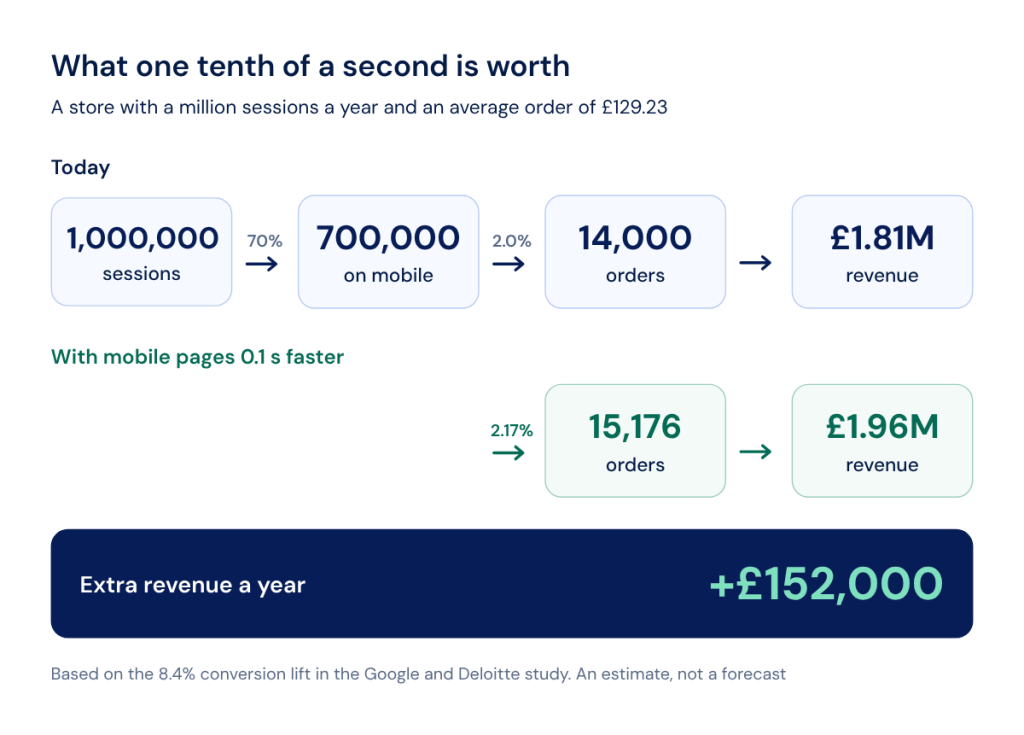
Take a store with a million sessions a year. At the 70% mobile share Contentsquare measured across 99 billion sessions, that is 700,000 mobile sessions. At a 2.0% mobile retail conversion rate, that is 14,000 orders. At an average order value of £129.23, that is roughly £1.81 million in mobile revenue.
Now apply the Deloitte figure to a 0.1 second improvement: 8.4% more conversions gives about 15,176 orders, or £1.96 million. The difference is around £152,000 a year from one tenth of a second.
Three honest caveats belong with that number. The 8.4% is a relative lift, so 2.00% becomes 2.17% rather than 10.4%. It is not linear, so multiplying by ten to model a full second is indefensible. And it is an association observed across 37 large brands in 2019, not a promise about your site.
Which is the point. The average tells you the shape of the opportunity. Only a crawl of your own templates, run against your own segments with your own field data next to it, tells you which pages are carrying the loss and how much of it is recoverable. That is where mobile SEO for eCommerce stops being a benchmark conversation and turns into a list of templates ranked by what they cost you.