Internal linking SEO is the part of optimization you control completely. Every internal link tells Googlebot where to go next, tells AI crawlers which pages exist and tells users what to read after this page. On a 200-page site you can manage that by hand. On a catalog with millions of URLs, the same job decides which products ever reach the index.
This guide covers both sides. You will learn what internal links are, why they matter for search engines and AI crawlers, how to build a linking strategy step by step and how many links a page should carry. The last sections show how to audit an existing site and how to scale the work when manual linking stops being realistic.
TL;DR
- Internal linking for SEO helps search engines discover, index and understand pages, and it passes link equity to the pages you want to rank.
- Contextual links with descriptive anchor text carry the most meaning, while navigational links define hierarchy and keep key pages within two or three clicks of the homepage.
- Google sets no fixed limit on internal links per page, but each extra link passes less value, so relevance and priority matter more than volume.
- AI crawlers read links in the raw HTML and do not execute JavaScript, so orphan pages and JS-only navigation can stay invisible to AI search.
- On sites with thousands of pages, manual linking does not scale, and automating link suggestions from crawl, log and GSC data closes the gap.
What Are Internal Links?
An internal link is a hyperlink from one page of a website to another page on the same domain. In HTML, it is an anchor element with an href attribute, and Google states that it can generally only crawl a link if it’s an <a> element with an href. Buttons that navigate with JavaScript and spans with click handlers look like links to users, yet crawlers may never follow them.
The table shows how internal links differ from external ones:
| Internal links | External links | |
|---|---|---|
| Where they point | To pages on the same domain | To other domains |
| Main role | Crawling, site structure, link equity distribution and navigation | Trust, context and referral traffic |
| Control | Full control | You control outbound links only |
| SEO impact | Direct effect on discovery, indexation and page priority | Indirect, since backlinks from other sites influence rankings |
There are two main types of internal links. Navigational links live in menus, category trees and breadcrumbs and repeat across templates, so they define the site’s hierarchy. Contextual links sit inside the main content and connect pages by meaning, such as a guide that links to the product it describes. Footer links, image links and CTA buttons are variations of these two types and follow the same rules.
Internal link building is a different discipline from link building. Link building means earning links from other websites to yours. Internal linking happens entirely on your own site, so you can change it today without asking anyone.
Why Internal Linking Matters for SEO
So do internal links help SEO? Yes, and in three distinct ways. They help crawlers find and index pages, they show how topics relate to each other and they move authority toward the pages that need it. Google puts the baseline plainly: every page you care about should have a link from at least one other page on your site.
Internal Links Help Search Engines and AI Crawlers Find and Index Pages
Crawlers discover most pages by following links from pages they already know. A page without internal links, an orphan page, depends on the sitemap or external links to be found at all, and it gets far less crawl attention once it is found. On a large catalog this adds up quickly. JetOctopus reports that on large e-commerce sites, catalogs and classifieds, Googlebot crawls only 40 to 70% of pages, and click depth is one of the main reasons. Pages that need four or more clicks from the homepage receive less crawl attention.
AI crawlers make the HTML layer even more important. JetOctopus’s 2026 playbook for AI crawlers states that AI bots do not render JavaScript and that internal links are their primary crawl mechanism. An independent test of 12 AI assistants found that the entire US top tier reads raw HTML only when grounding an answer. If your category links load through JavaScript, those assistants never see them.
AI crawlers also cover far less of the web than Googlebot. Cloudflare data for 2025 showed that Googlebot reached 11.6% of unique pages, against 3.6% for GPTBot and 2.4% for ClaudeBot, and JetOctopus log reviews show that AI bots drop off fast beyond two or three clicks. Shallow, well-linked pages are the ones they reach.
Server logs show whether any of this works: a crawl tells you which links exist, while logs show which pages bots actually request.
Internal Links Show Site Structure and Topical Relationships
Links also tell search engines how your content is organized. A clothing store might have a Men’s Shoes hub that links to Running Shoes, Boots and Sneakers, while each of those pages links back to the hub and to related guides. This hub-and-spoke pattern creates a clear internal linking structure: the hub signals the broad topic and the spokes signal its subtopics.
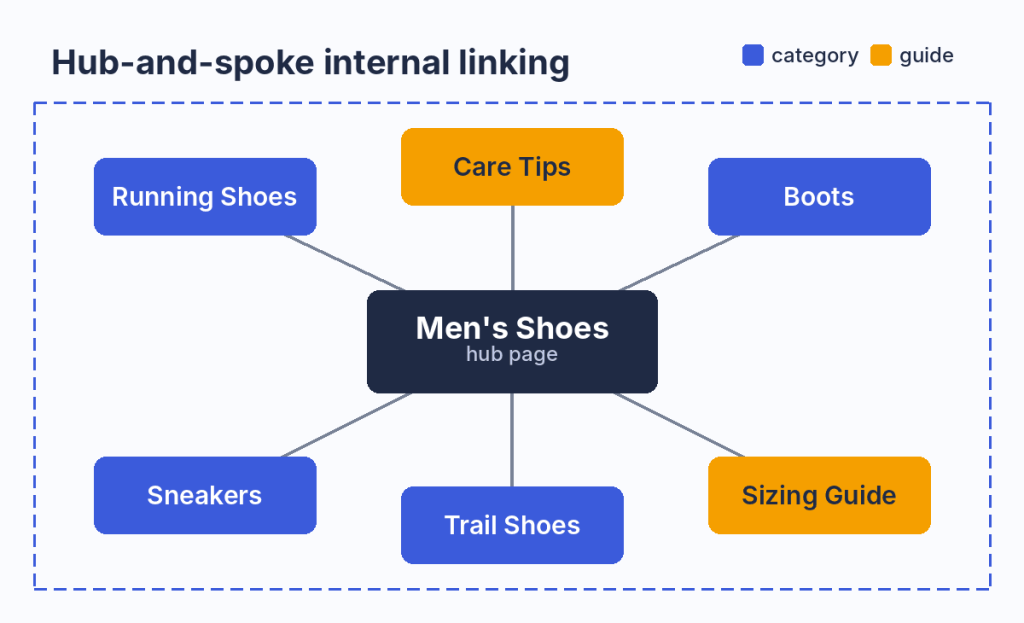
A hub page links to its subcategories and guides, and each of them links back to the hub.
Anchor text adds context to that structure. When a sizing guide links to the running shoes category with the anchor “men’s running shoes”, it describes the target page in words a search engine can use. Yoast describes this shift directly: with AI search, internal links are no longer mere SEO signals but also context signals that shape how Google and AI models understand your topics.
AI search raises the stakes further. Google’s AI Mode uses a query fan-out technique, breaking down your question into subtopics, so a site with clearly linked subtopic pages has more chances to match those sub-queries.
Internal Links Pass Authority and Improve Navigation
Every page holds some authority, often called link equity or link juice, and internal links pass part of it to the pages they point to. That is why a link from a strong page carries more weight than a link from a page nobody visits. Google has confirmed that even 301 and other permanent redirects don’t cause a loss in PageRank, which shows that PageRank still flows through the links on your site.
The practical use is to support weak pages from strong ones. If your article about crawl budget ranks well and attracts links, a contextual link from it to your guide on fixing redirect chains pushes some of that strength to a page that would struggle on its own.
Users benefit from the same links, since a reader who finds the next logical step has a reason to stay. Among the internal linking benefits, this one is the easiest to see in analytics.
How to Build an Internal Linking Strategy
A good internal linking strategy starts with structure and ends with maintenance. Here is how to build internal links for SEO in seven steps:
- Map your hub pages: choose the broad pages that represent your main topics or categories.
- Group content into topic clusters: assign every supporting page to one hub.
- Add contextual links with clear anchors: link related pages inside the content with descriptive anchor text.
- Find your authority pages: identify the pages with the most crawl activity, traffic and external links.
- Link from authority pages to target pages: send links from strong pages to the pages you want to rank.
- Support new content right away: give every new page several internal links on the day it goes live.
- Keep key pages within three clicks: make sure important pages are reachable from the homepage in two or three clicks.
Steps 1 and 2: Map Hub Pages and Topic Clusters
Start with a list of your main topics and pick one page that represents each. On an e-commerce site these are usually category pages, while on a blog they are pillar guides. Each hub should link down to every page in its cluster, and every page in the cluster should link back up.
The structure behind this is your website architecture. JetOctopus recommends keeping your most important pages reachable within 2-3 clicks from your homepage and treats a flat architecture as generally preferable to a deep one. On large sites, that rule shapes the category tree more than any single link does.
Clusters also stop pages from competing with each other, since a shared hub makes the hierarchy explicit. Review the cluster map whenever you add or retire a category, because every change in the tree changes the paths crawlers take.
Step 3: Add Contextual Links With the Right Anchor Text
Anchor text should describe the page it points to. Google’s guidance is that good anchor text is descriptive, reasonably concise and relevant to both the source page and the target, and its examples mark “click here” as too generic.
A few rewrites show the difference:
- Weak: “read more here”. Strong: “how to fix redirect chains”.
- Weak: “this page”. Strong: “men’s waterproof hiking boots”.
- Weak: “our tool”. Strong: “log file analyzer for Googlebot visits”.
Keep one anchor for one target. Backlinko advises that you avoid using the same words for two different pages, since the same anchor pointing to two URLs sends a mixed signal about which page owns the topic. At the same time, identical anchors repeated across hundreds of pages look unnatural, so vary the wording around one core phrase. Exact match anchors work best in navigation, while partial match anchors read more naturally inside an article.
Steps 4 to 6: Pass Authority to Target Pages and New Content
Authority pages are usually identified by backlinks. On large sites that is only part of the picture, since many strong pages earn their strength from crawl frequency and search impressions. JetOctopus uses a donor and acceptor model for this: donors are strong pages with crawl budget, traffic and impressions in Google, while acceptors are weak, orphan or unindexed pages that need a boost.
To find donors, combine three sources. A crawl shows which pages have the most internal links, server logs show which pages Googlebot visits most often and Search Console shows which pages earn impressions and clicks. Then link to each target page from several relevant donors on the same topic.
New pages need the same treatment from day one. Semrush recommends that you aim for at least two or three internal links pointing to every new piece of content. For a new product or article, the quickest wins are its parent category, one or two related pages and any hub that lists recent content.
Working with 10,000+ pages? Manual linking will not keep up with your catalog. Jump to how to automate internal linking at scale.
How Many Internal Links Should a Page Have?
There is no official limit. Google’s own documentation says there’s no magical ideal number of links a given page should contain, and adds that if you think it is too much, it probably is.
The right number depends on the page type and the amount of content. What matters more is that each link is relevant and that your priority pages get enough of them. Backlinko notes that beyond a certain point, each additional link on that page passes less and less value, and Siteimprove warns that pages with hundreds of links dilute the importance of each one.
On the receiving side, the numbers are clearer. JetOctopus lists pages with fewer than 10 unique internal links from indexable pages among the highest-impact issues to fix, and its link reports flag only 1 inline and extreme counts of more than 2,000 links as separate problems.
The table below is practical guidance by page type, built on the sources above:
| Page type | Practical guidance | Why |
|---|---|---|
| Homepage | Links to every main hub or category | It is the strongest page and the starting point of most crawl paths |
| Hub or pillar page | Links to every page in its cluster | It defines the topic and passes authority down |
| Category page | Links to subcategories and top products, plus deeper pages through pagination | Pagination hides most products, so products beyond the first pages are often linked from nowhere else |
| Product page | Links to its parent category, related products and the brand page | It connects the catalog sideways as well as up |
| Blog article | Several contextual links to related guides and one to the relevant product or category | Readers and crawlers both need a next step |
| New page | At least two or three inbound links on launch day | It has no history, so links are its only discovery path |
Internal Linking Best Practices
The steps above build the structure, and these internal linking best practices keep it working:
- Use descriptive anchors: every anchor should tell users and crawlers what the target page is about.
- Give each target one core anchor: keep a consistent phrase for each important page and avoid reusing it for another URL.
- Keep internal links followable: Google recommends the robots.txt disallow rule when you need to stop it from fetching a page on your own site, so nofollow is the wrong tool for internal pages.
- Place important links early: put key links in the first screens of the main content, where readers who skim still see them.
- Mind the first link on a page: many SEOs believe that only the first link to a URL on a page counts, and while Google has not confirmed a rule, it is safer to make the first anchor the most descriptive one.
- Link from and to priority pages: your strongest pages should point to your money pages, and those should never sit at the edge of the site.
- Update old content: when you publish a new page, add links to it from older articles on the same topic.
- Keep the count reasonable: add links where they help a reader, and remove blocks that only exist to stuff links into a template.
- Prioritize relevance: a link between unrelated pages helps neither users nor rankings.
- Review automated links: if a plugin or script adds links, check its output regularly, since bad matches scale as fast as good ones.
Test before you roll out a big change. SearchPilot found that linking the plain-text brand name on product pages to the brand listing page brought a predicted +18% uplift for brand-level PLPs, while a static block of 30 popular destination links didn’t lead to a noticeable change in organic traffic. Relevant links tend to beat generic link blocks.
How to Audit Your Internal Links and Fix Common Issues
An internal linking analysis answers four questions. How many internal links point to each page, are they follow or nofollow, do they lead to live final URLs and which pages have no links at all?
A crawl gives you the first three answers. In JetOctopus, the Links Overview and Internal Links reports show the distribution of inlinks, follow and nofollow links, image and text links and link targets, with a problem list that flags pages with fewer than 10 inlinks, pages with only one inline and links to HTTP pages. The step-by-step guide on how to analyze internal linking walks through each report.
The fourth question needs more than a crawl, because orphan pages are by definition missing from the link graph. Compare the crawl with your sitemap, Search Console data and server logs: any URL that appears there but not in the crawl is an orphan.
Look for internal linking opportunities at the same time. Pages with impressions but few inlinks, deep pages that Googlebot rarely visits and new pages with a single link are the first candidates for new links. Run the audit every few months, as Siteimprove suggests, and after every redesign or migration.
Find every page with weak, broken or nofollow internal links on your own site

Internal Linking Mistakes to Avoid
Most internal linking problems fall into a handful of patterns, and each has a clear fix:
| Mistake | Why it hurts | How to find and fix it |
|---|---|---|
| Broken internal links | They lead users and crawlers to dead ends and waste crawl budget | Find links to broken pages and point them to live URLs |
| Nofollow on internal links | If all links to an indexable page are nofollow, Google may not crawl that page | Find nofollow links to indexable pages and remove the attribute |
| Orphan pages | Pages without internal links are hard to discover and index | Find orphan pages and link them from relevant hubs |
| Pages with one internal link | A single link is a weak signal of importance | Add links from related pages and the parent category |
| Redirects and redirect chains | Google advises you to avoid long redirect chains, which hurt crawling | Link straight to the final URL |
| HTTP links on HTTPS pages | Each one adds a redirect and mixes signals | Update links to the HTTPS version |
| Click depth above three | Deep pages get less crawl attention | Bring them up through navigation and hub pages |
| Links that exist only in JavaScript | AI crawlers do not render JavaScript and may never see them | Keep key links in the initial HTML |
An audit of a large catalog will surface thousands of pages that need links, and fixing them one by one is not realistic. That is the point where linking has to move from a spreadsheet to a system.
Scale Internal Linking With JetOctopus Internal Linker
Large catalogs share the same structural problems. Pagination buries most products, a handful of top pages collect most of the links and faceted URLs and orphan pages sit outside the main link graph. According to JetOctopus, on large sites 80% of pages remain underlinked while a few top pages get overlinked. JetOctopus CTO Serge Bezborodov puts it more bluntly in his guide to internal linking for big websites: usually, less than half of a website has enough internal links.
Manual work cannot close that gap, and semantic matching alone falls short too. Text embeddings can tell you that two pages are similar, but they cannot tell you which page Googlebot ignores or which one already earns impressions, so an algorithm without crawl, log and GSC data may add links to pages that are already strong.
The JetOctopus AI Internal Linker works in four steps:
- Select donors and acceptors: filter strong donor pages and weak, orphan or unindexed acceptor pages by any crawl, log or GSC metric.
- Set matching rules and run AI matching: matching fields group pages first, and AI text embeddings then pick topically related pairs.
- Review the linking scheme: you get a set of links with anchors for each donor page and check them before anything goes live.
- Ship and watch the results: export the scheme as a CSV or push it live through the Linker API, which returns links during page render in 10 to 20ms.
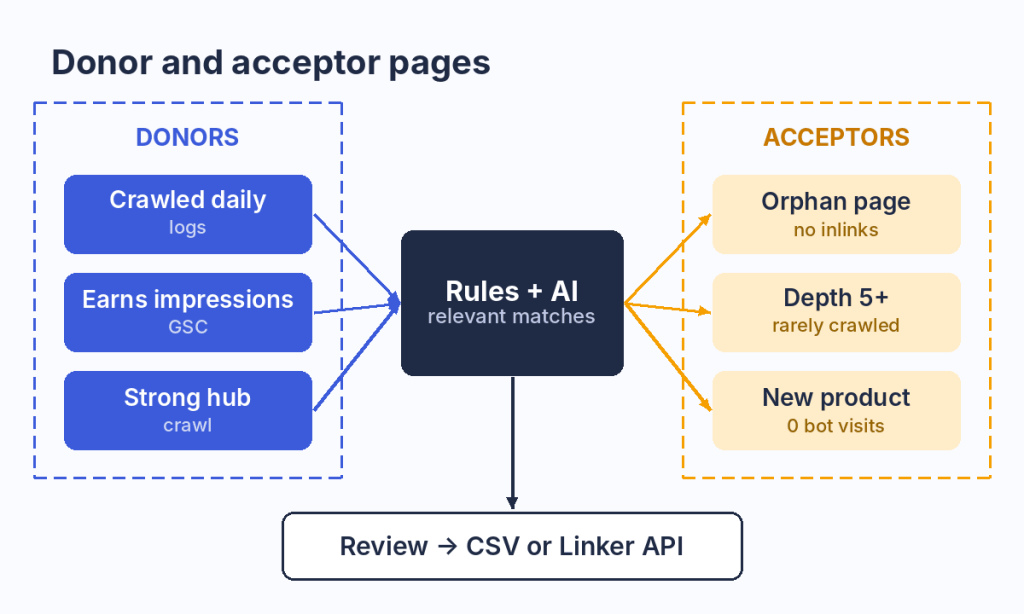
Donors are chosen by crawl, log and GSC data, while acceptors are the pages that need links. Every match is reviewed before release.
The Linker doesn’t touch your existing internal links and does not insert links into existing text. It delivers them in a block-based format that fits catalog templates, such as a related listings block on product or category pages. The manual recommends up to 10 donor links per page in most cases, which keeps each block useful for readers.
The results depend on the site, so treat any single number with care. In one test described in the same guide, only 40% of pages were crawled by Googlebot, and after a new internal linking scheme it increased to 70%, which was reflected in indexation and organic traffic.
The tool is built for websites with 10,000+ pages in e-commerce, classifieds, real estate, automotive and listings, where the catalog changes faster than any team can relink it.
FAQ
Do internal links help SEO?
Yes. Internal links help search engines discover and index pages, show how topics relate and pass link equity to the pages you want to rank. They are one of the few ranking levers you control completely, and they matter even more for AI crawlers, which find pages almost entirely through links in the HTML.
What is internal linking? Give an example.
Internal linking means connecting pages on the same website with hyperlinks. For example, a blog post about choosing running shoes that links to your men’s running shoes category with the anchor “men’s running shoes” is an internal link. It helps readers buy and tells search engines what the category is about.
What is the difference between internal and external links?
Internal links point to pages on the same domain and shape crawling, structure and authority flow on your site. External links point to other domains. You fully control internal links, while for external links you control only the ones you place, and backlinks from other sites remain outside your direct control.
How many internal links should a page have?
Google sets no fixed number. Use as many links as help the reader, give every new page at least two or three inbound links and keep important pages within three clicks of the homepage. Pages with hundreds of links pass less value per link, so prune template blocks that add nothing.
How do you create an internal link in HTML?
Use an anchor element with an href attribute that points to the target URL and descriptive text between the tags. Google can reliably crawl only links built this way:
| <a href=”https://www.example.com/mens-running-shoes/”>men’s running shoes</a> |
Relative URLs such as href=”/mens-running-shoes/” work as well.
Should internal links be nofollow?
No. Nofollow on internal links stops link equity from reaching your own pages, and if every link to an indexable page is nofollow, Google may not crawl it. If you need to keep crawlers away from certain URLs, such as filters or internal search, use robots.txt rules instead.
Do AI crawlers follow internal links?
Yes, and they depend on them even more than Googlebot does. AI crawlers such as GPTBot, ClaudeBot and PerplexityBot read the raw HTML and do not execute JavaScript, so they follow standard anchor links and miss links injected by scripts. They also tend to drop off beyond two or three clicks from the homepage.
What is the difference between internal linking and link building?
Internal linking connects pages within your own website, so you can change it at any time. Link building means earning links from other websites to yours, which depends on other publishers. Both pass authority, but internal linking SEO work is faster to ship and easier to measure in crawl and log data.
Conclusion
Internal links decide which pages search engines and AI crawlers find, how they understand your topics and where your site’s authority flows. On a small site, a clear hub structure, descriptive anchors and a quarterly audit cover most of the work. On a site with tens of thousands of pages, the same principles need data and automation behind them, because the gap between what exists and what Googlebot visits grows with every new product.
Start with an audit, fix the broken, nofollow and orphan cases and then build a repeatable process for the rest. That is what internal linking for SEO looks like when it scales.