Orphan pages are pages that exist on your site, sit in your sitemap or earn impressions in Search Console, yet no other page links to them. Users cannot click their way to them, and crawlers that follow links never arrive. On a large catalog they pile up quietly after every migration, template change and product import.
This guide covers the full cycle.
You will see what orphan pages are, when they hurt SEO and what usually causes them. Then comes a step-by-step process to find them in JetOctopus and a decision table for fixing them, by hand on a small site and with automation on a large one.
TL;DR
- An orphan page has no internal links pointing to it, so users and crawlers cannot reach it by following links.
- Orphan pages rarely rank: they get no internal link equity, may drop out of the index and can waste crawl budget.
- To find them, compare a full site crawl with other URL sources such as XML sitemaps, Google Search Console and server logs.
- Not every orphan page needs a link: decide by traffic, external links and content value, then link, redirect, noindex or remove.
- On large sites manual fixing does not scale, and JetOctopus Internal Linker connects orphan and weak pages to strong ones automatically.
What Are Orphan Pages?
What is an orphan page? It is a page on your website that has no internal links from any other page on the same site. You may also see the terms orphaned page, orphan web page or orphaned content, and they all describe the same thing: a URL that exists but sits outside your site’s link graph.
Sitebulb defines it as any page on your site that doesn’t have a link from any other page on your site, and Conductor narrows the problem down further: a true orphan page is a page that has value for users and is live, just unreachable.
How common are they?
A 2026 study by SEOmator of more than 100,000 websites found that the median failing site carries 14 broken internal links, and 8% of its pages are orphans. The panel leans toward B2B SaaS sites, so treat the figure as a general baseline rather than a benchmark for large catalogs.
Can Google Still Find Orphan Pages?
Yes, but only through sources other than your own links. Google can discover an orphan URL through your XML sitemap, through backlinks from other sites or through old references it still remembers. The URL Inspection tool in Search Console even shows how Google found the URL, listing sitemaps and a referring page as discovery sources.
Discovery is not the same as attention, though. Google’s documentation says a sitemap helps search engines discover URLs on your site, but it doesn’t guarantee that all the items in your sitemap will be crawled and indexed. In JetOctopus’s own experience with large catalogs, Googlebot crawls a very tiny number of such pages, keeping them out of the index.
Orphan Pages vs Dead-End Pages
These two problems sit at opposite ends of a link. An orphan page has no incoming internal links, so nothing leads to it. A dead-end page has no outgoing links, so a user or crawler that lands there has nowhere to go next.
An orphan cannot receive authority from the rest of the site, while a dead end receives it and passes nothing on, and a single page can be both.
Do Orphan Pages Hurt SEO?
Short answer: yes, but indirectly. Google does not penalize a site for having orphan pages. The damage comes from what those pages miss and from the crawl resources they consume. So do orphan pages hurt SEO? Here is how the harm shows up in practice:
- They may not get indexed. Google’s guidance is that every page you care about should have a link from at least one other page on your site. Without that link, a page depends on the sitemap alone, and Google may discover it without ever crawling or indexing it.
- They get little link equity, so they rarely rank. Internal links pass authority from strong pages to the pages they point to. An orphan page receives none, which puts it at a disadvantage against linked competitors even when its content is better.
- They can waste crawl budget. Orphans that Googlebot still visits take crawl cycles away from the pages you want indexed. JetOctopus describes orphan pages as a real crawl budget issue on large sites, and the TemplateMonster case shows the scale: a crawl combined with log analysis surfaced 3 million unknown orphaned pages crawled by Googlebot, while 250,000 pages in the structure were not crawled at all.
- They are harder for AI crawlers to reach. This area is still developing, but the early evidence points one way. JetOctopus notes that orphan pages are unlikely to be discovered by AI crawlers at all, and an independent 2026 test found that the entire US top tier of AI assistants reads raw HTML only. AI crawlers also reach fewer pages overall: Cloudflare data showed GPTBot on 3.6% of unique web pages against 11.6% for Googlebot.
What Causes Orphan Pages?
Orphan pages rarely appear because someone decided to hide a page. They are side effects of how large sites change over time. These are the most common causes:
- New pages without a place in the structure: a product or article goes live, but nobody adds it to a category, hub or related block.
- Migrations and redesigns: URLs change, old links break and some pages lose every route that used to lead to them.
- Navigation changes: a category leaves the menu, and the pages that only the menu linked to become orphans.
- Pagination and filters: products beyond the first pages of a category often have no other link, and the Internal Linker page notes that only the first 100 to 150 items in a category get linked on many catalogs.
- Outdated content: expired listings, old promotions and seasonal pages stay live and stay in the sitemap long after the links to them are gone.
How to Find Orphan Pages on a Website (Orphan Pages Checker)
A crawler alone cannot find orphan pages. It discovers URLs by following links, and an orphan page has no link to follow. So every orphan pages checker works the same way: it collects URLs from other sources, compares them with the crawl and flags the ones the crawl never reached.
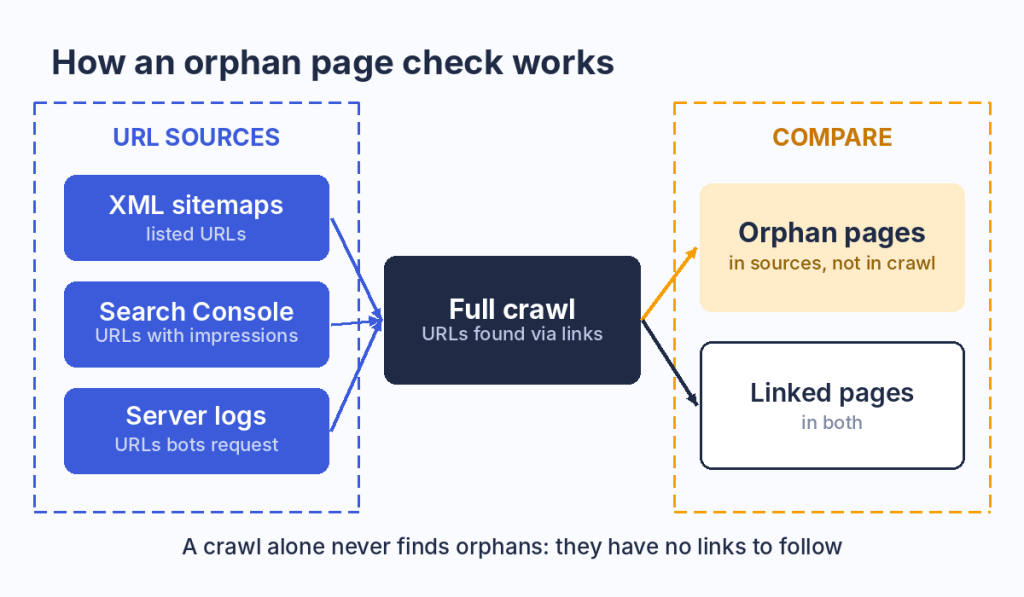
Any URL found in a sitemap, Search Console or logs but missing from the full crawl is an orphan page.
Here is how to find orphan pages on a website with JetOctopus, in five steps.
Step 1: Add Sitemaps as a URL Source
Sitemaps are the most important source of orphan URLs, because they list pages the site owner wants indexed whether or not anything links to them. In the crawl settings, activate the “Process sitemaps” checkbox in the basic settings, then add the list of your sitemaps in the advanced settings. If you skip the list, JetOctopus can fetch a sitemap URL from your robots.txt file.
Step 2: Connect Google Search Console
Search Console adds URLs that Google already knows and shows in search, including pages that are missing from your sitemap. Connect your account in the Google Search Console menu, grant JetOctopus access and select the properties you want to crawl. If you select a domain property, JetOctopus scans URLs from all subdomains connected to it. For page-level data, the GSC integration adds clicks, impressions, CTR and position for every URL, which you will need later to decide what to do with each orphan.
Step 3: Check the Sitemap Report
When the crawl is finished, open the Sitemap report. It gives you a quick visual comparison of orphan pages against interlinked URLs, so you can see at once whether you are dealing with a handful of pages or a structural problem.
Step 4: Open the Orphan Pages Report
The Orphan Pages report holds the full list of orphan URLs, and you can filter it by source. For example, you can isolate the pages found only in sitemaps and review them separately from the ones that came from Search Console. Pages from Search Console deserve attention first, since they already earn impressions without any internal support.
Step 5: Filter Orphan Pages in Data Tables
For deeper analysis, open Data Tables, select the “Is orphaned” filter and click Apply. Here you can combine orphan status with any other column, such as indexability, status code or content length, and export the list for your developers or content team.
Server logs add one more angle. The log file analysis module shows which orphaned pages Googlebot still visits, and JetOctopus recommends that you cross-reference a crawl with log file data to surface pages that receive no internal links but are still being crawled, including by AI bots.
Why You Need a Full Crawl
Orphan detection only works on a complete crawl. If the crawl stopped halfway, every page it did not reach looks like an orphan, and the report becomes useless. JetOctopus warns that partial crawls will not locate all the errors and lead to wrong conclusions, so scan the whole website before you act on the list.
See how Internal Linker works on your own data.
How to Fix Orphan Pages
Not every orphan deserves a link. Before you decide how to fix orphan pages, ask three questions about each one:
- Does it get organic traffic or impressions? Check Search Console data for the URL.
- Does it have external links? Backlinks mean the page holds authority worth keeping.
- Does it have useful, current content? A page that answers a real question is worth reconnecting.
JetOctopus warns against treating “delete all orphans” as the default instead of triaging each page, and the answers above decide which path to take.
Decision Table: Link, Redirect, Noindex or Remove
Use this table to match each orphan page to an action:
| Page type | Action | Notes |
|---|---|---|
| Useful page with search potential | Add internal links from relevant pages that are not orphans themselves, and add it to navigation, a hub and the XML sitemap | The main scenario. Never link from another orphan |
| Outdated or thin content with no traffic or backlinks | Remove it with a 404 or 410 and take it out of the sitemap | Google removes indexed URLs that return a 4xx code. Check that no internal links still point to it |
| Weak page with backlinks or traffic | 301 redirect to the most relevant page | A permanent redirect signals that the target should be canonical. Do not redirect to the homepage by default, since Google can treat that as a soft 404 |
| Intentional page (PPC, test or campaign landing) | Keep it and add noindex | Not a problem. The noindex rule only works if crawlers can access the page |
| Duplicate URL (www, trailing slash, parameters) | Set a canonical or fix the source of the duplicate | A tool may flag it as an orphan, but it is a canonicalization issue |
For a few dozen pages, the fix is manual: add a contextual link with a descriptive anchor from a relevant page with real authority, then confirm in the next crawl that the page is no longer orphaned.
Pages With Only One Internal Link
An orphan is the extreme case of weak internal linking, and the next level up is almost as risky. A page has only one dofollow incoming internal link when a single breadcrumb, menu entry or related block is all that holds it in the structure. Technically it is not an orphan, yet it gets very little equity and drops out of sight the moment that one link changes.
The quickest way to see how big this layer is on your site is the Links Overview dashboard in JetOctopus. Its “Pages by count of” chart splits every crawled page by the number of internal links pointing to it, so orphans, pages with a single link and pages with 2 to 10 links sit next to each other as separate columns. Click any column, and you get the full list of those URLs.
On large sites the list of weak pages runs into thousands. Internal Linker treats them as acceptors alongside orphans and finds donor pages for them, which is the subject of the next section.
How to Fix Orphan Pages at Scale With JetOctopus Internal Linker
Why Manual Linking Doesn’t Scale
On a catalog with hundreds of thousands of URLs, the decision table produces thousands of “add links” rows, and no content team can write them by hand. The structure works against you as well. The Internal Linker page notes that 80% of the rest remain underlinked while a handful of top pages get overlinked, that pagination limits how deep category links reach and that faceted filters generate endless URLs that drain crawl budget. On such sites, Googlebot crawls only 40 to 70% of pages.
How Internal Linker Works
Internal Linker runs the same logic as the manual fix, applied to the whole site in four steps:
- Select donors and acceptors: pick pages with filters by any crawl, log or GSC metric.
- Set matching rules and run AI semantic matching: rules narrow the candidates, and AI text embeddings pick relevant pairs.
- Generate the linking schema: review the proposed links and their anchors before anything goes live.
- Fine-tune, ship and watch the results: adjust the rules, deploy the links and track how bots and users respond.
Donors and Acceptors
Donors are strong pages with crawl budget, traffic and impressions in Google, while acceptors are weak, orphan or unindexed pages that need a boost. Relevance comes from AI text embeddings, so a phone case page gets a link from a phone page rather than from a garden tools category.
The choice of donors relies on three data sources. The crawl shows the current structure and how pages are linked, server logs show which pages Google and AI bots actually visit and Search Console shows which pages drive impressions and clicks.
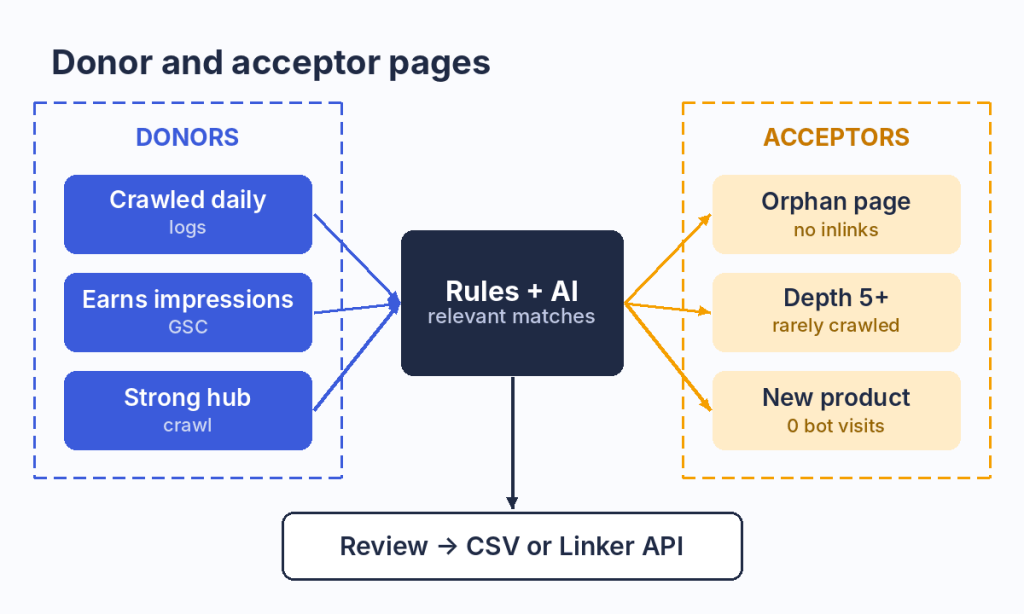
Donor pages are chosen by crawl, log and GSC data, while orphan and weak pages become acceptors.
The output fits into existing workflows:
- CSV export: hand the linking schema to your developers in a ready format.
- Linker API: push links live through an API that returns links during page render in 10 to 20ms.
- Block-based format: links arrive in blocks that fit large catalog templates.
- No changes to existing links: JetOctopus doesn’t touch your existing internal links and adds a new layer on top.
Results and Who It’s For
Internal Linker is designed for websites with 10,000+ pages, such as e-commerce catalogs, marketplaces, classifieds, real estate and automotive sites. The product page lists results such as +350% Googlebot visits and +700% SERP impressions for Swiss Marketplace Group, and more examples are collected in the JetOctopus case studies. For smaller sites, the manual decision table above is usually enough.
How to Prevent Orphan Pages
Prevention is cheaper than cleanup, and it comes down to two habits. First, crawl the site regularly and always after releases and migrations, since those are the moments when links break and pages fall out of the structure. Crawl alerts run on your scheduled crawl cadence and can notify your team by email, Slack or MS Teams when indexation drops.
Second, adopt one rule for every new page: it goes live with at least one link from a relevant page that is already part of the structure. Review the sitemap in the same routine, so expired URLs leave it at the same time they leave the navigation.
FAQ
Can Google Search Console or a standard crawler find orphan pages on its own?
No. Search Console does not show which URLs your internal links point to, and a standard crawler never reaches pages without links. An orphan page checker combines a full crawl with extra URL sources such as sitemaps, Search Console and logs, then compares the two lists. JetOctopus does this in the Orphan Pages report.
What does “URL is orphaned and was not found by the crawler” mean?
The URL appeared in another source, such as a sitemap or Search Console, but the crawler did not reach it by following links. Before you treat it as a true orphan, check for links that load only through JavaScript, nofollow links, links on pages blocked by robots.txt and crawl depth limits.
Can log files help find orphan pages?
Yes. Server logs show URLs that Googlebot and AI bots request even though the crawl never found them through links. In JetOctopus, you cross-reference the crawl with Log Analyzer data to see which orphaned pages bots still visit, which helps you decide which ones to reintegrate and which to block or remove.
What should an orphan page tool offer for a large site?
It should run a full crawl without page limits, combine several URL sources, offer filters and segmentation by page type and export results to CSV. On a large site it also needs a way to act on the findings, such as generating internal links for thousands of pages rather than producing a list nobody can process by hand.
Are orphan pages bad for SEO?
They are not penalized, but they underperform. Orphan pages get no internal link equity, are crawled less often and may stay out of the index. Low-value orphans can also waste crawl budget. Intentional orphans, such as PPC landing pages, are fine when they carry a noindex rule.
Should I add every orphan page to my sitemap?
No. A sitemap helps discovery, but it cannot replace internal links and does not guarantee crawling or indexing. Add pages you want indexed to both the sitemap and the link structure, and take outdated or intentional orphans out of the sitemap so they stop competing for crawl budget.
How often should I check for orphan pages?
Check after every release, migration or navigation change, and run a full crawl on a regular schedule, monthly for most large sites. Sites that add thousands of products or listings a week benefit from a scheduled crawl with alerts, so new orphans surface before they pile up.
Wrapping Up
Orphan pages cost you indexation, link equity and crawl budget without ever showing up as an error in your CMS. Finding them takes a full crawl compared against sitemaps, Search Console and logs. Fixing them takes a decision for each page: link, redirect, noindex or remove.