When we launched JetOctopus MCP in June, it let Claude, ChatGPT and other AI clients answer questions about your crawl, logs and Search Console data. Two weeks later it learned to run your crawls. Both posts promised Google Analytics 4 and deeper analysis next.
Both have shipped, along with something we had not promised: before it answers, the assistant now checks what data exists for your site and tells you when a correct-looking figure would mislead you.
TL;DR
- Google Analytics 4 is the fourth data source, joined page by page with crawl, Search Console and logs
- “What should I fix first?” returns ranked AI recommendations with the pages behind each finding
- Answers warn you when a number could mislead and link to the exact pages in JetOctopus
- Alerts, Core Web Vitals, country data, crawl comparison and eight ready-made prompts all work in the chat
Already use JetOctopus? Connect it to Claude in one click.
If you don’t have a JetOctopus account yet, book a demo and we will show it on your own site.
What Changed Since June
The server now has 46 tools, up from the more than 30 we launched with, and one question can draw on four sources at once: crawl, Search Console, server logs and Google Analytics. The server address is still https://my.jetoctopus.com/mcp, so nothing changes in your client.
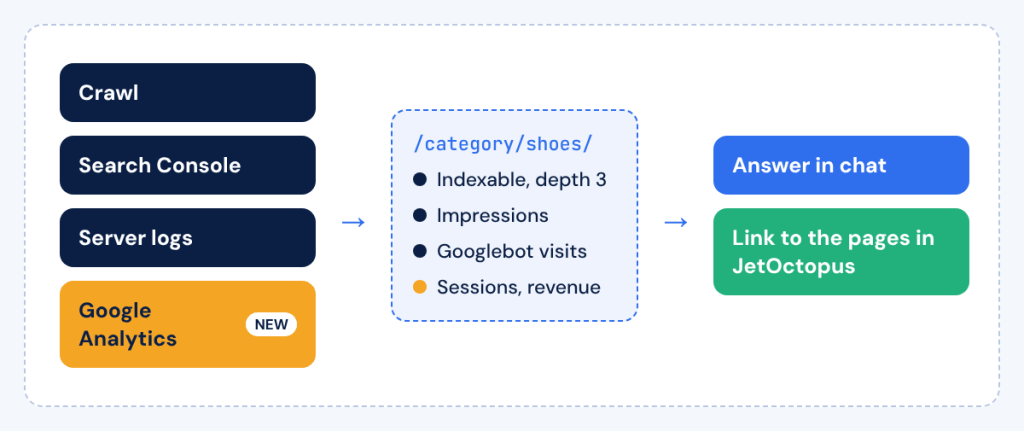
One question, four sources joined for each URL, with a link back to the matching pages in JetOctopus
How Much Revenue Sits Behind a Technical Problem?
You can now ask that directly. The assistant reads the Google Analytics data JetOctopus imports for your site, from sessions and engaged sessions to revenue and custom metrics like add-to-carts, and joins it page by page with the crawl, Search Console and logs.
Keep one detail in mind: revenue is counted per entry page, so a product page that visitors reach through a category page will not show the sale. This needs Google Analytics connected in JetOctopus and an active Analytics subscription.
“Rank my entry pages by organic revenue and tell me which of them have a technical SEO problem in the last crawl.”
“Which of my crawled product pages get no Analytics traffic at all?”
What Should I Fix First?
Ask exactly that. The assistant reads the AI SEO Recommender report of a crawl and returns findings in order of importance, each with the share of pages affected, the impressions behind them, a recommended action and a link that opens those pages in JetOctopus. The issue scan works the same way now: the biggest issues come first instead of about 90 flat numbers.
The recommendations are AI-generated, and the Recommender page itself calls them a first pass, “not a final verdict”. That is why every finding comes with its list of pages, so you can check before a ticket goes to your developers.
Can You Trust the Number the Assistant Gives You?
More than before, because the server now checks its own data first. Ask about Googlebot visits, and if the count includes requests that are not verified as Googlebot, the answer adds the verified-only figure. If the logs for one of those days are incomplete, you get a warning with the number.
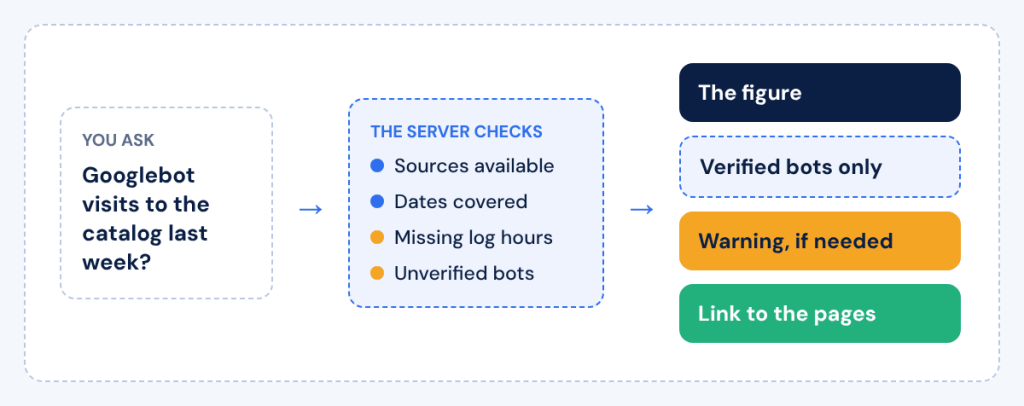
Before the answer, the server checks sources, dates, log gaps and unverified bots, then links the figure to the pages behind it
The same kind of warning appears when a default period was applied, when the period runs past the latest data JetOctopus holds or when Search Console web, Discover and News data were mixed in one total. A completeness check goes through the last 46 days and flags missing log hours and missing imports.
Every answer that JetOctopus can show exactly links to the same pages or report in the app, so checking the assistant takes one click. Average position and CTR are weighted as in JetOctopus reports, which means the chat and the app show the same figure.
“Are my server logs complete for October? Any days with missing hours?”
Which Markets and Which Queries Are Moving?
Search Console data now comes by country, and every answer says whether a figure is worldwide or market-specific. Cannibalization is counted per market too, so a page for Germany and a page for Austria targeting the same query no longer show up as competitors.
Every query also carries two flags. Branded marks queries with your brand words. Fan-out marks long queries of 7 words or more with no clicks, seen on 7 days or fewer: the kind Google’s AI Mode sends on a user’s behalf when it uses its query fan-out technique.
“How much of my impression growth in October came from AI fan-out queries?”
Did the Release Break Anything?
Compare two crawls and the assistant shows what changed in status codes, indexability, titles, H1s, load time and content, with a per-URL list for every change. It also finds pages whose body text shrank sharply, including raw HTML on JavaScript crawls, which is how a broken prerender shows up. Our guide to JavaScript rendering strategies explains why that matters.
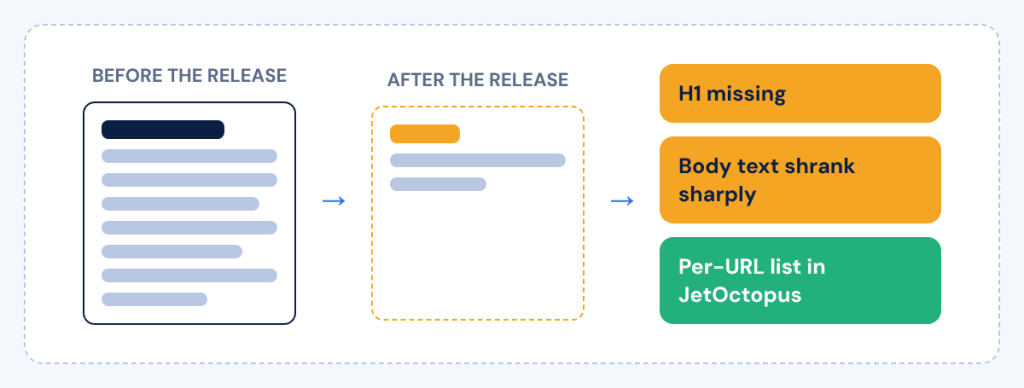
Crawl comparison flags pages that lost their H1 or most of their body text after a release
Core Web Vitals are now available per page, so page speed can be crossed with indexability, impressions and Googlebot visits in one question. On crawls run with image processing, you also get image data: broken files, oversized images and missing alt text, page by page.
“Compare the crawl from before the migration with yesterday’s. What got worse?”
How Do You Set Up Monitoring From the Chat?
The assistant lists your JetOctopus alerts in plain words and creates new threshold alerts on logs or Search Console data after you confirm. An alerts digest for the last 30, 60 or 90 days shows which alerts fire most, which are getting worse and how much traffic they touch, so the assistant can rank what to fix first.
“Alert me when more than 5% of verified Googlebot requests return 4xx in a day.”
Where Should You Start?
Start with one of the eight ready-made prompts in the prompt menu of your AI client:
| Prompt | Who it is for | What it answers |
|---|---|---|
| Weekly SEO health check | In-house SEO teams | The biggest issues of the latest crawl and what to fix first |
| Agency portfolio sizing | Agencies | One row per client site with its biggest issues and which sites need attention first |
| Crawl budget waste | E-commerce | How much Googlebot activity goes to pages that cannot rank |
| Indexable pages without impressions | Large sites | Indexable pages that earn no impressions, visited or ignored by Googlebot |
| Content decay | Publishers | Pages that lost content between two crawls and lost clicks |
| Hreflang health | Multilingual sites | Broken return links and language versions shown in the wrong countries |
| JavaScript rendering regression | SPA and prerendered sites | Whether a release broke titles, headings, links or content after rendering |
| Googlebot errors trend | Any site with logs | The weekly share of redirects and errors Googlebot gets over 12 weeks |
The server also covers inbound links and anchors for up to 50 pages at once, hreflang return links, crawls of URL lists up to 10,000 pages, monthly schedules and exports to Excel and Parquet.
How to Connect JetOctopus MCP in One Click
The MCP page in the JetOctopus app now has an Add to Claude button that opens Claude’s connector dialog with everything filled in. You need a JetOctopus account, since the Allow step signs you in.
- Check that the URL is https://my.jetoctopus.com/mcp, click Continue, then click Add.
- On the new connector tile, click Connect, then click Allow in the JetOctopus tab.
- Open a new chat and ask about one of your sites, for example “Show me 404 errors on my website”.
Connect JetOctopus to Claude and ask your first question.
On a Claude Team or Enterprise plan, an Owner adds the connector for the whole organization. Cursor and VS Code have their own buttons on the same MCP page, and the Other clients tab has setup for Claude Code, Codex CLI, Gemini CLI, GitHub Copilot CLI, Perplexity and more. ChatGPT connects through chatgpt.com/plugins with Add custom MCP server.
Frequently Asked Questions
Do I Need Google Analytics Connected to Use JetOctopus MCP?
You need it only for Analytics questions. Crawl, Search Console and log questions work as before, while sessions and revenue need Google Analytics connected in JetOctopus and an active Analytics subscription.
Can the Assistant Change Anything Without Asking?
Actions with consequences wait for your confirmation. New alerts, new AI analyses, exports and crawls that spend quota all show a preview or ask first.
Why Does the Assistant Add Warnings to Some Answers?
A warning appears when a figure could mislead without context, for example incomplete logs on a given day or bot counts that include unverified requests. In that case you also get the verified-only figure.
Which AI Clients Can Connect to JetOctopus MCP?
Claude has a one-click button, Cursor and VS Code have their own buttons and Claude Code, Codex CLI, Gemini CLI, GitHub Copilot CLI, ChatGPT and Perplexity on paid plans connect through their own setup steps.
If you connected in June, run the weekly SEO health check prompt on a site you know well. You already know where its problems are, so you will quickly see how the findings, warnings and links hold up.